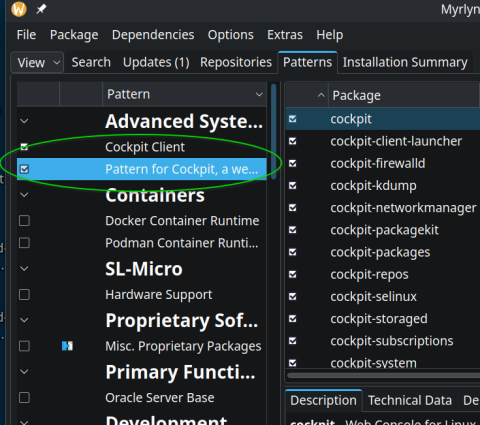
I’m currently trying openSUSE in order to eveluate switching my and my girlfriends laptop to it. I heard that openSUSE replaced YaST with Cockpit. So I thought, in order to manage Btrfs snapshots, I have to open Cockpit on Leap 16.0. But it’s not in the menu.
According to Cockpit the easy way - Be happy without YaST, you have to install Cockpit first (which would mean that what I heard is wrong: YaST has not been replaced with Cockpit, but has been removed without replacement, and users are on themselves to find a replacement).
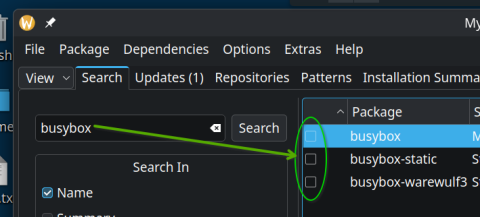
The thing is: On a fresh Leap 16 install, Discover fails to install Cockpit because it can’t resolve dependencies. zypper install cockpit-client-launcher offers me to resolve dependencies by either 1. uninstalling busybox-hostname-something (sounds dangerous), 2. not instaling cockpit-client-launcher 3. installing it, but it will be broken.
Is it really true that YaST got removed without replacement, and Cockpit + Myrlyn is just what users figure out themselves to replace YaST?
Is it really true that Cockpit can’t even be installed on a fresh Leap?
Would Cockpit even be the place to search for a GUI for snapshots, or is the “snapshots with GUI” feature just gone for good in openSUSE?
The advantage of the launcher is, it adds an desktop/menu entry for the users which do not want to create one on their own or type the address in the browser. Additionally it starts the cokpit socket and can enable SSH if wanted and some small helping steps.
This launcher was created after some users complained that they can’t find it in the app menu.
Nevertheless it is possible to use cockpit for local administration without cockpit-client-launcher. I for example entered “localhost:9090” in my favorite web browser (so no need for ssh) once and set a bookmark for future use.
But it would be interesting to know where that busybox-dependency comes from.
It is a known bug with the busybox packages. There are several busybox packages which provide the same files/functions of other packages. Unfortunately the package solver sometimes chooses to install the busybox packages, which later leads to conflicts like the one in the opening thread.
busybox-hostname and hostname are the packages here in question.
There is a bugreport for this exact case but i don‘t find it atm.
That surprises me, too! I can assure you that I didn’t install anything after following the openSUSE Leap installer, where I selected the “KDE Plasma packages” option.
But if this is a known bug, I assume someone already reported it and I don’t have to?
Thanks for the explanation. But I don’t think this is obvious from the release notes.
The release notes don’t say Cockpit will be missing if you don’t do that, they just list the names of the modules this pattern will install. Also, they don’t tell you how to run Cockpit. If localhost:9090 is the way to go, that information is missing.
If those release notes are the place that should inform users about how to use Cockpit, they are incomplete, and maybe I should file a bug somewhere.
Generally I think saying “YaST got replaced with Cockpit and Myrlyn” is a bit misleading, if you need to perform additional steps in the terminal to install them, while YaST was just there.
The download website still advertises YaST as one of openSUSE’s USPs btw., but there already is an issue covering that.
And comment #3 fits to what I experienced while installing openSUSE Tumbleweed completely without installer:
When I installed packages which required some not yet installed other package and there was a busy box-equivalent for that not yet installed package then the busybox-package got installed without asking.
Now the question is: Why does this happen on an installer-based (Agama) installation?
Hmmm, … but shouldn’t an installer arrange the sequence in which the default packages will be installed, arrange in a way so that no busybox packets will be selected?