"Unable to write print data: Broken pipe"

# zypper --no-refresh se -s -i wall selinu parm | egrep -v 'debug|devel|srcp|openSUSE-20' | egrep 'x86|noarch'| sort -f
i  | libapparmor1                | package | 4.1.7-160000.2.1         | x86_64 | OSS
i  | libselinux1                 | package | 3.8.1-160000.4.1         | x86_64 | OSS
i  | rpm-plugin-selinux          | package | 4.20.1-160000.4.1        | x86_64 | OSS
i  | wallpaper-branding-openSUSE | package | 16.0.20240405-lp160.10.1 | noarch | OSS
i  | yast2-firewall              | package | 4.6.0-160000.2.2         | noarch | OSS
i+ | hdparm                      | package | 9.65-160000.3.2          | x86_64 | OSS
# zypper --no-refresh se -s -i print cups | egrep -v 'debug|devel|srcp|openSUSE-20' | egrep 'x86|noarch'| sort -f
i  | cups-filters          | package | 1.28.17-bp160.3.1             | x86_64 | OSS
i  | libQt6PrintSupport6   | package | 6.9.1-160000.2.2              | x86_64 | OSS
i  | qt6-printsupport-cups | package | 6.9.1-160000.2.2              | x86_64 | OSS
i+ | cups                  | package | 2.4.19-160000.2.1             | x86_64 | OSS
i+ | cups-backends         | package | 1.1-bp160.1.10                | noarch | OSS
i+ | cups-client           | package | 2.4.19-160000.2.1             | x86_64 | OSS
i+ | cups-config           | package | 2.4.19-160000.2.1             | x86_64 | OSS
i+ | libchromaprint1       | package | 1.5.1+git.20221217-160000.2.2 | x86_64 | OSS
i+ | libcups2              | package | 2.4.19-160000.2.1             | x86_64 | OSS
i+ | libcupsimage2         | package | 2.4.19-160000.2.1             | x86_64 | OSS
i+ | libQt5PrintSupport5   | package | 5.15.17+kde122-160000.2.2     | x86_64 | OSS

“Brother HL-5470DW with driver Brother HL-5370DW BR-Script3” is cups’ description. No Brother drivers are installed for this printer, just brscan4-0.4.10-1 86_64 system package for my multifunction Brother, which I don’t try to print with. This started quite some days ago, IIRC after the last zypper up before today’s, a week or more ago, possibly the up before that one.

All job attempts get this status in cups:
Paused - "Unable to write print data: Broken pipe"
/var/log/cups/error_log I’m not recognizing anything helpful in this log (August to date). Booting 15.6 instead, printing works as expected, same 15.6 this 16.0 was cloned and dup’d to 16.0 from last winter.

Somewhere among searches was suggested switching from default “warn” to “debug” logging. Results:

# grep :17:1 error_log | wc -l
3501
# ls -gGh debuglog.txt
-rw-r--r-- 1 308K Oct 18 17:15 debuglog.txt

Susepasted here loaded with repetition, but includes:

# grep -i fail debuglog.txt
D [18/Oct/2026:17:11:09 -0400] FindDeviceById failed: org.freedesktop.DBus.Error.ServiceUnknown:The name is not activatable
W [18/Oct/2026:17:11:09 -0400] CreateProfile failed: org.freedesktop.DBus.Error.ServiceUnknown:The name is not activatable
W [18/Oct/2026:17:11:09 -0400] CreateDevice failed: org.freedesktop.DBus.Error.ServiceUnknown:The name is not activatable
#

What “pipe”? Where? Is this something deleting the printer in cups, and /var/spool/[cups,lpd], before adding it back might fix? Have I encountered a software bug? Help please.

Not apparmor getting in the way?

After running a print job, examine sudo dmesg | grep -i apparmor. If you see any DENIED entries containing cups, gs, or pdfetc, try putting the CUPS daemon into complain mode to verify if it fixes the problem…
sudo aa-complain /usr/sbin/cupsd

The other thought I had is that the Brother HL-5470DW is a modern network printer, so likely supports driverless printing? If you have mdns allowed in your firewall configuration (assuming active), it might be discovered automatically that way. Check if is discovered on your LAN using…

sudo /usr/sbin/lpinfo -v
driverless

You can also configure CUPS explicitly like this…

sudo lpadmin -p Brother_Driverless -v ipp://<printer-ip-address>/ipp/print -E -m everywhere

I also notice you’re using the socket backend…

D [18/Oct/2026:13:48:26 -0400] [Job 233] PID 78172 (/usr/lib/cups/backend/socket) stopped with status 1.
D [18/Oct/2026:13:48:26 -0400] [Job 233] Hint: Try setting the LogLevel to "debug" to find out more.
D [18/Oct/2026:13:48:26 -0400] [Job 233] Error reading back-channel data: Connection reset by peer
D [18/Oct/2026:13:48:26 -0400] [Job 233] Set job-printer-state-message to "Unable to write print data: Broken pipe", current level=ERROR

It might be worth trying the lpd backend instead…
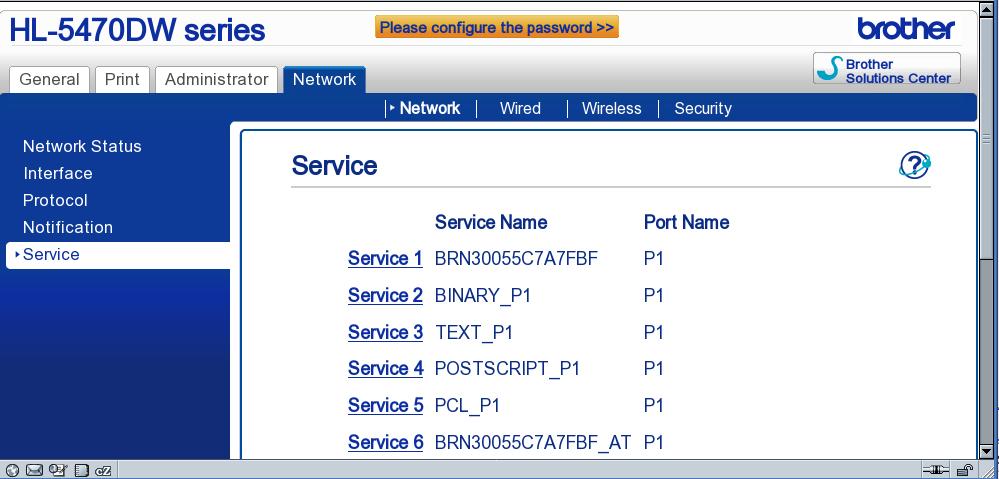
lpd://<printer-ip-address>/binary_p1
That is usually the appropriate LPD queue name for Brother printers (at least when I last had to print to an old network-attached Brother printer).

BTW, you can also increase CUPS logging verbosity with
sudo cupsctl --debug-logging
and turn it off again with
sudo cupsctl --no-debug-logging
For more info: man cupsctl

I wasn’t aware removing it was possible, but removing it didn’t help.

# dmesg | grep -i denied
#
# aa-complain /usr/sbin/cupsd
-bash: aa-complain: command not found
#
# lpinfo -v
network beh
direct pipe
network beh.pl
network https
network lpd
network socket
network ipp
network ipps
network http
network lpd://BRNMFC8910/BINARY_P1
network lpd://P5470/BINARY_P1
#
lpadmin: Unable to create PPD: No IPP attributes.

I thought I already had it configured in driverless mode. :stuck_out_tongue:

# lpd://<redact>/binary_p1
-bash: lpd://<redact>/binary_p1: No such file or directory
# lpd://<redact>/BINARY_P1
-bash: lpd://<redact>/BINARY_P1: No such file or directory
# lpd://P5470/BINARY_P1
-bash: lpd://P5470/BINARY_P1: No such file or directory
#

Except for the commands you suggested, I’ve only been exposing myself to cups via web browser interface. Best as I can remember, printing with this printer never gave me any trouble before in the >8 years I’ve had it. It was just fine a month or so ago, and still is booted to 15.6.

Since none of the above produced a successful print, I used the web browser cups interface, deleted the printer, and added it back the same way, initially puzzled how to determine which “make” to select. Among the options are generic, raw and postscript, but not Brother. Next under selection is “Or Provide a PPD File”. /usr/share/cups/model/ on my 15.6 contains both manufacturer-PPDs and brother, but in 16.0 there were only Postscript-level1.ppd.gz, Postscript-level2.ppd.gz, Postscript.ppd.gz. I then went to https://openprinting.github.io/downloads to see what’s offered, and saved file Brother/BR5370_2_GPL.ppd to /usr/share/cups/model/br/, selected it, set the options (e.g. letter instead of A4), and found status showed idle. The process warned me what I did will become unsupported in the future.

I’m since able to print from Firefox, but lpr, which I most often use to print, reports lpr: Error - No default destination or lpr: Error - The printer or class does not exist.. With bothlpr & lp, --help, like man lpr, shows nothing about listing available printers, or setting a default destination, the latter of which is missing in browser cups interface also.

I suspect what I have done is create a drivered configuration, and I’d rather get setup the modern way, driverless, as well as making lpr work again.

YaST2 was so much less frustrating. :frowning:

edit: got lpadmin -d to make lpr work. :slight_smile:

This just shows that CUPS has the LPD backend available and has discovered two LPD printer URIs. Not driverless, although you’d need to confirm that the firewall is allowing mdnsfor discovery before we could say it does (or doesn’t) support driverless printing.

The above suggests that supplying the BR-Script3 PPD recreated a traditional driver-based configuration. The Brother vendor has the rpm packages for your printer:
https://support.brother.com/g/b/spec.aspx?c=nz&lang=en&prod=hl5470dw_us_eu_as

You can set the default printer via the CUPS web interface, or do
sudo lpadmin -d <printer-name>

Anyway, if I understand your last post, printing is working again?

I missed this before…

This is a network path, not a command to try and execute. (It simply represents how CUPS communicates with your printer over the network.) You can see how your current printers are configured by running…
lpstat -t

$ lpstat -t
scheduler is running
no system default destination
device for HL5470DW: lpd://P5470/BINARY_P1
HL5470DW accepting requests since 2026-10-19T10:48:39 EDT
printer HL5470DW is idle.  enabled since 2026-10-19T10:48:39 EDT

Because of the cups deprecation of traditional printing, I’d very much like to reject the current (working) state, particularly the 32bit limitation of Brother support, and employ the modern driverless method if it’s possible. Right now I’m just past the 7 month interval between my last two heart attacks since my last one. My stress level is much too high.…

Are you serious? Forget YaST. The actual firewall service is firewalld , which has its own CLI tool, firewall-cmd , and a separate graphical configuration utility, firewall-config (which you may need to install first). Cockpit also offers a basic configuration module as well.

You can check whether the service is installed and running with…
systemctl status firewalld
If it is, check the current configuration…

sudo firewall-cmd --state
sudo firewall-cmd --get-active-zones
sudo firewall-cmd --list-all
$ systemctl status firewalld
Unit firewalld.service could not be found.
...
# rpm -qa | grep wall
wallpaper-branding-openSUSE-16.0.20240405-lp160.10.1.noarch
#

We still need to establish the capability of your printer.

Ok, so firewalld not installed.

The lpinfo command you ran earlier returned no results indicating an IPP Everywhere-capable printer. The driverless command can also be used, but I suspect it is a little too old unfortunately.

For reference, here’s what I get on my Leap 16 distro with a couple of office printers discovered on the LAN…

~> sudo lpinfo -v
[sudo] password for dean: 
network beh
network smb
network socket
network ipp
network lpd
network https
network http
network ipps
network dnssd://HP%20Color%20LaserJet%20Pro%20M478f-9f%20%5B12C8E6%5D._ipps._tcp.local/?uuid=b3289da5-1c99-55b0-a826-861ed2a47f53
network dnssd://HP%20LaserJet%20Pro%20M428f-M429f%20%5BBE6E3C%5D._ipp._tcp.local/?uuid=d27565e6-c62b-5361-2446-f3f2c52dbf92
network dnssd://HP%20Color%20LaserJet%20Pro%20M478f-9f%20%5B12C8E6%5D._ipp._tcp.local/?uuid=b3289da5-1c99-55b0-a826-861ed2a47f53
network ipps://HP%20Color%20LaserJet%20Pro%20M478f-9f%20%5B12C8E6%5D._ipps._tcp.local/
network ipps://HP%20LaserJet%20Pro%20M428f-M429f%20%5BBE6E3C%5D._ipps._tcp.local/
~> driverless
ipps://HP%20Color%20LaserJet%20Pro%20M478f-9f%20%5B12C8E6%5D._ipps._tcp.local/
ipps://HP%20LaserJet%20Pro%20M428f-M429f%20%5BBE6E3C%5D._ipps._tcp.local/
~> 
# lpinfo -v
network beh
direct pipe
network beh.pl
network http
network socket
network ipps
network ipp
network lpd
network https
network lpd://BRNMFC8910/BINARY_P1
network lpd://P5470/BINARY_P1
#

My manual has managed to escape my manuals box and I have no idea where to look that I haven’t looked already. In the monster pdf manual, file dated August 2012, I only looked in the specs. In the specs subsection for networking in protocols for ipv4 & ipv6, IPP/IPPS is listed among LPR/LPD and many others, and all I see that suggests possible driverless support. I found a check register entry August 2014 for Staples for $145.88, which I think is for the 5470, all I could find in a laser with Epson emulation.

IPP/IPPS support doesn’t prove IPP Everywhere capability unfortunately, and the lpinfo output is not promising either. It might be that it needs to be enabled via the printer’s web interface perhaps?

A manual for your printer can be got from here:
https://support.brother.com/g/b/manualtop.aspx?c=nz&lang=en&prod=hl5470dw_us_eu_as

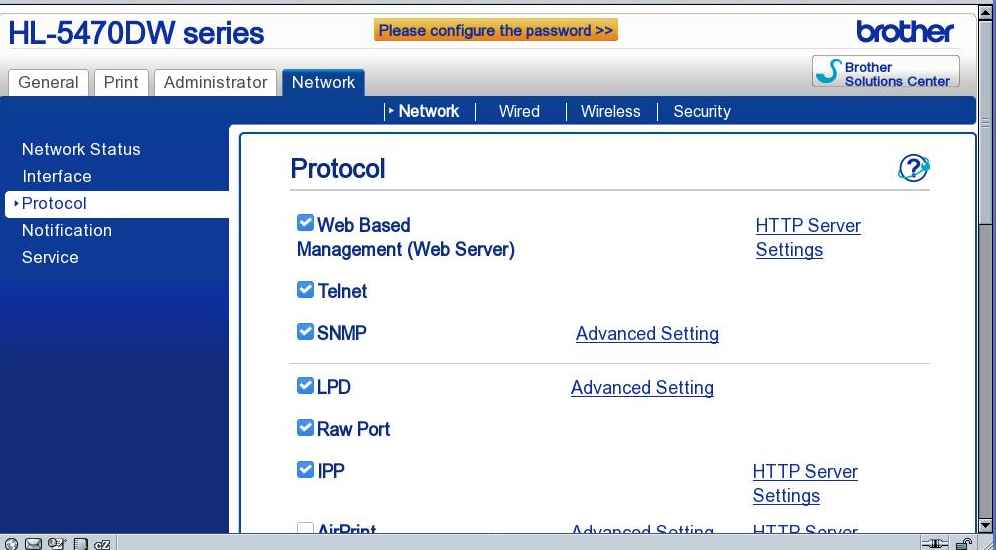
Did you notice in the top screen image you shared that “AirPrint” (partially obscured) is available but not yet enabled?

I thought that was an Apple-only thing. Do you think it’s related to IPP/IPPS and/or driverless printing functionality? I don’t use anything wireless that is practical enough wired. I don’t like the idea of all those extra electrons pounding my body. Only one PC and one laptop here contain wireless networking, and in neither is it enabled. If it wasn’t for one old Roku here used daily because it has legacy outputs that newer do not, I’d have wireless in my router entirely disabled.

Some reading for you…
https://openprinting.github.io/cups/drivers.html

I do not understand what you are trying to convey here. If you want driverless printing to work, turn it on. It has NOTHING to do with wireless connectivity.

I thought “air” would be Apple’s idea of an equivalent to wireless connectivity.

I turned on, applied, reset ensued, but lpinfo -v output remains the same.

Thanks for the links, which will have to wait, off to MD again…

No, AirPrint is Apple’s driverless printing technology. AirPrint and IPP Everywhere are closely related, but not identical standards.

Anyway, AirPrint / IPP Everywhere discovery normally relies on Bonjour (mDNS/DNS-SD) to advertise the printer on the local network. Enabling AirPrint may enable the printing protocol without ensuring that service discovery is enabled or working. I’d suggest checking the printer’s web interface under Network > Protocol for a separate Bonjour setting and enabling it if available.

Even if automatic discovery fails, the printer may still support driverless printing via its direct IPP URI. For that you’d need to try the following again…

sudo lpadmin -p Brother_Driverless -v ipp://<printer-ip-address>/ipp/print -E -m everywhere
# lpadmin -p Brother_Driverless -v ipp://xxx.xxx.xxx.xxx/ipp/print -E -m everywhere
lpadmin: Unable to create PPD: No IPP attributes.

lp/lpr and some apps have been printing, but print buttons on web pages in SeaMonkey Mail, Firefox ESR and Chromium only feign to print to printer, succeeding only to file, which when printed via installed .pdf reader, prints 4X the size that come on a typical delivered package, using nearly whole letter sheet. e.g., UPS print labels for RMA on newegg.com I managed to print yesterday running Safari on MacOS, in a session in which automatic Mac updates negated Grub after years of no problem. :frowning:

I still need to visit those provided links when I have a head for it…