# lpstat -t
scheduler is running
system default destination: HL5470DW
device for HL5470DW: lpd://P5470/BINARY_P1
HL5470DW accepting requests since Wed 28 Oct 2026 06:58:06 PM EDT
printer HL5470DW is idle.  enabled since Wed 28 Oct 2026 06:58:06 PM EDT
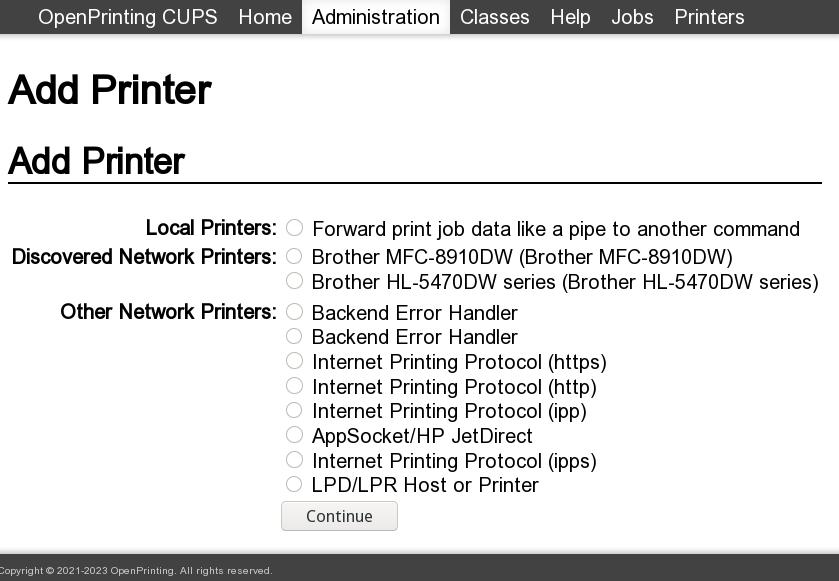
# lpinfo -v
network beh
direct pipe
network beh.pl
network ipp
network https
network lpd
network http
network socket
network ipps
network lpd://BRNMFC8910/BINARY_P1
network lpd://P5470/BINARY_P1
# egrep -i "name|model|filter" /etc/cups/ppd/*
/etc/cups/ppd/HL5470DW.ppd:*PCFileName: "BR5370_2.PPD"
/etc/cups/ppd/HL5470DW.ppd:*ShortNickName: "Brother HL-5370DW BR-Script3"
/etc/cups/ppd/HL5470DW.ppd:*ModelName: "Brother HL-5370DW BR-Script3"
/etc/cups/ppd/HL5470DW.ppd:*NickName: "Brother HL-5370DW BR-Script3"
/etc/cups/ppd/HL5470DW.ppd:     /devname (%disk0%) def
/etc/cups/ppd/HL5470DW.ppd:             devname exch 48 add 5 exch put
/etc/cups/ppd/HL5470DW.ppd:             devname devstatus {
/etc/cups/ppd/HL5470DW.ppd:*InkName: ProcessBlack/Process Black
/etc/cups/ppd/HL5470DW.ppd:*InkName: CustomColor/Custom Color
/etc/cups/ppd/HL5470DW.ppd:*InkName: ProcessCyan/Process Cyan
/etc/cups/ppd/HL5470DW.ppd:*InkName: ProcessMagenta/Process Magenta
/etc/cups/ppd/HL5470DW.ppd:*InkName: ProcessYellow/Process Yellow
/etc/cups/ppd/HL5470DW.ppd:     {(fonts/)AppendName exch pop mark exch
/etc/cups/ppd/HL5470DW.ppd:      {}=string filenameforall counttomark
/etc/cups/ppd/HL5470DW.ppd:  }=string filenameforall
/etc/cups/ppd/HL5470DW.ppd:*Message: "\FontName\ not found, using BR-03B."
/etc/cups/ppd/HL5470DW.ppd.O:*PCFileName: "BR5370_2.PPD"
/etc/cups/ppd/HL5470DW.ppd.O:*ShortNickName: "Brother HL-5370DW BR-Script3"
/etc/cups/ppd/HL5470DW.ppd.O:*ModelName: "Brother HL-5370DW BR-Script3"
/etc/cups/ppd/HL5470DW.ppd.O:*NickName: "Brother HL-5370DW BR-Script3"
/etc/cups/ppd/HL5470DW.ppd.O:   /devname (%disk0%) def
/etc/cups/ppd/HL5470DW.ppd.O:           devname exch 48 add 5 exch put
/etc/cups/ppd/HL5470DW.ppd.O:           devname devstatus {
/etc/cups/ppd/HL5470DW.ppd.O:*InkName: ProcessBlack/Process Black
/etc/cups/ppd/HL5470DW.ppd.O:*InkName: CustomColor/Custom Color
/etc/cups/ppd/HL5470DW.ppd.O:*InkName: ProcessCyan/Process Cyan
/etc/cups/ppd/HL5470DW.ppd.O:*InkName: ProcessMagenta/Process Magenta
/etc/cups/ppd/HL5470DW.ppd.O:*InkName: ProcessYellow/Process Yellow
/etc/cups/ppd/HL5470DW.ppd.O:     {(fonts/)AppendName exch pop mark exch
/etc/cups/ppd/HL5470DW.ppd.O:      {}=string filenameforall counttomark
/etc/cups/ppd/HL5470DW.ppd.O:  }=string filenameforall
/etc/cups/ppd/HL5470DW.ppd.O:*Message: "\FontName\ not found, using BR-03B."
None of those drivers apparently differ from what I downloaded when I got the 5470 many moons ago:
$ ls -gG
total 785
-rw-rw-r-- 1  17925 Oct 28 19:55 brgenml1cupswrapper-3.1.0-1-ff.i386.rpm
-rw-rw-r-- 1  17925 Jun 20  2014 brgenml1cupswrapper-3.1.0-1.i386.rpm
-rw-rw-r-- 1  17925 Jun 20  2014 brgenml1cupswrapper-3.1.0-1-wget2026.i386.rpm
-rw-rw-r-- 1  38800 Oct 28 19:53 brgenml1lpr-3.1.0-1-ff.i386.rpm
-rw-rw-r-- 1  38800 Jun 20  2014 brgenml1lpr-3.1.0-1.i386.rpm
-rw-rw-r-- 1  38800 Jun 20  2014 brgenml1lpr-3.1.0-1-wget2026.i386.rpm
-rw-rw-r-- 1 195300 Oct 28 20:05 BRH5470P-ff.zip
-rw-rw-r-- 1 195300 Dec  5  2024 BRH5470P-wget2026.zip
-rw-rw-r-- 1  18743 Oct 28 19:48 hl5470dwcupswrapper-3.0.0-1-ff.i386.rpm
-rw-rw-r-- 1  18743 Jun  5  2012 hl5470dwcupswrapper-3.0.0-1.i386.rpm
-rw-rw-r-- 1  18743 Jun 26  2013 hl5470dwcupswrapper-3.0.0-1-wget2026.i386.rpm
-rw-rw-r-- 1  17220 Aug  1  2013 hl5470dwcupswrapper-sourcecodes-3.0.0-1.tar.gz
-rw-rw-r-- 1  37106 Oct 28 19:51 hl5470dwlpr-3.0.0-1-ff.i386.rpm
-rw-rw-r-- 1  37106 Jun  5  2012 hl5470dwlpr-3.0.0-1.i386.rpm
-rw-rw-r-- 1  37106 Jun 26  2013 hl5470dwlpr-3.0.0-1-wget2026.i386.rpm
-rw-rw-r-- 1  25070 Oct 28 20:03 linux-brprinter-installer-2.2.6-1-ff.gz
-rw-rw-r-- 1  25070 Oct 26 13:03 linux-brprinter-installer-2.2.6-1-wget2026.gz
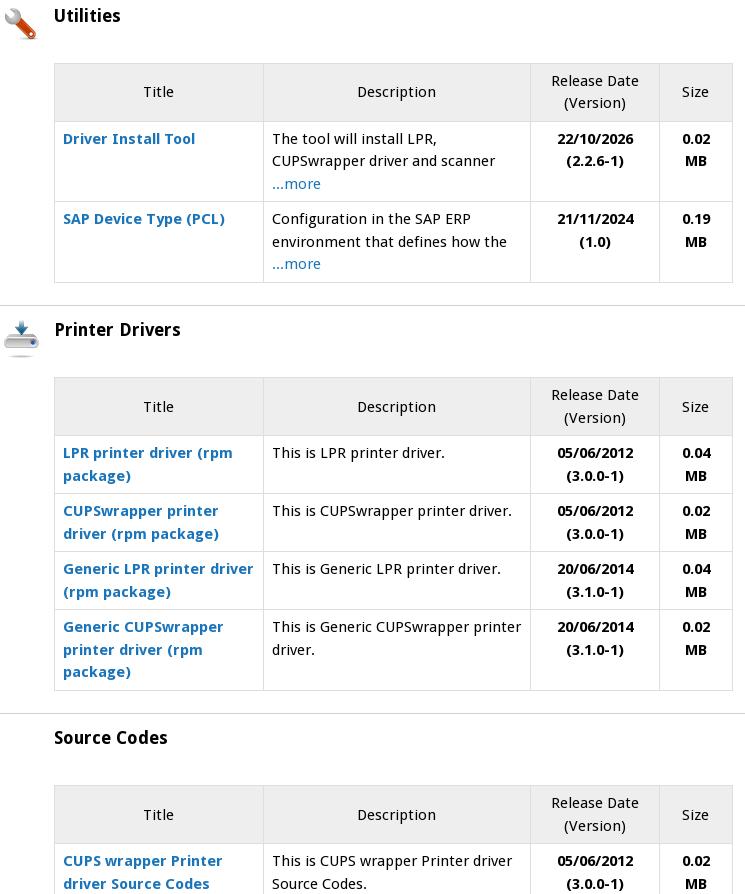
All rpms are 32bit packages I desire to keep uninstalled if at all possible. Those filenames containing “ff” and corrupt timestamps came from using the button on your provided brother.com download links in Firefox. Those containing wget came from using it to fetch via download URLs only available via the FF download manager. Attachment is a screenshot of the relevant part of the page you linked to so as to ID the files downloaded:
It doesn’t look like your printer does support driverless printing (with the current printer config anyway), and certainly not discoverable. I think you’re stuck with using your existing PPD-based driver.
I assume this means…
Browser → printer: The browser’s direct-to-printer attempt appears not to produce a physical print.
Browser → print to file (PDF) → PDF reader → printer: Printing succeeds, but the label is scaled incorrectly.
For “1” you would need to examine the CUPS error log immediately after attempting to print directly from a browser. Did CUPS even receive the job? Look for a new job ID, filter errors, or backend errors at the time of the browser print attempt.
For “2” you should examine the PDF page size details as reported by pdfinfo(poppler-tools package). Is it the expected label size, or is it Letter/A4?
PDF dimensions are reported in points, with 72 points per inch. Knowing the PDF’s actual page size will help distinguish a browser-generated layout problem from a scaling or paper-size issue in the PDF reader.
As an example…
~> pdfinfo ~/Downloads/sample.pdf
Creator:         Adobe InDesign 20.2 (Macintosh)
Producer:        Adobe PDF Library 17.0
CreationDate:    Tue Apr  8 15:39:14 2025 NZST
ModDate:         Tue Apr  8 15:39:14 2025 NZST
Custom Metadata: no
Metadata Stream: yes
Tagged:          yes
UserProperties:  no
Suspects:        no
Form:            none
JavaScript:      no
Pages:           1
Encrypted:       no
Page size:       841.89 x 595.276 pts (A4)
Page rot:        0
File size:       125811 bytes
Optimized:       yes
PDF version:     1.4
2307 lines added to /var/log/cups/error_log. Earlier in thread I had changed /etc/cups/cupsd.conf to include LogLevel debug. It seems some intervening update or something I did in http://localhost:631/printers/ must have since reduced its size by 41% by stripping all comment lines. I changed LogLevel back to warn, tried again, and new error_log did not change when I tried to print same newegg return label from FF ESR153, even after zypper up & rebooting with new kernel. I did a print with lpr to confirm printer still works. Error_log increased by only the following 2 lines and 335 bytes:
W [29/Oct/2026:10:56:23 -0400] [Job 263] Grayscale/monochrome printing requested for this job but Poppler is not able to convert to grayscale/monochrome PostScript.
W [29/Oct/2026:10:56:23 -0400] [Job 263] Use \"pdftops-renderer\" option (see cups-filters README file) to use Ghostscript or MuPDF for the PDF -> PostScript conversion.
$ pdfinfo returnLabelNewegg.pdf
Creator:         Mozilla Firefox 140.17.0
Producer:        cairo 1.18.0 (https://cairographics.org)
CreationDate:    Tue Oct 27 08:55:12 2026 EDT
Custom Metadata: no
Metadata Stream: no
Tagged:          no
UserProperties:  no
Suspects:        no
Form:            none
JavaScript:      no
Pages:           1
Encrypted:       no
Page size:       612 x 792 pts (letter)
Page rot:        0
File size:       13978 bytes
Optimized:       no
PDF version:     1.7
$ xdpyinfo | grep -E 'dimen|ution'
  dimensions:    1920x1200 pixels (406x254 millimeters)
  resolution:    120x120 dots per inch
$ xrdb -query | grep dpi
Xft.dpi:        120
Seems fine I suppose. I guess some tools still don’t understand everyone doesn’t run X at 96 DPI.
Does any of the following tell us anything helpful?
To put CUPS into debug mode do sudo cupsctl --debug-logging
Back to normal logging with sudo cupsctl --no-debug-logging
The pdfinfo output confirmed PDF page size is US Letter (8.5 × 11 inches). The 120 DPI display setting is completely irrelevant to the print scaling issue. Physical print size is down to PDF page dimensions and print scaling settings.
That confirms submission, not successful physical printing. It’s the error_log that is needed to follow the job through filtering and delivery.
The IPP Everywhere links? They were just background reading about modern printing protocols, not steps you need to complete. No need to worry about them.
I had a look at the error_log , but the first thing I noticed is that its timestamps don’t match the access_log entries you shared. The debug excerpt appears to be from 08:15, whereas the job submission shown in access_log was at 10:56.
Enable CUPS debug logging (as I have explained already), reproduce one of the failed browser print attempts, note the time, and then share the corresponding access_log and error_log entries.
I would filter the error_log output a bit like this… egrep -iA2 "filter|error|broken" /var/log/cups/error_log
W [29/Oct/2026:10:56:23 -0400] [Job 263] Grayscale/monochrome printing requested for this job but Poppler is not able to convert to grayscale/monochrome PostScript.
W [29/Oct/2026:10:56:23 -0400] [Job 263] Use \"pdftops-renderer\" option (see cups-filters README file) to use Ghostscript or MuPDF for the PDF -> PostScript conversion.
W [30/Oct/2026:14:42:51 -0400] [Job 264] Grayscale/monochrome printing requested for this job but Poppler is not able to convert to grayscale/monochrome PostScript.
W [30/Oct/2026:14:42:51 -0400] [Job 264] Use \"pdftops-renderer\" option (see cups-filters README file) to use Ghostscript or MuPDF for the PDF -> PostScript conversion.
That is directly relevant to the PDF-to-PostScript conversion path. Given that you reported browser printing failing while PDF-reader printing works (albeit at the wrong size), it’s worth investigating.
Something to try: The PDF is a standard Letter page, so the label is being enlarged inside it. In the browser’s print dialog, try setting Scale to about 50% (or turning off “Shrink to fit” and choosing a custom scale), then print to the HL5470DW directly. If the size is right, the scaling is the cause.
 Earlier in thread I had changed
 It seems some intervening update or something I did in