kitman
October 4, 2023, 4:07am
1
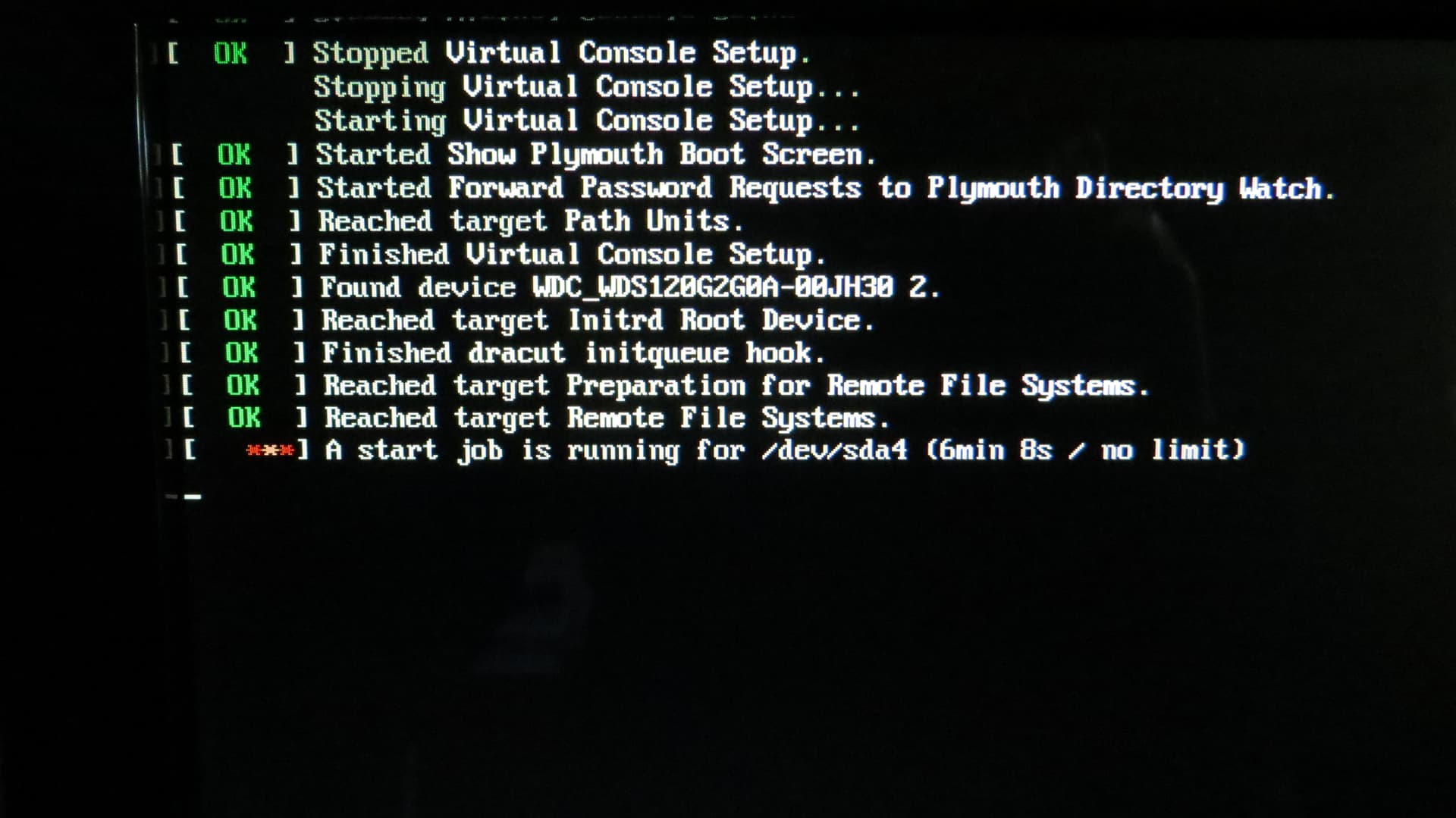
HI, thought I would share this weird titbit. In a dup just prior to version 20230929 I noticed that when I cold booted by PC the boot sequence would hang indefinitely. I had to Ctrl+Alt+Del to kill the process and the PC would now ‘warm’ boot (I guess you could call it that). Now the PC would boot normally. Unfortunately there were no journal entries at all for the cold boot attempt. All I could do was take a photo of the screen as seen below.
/dev/sda4 is my swap partition.
This would always happen - cold boot hang, Ctrl+Alt+Del restart, warm boot ok.
After doing a dup to 20230929 this issue disappeared.
Weird.
kitman:
Weird.
The wdc wds120g2g0a-00jh30 is a “WD Green” 120 GB Internal SSD. More hassle with effing “WD Green” HDD: Infamous Host erlangen - #4 by karlmistelberger This has been the worst experience ever.
kitman
October 4, 2023, 9:42am
3
eek?
Here’s the SMART results. Does it mean anything?
chris@asus-roc:~>$sudo smartctl -a /dev/sda
smartctl 7.4 2023-08-01 r5530 [x86_64-linux-6.5.4-1-default] (SUSE RPM)
Copyright (C) 2002-23, Bruce Allen, Christian Franke, www.smartmontools.org

=== START OF INFORMATION SECTION ===
Model Family:     WD Blue / Red / Green SSDs
Device Model:     WDC WDS120G2G0A-00JH30
Serial Number:    174303461609
LU WWN Device Id: 5 001b44 4a9b9a349
Firmware Version: UE300000
User Capacity:    120,040,980,480 bytes [120 GB]
Sector Size:      512 bytes logical/physical
Rotation Rate:    Solid State Device
Form Factor:      2.5 inches
TRIM Command:     Available, deterministic
Device is:        In smartctl database 7.3/5528
ATA Version is:   ACS-2 T13/2015-D revision 3
SATA Version is:  SATA 3.2, 6.0 Gb/s (current: 6.0 Gb/s)
Local Time is:    Wed Oct  4 17:37:47 2023 AWST
SMART support is: Available - device has SMART capability.
SMART support is: Enabled

=== START OF READ SMART DATA SECTION ===
SMART overall-health self-assessment test result: PASSED

General SMART Values:
Offline data collection status:  (0x00)	Offline data collection activity
					was never started.
					Auto Offline Data Collection: Disabled.
Self-test execution status:      (  32)	The self-test routine was interrupted
					by the host with a hard or soft reset.
Total time to complete Offline
data collection: 		(  120) seconds.
Offline data collection
capabilities: 			 (0x15) SMART execute Offline immediate.
					No Auto Offline data collection support.
					Abort Offline collection upon new
					command.
					No Offline surface scan supported.
					Self-test supported.
					No Conveyance Self-test supported.
					No Selective Self-test supported.
SMART capabilities:            (0x0003)	Saves SMART data before entering
					power-saving mode.
					Supports SMART auto save timer.
Error logging capability:        (0x01)	Error logging supported.
					General Purpose Logging supported.
Short self-test routine
recommended polling time: 	 (   2) minutes.
Extended self-test routine
recommended polling time: 	 (  21) minutes.

SMART Attributes Data Structure revision number: 1
Vendor Specific SMART Attributes with Thresholds:
ID# ATTRIBUTE_NAME          FLAG     VALUE WORST THRESH TYPE      UPDATED  WHEN_FAILED RAW_VALUE
  5 Reallocated_Sector_Ct   0x0032   100   100   000    Old_age   Always       -       0
  9 Power_On_Hours          0x0032   100   100   000    Old_age   Always       -       16252
 12 Power_Cycle_Count       0x0032   100   100   000    Old_age   Always       -       5048
165 Block_Erase_Count       0x0032   100   100   000    Old_age   Always       -       4989
166 Minimum_PE_Cycles_TLC   0x0032   100   100   ---    Old_age   Always       -       51
167 Max_Bad_Blocks_per_Die  0x0032   100   100   ---    Old_age   Always       -       0
168 Maximum_PE_Cycles_TLC   0x0032   100   100   ---    Old_age   Always       -       76
169 Total_Bad_Blocks        0x0032   100   100   ---    Old_age   Always       -       87
170 Grown_Bad_Blocks        0x0032   100   100   ---    Old_age   Always       -       0
171 Program_Fail_Count      0x0032   100   100   000    Old_age   Always       -       0
172 Erase_Fail_Count        0x0032   100   100   000    Old_age   Always       -       0
173 Average_PE_Cycles_TLC   0x0032   100   100   000    Old_age   Always       -       51
174 Unexpected_Power_Loss   0x0032   100   100   000    Old_age   Always       -       44
184 End-to-End_Error        0x0032   100   100   ---    Old_age   Always       -       0
187 Reported_Uncorrect      0x0032   100   100   000    Old_age   Always       -       12
188 Command_Timeout         0x0032   100   100   ---    Old_age   Always       -       0
194 Temperature_Celsius     0x0022   072   049   000    Old_age   Always       -       28 (Min/Max 0/49)
199 UDMA_CRC_Error_Count    0x0032   100   100   ---    Old_age   Always       -       0
230 Media_Wearout_Indicator 0x0032   100   100   000    Old_age   Always       -       0x0e190a140e19
232 Available_Reservd_Space 0x0033   100   100   005    Pre-fail  Always       -       100
233 NAND_GB_Written_TLC     0x0032   100   100   ---    Old_age   Always       -       6060
234 NAND_GB_Written_SLC     0x0032   100   100   000    Old_age   Always       -       27757
241 Host_Writes_GiB         0x0030   100   100   000    Old_age   Offline      -       9794
242 Host_Reads_GiB          0x0030   100   100   000    Old_age   Offline      -       11801
244 Temp_Throttle_Status    0x0032   000   100   ---    Old_age   Always       -       0

SMART Error Log Version: 1
No Errors Logged

SMART Self-test log structure revision number 1
Num  Test_Description    Status                  Remaining  LifeTime(hours)  LBA_of_first_error
# 1  Short offline       Completed without error       00%     16245         -
# 2  Short offline       Completed without error       00%     16236         -
# 3  Short offline       Completed without error       00%     16225         -
# 4  Extended offline    Completed without error       00%     16216         -
# 5  Extended offline    Self-test routine in progress 20%     16216         -
# 6  Extended offline    Self-test routine in progress 20%     16216         -
# 7  Extended offline    Self-test routine in progress 20%     16216         -
# 8  Extended offline    Self-test routine in progress 20%     16216         -
# 9  Short offline       Completed without error       00%     16204         -
#10  Short offline       Completed without error       00%     16193         -
#11  Short offline       Completed without error       00%     16182         -
#12  Short offline       Completed without error       00%     16173         -
#13  Short offline       Completed without error       00%     16163         -
#14  Short offline       Completed without error       00%     16155         -
#15  Short offline       Completed without error       00%     16145         -
#16  Short offline       Completed without error       00%     16134         -
#17  Short offline       Self-test routine in progress 20%     16134         -
#18  Short offline       Completed without error       00%     16125         -
#19  Short offline       Completed without error       00%     16116         -
#20  Short offline       Completed without error       00%     16110         -
#21  Short offline       Self-test routine in progress 20%     16110         -

Selective Self-tests/Logging not supported

The above only provides legacy SMART information - try 'smartctl -x' for more

chris@asus-roc:~>$
The WDS120G2G0A-00JH30 is a cheap drive. They have some reading: SSD Endurance and Wear Information
@kitman So are you using UUID’s for disks (I suspect not)… Can you post the output from cat /proc/cmdline is there a resume entry there for sda4. If you run cat /etc/fstab are the disk references in sdX or UUID format?
Have a read of this thread https://forums.opensuse.org/t/problem-with-disks-order-after-snapshot-20230921
hcvv
October 4, 2023, 12:04pm
6
@kitman ,
Now this is on OpenChat, but it seems that it turns into a technical help thread. Shouldn’t this be in Install/Boot/Login?
1 Like
kitman
October 5, 2023, 12:28am
7
Crud!!! The boot issue with /dev/sda4 has reappeared. Yes, please move to Install/Boot/Login.
kitman
October 5, 2023, 12:33am
8
here tis…
chris@asus-roc:~>$cat /proc/cmdline
BOOT_IMAGE=/boot/vmlinuz-6.5.4-1-default root=UUID=ec2886bb-12d5-4e39-b55d-9d5cdd78c3c0 resume=/dev/sda4 cpufreq.default_governor=performance splash=verbose quiet showopts mds=off nosimplefb=1
chris@asus-roc:~>$
and
chris@asus-roc:~>$cat /etc/fstab
UUID=ec2886bb-12d5-4e39-b55d-9d5cdd78c3c0  /                       btrfs  noatime                       0  0
UUID=ec2886bb-12d5-4e39-b55d-9d5cdd78c3c0  /boot/grub2/x86_64-efi  btrfs  subvol=/@/boot/grub2/x86_64-efi  0  0
UUID=ec2886bb-12d5-4e39-b55d-9d5cdd78c3c0  /boot/grub2/i386-pc     btrfs  subvol=/@/boot/grub2/i386-pc  0  0
UUID=ec2886bb-12d5-4e39-b55d-9d5cdd78c3c0  /.snapshots             btrfs  subvol=/@/.snapshots          0  0
UUID=ec2886bb-12d5-4e39-b55d-9d5cdd78c3c0  /var                    btrfs  subvol=/@/var                 0  0
UUID=ec2886bb-12d5-4e39-b55d-9d5cdd78c3c0  /usr/local              btrfs  subvol=/@/usr/local           0  0
UUID=ec2886bb-12d5-4e39-b55d-9d5cdd78c3c0  /tmp                    btrfs  subvol=/@/tmp                 0  0
UUID=ec2886bb-12d5-4e39-b55d-9d5cdd78c3c0  /srv                    btrfs  subvol=/@/srv                 0  0
UUID=ec2886bb-12d5-4e39-b55d-9d5cdd78c3c0  /root                   btrfs  subvol=/@/root                0  0
UUID=ec2886bb-12d5-4e39-b55d-9d5cdd78c3c0  /opt                    btrfs  subvol=/@/opt                 0  0
UUID=89235770-13b7-47e9-925f-dfd36448afde  /home                   xfs    noatime                       0  0
UUID=0aba2917-93b8-4435-afe1-6ccdf433c6f3  swap                    swap   defaults                      0  0
UUID=eacbc2fa-33ec-4e1b-844e-861a03751702  /data                   ext4   data=ordered                  0  2
chris@asus-roc:~>$
Reading that thread referenced.
@kitman so fire up YaST2 bootloader, in the kernel options change the resume to resume=UUID=0aba2917-93b8-4435-afe1-6ccdf433c6f3 to match swap…
kitman
October 5, 2023, 1:24am
10
Will set that now and see what happens at ‘cold boots’ tomorrow.
hcvv
October 5, 2023, 10:46am
11
It is moved.
Please next time first try to decide if you have a technical problem/question, or if you just want to go for some small talk.
mrmazda
October 5, 2023, 11:45am
12
I’ve had 100% bad experiences with WD Green drive lifetimes. All but one were acquired as OEM drives in Funai HD video recorders, either 320M or 500M size. Before I knew Green was bad on account of a second failure, and subsequent www confirmation, I replaced one with a retail WD Green. All acquired too many bad sectors to continue using. IIRC, none lasted much more than several weeks or less beyond the end of the warranty period for Green drives of the applicable generation.
hcvv
October 5, 2023, 5:44pm
13
kitman
October 12, 2023, 12:43am
14
Can’t see my stuff in that url.
Anyway bottom line is that after a week of cold boots using the UUIDs in /etc/fstabeverything is fine now.
Story ends