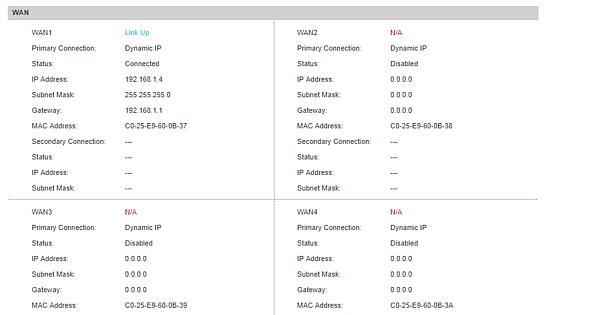
Please excuse me, I am not trying to oppose your suggestion good sire, is it optional to have a firewall? coz what i have here is a test PC. for some reason, that i am not quite sure… HDD is cloned from another PC… is it possible that i am just having an issue with a mac address or does it retain the previous IP settings before configuration, Apologies for my dull conclusion, i haven’t navigated much about this PC and all i did was follow a set-up guide from youtube and stuff accordingly. but your suggestion is very much appreciated
Your unprotected machine is visible to the world. If I were you I’d disconnect it immediately. I’ll send you a PM with the port scan results I just got. It’s not the correct way to connect the machine to the internet. You will get hacked!
You also need to tell us whether you’re using NetworkManager or wicked
systemctl status network
The output will quickly tell you which service is running.
For a server with a network connection that is not likely to change that makes sense.
Get yourself a decent router with ethernet WAN port, so that your network looks like this
DSL Modem-----(WAN port)Router/Firewall(LAN port)-----Your server
Your server can be set up with private IP address (DHCP via router or a static IP address). If the server is going to be used as a web server you will need to configure port forwarding in the router. There are lots of guides on how to do this when the time comes.
Just for completeness. I checked the vicibox instructions… in particular the network configuration section, and it mentions about assigning a static IP address (via YaST > Network Devices > Network Settings). When you do this you will need to assign an IP address, netmask, gateway address (which will be the router address), and valid DNS servers for name resolution.
HOWEVER, all this assume that you are behind a router - not directly connected to a DSL modem. So, do that first and we can help you again when you get yourself sorted.
As the table informs,
A 32-bit netmask only allows for one valid host address.
Which means that you can certainly configure an address, but not another for a second machine.
No, the DSL circuit is likely using PPPoE. A /32 address is often associated point-to-point links like this. The OP needs to install an internet-facing outer.
ok, yes.
post #16 says he’s 'connecting directly to a modem."
And, that is one of the “direct connection” scenarios where a /32 netmask can be valid.
In that case, his configuration is radically different.
So, to the @OP,
Did your ISP provide you with specific information how to set up your connection?
Simplest is to simply drop in a device but with the right information you should also be able to configure your openSUSE without a special device (but requires work).
If you’re really setting up a PPoE on openSUSE, I recommend you do this in Network Manager
They didn’t provide stuff, they just gave us what our Static IP assignment will be which is somehow easy to find, that’s it. since they didn’t want to step-in with the server configuration which i thought would be smooth since i have followed a guide from installation and stuff which didn’t gave me much trouble until this eth0 issue configuration.
Ask to speak to someone higher up.
Ask to see your ISP agreement about whether you can set up your own Gateway device.
Assuming you really are setting up a PPoE device,
As I described, open up your Network Manager and explore the steps to set up a PPoE connection, that’ll tell you what your ISP needs to provide you.
It will arrive within the day sir, I ordered the most affordable upon your recommendation the same day you mentioned i need a firewall.
btw Sir, just for clarification, I have to plug it on another PC to configure it right?
I am a bit confused why it shows 192.168.1.4 on the static IP, also i tried setting up the openSUSE PC’s mac address i’ve seen some of your guides to get it and tried to input not sure why it doesn’t accept my input. apologies for the trouble.
If you can reserve an address for your ViciBox then you can simply configure this to use DHCP and it will get the same address served each time. Alternatively, you might also be able to restrict the range of IP addresses the router can serve, and then you can configure your server to use a static IP (eg 192.168.0.100) outside the DHCP range (192.168.0.2 - 192.168.0.99).