Hola.
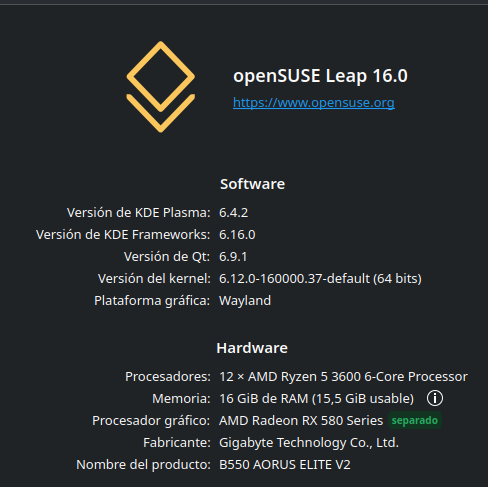
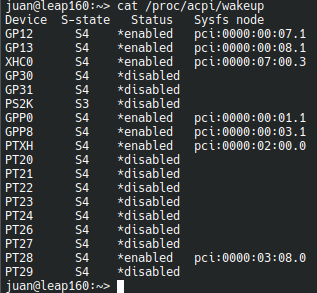
Estoy intentando suspender el sistema pero se arranca de nuevo en solo enseguida.
Pruebo con el comando:
systemctl suspend
Esta es la salida del journalctl a ver si alguien sabe como solucionarlo :
juan@leap160:~> sudo journalctl -b --since "09:29:00" --until "09:29:30" | grep -iE 'kernel:|hardware|fail|wake'
ago 14 09:29:11 leap160 kernel: Lockdown: systemd-logind: hibernation is restricted; see man kernel_lockdown.7
ago 14 09:29:11 leap160 kernel: PM: hibernation: The secret key is invalid. It can be regenerated through /sys/firmware/efi/secret-key/regen
ago 14 09:29:11 leap160 kernel: Lockdown: systemd-logind: hibernation is restricted; see man kernel_lockdown.7
ago 14 09:29:11 leap160 kernel: PM: hibernation: The secret key is invalid. It can be regenerated through /sys/firmware/efi/secret-key/regen
ago 14 09:29:11 leap160 kwin_wayland[1639]: kwin_core: Failed to delay sleep: Sender is not authorized to send message
ago 14 09:29:11 leap160 kernel: r8169 0000:04:00.0 eno1: Link is Down
ago 14 09:29:12 leap160 kernel: Lockdown: systemd-logind: hibernation is restricted; see man kernel_lockdown.7
ago 14 09:29:12 leap160 kernel: PM: hibernation: The secret key is invalid. It can be regenerated through /sys/firmware/efi/secret-key/regen
ago 14 09:29:12 leap160 kernel: Lockdown: systemd-logind: hibernation is restricted; see man kernel_lockdown.7
ago 14 09:29:12 leap160 kernel: PM: hibernation: The secret key is invalid. It can be regenerated through /sys/firmware/efi/secret-key/regen
ago 14 09:29:12 leap160 kernel: Lockdown: systemd-logind: hibernation is restricted; see man kernel_lockdown.7
ago 14 09:29:12 leap160 kernel: PM: hibernation: The secret key is invalid. It can be regenerated through /sys/firmware/efi/secret-key/regen
ago 14 09:29:12 leap160 kernel: Lockdown: systemd-logind: hibernation is restricted; see man kernel_lockdown.7
ago 14 09:29:12 leap160 kernel: PM: hibernation: The secret key is invalid. It can be regenerated through /sys/firmware/efi/secret-key/regen
ago 14 09:29:12 leap160 kernel: Lockdown: systemd-logind: hibernation is restricted; see man kernel_lockdown.7
ago 14 09:29:12 leap160 kernel: PM: hibernation: The secret key is invalid. It can be regenerated through /sys/firmware/efi/secret-key/regen
ago 14 09:29:12 leap160 kernel: PM: suspend entry (deep)
ago 14 09:29:14 leap160 kernel: Filesystems sync: 2.382 seconds
ago 14 09:29:19 leap160 kernel: Freezing user space processes
ago 14 09:29:19 leap160 kernel: Freezing user space processes completed (elapsed 0.001 seconds)
ago 14 09:29:19 leap160 kernel: OOM killer disabled.
ago 14 09:29:19 leap160 kernel: Freezing remaining freezable tasks
ago 14 09:29:19 leap160 kernel: Freezing remaining freezable tasks completed (elapsed 0.001 seconds)
ago 14 09:29:19 leap160 kernel: printk: Suspending console(s) (use no_console_suspend to debug)
ago 14 09:29:19 leap160 kernel: sd 1:0:0:0: [sdb] Synchronizing SCSI cache
ago 14 09:29:19 leap160 kernel: sd 0:0:0:0: [sda] Synchronizing SCSI cache
ago 14 09:29:19 leap160 kernel: ata2.00: Entering standby power mode
ago 14 09:29:19 leap160 kernel: ata1.00: Entering standby power mode
ago 14 09:29:19 leap160 kernel: amdgpu 0000:05:00.0: amdgpu: PCI CONFIG reset
ago 14 09:29:19 leap160 kernel: ACPI: PM: Preparing to enter system sleep state S3
ago 14 09:29:19 leap160 kernel: ACPI: PM: Saving platform NVS memory
ago 14 09:29:19 leap160 kernel: Disabling non-boot CPUs ...
ago 14 09:29:19 leap160 kernel: smpboot: CPU 11 is now offline
ago 14 09:29:19 leap160 kernel: smpboot: CPU 10 is now offline
ago 14 09:29:19 leap160 kernel: smpboot: CPU 9 is now offline
ago 14 09:29:19 leap160 kernel: smpboot: CPU 8 is now offline
ago 14 09:29:19 leap160 kernel: smpboot: CPU 7 is now offline
ago 14 09:29:19 leap160 kernel: smpboot: CPU 6 is now offline
ago 14 09:29:19 leap160 kernel: Spectre V2 : Update user space SMT mitigation: STIBP off
ago 14 09:29:19 leap160 kernel: smpboot: CPU 5 is now offline
ago 14 09:29:19 leap160 kernel: smpboot: CPU 4 is now offline
ago 14 09:29:19 leap160 kernel: smpboot: CPU 3 is now offline
ago 14 09:29:19 leap160 kernel: smpboot: CPU 2 is now offline
ago 14 09:29:19 leap160 kernel: smpboot: CPU 1 is now offline
ago 14 09:29:19 leap160 kernel: ACPI: PM: Low-level resume complete
ago 14 09:29:19 leap160 kernel: ACPI: PM: Restoring platform NVS memory
ago 14 09:29:19 leap160 kernel: LVT offset 0 assigned for vector 0x400
ago 14 09:29:19 leap160 kernel: Enabling non-boot CPUs ...
ago 14 09:29:19 leap160 kernel: smpboot: Booting Node 0 Processor 1 APIC 0x2
ago 14 09:29:19 leap160 kernel: CPU1 is up
ago 14 09:29:19 leap160 kernel: smpboot: Booting Node 0 Processor 2 APIC 0x4
ago 14 09:29:19 leap160 kernel: CPU2 is up
ago 14 09:29:19 leap160 kernel: smpboot: Booting Node 0 Processor 3 APIC 0x8
ago 14 09:29:19 leap160 kernel: CPU3 is up
ago 14 09:29:19 leap160 kernel: smpboot: Booting Node 0 Processor 4 APIC 0xa
ago 14 09:29:19 leap160 kernel: CPU4 is up
ago 14 09:29:19 leap160 kernel: smpboot: Booting Node 0 Processor 5 APIC 0xc
ago 14 09:29:19 leap160 kernel: CPU5 is up
ago 14 09:29:19 leap160 kernel: smpboot: Booting Node 0 Processor 6 APIC 0x1
ago 14 09:29:19 leap160 kernel: Spectre V2 : Update user space SMT mitigation: STIBP always-on
ago 14 09:29:19 leap160 kernel: CPU6 is up
ago 14 09:29:19 leap160 kernel: smpboot: Booting Node 0 Processor 7 APIC 0x3
ago 14 09:29:19 leap160 kernel: CPU7 is up
ago 14 09:29:19 leap160 kernel: smpboot: Booting Node 0 Processor 8 APIC 0x5
ago 14 09:29:19 leap160 kernel: CPU8 is up
ago 14 09:29:19 leap160 kernel: smpboot: Booting Node 0 Processor 9 APIC 0x9
ago 14 09:29:19 leap160 kernel: CPU9 is up
ago 14 09:29:19 leap160 kernel: smpboot: Booting Node 0 Processor 10 APIC 0xb
ago 14 09:29:19 leap160 kernel: CPU10 is up
ago 14 09:29:19 leap160 kernel: smpboot: Booting Node 0 Processor 11 APIC 0xd
ago 14 09:29:19 leap160 kernel: CPU11 is up
ago 14 09:29:19 leap160 kernel: ACPI: PM: Waking up from system sleep state S3
ago 14 09:29:19 leap160 kernel: xhci_hcd 0000:02:00.0: xHC error in resume, USBSTS 0x401, Reinit
ago 14 09:29:19 leap160 kernel: usb usb1: root hub lost power or was reset
ago 14 09:29:19 leap160 kernel: usb usb2: root hub lost power or was reset
ago 14 09:29:19 leap160 kernel: nvme nvme0: D3 entry latency set to 8 seconds
ago 14 09:29:19 leap160 kernel: [drm] PCIE GART of 256M enabled (table at 0x000000F400380000).
ago 14 09:29:19 leap160 kernel: usb 1-7: WARN: invalid context state for evaluate context command.
ago 14 09:29:19 leap160 kernel: [drm] UVD and UVD ENC initialized successfully.
ago 14 09:29:19 leap160 kernel: ata3: SATA link down (SStatus 0 SControl 330)
ago 14 09:29:19 leap160 kernel: ata6: SATA link down (SStatus 0 SControl 330)
ago 14 09:29:19 leap160 kernel: ata4: SATA link down (SStatus 0 SControl 330)
ago 14 09:29:19 leap160 kernel: nvme nvme0: 12/0/0 default/read/poll queues
ago 14 09:29:19 leap160 kernel: usb 1-7: reset full-speed USB device number 3 using xhci_hcd
ago 14 09:29:19 leap160 kernel: [drm] VCE initialized successfully.
ago 14 09:29:19 leap160 kernel: ata2: SATA link up 6.0 Gbps (SStatus 133 SControl 300)
ago 14 09:29:19 leap160 kernel: sd 1:0:0:0: [sdb] Starting disk
ago 14 09:29:19 leap160 kernel: ata2.00: configured for UDMA/133
ago 14 09:29:19 leap160 kernel: ata1: SATA link up 6.0 Gbps (SStatus 133 SControl 300)
ago 14 09:29:19 leap160 kernel: ata1.00: NCQ Send/Recv Log not supported
ago 14 09:29:19 leap160 kernel: sd 0:0:0:0: [sda] Starting disk
ago 14 09:29:19 leap160 kernel: ata1.00: NCQ Send/Recv Log not supported
ago 14 09:29:19 leap160 kernel: ata1.00: configured for UDMA/133
ago 14 09:29:19 leap160 kernel: ata1.00: Enabling discard_zeroes_data
ago 14 09:29:19 leap160 kernel: usb 1-6: reset high-speed USB device number 2 using xhci_hcd
ago 14 09:29:19 leap160 kernel: usb 1-8: WARN: invalid context state for evaluate context command.
ago 14 09:29:19 leap160 kernel: ata5: failed to resume link (SControl 0)
ago 14 09:29:19 leap160 kernel: ata5: SATA link down (SStatus 0 SControl 0)
ago 14 09:29:19 leap160 kernel: usb 1-8: reset full-speed USB device number 4 using xhci_hcd
ago 14 09:29:19 leap160 kernel: OOM killer enabled.
ago 14 09:29:19 leap160 kernel: Restarting tasks ... done.
ago 14 09:29:19 leap160 kernel: random: crng reseeded on system resumption
ago 14 09:29:19 leap160 kernel: PM: suspend exit
ago 14 09:29:19 leap160 NetworkManager[1173]: <info>  [1786692559.8412] manager: sleep: wake requested (sleeping: yes  enabled: yes)
ago 14 09:29:19 leap160 kernel: Realtek Internal NBASE-T PHY r8169-0-400:00: attached PHY driver (mii_bus:phy_addr=r8169-0-400:00, irq=MAC)
ago 14 09:29:19 leap160 kernel: r8169 0000:04:00.0 eno1: Link is Down
ago 14 09:29:22 leap160 kernel: r8169 0000:04:00.0 eno1: Link is Up - 1Gbps/Full - flow control rx/tx
ago 14 09:29:23 leap160 kscreenlocker_greet[14564]: Failed to write to the pipe: Descriptor de fichero erróneo.
Saludos.