Secure Boot and Demise Microsoft CA 2011

There have been many YouTubes concerning the rapidly oncoming (26 Jun 2026) expiry of Microsoft CA 2011, and potential dire straits (including bricked motherboards) if Secure Boot is not correctly installed and the system correctly updated. One example is: “Secure Boot Certificate Expiry (Windows & Linux)” at:
https://www.youtube.com/watch?v=_AwzaZmRNsI .
I use OpenSuSE Leap 15.6: I cannot migrate to 16.0 because the kernel no longer supports my Areca RAID card (which contains all my important data and downloads). I originally chose not to implement Secure Boot (perhaps mistakenly feeling I did not want MicroSoft to dictate the software I used), but now realise it is an important tool to protect against a RootKit attack — it protects the (UEFI) BIOS.

I use a Gigabyte X870 AORUS Elite WIFI7 ICE motherboard, which has built-in fTPM2.0, and have even installed their (only) recommended GIGABYTE GC-TPM 2.0 SPI V2. I use UEFI, with appropriate drive partitioning, but cannot get Secure Boot to run. Some symptoms:

sudo mokutil --sb-state
SecureBoot disabled
Platform is in Setup Mode

sudo mokutil --kek
(No kek keys!!)
sudo fwupdmgr refresh
Updating lvfs
Downloading? [ - ]
Successfully downloaded new metadata: 0 local devices supported

sudo fwupdmgr get-updates
Devices with no available firmware updates:
? SSD PLUS 240GB
? UEFI Device Firmware
? USB4 host controller
No updatable devices
lee@mozart:~> sudo fwupdmgr update
Devices with no available firmware updates:
? SSD PLUS 240GB
? UEFI Device Firmware
? USB4 host controller
No updatable devices

I get the impression I have no KEK or other keys.

Questions:

  1. To date I have not been using Secure Boot. Should I continue to try (so far, abysmal failure).
  2. Assuming Secure Boot is a good idea, how do I fix this? What will happen to my system after the old 2011 CA Authorisation Certificate expires?
  3. I note the SUSE Security Keys Portal at: https://www.suse.com/support/security/keys/ . However, this seems to include keys only for Enterprise SuSE. Are OpenSuSE owners not expected to use Secure Boot?

Help and advice desperately needed!!

What does fwupdmgr security show for your system (it runs as you user)?

Malcolm:
Thanks for responding:

fwupdmgr security
Host Security ID: HSI:0! (v1.9.10)

HSI-1
:heavy_check_mark: BIOS firmware updates: Enabled
:heavy_check_mark: Fused platform: Locked
:heavy_check_mark: Supported CPU: Invalid
:heavy_check_mark: UEFI bootservice variables: Locked
✘ TPM v2.0: Not found

HSI-2
:heavy_check_mark: SPI write protection: Enabled
:heavy_check_mark: IOMMU: Enabled
:heavy_check_mark: Platform debugging: Locked

HSI-3
✘ SPI replay protection: Not supported
✘ Pre-boot DMA protection: Disabled
✘ Suspend-to-idle: Disabled
✘ Suspend-to-ram: Enabled

HSI-4
✘ Processor rollback protection: Disabled
✘ Encrypted RAM: Not supported

Runtime Suffix -!
:heavy_check_mark: fwupd plug-ins: Untainted
:heavy_check_mark: Linux kernel: Untainted
✘ Linux kernel lockdown: Disabled
✘ Linux swap: Unencrypted
✘ UEFI secure boot: Disabled

This system has a low HSI security level.
» https://fwupd.github.io/hsi.html#low-security-level

This system has HSI runtime issues.
» https://fwupd.github.io/hsi.html#hsi-runtime-suffix

Upload these anonymous results to the Linux Vendor Firmware Service to help other users? [y|N]:

Not sure I understand these results, but from earlier attempts at exploration I understand there is a firmware TPU (fTPU), and in addition I have plugged a separate TPU ( GIGABYTE GC-TPM2.0 SPI V2 1.0) into their TPU header on the motherboard.

I’ll check out the CPU and it’s details.

My CPU is, of course, well hidden behind a huge cooler. However, a “search” on the Application Launcher (?) gives:
Architecture: x86_64
CPU op-mode(s): 32-bit, 64-bit
Address sizes: 48 bits physical, 48 bits virtual
Byte Order: Little Endian
CPU(s): 24
On-line CPU(s) list: 0-23
Vendor ID: AuthenticAMD
Model name: AMD Ryzen 9 9900X 12-Core Processor
CPU family: 26
Model: 68
Thread(s) per core: 2
Core(s) per socket: 12
Socket(s): 1
Stepping: 0
Frequency boost: enabled
CPU(s) scaling MHz: 36%
CPU max MHz: 8696.8750
CPU min MHz: 3000.0000
BogoMIPS: 8782.96

(I had sought a CPU that was single-core fast, as well as having a moderate number of cores). From the web AI:
The AMD Ryzen 9 9900X is a desktop processor with 12 cores, launched in August 2024, at an MSRP of $499. It is part of the Ryzen 9 lineup, using the Zen 5 (Granite Ridge) architecture with Socket AM5.

[So I would anticipate it was new enought to be compatible]. And:

The AMD Ryzen 9 9900X 12-Core Processor is fully compatible with Secure Boot. Secure Boot functionality is entirely managed by your motherboard, not the CPU itself. Because the 9900X is on the AM5 platform, it utilizes firmware-based TPM (fTPM) to support hardware-level security requirements like Windows 11

Aghh: TPM, not TPU!

Hi, if you install tpm2.0-tools and reboot, the TPM2.0 should show up…

Do you have Windows installed, or ability from the BIOS to update firmware etc?

I would have expectyed to see more UEFI items as in UEFI db, maybe that’s because it’s in setup mode… Does it have any details in the Motherboard Service Manual?

Apologies Delay. Installed TPM2.0 using Yast2. Restarted twice (one website suggested this might be necessary). Improvements in:
fwupdmgr security
Host Security ID: HSI:2! (v1.9.10)

HSI-1
:heavy_check_mark: BIOS firmware updates: Enabled
:heavy_check_mark: Fused platform: Locked
:heavy_check_mark: Supported CPU: Invalid
:heavy_check_mark: TPM empty PCRs: Valid
:heavy_check_mark: TPM v2.0: Found
:heavy_check_mark: UEFI bootservice variables: Locked

HSI-2
:heavy_check_mark: SPI write protection: Enabled
:heavy_check_mark: IOMMU: Enabled
:heavy_check_mark: Platform debugging: Locked
:heavy_check_mark: TPM PCR0 reconstruction: Valid

HSI-3
✘ SPI replay protection: Not supported
✘ Pre-boot DMA protection: Disabled
✘ Suspend-to-idle: Disabled
✘ Suspend-to-ram: Enabled

HSI-4
✘ Processor rollback protection: Disabled
✘ Encrypted RAM: Not supported

Runtime Suffix -!
:heavy_check_mark: fwupd plug-ins: Untainted
:heavy_check_mark: Linux kernel: Untainted
✘ Linux kernel lockdown: Disabled
✘ Linux swap: Unencrypted
✘ UEFI secure boot: Disabled

Looks like it found TPM 2.0.
This is a Linux-only system (no dual boot).
Within BIOS offers “Q-Flash”, which appears to be a means of flashing the BIOS (which I understand can be dangerous!). At the left, it states:
Current Flash: Model Name XB70 AORUS ELITE WIFI7 ICE
Bios Version: F2
Bios Date: 08/14/2024
Flash Type/Size:
Winbond 25X/Q Series 32MB.

Not sure what you mean by the “Motherboard Service Manual”. I have the User Manual, and also a BIOS Setup (AMD 800 Series) manual. It notes: “When the power is turned off, the battery on the motherboard supplies the necessary power to the CMOS to
keep the configuration values in the CMOS”. Possible Issue? Also:
“To upgrade the BIOS, use either the GIGABYTE Q-Flash or Q-Flash Plus utility. … Because BIOS flashing is potentially risky, if you do not encounter problems using the current
version of BIOS, it is recommended that you not flash the BIOS. To flash the BIOS, do it with
caution. Inadequate BIOS flashing may result in system malfunction”.

Remains at:

sudo mokutil --sb-state
SecureBoot disabled

sudo mokutil --kek

Apparently, still no keys.

mokutil --db

Does not return any certificates (neither new nor old).

Not sure why it shows this…“Supported CPU: Invalid”.

So is there a later BIOS, if so what does the readme say about the update? Up to you but sounds like you have an issue with the current BIOS, talk to the Motherboard manufacturer support?

All my Dell systems get BIOS updates via fwupdmgr…

Not au fait with detaills, but I suspect if you have no KEK (Key Exchange Key) you cannot authorise other signatures — as I understand it’s task is to administer the trusted (db) and blacklisted (dbx) signature databases. Suspect I’ll have to be brave and flash that BIOS.

1 Like

I obtained the latest BIOS from Gigabyte: Version F13a, dated Jun 10
2026, as file mb_bios_x870-a-elite-wf7-ice_8arpl327_f13a.zip. This
claims a “Checksum” of 27AB — supposedly a CRC16 checksum. Sadly, no
downloads anywhere of a CRC16 checker (neither Windows nor Linux),
although online checkers are available — but for a size limit of
5MD. As this file is 15.55MB, it could not be checked. You cannot
make this up!. I eventually downloaded twice, and compared their MDSUM
values; which were identical — so I had to assume the file was OK.

Performed a BIOS Flash using this file, and afterwards things seemed
OK (extracts shown):

sudo mokutil --kek
[key 1] …
Subject: C=US, O=Microsoft Corporation, CN=Microsoft Corporation KEK 2K CA 2023
[key 2] …
Subject: C=US, ST=Washington, L=Redmond, O=Microsoft Corporation, CN=Microsoft Corporation KEK CA 2011
[key 3] …
Issuer: CN=GIGABYTE CA
Validity
Not Before: Sep 5 06:39:55 2023 GMT
Not After : Sep 5 06:39:54 2053 GMT

sudo fwupdmgr --force refresh
Updating lvfs
Downloading? [ - ]
Failed to download metadata for lvfs: failed to download file: Could not resolve host: cdn.fwupd.org

Not sure about that one.

sudo dmesg | grep Secure
… did state Secure boot enabled, although I have since disabled (see
below).

Problem: I had an old comms card, and after all this my comms were
unable to access the local network. I removed the old comms card, and
connected the wired network cable to the motherboard’s built-in RJ-45
port. To my surprise, still no comms to local network. Exploring the
web, I find: “Your RJ-45 port is driven by the Realtek 2.5GbE LAN chip
(RTL8125). When Secure Boot is enabled in the BIOS/UEFI of your
Gigabyte X870 AORUS ELITE WIFI7 ICE, SuSE Linux 15.5 blocks unsigned
… drivers … as a security measure, which disables the internet”.

lspci -nm | grep -i ethernet gives zero output.
lspci > lspci.txt
… shows lots of stuff, but no ethernet or r8168 or r8169.

Googling “realtek r8169 linux driver” produces: “The r8169 is the
open-source, in-kernel Linux driver for RealTek Gigabyte Ethernet
Chips … it is included by default in the Linux kernel”.

Apparently, not in SuSE Linux Leap 15.6. I’m now getting pretty
desperate. Driver conflicts are mentioned. Disabling Secure Boot has
not permitted access to the local network, either via the old comms
card, or via the built-in RJ-45 port. Help urgently required! I’m
now not even sure that I can return to my previous (working) state
without Secure Boot.

Use

inxi -Naz

or

/sbin/lspci -nnk | grep -iA3 net

to get info about your network card.

Please forgive slowness: I am responding via a Win11 PC about results from a Linux Leap 15.6 system that does not connect to network! Also I have replaced “old” comm card in the hope of getting some comms to network — and at present I can only see one monitor at a time.

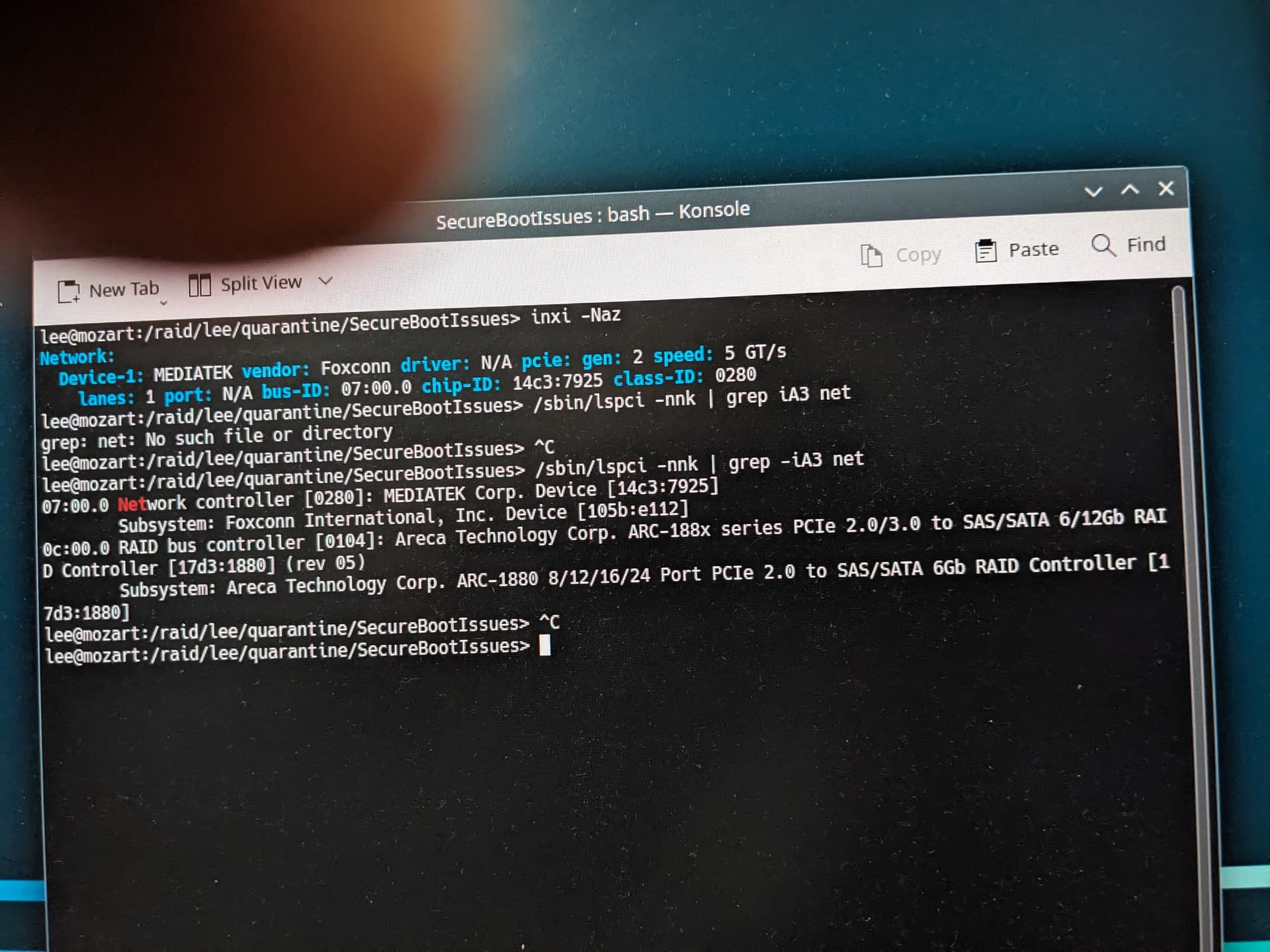
inxi -Naz
Network:
Device-1: MEDIATEK vendor: Foxconn driver: N/A pcie: gen: 2 speed: 5 GT/s
lanes: 1 port: N/A bus-ID: 07:00.0 chip-ID: 14c3:7925 class-ID: 0280

/sbin/lspci -nnk | grep iA3 net
grep: net: No such file or directory

You missed the minus…

This is Wlan:

Network:
Device-1: MEDIATEK vendor: Foxconn driver: N/A pcie: gen: 2 speed: 5 GT/s
lanes: 1 port: N/A bus-ID: 07:00.0 chip-ID: 14c3:7925 class-ID: 0280

Wlan not available in Leap 15.6:

opensuse156:/home/stephan # modinfo mt7925e
modinfo: ERROR: Module mt7925e not found.
opensuse156:/home/stephan # 

mt7925e s the driver for Wlan.

Sorry, nothing seems to be working. I’ve been ytying to use a thumb drive to report message, but on receipt the file claims empty. Tried photograph Linux, but email of photo to Win11 claims empty file. Manual attempt:
. /sbin/lspci -nmk | grep -iA3 net
07:00.0 Network controller [0280]: MEDIATEK Corp. Device [14c3:7925]
Subsystem Foxcomm International, Inc Device [105b:e112]
0c:00.0 RAID bus controller [0104]: Areca Technology Corp. ARC-188x series PCIe 2.0/3.0 to SAS/SATA 6/12Gb RAID Controller [17d3:1880] (rev 05)
Subsystem: Areca …(and more Areca stuff)
Hope this is enough!!

No network controller, only wlan…

Ah: the photo finally came through:

As I wrote: no Lan…