NVidia X11 Tumbleweed Leap ISO upgrade

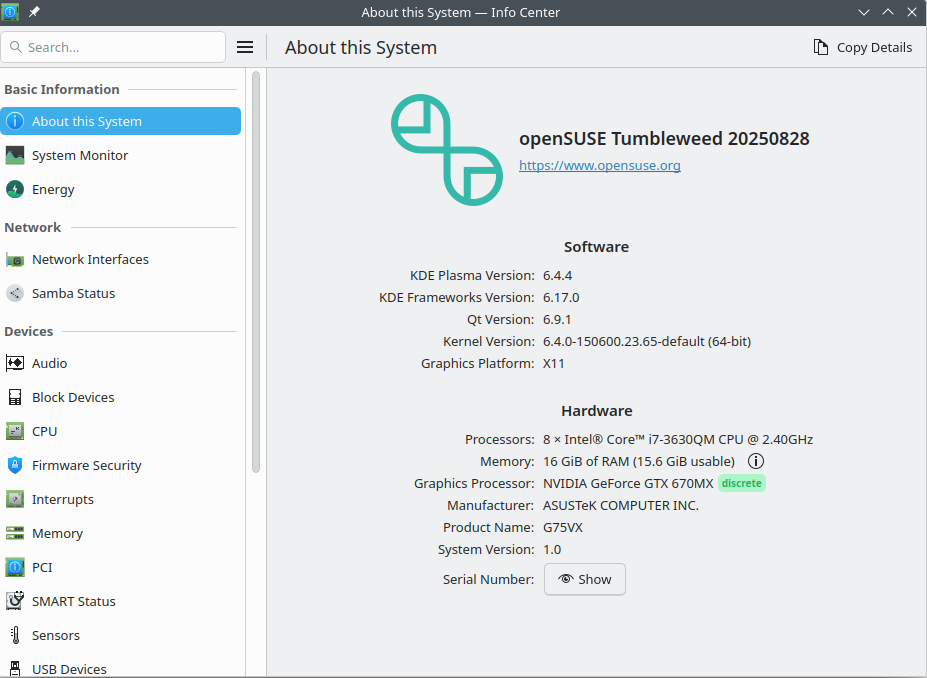
Hi there, I did an ISO upgrade from Leap 15.6 to Tumbleweed, and I kept Kernel 6.4.0

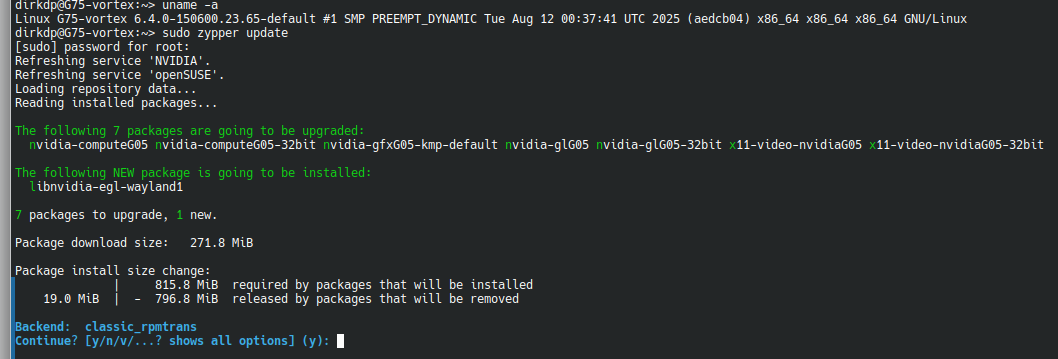
If I run sudo zypper update, the following packages are suggested for upgrade:

The following 7 packages are going to be upgraded:
nvidia-computeG05 nvidia-computeG05-32bit nvidia-gfxG05-kmp-default nvidia-glG05 nvidia-glG05-32bit x11-video-nvidiaG05 x11-video-nvidiaG05-32bit

The following NEW package is going to be installed:
libnvidia-egl-wayland1

However, it seems the compilation fails on one of the packages, exiting with an exit script failure. I can provide the output if necessary.

I then tried to install kernel-longterm-devel and kernel-longterm (kernel 6.12.x), and then update those packages still had the same outcome.

Snapshot rollback works, and I am thinking of simply “freezing” those packages as the screencard works.

However, if I am missing something I need to set or can try to make this work, it will be great. I really would like to stay on KDE Plasma 6. Otherwise, I will rollback to Leap 15.6

Thank you

  Kernel: 6.4.0-150600.23.65-default arch: x86_64 bits: 64 compiler: gcc v: 7.5.0 clocksource: tsc
    avail: hpet,acpi_pm parameters: BOOT_IMAGE=/boot/vmlinuz-6.4.0-150600.23.65-default
    root=/dev/mapper/system-root rootflags=subvol=/@/.snapshots/101/snapshot
    resume=/dev/system/swap6 splash=silent preempt=full quiet security=apparmor mitigations=auto
  Console: pty pts/2 DM: SDDM Distro: openSUSE Tumbleweed 20250828
Graphics:
  Device-1: NVIDIA GK104M [GeForce GTX 670MX] vendor: ASUSTeK driver: nvidia v: 470.256.02
    alternate: nvidia_drm non-free: series: 470.xx+ status: legacy-active (EOL~2024-09-xx)
    arch: Kepler-2 code: GKxxx process: TSMC 28nm built: 2012-2018 pcie: gen: 1 speed: 2.5 GT/s
    lanes: 16 link-max: gen: 2 speed: 5 GT/s ports: active: none off: VGA-1,eDP-1
    empty: DP-1,HDMI-A-1 bus-ID: 01:00.0 chip-ID: 10de:11a1 class-ID: 0300
  Device-2: Sunplus Innovation ASUS Webcam driver: uvcvideo type: USB rev: 2.0 speed: 480 Mb/s
    lanes: 1 mode: 2.0 bus-ID: 2-1.3:4 chip-ID: 1bcf:2885 class-ID: 0e02
  Display: unspecified server: X.org v: 1.21.1.15 with: Xwayland v: 24.1.8 compositor: kwin_x11
    driver: X: loaded: nvidia gpu: nvidia,nvidia-nvswitch tty: 169x47
  Monitor-1: VGA-1 model: Samsung SA300/SA350 serial: <filter> built: 2011 res: 1920x1080
    dpi: 96 gamma: 1.2 size: 510x287mm (20.08x11.3") diag: 585mm (23") ratio: 16:9 modes:
    max: 1920x1080 min: 640x480
  Monitor-2: eDP-1 model: Seiko Epson 0x5044 built: 2010 res: 1920x1080 dpi: 128 gamma: 1.2
    size: 382x215mm (15.04x8.46") diag: 438mm (17.3") ratio: 16:9 modes: 1920x1080
  API: EGL v: 1.5 hw: drv: nvidia platforms: device: 0 drv: nvidia device: 2 drv: swrast gbm:
    drv: kms_swrast surfaceless: drv: swrast inactive: wayland,x11,device-1
  API: OpenGL v: 4.6.0 compat-v: 4.5 vendor: mesa v: 25.1.7 note: console (EGL sourced)
    renderer: llvmpipe (LLVM 20.1.8 256 bits), NVIDIA GeForce GTX 670MX/PCIe/SSE2
  API: Vulkan v: 1.4.321 layers: 2 device: 0 type: discrete-gpu name: NVIDIA GeForce GTX 670MX
    driver: N/A device-ID: 10de:11a1 surfaces: N/A device: 1 type: cpu name: llvmpipe (LLVM 20.1.8
    256 bits) driver: N/A device-ID: 10005:0000 surfaces: N/A
  Info: Tools: api: eglinfo, glxinfo, vulkaninfo de: kscreen-console,kscreen-doctor
    gpu: nvidia-settings,nvidia-smi wl: wayland-info x11: xdpyinfo, xprop, xrandr

OS: openSUSE Tumbleweed x86_64
Kernel: Linux 6.4.0-150600.23.65-default
Packages: 2936 (rpm), 10 (flatpak)
Shell: bash 5.3.3
Display (SEC5044): 1920x1080 @ 120 Hz in 17" [External]
Display (SA300/SA350): 1920x1080 @ 60 Hz in 23" [External] *
DE: KDE Plasma 6.4.4
WM: KWin (X11)


switcherooctl glxinfo |grep renderer
OpenGL renderer string: NVIDIA GeForce GTX 670MX/PCIe/SSE2

glxinfo |grep renderer
OpenGL renderer string: NVIDIA GeForce GTX 670MX/PCIe/SSE2

vulkaninfo --summary
==========
VULKANINFO
==========

Vulkan Instance Version: 1.4.321


Instance Extensions: count = 23
-------------------------------
VK_EXT_acquire_xlib_display            : extension revision 1
VK_EXT_debug_report                    : extension revision 9
VK_EXT_debug_utils                     : extension revision 2
VK_EXT_direct_mode_display             : extension revision 1
VK_EXT_display_surface_counter         : extension revision 1
VK_EXT_headless_surface                : extension revision 1
VK_EXT_surface_maintenance1            : extension revision 1
VK_EXT_swapchain_colorspace            : extension revision 5
VK_KHR_device_group_creation           : extension revision 1
VK_KHR_display                         : extension revision 23
VK_KHR_external_fence_capabilities     : extension revision 1
VK_KHR_external_memory_capabilities    : extension revision 1
VK_KHR_external_semaphore_capabilities : extension revision 1
VK_KHR_get_display_properties2         : extension revision 1
VK_KHR_get_physical_device_properties2 : extension revision 2
VK_KHR_get_surface_capabilities2       : extension revision 1
VK_KHR_portability_enumeration         : extension revision 1
VK_KHR_surface                         : extension revision 25
VK_KHR_surface_protected_capabilities  : extension revision 1
VK_KHR_wayland_surface                 : extension revision 6
VK_KHR_xcb_surface                     : extension revision 6
VK_KHR_xlib_surface                    : extension revision 6
VK_LUNARG_direct_driver_loading        : extension revision 1

Instance Layers: count = 2
--------------------------
VK_LAYER_MESA_device_select Linux device selection layer 1.4.303  version 1
VK_LAYER_NV_optimus         NVIDIA Optimus layer         1.2.175  version 1

Devices:
========
GPU0:
        apiVersion         = 1.2.175
        driverVersion      = 471.0.2.0
        vendorID           = 0x10de
        deviceID           = 0x11a1
        deviceType         = PHYSICAL_DEVICE_TYPE_DISCRETE_GPU
        deviceName         = NVIDIA GeForce GTX 670MX
        driverID           = DRIVER_ID_NVIDIA_PROPRIETARY
        driverName         = NVIDIA
        driverInfo         = 470.256.02
        conformanceVersion = 1.2.6.0
        deviceUUID         = f0635865-0f09-54ca-089a-bf56339f1d5d
        driverUUID         = b67e126b-ca9f-5837-843e-603a6ad11b15
GPU1:
        apiVersion         = 1.4.311
        driverVersion      = 25.1.7
        vendorID           = 0x10005
        deviceID           = 0x0000
        deviceType         = PHYSICAL_DEVICE_TYPE_CPU
        deviceName         = llvmpipe (LLVM 20.1.8, 256 bits)
        driverID           = DRIVER_ID_MESA_LLVMPIPE
        driverName         = llvmpipe
        driverInfo         = Mesa 25.1.7 (LLVM 20.1.8)
        conformanceVersion = 1.3.1.1
        deviceUUID         = 6d657361-3235-2e31-2e37-000000000000
        driverUUID         = 6c6c766d-7069-7065-5555-494400000000
When upgrading from Leap to Tumbleweed you need to exchange the Nvidia repository. The Nvidia driver (kernel module) is compiled against the kernel (logic). That means, Nvidia drivers for Leap kernel won’t work on Tumbleweed.

As Nvidia drivers are not available on the offline media, the upgrade will fail. The online method is prefered in the case of additional external repos like Nvidia.
https://en.opensuse.org/openSUSE:Migrate_Leap_to_Tumbleweed

Tumbleweed is only upgraded via zypper dup.

Why? This is a Leap kernel. Don’t you want to use Tumbleweed?

Show output of following commands:
zypper lr -d
zypper se -si nvidia
zypper se -si kernel

Thank you for the reply.
Firstly, it did not fail the upgrade. Secondly, only after the upgrade does it show these to be updated AFTER running sudo zypper update

nvidia-computeG05 nvidia-computeG05-32bit nvidia-gfxG05-kmp-default nvidia-glG05 nvidia-glG05-32bit x11-video-nvidiaG05 x11-video-nvidiaG05-32bit```

And if you do update it, you do not boot into the GUI. Leap was upgraded to tumbleweed, no issues. Kernel 6.4.0 was the kernel that worked with this driver and the graphics card. And it actually does work on Tumbleweed, I would, however, prefer to use the LTS kernel. If possible

``` zypper lr -d
#  | Alias                            | Name                                   | Enabled | GPG Check | Refresh | Keep | Priority | Type   | URI                                                      | Service
---+----------------------------------+----------------------------------------+---------+-----------+---------+------+----------+--------+----------------------------------------------------------+---------
 1 | NVIDIA:repo-non-free             | repo-non-free                          | Yes     | (r ) Yes  | Yes     | -    |   99     | rpm-md | https://download.nvidia.com/opensuse/tumbleweed          | NVIDIA
 2 | download.opensuse.org-non-oss    | Main Repository (NON-OSS)              | Yes     | (r ) Yes  | Yes     | -    |   99     | rpm-md | http://download.opensuse.org/tumbleweed/repo/non-oss/    | 
 3 | download.opensuse.org-oss        | Main Repository (OSS)                  | Yes     | (r ) Yes  | Yes     | -    |   99     | rpm-md | http://download.opensuse.org/tumbleweed/repo/oss/        | 
 4 | download.opensuse.org-tumbleweed | Main Update Repository                 | Yes     | (r ) Yes  | Yes     | -    |   99     | rpm-md | http://download.opensuse.org/update/tumbleweed/          | 
 5 | openSUSE:repo-non-oss            | repo-non-oss                           | Yes     | (r ) Yes  | Yes     | -    |   99     | rpm-md | http://cdn.opensuse.org/tumbleweed/repo/non-oss          | openSUSE
 6 | openSUSE:repo-openh264           | repo-openh264                          | Yes     | (r ) Yes  | Yes     | -    |   99     | rpm-md | https://codecs.opensuse.org/openh264/openSUSE_Tumbleweed | openSUSE
 7 | openSUSE:repo-oss                | repo-oss                               | Yes     | (r ) Yes  | Yes     | -    |   99     | rpm-md | http://cdn.opensuse.org/tumbleweed/repo/oss              | openSUSE
 8 | openSUSE:repo-oss-debug          | repo-oss-debug                         | No      | ----      | ----    | -    |   99     | N/A    | http://cdn.opensuse.org/debug/tumbleweed/repo/oss        | openSUSE
 9 | openSUSE:repo-oss-source         | repo-oss-source                        | No      | ----      | ----    | -    |   99     | N/A    | http://cdn.opensuse.org/source/tumbleweed/repo/oss       | openSUSE
10 | openSUSE:update-tumbleweed       | update-tumbleweed                      | Yes     | (r ) Yes  | Yes     | -    |   99     | rpm-md | http://cdn.opensuse.org/update/tumbleweed                | openSUSE
11 | repo-debug                       | openSUSE-Tumbleweed-Debug              | No      | ----      | ----    | -    |   99     | rpm-md | http://download.opensuse.org/debug/tumbleweed/repo/oss/  | 
12 | repo-openh264                    | Open H.264 Codec (openSUSE Tumbleweed) | Yes     | (r ) Yes  | Yes     | -    |   99     | rpm-md | http://codecs.opensuse.org/openh264/openSUSE_Tumbleweed  | 
13 | repo-source                      | openSUSE-Tumbleweed-Source             | No      | ----      | ----    | -    |   99     | rpm-md | http://download.opensuse.org/source/tumbleweed/repo/oss/ | 
Loading repository data...
Reading installed packages...

S  | Name                             | Type    | Version                                | Arch   | Repository
---+----------------------------------+---------+----------------------------------------+--------+----------------------
i  | kernel-firmware-nvidia           | package | 20250516-4.1                           | noarch | Main Repository (OSS)
i  | kernel-firmware-nvidia           | package | 20250516-4.1                           | noarch | repo-oss
i+ | nvidia-computeG05                | package | 470.256.02-lp156.80.1                  | x86_64 | (System Packages)
i  | nvidia-computeG05-32bit          | package | 470.256.02-lp156.80.1                  | x86_64 | (System Packages)
i  | nvidia-gfxG05-kmp-default        | package | 470.256.02_k6.4.0_150600.21-lp156.80.1 | x86_64 | (System Packages)
i+ | nvidia-glG05                     | package | 470.256.02-lp156.80.1                  | x86_64 | (System Packages)
i  | nvidia-glG05-32bit               | package | 470.256.02-lp156.80.1                  | x86_64 | (System Packages)
i  | openSUSE-repos-Tumbleweed-NVIDIA | package | 20250728.9adc675-1.1                   | x86_64 | Main Repository (OSS)
i  | openSUSE-repos-Tumbleweed-NVIDIA | package | 20250728.9adc675-1.1                   | x86_64 | repo-oss
i+ | x11-video-nvidiaG05              | package | 470.256.02-lp156.80.1                  | x86_64 | (System Packages)
i  | x11-video-nvidiaG05-32bit        | package | 470.256.02-lp156.80.1                  | x86_64 | (System Packages)
zypper se -si kernel
Loading repository data...
Reading installed packages...

S  | Name                                    | Type    | Version              | Arch   | Repository
---+-----------------------------------------+---------+----------------------+--------+----------------------
i+ | kernel-default                          | package | 6.4.0-150600.23.65.1 | x86_64 | (System Packages)
i+ | kernel-default                          | package | 6.16.3-1.1           | x86_64 | Main Repository (OSS)
i+ | kernel-default                          | package | 6.16.3-1.1           | x86_64 | repo-oss
i  | kernel-default-devel                    | package | 6.4.0-150600.23.65.1 | x86_64 | (System Packages)
i  | kernel-default-devel                    | package | 6.4.0-150600.21.3    | x86_64 | (System Packages)
i  | kernel-default-devel                    | package | 6.16.3-1.1           | x86_64 | Main Repository (OSS)
i  | kernel-default-devel                    | package | 6.16.3-1.1           | x86_64 | repo-oss
i+ | kernel-devel                            | package | 6.4.0-150600.23.65.1 | noarch | (System Packages)
i+ | kernel-devel                            | package | 6.4.0-150600.21.2    | noarch | (System Packages)
i+ | kernel-devel                            | package | 6.16.3-1.1           | noarch | Main Repository (OSS)
i+ | kernel-devel                            | package | 6.16.3-1.1           | noarch | repo-oss
i  | kernel-firmware-all                     | package | 20250206-1.1         | noarch | Main Repository (OSS)
i  | kernel-firmware-all                     | package | 20250206-1.1         | noarch | repo-oss
i  | kernel-firmware-amdgpu                  | package | 20250825-1.1         | noarch | Main Repository (OSS)
i  | kernel-firmware-amdgpu                  | package | 20250825-1.1         | noarch | repo-oss
i  | kernel-firmware-ath10k                  | package | 20250206-4.1         | noarch | Main Repository (OSS)
i  | kernel-firmware-ath10k                  | package | 20250206-4.1         | noarch | repo-oss
i  | kernel-firmware-ath11k                  | package | 20250820-1.1         | noarch | Main Repository (OSS)
i  | kernel-firmware-ath11k                  | package | 20250820-1.1         | noarch | repo-oss
i  | kernel-firmware-ath12k                  | package | 20250808-1.1         | noarch | Main Repository (OSS)
i  | kernel-firmware-ath12k                  | package | 20250808-1.1         | noarch | repo-oss
i  | kernel-firmware-atheros                 | package | 20250206-2.1         | noarch | Main Repository (OSS)
i  | kernel-firmware-atheros                 | package | 20250206-2.1         | noarch | repo-oss
i  | kernel-firmware-bluetooth               | package | 20250820-1.1         | noarch | Main Repository (OSS)
i  | kernel-firmware-bluetooth               | package | 20250820-1.1         | noarch | repo-oss
i  | kernel-firmware-bnx2                    | package | 20250627-1.1         | noarch | Main Repository (OSS)
i  | kernel-firmware-bnx2                    | package | 20250627-1.1         | noarch | repo-oss
i  | kernel-firmware-brcm                    | package | 20250623-1.1         | noarch | Main Repository (OSS)
i  | kernel-firmware-brcm                    | package | 20250623-1.1         | noarch | repo-oss
i  | kernel-firmware-chelsio                 | package | 20250627-1.1         | noarch | Main Repository (OSS)
i  | kernel-firmware-chelsio                 | package | 20250627-1.1         | noarch | repo-oss
i  | kernel-firmware-dpaa2                   | package | 20250206-2.1         | noarch | Main Repository (OSS)
i  | kernel-firmware-dpaa2                   | package | 20250206-2.1         | noarch | repo-oss
i  | kernel-firmware-i915                    | package | 20250730-1.1         | noarch | Main Repository (OSS)
i  | kernel-firmware-i915                    | package | 20250730-1.1         | noarch | repo-oss
i  | kernel-firmware-intel                   | package | 20250825-1.1         | noarch | Main Repository (OSS)
i  | kernel-firmware-intel                   | package | 20250825-1.1         | noarch | repo-oss
i  | kernel-firmware-iwlwifi                 | package | 20250818-1.1         | noarch | Main Repository (OSS)
i  | kernel-firmware-iwlwifi                 | package | 20250818-1.1         | noarch | repo-oss
i  | kernel-firmware-liquidio                | package | 20250206-2.1         | noarch | Main Repository (OSS)
i  | kernel-firmware-liquidio                | package | 20250206-2.1         | noarch | repo-oss
i  | kernel-firmware-marvell                 | package | 20250206-2.1         | noarch | Main Repository (OSS)
i  | kernel-firmware-marvell                 | package | 20250206-2.1         | noarch | repo-oss
i  | kernel-firmware-media                   | package | 20250825-1.1         | noarch | Main Repository (OSS)
i  | kernel-firmware-media                   | package | 20250825-1.1         | noarch | repo-oss
i  | kernel-firmware-mediatek                | package | 20250813-1.1         | noarch | Main Repository (OSS)
i  | kernel-firmware-mediatek                | package | 20250813-1.1         | noarch | repo-oss
i  | kernel-firmware-mellanox                | package | 20250717-1.1         | noarch | Main Repository (OSS)
i  | kernel-firmware-mellanox                | package | 20250717-1.1         | noarch | repo-oss
i  | kernel-firmware-mwifiex                 | package | 20250206-2.1         | noarch | Main Repository (OSS)
i  | kernel-firmware-mwifiex                 | package | 20250206-2.1         | noarch | repo-oss
i  | kernel-firmware-network                 | package | 20250804-1.1         | noarch | Main Repository (OSS)
i  | kernel-firmware-network                 | package | 20250804-1.1         | noarch | repo-oss
i  | kernel-firmware-nfp                     | package | 20250206-2.1         | noarch | Main Repository (OSS)
i  | kernel-firmware-nfp                     | package | 20250206-2.1         | noarch | repo-oss
i  | kernel-firmware-nvidia                  | package | 20250516-4.1         | noarch | Main Repository (OSS)
i  | kernel-firmware-nvidia                  | package | 20250516-4.1         | noarch | repo-oss
i  | kernel-firmware-platform                | package | 20250811-1.1         | noarch | Main Repository (OSS)
i  | kernel-firmware-platform                | package | 20250811-1.1         | noarch | repo-oss
i  | kernel-firmware-prestera                | package | 20250206-2.1         | noarch | Main Repository (OSS)
i  | kernel-firmware-prestera                | package | 20250206-2.1         | noarch | repo-oss
i  | kernel-firmware-qcom                    | package | 20250820-1.1         | noarch | Main Repository (OSS)
i  | kernel-firmware-qcom                    | package | 20250820-1.1         | noarch | repo-oss
i  | kernel-firmware-qlogic                  | package | 20250717-1.1         | noarch | Main Repository (OSS)
i  | kernel-firmware-qlogic                  | package | 20250717-1.1         | noarch | repo-oss
i  | kernel-firmware-radeon                  | package | 20250627-1.1         | noarch | Main Repository (OSS)
i  | kernel-firmware-radeon                  | package | 20250627-1.1         | noarch | repo-oss
i  | kernel-firmware-realtek                 | package | 20250820-1.1         | noarch | Main Repository (OSS)
i  | kernel-firmware-realtek                 | package | 20250820-1.1         | noarch | repo-oss
i  | kernel-firmware-serial                  | package | 20250717-1.1         | noarch | Main Repository (OSS)
i  | kernel-firmware-serial                  | package | 20250717-1.1         | noarch | repo-oss
i  | kernel-firmware-sound                   | package | 20250821-1.1         | noarch | Main Repository (OSS)
i  | kernel-firmware-sound                   | package | 20250821-1.1         | noarch | repo-oss
i  | kernel-firmware-ti                      | package | 20250206-2.1         | noarch | Main Repository (OSS)
i  | kernel-firmware-ti                      | package | 20250206-2.1         | noarch | repo-oss
i  | kernel-firmware-ueagle                  | package | 20250206-2.1         | noarch | Main Repository (OSS)
i  | kernel-firmware-ueagle                  | package | 20250206-2.1         | noarch | repo-oss
i  | kernel-firmware-usb-network             | package | 20250717-1.1         | noarch | Main Repository (OSS)
i  | kernel-firmware-usb-network             | package | 20250717-1.1         | noarch | repo-oss
i  | kernel-macros                           | package | 6.16.3-1.1           | noarch | Main Repository (OSS)
i  | kernel-macros                           | package | 6.16.3-1.1           | noarch | repo-oss
i  | libabsl_kernel_timeout_internal2508_0_0 | package | 20250814.0-2.1       | x86_64 | Main Repository (OSS)
i  | libabsl_kernel_timeout_internal2508_0_0 | package | 20250814.0-2.1       | x86_64 | repo-oss
i  | purge-kernels-service                   | package | 0-9.9                | noarch | Main Repository (OSS)
i  | purge-kernels-service                   | package | 0-9.9                | noarch | repo-oss

You have issues on your box. It is not properly upgraded to Tumbleweed. You are still using the Leap kernel and Leap Nvidia packages.

You need to boot into a terminal session with the actual Tumbleweed kernel kernel-default-6.16.3-1.1. From within the terminal session you need to install the Tumbleweed Nvidia drivers and remove the Leap ones.

As explained above, you are booting a Leap kernel and trying to update to Tumbleweed Nvidia packages. This can’t work.

After you have booted the actual Tumbleweed kernel in a terminal session (with network access):
sudo zypper rm *G05*
sudo zypper in nvidia-computeG05 nvidia-glG05 x11-video-nvidiaG05 nvidia-gfxG05-kmp-default

Thank you,

I do not think you understand what happened.

  1. The Leap upgrade is done, and the workstation functions. See below.

  2. However, when you run the zipper upgrade command, whether with LTS or 6.4, it will not compile, and it will definitely not work with anything above Kernel 6.12. x, as far as I am aware, of no patched NVidia 470.xx drivers.

I have dual-screen ability. I am typing on the machine in question, see below

The upgrade worked with the kernel hold:
https://en.opensuse.org/SDB:Keep_multiple_kernel_versions

The repositories are correct:

sudo zypper lr -u
Repository priorities are without effect. All enabled repositories share the same priority.

#  | Alias                            | Name                                   | Enabled | GPG Check | Refresh | URI
---+----------------------------------+----------------------------------------+---------+-----------+---------+---------------------------------------------------------
 1 | NVIDIA:repo-non-free             | repo-non-free                          | Yes     | (r ) Yes  | Yes     | https://download.nvidia.com/opensuse/tumbleweed
 2 | download.opensuse.org-non-oss    | Main Repository (NON-OSS)              | Yes     | (r ) Yes  | Yes     | http://download.opensuse.org/tumbleweed/repo/non-oss/
 3 | download.opensuse.org-oss        | Main Repository (OSS)                  | Yes     | (r ) Yes  | Yes     | http://download.opensuse.org/tumbleweed/repo/oss/
 4 | download.opensuse.org-tumbleweed | Main Update Repository                 | Yes     | (r ) Yes  | Yes     | http://download.opensuse.org/update/tumbleweed/
 5 | openSUSE:repo-non-oss            | repo-non-oss                           | Yes     | (r ) Yes  | Yes     | http://cdn.opensuse.org/tumbleweed/repo/non-oss
 6 | openSUSE:repo-openh264           | repo-openh264                          | Yes     | (r ) Yes  | Yes     | https://codecs.opensuse.org/openh264/openSUSE_Tumbleweed
 7 | openSUSE:repo-oss                | repo-oss                               | Yes     | (r ) Yes  | Yes     | http://cdn.opensuse.org/tumbleweed/repo/oss
 8 | openSUSE:repo-oss-debug          | repo-oss-debug                         | No      | ----      | ----    | http://cdn.opensuse.org/debug/tumbleweed/repo/oss
 9 | openSUSE:repo-oss-source         | repo-oss-source                        | No      | ----      | ----    | http://cdn.opensuse.org/source/tumbleweed/repo/oss
10 | openSUSE:update-tumbleweed       | update-tumbleweed                      | Yes     | (r ) Yes  | Yes     | http://cdn.opensuse.org/update/tumbleweed
11 | repo-debug                       | openSUSE-Tumbleweed-Debug              | No      | ----      | ----    | http://download.opensuse.org/debug/tumbleweed/repo/oss/
12 | repo-openh264                    | Open H.264 Codec (openSUSE Tumbleweed) | Yes     | (r ) Yes  | Yes     | http://codecs.opensuse.org/openh264/openSUSE_Tumbleweed
13 | repo-source                      | openSUSE-Tumbleweed-Source             | No      | ----      | ----    | http://download.opensuse.org/source/tumbleweed/repo/oss/ 

The PROBLEM is that the moment you update to the drivers for Tumbleweed, even with the 6.12 LTS drivers, they do not seem to compile.

So my question is, can I freeze those updates until updates for the NvidiaG05, aka Nvidia 470.xx drivers are available, OR is there another workaround? The issue is that default-6.16.3-1.1 does not support Nvidia 470 in any shape or form, as the drivers were not patched since I think kernel 6.12.x.

My question is, IF I use the LTS Kernel as supported, can I then run your suggestion:

sudo zypper rm G05
sudo zypper in nvidia-computeG05 nvidia-glG05 x11-video-nvidiaG05 nvidia-gfxG05-kmp-default

As updating does not work after Leap was upgraded to Tumbleweed, I tried it.

Thank you

Like @hui says, you did not upgrade to Tumbleweed. You now have some in-between mix of Leap and TW that is basically not supported. Currently that is a problem that needs solving before even getting to NVIDIA issues.

I think you meant user “hui”. :wink:

As Hui noted, you used zypper update. You’re running Tumbleweed, so you don’t use that. You use zypper dup.

Always.

The kernel version that you kept wasn’t built for Tumbleweed, so it’s not surprising that the TW build of the G05 driver doesn’t work.

What video card are you using? If it’s the RTX 2000 series, then you probably want the nvidia-open-gfxG05-kmp-default package with the latest kernel.

But someone should confirm that, as I use the G06 here myself, so I don’t have the hardware to verify that.

@hendersj output shows a GTX 670MX (Kepler)… :wink:

1 Like

Small print in an image. :smiley:

Think the open driver will work with that?

Not at all the open driver only works with Turing or newer.

1 Like

You continue to repeat it but so far you did not show any evidence of it. Show full protocol of the command execution (complete command line and its output) where it fails to compile. If it is long, upload to the https://paste.opensuse.org/.

Where do you have this from? G05 drivers get patched since ages to be compatible with the latest openSUSE kernel.

And if you do not trust @hui, you can look at:

It’s the build for the G04 driver.

Last accepted patch was a patch for Kernel 6.15, kernel 6.16 does not need a patch, next patch will be for kernel 6.17.

And to finaly crush @dirkduplooy 's claim that G05 drivers do not support the latest TW kernel: i downgraded one of my older machines with a GTX 1060 from G06 to G05. It works flawlessly with kernel-default-6.16.3-1.1

ich@neuerpc:~> inxi -GSaz
System:
  Kernel: 6.16.3-1-default arch: x86_64 bits: 64 compiler: gcc v: 15.1.1
    clocksource: tsc avail: acpi_pm
    parameters: BOOT_IMAGE=/boot/vmlinuz-6.16.3-1-default
    root=UUID=51451079-ce86-4bf4-ac92-5bf04f3317b1 mitigations=auto
  Desktop: KDE Plasma v: 6.4.4 tk: Qt v: N/A info: frameworks v: 6.17.0
    wm: kwin_wayland tools: avail: xscreensaver vt: 3 dm: SDDM Distro: openSUSE
    Tumbleweed 20250829
Graphics:
  Device-1: Intel CoffeeLake-S GT2 [UHD Graphics 630] vendor: Elite Systems
    driver: i915 v: kernel arch: Gen-9.5 process: Intel 14nm built: 2016-20
    ports: active: none empty: DP-1,HDMI-A-1,HDMI-A-2 bus-ID: 00:02.0
    chip-ID: 8086:3e92 class-ID: 0380
  Device-2: NVIDIA GP106 [GeForce GTX 1060 6GB]
    vendor: PC Partner / Sapphire driver: nvidia v: 470.256.02
    alternate: nouveau,nvidia_drm non-free: 550/565.xx+ status: current (as
    of 2025-01; EOL~2026-12-xx) arch: Pascal code: GP10x process: TSMC 16nm
    built: 2016-2021 pcie: gen: 3 speed: 8 GT/s lanes: 16 ports: active: none
    off: DP-2 empty: DP-3, DP-4, DVI-D-1, HDMI-A-3 bus-ID: 01:00.0
    chip-ID: 10de:1c03 class-ID: 0300
  Display: wayland server: X.org v: 1.21.1.15 with: Xwayland v: 24.1.8
    compositor: kwin_wayland driver: X: loaded: modesetting unloaded: vesa
    failed: nvidia alternate: fbdev,intel,nouveau,nv dri: iris
    gpu: nvidia,nvidia-nvswitch d-rect: 3200x1080 display-ID: 0
  Monitor-1: DP-2 pos: right model: VG278 serial: <filter> built: 2019 res:
    mode: 1920x1080 hz: 144 scale: 100% (1) dpi: 82 gamma: 1.2
    size: 598x336mm (23.54x13.23") diag: 686mm (27") ratio: 16:9 modes:
    max: 1920x1080 min: 640x480
  Monitor-2: Unknown-1 pos: primary,left res: mode: 1280x1024 hz: 60
    scale: 100% (1) dpi: 96 size: 338x270mm (13.31x10.63") diag: 433mm (17.03")
    modes: 1280x1024
  API: EGL v: 1.5 hw: drv: intel iris drv: nvidia platforms: device: 0
    drv: nvidia device: 1 drv: iris device: 3 drv: swrast gbm: drv: iris
    surfaceless: drv: iris wayland: drv: swrast x11: drv: swrast
    inactive: device-2
  API: OpenGL v: 4.6.0 compat-v: 4.5 vendor: mesa v: 25.1.7 glx-v: 1.4
    direct-render: yes renderer: llvmpipe (LLVM 20.1.8 256 bits)
    device-ID: ffffffff:ffffffff memory: 15.14 GiB unified: yes
    display-ID: :1.0
  API: Vulkan v: 1.4.321 layers: 6 device: 0 type: discrete-gpu name: NVIDIA
    GeForce GTX 1060 6GB driver: N/A device-ID: 10de:1c03 surfaces: N/A
    device: 1 type: integrated-gpu name: Intel UHD Graphics 630 (CFL GT2)
    driver: N/A device-ID: 8086:3e92 surfaces: N/A device: 2 type: cpu
    name: llvmpipe (LLVM 20.1.8 256 bits) driver: N/A device-ID: 10005:0000
    surfaces: N/A
  Info: Tools: api: clinfo, eglinfo, glxinfo, vulkaninfo
    de: kscreen-console,kscreen-doctor gpu: nvidia-settings,nvidia-smi
    wl: wayland-info x11: xdpyinfo, xprop, xrandr
ich@neuerpc:~> 
ich@neuerpc:~> nvidia-smi
Sun Aug 31 09:04:53 2025       
+-----------------------------------------------------------------------------+
| NVIDIA-SMI 470.256.02   Driver Version: 470.256.02   CUDA Version: 11.4     |
|-------------------------------+----------------------+----------------------+
| GPU  Name        Persistence-M| Bus-Id        Disp.A | Volatile Uncorr. ECC |
| Fan  Temp  Perf  Pwr:Usage/Cap|         Memory-Usage | GPU-Util  Compute M. |
|                               |                      |               MIG M. |
|===============================+======================+======================|
|   0  NVIDIA GeForce ...  Off  | 00000000:01:00.0  On |                  N/A |
| 33%   32C    P8     7W / 120W |     34MiB /  6070MiB |      0%      Default |
|                               |                      |                  N/A |
+-------------------------------+----------------------+----------------------+
                                                                               
+-----------------------------------------------------------------------------+
| Processes:                                                                  |
|  GPU   GI   CI        PID   Type   Process name                  GPU Memory |
|        ID   ID                                                   Usage      |
|=============================================================================|
|    0   N/A  N/A      1571      G   /usr/bin/Xorg.bin                  14MiB |
+-----------------------------------------------------------------------------+
ich@neuerpc:~> 
ich@neuerpc:~> zypper se -si nvidia
Repository-Daten werden geladen...
Installierte Pakete werden gelesen...

S  | Name                             | Type  | Version                    | Arch   | Repository
---+----------------------------------+-------+----------------------------+--------+--------------
i  | libnvidia-egl-gbm1               | Paket | 1.1.2-7.14                 | x86_64 | repo-non-free
i  | libnvidia-egl-gbm1-32bit         | Paket | 1.1.2-7.9                  | x86_64 | repo-non-free
i  | libnvidia-egl-wayland1           | Paket | 1.1.20-51.1                | x86_64 | repo-non-free
i  | libnvidia-egl-wayland1-32bit     | Paket | 1.1.20-51.1                | x86_64 | repo-non-free
i  | libnvidia-egl-x111               | Paket | 1.0.3-21.1                 | x86_64 | repo-non-free
i  | libnvidia-egl-x111-32bit         | Paket | 1.0.3-21.1                 | x86_64 | repo-non-free
i  | nvidia-computeG05                | Paket | 470.256.02-80.1            | x86_64 | repo-non-free
i  | nvidia-computeG05-32bit          | Paket | 470.256.02-80.1            | x86_64 | repo-non-free
i+ | nvidia-gfxG05-kmp-default        | Paket | 470.256.02_k6.15.8_1-80.18 | x86_64 | repo-non-free
i  | nvidia-glG05                     | Paket | 470.256.02-80.1            | x86_64 | repo-non-free
i  | nvidia-glG05-32bit               | Paket | 470.256.02-80.1            | x86_64 | repo-non-free
i  | openSUSE-repos-Tumbleweed-NVIDIA | Paket | 20250728.9adc675-1.1       | x86_64 | repo-oss
i  | x11-video-nvidiaG05              | Paket | 470.256.02-80.1            | x86_64 | repo-non-free
i  | x11-video-nvidiaG05-32bit        | Paket | 470.256.02-80.1            | x86_64 | repo-non-free
ich@neuerpc:~> 

Thank you, everyone, as it became a competition to show who has more “skill,” I will simply rollback. Then, to do the CLI upgrade. Anyway enjoy

  Device-1: NVIDIA GK104M [GeForce GTX 670MX] vendor: ASUSTeK driver: nvidia v: 470.256.02
    alternate: nvidia_drm non-free: series: 470.xx+ status: legacy-active (EOL~2024-09-xx)
    arch: Kepler-2 code: GKxxx process: TSMC 28nm built: 2012-2018 pcie: gen: 1 speed: 2.5 GT/s
    lanes: 16 link-max: gen: 2 speed: 5 GT/s ports: active: none off: VGA-1,eDP-1
    empty: DP-1,HDMI-A-1 bus-ID: 01:00.0 chip-ID: 10de:11a1 class-ID: 0300
  Device-2: Sunplus Innovation ASUS Webcam driver: uvcvideo type: USB rev: 2.0 speed: 480 Mb/s
    lanes: 1 mode: 2.0 bus-ID: 2-1.3:4 chip-ID: 1bcf:2885 class-ID: 0e02
  Display: unspecified server: X.org v: 1.21.1.15 with: Xwayland v: 24.1.8 compositor: kwin_x11
    driver: X: loaded: nvidia gpu: nvidia,nvidia-nvswitch tty: 169x47

Anyway as stated not worth my time to fiddle around, barely got it up an running on Leap and it was functioning all right.

Thanks for your time and attention

Thanks @knurpht. Please simply delete the thread. Going to do a rollback to Leap