Starting today, I can no longer search on Firefox.
As soon as I type a word into the search bar, a page appears:
“3opus, the tab has crashed: we can help you,” with the option to close the tab or restore it.
If I close it and open a new tab, then type in my search, I get the same message or Firefox closes.
If I choose to restore the tab, my new search query brings up the same message.
If, instead of typing a search, I click on a bookmark, there is no problem.
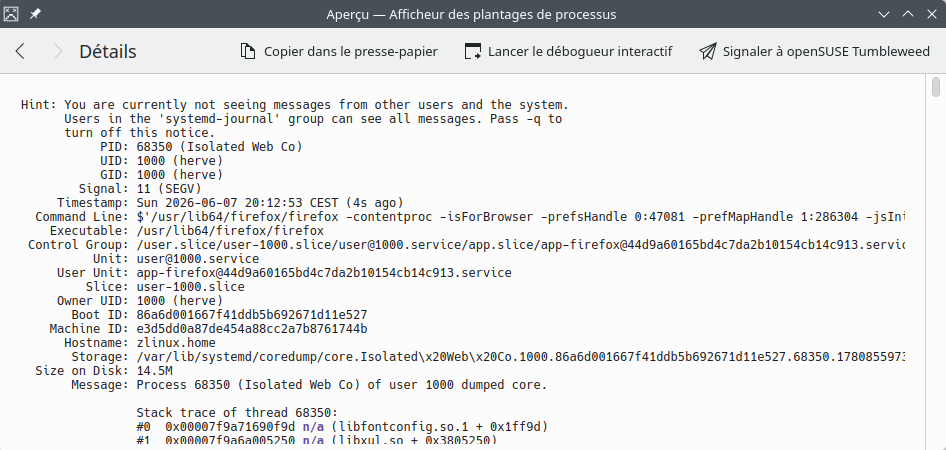
Below is a truncated version of the error message.
I have used troubleshoot mode : the extension is not the problem.
I’ll follow the rest of the steps outlined by Mozilla and let you know how it goes. But not until tomorrow.
I’ve had many firefox tab crashes since updating tumbleweed this morning and many don’t involve any search. Some that crash every time a page loads: FedEx tracking, Ebay home page, USPS tracking https://tools.usps.com/tracking/
Try reverting fontconfig and libfontconfig1 to 2.17.1, there seems to be a bug in FF in combination with fontconfig 2.18.0 that will be solved in the next FF release.
You can find the older fontconfigs in one of the history snapshots
sudo zypper in --oldpackage https://download.opensuse.org/history/20260603/tumbleweed/repo/oss/x86_64/{fontconfig,libfontconfig1}-2.17.1-1.2.x86_64.rpm
The Bug Report mentions the DuckDuckGo Mozilla Firefox issue – I’ve simply changed my Firefox Search Engine to “Ecosia” and will wait until the dust settles …
BTW, this morning Firefox tabs crashed when I opened specific CNN and CNBC and “Huffington Post” news items in new tabs.
In other words, it ain’t only a Search Engine which is causing the Firefox crashes – it’s also specific News Services.
To date I’ve only experienced this issue with US American News Services – haven’t tried any other countries yet …
I don’t know if it was the new Firefox or the new fontconfig, but with TW20260609 we can remove the lock on fontconfig and upgrade (and DuckDuck goes searching again).