Hello Team,
Slightly disappointing results of my upgrade to Leap 16.0 from 15.6.
I used
opensuse-migration-tool
There are no custom repos (I think one was shown named snappy, but it’s not added by me, and I didn’t take actions on it).
Migration completed without errors, I rebooted and my 2 network interfaces were listed 2 times above the login prompt, but both were empty, not showing any IP’s configured on them.
I had to restore from backup very fast as this machine is critical, but will appreciate any thoughts on what could be wrong. Everything was worked, and is working very smooth when I restored from backup. The server is ESXi VM, everything is pretty standard and every upgrade so far was very smooth.
First, welcome to the openSUSE Forums.
Did you take note of the Release Notes before upgrading?
- Especially the Hardware requirements – <Minimum hardware requirements>
What does “systemctl status network.service” report?
- Are you using “Network Manager” or “Wicked”?
Thank you for replying to my issue. Below is the output from the working Leap 15.6
systemctl status network.service
● wicked.service - wicked managed network interfaces
     Loaded: loaded (/usr/lib/systemd/system/wicked.service; enabled; preset: disabled)
     Active: active (exited) since Mon 2026-01-26 18:04:18 EET; 1h 53min left
    Process: 1265 ExecStart=/usr/sbin/wicked --systemd ifup all (code=exited, status=0/SUCCESS)
   Main PID: 1265 (code=exited, status=0/SUCCESS)
        CPU: 22ms
Edit by Sauerland:
Code-Tags
Does this mean that if wicked is used, upgrade will fail? Are there any instructions how to proceed manually (if needed to switch to networkmanager before the upgrade)?
Post from Leap 16.0
/sbin/lspci -nnk | grep -iA3 net
Please use Code-Tags for Terminal output, see
Code-Tags
Leap 16.0 Release Notes: <Changes affecting all architectures>
NetworkManager is now the only network configuration stack in openSUSE Leap 16.0.
Wicked is working fine here.
This was an Upgrade by the migration-tool.
Only by default. Both wicked and systemd-network are still available if desired.
Thank you for replying to my issue. After the failed upgrade attempt I restored from backup as the machine is critical. I hope to try again this weekend. Should I try different method, maybe manual upgrade?
Seems the problem is with wicked, which is not installed by default you may need to manually install wicked
Wicked is available in Leap 16 [1].
A person can switch back-n-forth from wicked and NetworkManager (and vice-versa) very easy, at the command line. It takes about one-two minutes to switch.
(The reason I did it was to do troubleshooting for either option to Reply to threads).
.
[1]
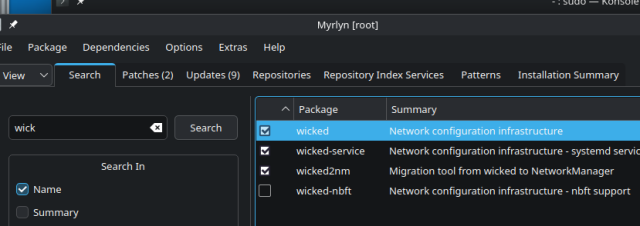
@gogalthorp The OP’s network.service output showed that wicked was active.
Then, let us begin with debugging:
-
What does the output of the following CLI command indicate?
“/lib64/ld-linux-x86-64.so.2 --help | tail” -
Is the package “iproute2” installed?
-
Please post the output of the following CLI commands:
“ip --details link”
“ip --details route”
“ip --details rule”
“file /etc/resolv.conf”
Do the values of the following variables in ‘/etc/sysconfig/network/config’ point to valid DNS services on your network?
- NETCONFIG_DNS_STATIC_SEARCHLIST
- NETCONFIG_DNS_STATIC_SERVERS
Is the value of the variable NETCONFIG_DNS_FORWARDER set to the default value of “resolver”?
Did you actually read the thread?
We don’t know for sure if the Hardware is supported by Leap 16.0.
We don’t know why DHCP didn’t supply any IP addresses for the machine’s interfaces.
- The “ip” commands work for both Wicked and Network Manager …
Well, the DNS variables are completely irrelevant if the OP has no IP addresses assigned.
To move this forward (assuming that the OP hasn’t already quietly solved this on their own), it would be more useful to see the following information…
Network hardware, driver, and interface names:
inxi -Nnaz
Wicked’s journal output (DHCP, link state, errors):
journalctl -b -u wicked
1 Like
Hello All and thank you for trying to help. It seems to be a “common” problem to lose network functionality after the upgrade. Why I say this, because I found this article which explains what to do to have network after the upgrade link. There seems to be several problems after the upgrade, and the one that is showstopper for me is the network problem. I tried the steps provided in this article, after the upgrade the network interfaces are without settings like ip’s network masks, gateway etc. Adding manually (after reconfiguring firewalld with the new interface names which now are ens…) makes it to work, the machine is a router too and gives internet to backend machines. However, the moment I try to make the settings permanent so they can survive a reboot, either via the nmtui or with commands, the routing stops and backend machines lose internet connection.Tried to set selinux to permissive, didn’t help. If I delete the interfaces from nmtui and then configure them with ip addr… routing starts working, the moment I try to make them permanent, routing stops. I want to mention that this machine is very standard installation without any custom software (except the letsencrypt certbot that renews the ssl cert). 2 network interfaces, act as router, apache webserver, dns server, mail server, and that’s pretty much all. Someone would expect that such a basic functionality should be working flawlessly after OS upgrade, but it is not.I don’t know what my options are. Wait hoping that the upgrade process will improve and try again in few weeks, Install 16 and migrate the services I’m using there, or switch to another distribution.
Ok, you followed a guide (as per your link), and did you explicitly disable wicked, enable NetworkManager as described? (It would be problematic if both were active somehow.)
Ok, it’s good that the ip commands work to getting immediately network connectivity as expected.
It’s a little hard to tell from your words alone as to whether it is just IPv4 forwarding that is not working. Are you using static IP addresses, DHCP, or a mixture of both? NetworkManager should be able to configure the interfaces as you require, but you should check the NetworkManager.service for errors and the journal for a more comprehensive analysis…
sudo systemctl status NetworkManager
sudo journalctl -u NetworkManager
ip a
ip r
This will provide a lot of details about the network interfaces and their configuration…
nmcli -p device show
With respect to IP forwarding, make sure to create a file eg /etc/sysctl.d/10-ipv4.conf with net.ipv4.ip_forward = 1 to facilitate kernel-level forwarding.
Please be aware that, system administration in an SELinux environment has one or two differences to system administration in a non-SELinux (AppArmor) environment.
One of the things I find that’s needed is, that after each and every system Patch or system Update, “restorecon” has to be forcibly and recursively applied to “/usr”, “/etc” and “/var”.
And, it doesn’t pay to change to distribution’s supplied SELinux Policy configuration.
On a server system you shouldn’t need to change anything except, possibly, the User’s Home directories – further information is in the examples at the end of the “semanage-fcontext” man page.
This topic was automatically closed 30 days after the last reply. New replies are no longer allowed.