Considering reinstalling Leap 16.0 using Gnome DE to test audio.
You can install Gnome without reinstalling the whole system, so that you can easily revert to Plasma if it best suits you.
But don’t expect miracles, kernel and alsa are the same, pipewire is the same, applications might be different but use the same backends like ffmpeg, as I see it just the output selector panel is a bit more tidy but that’s all.
1 Like
Installed Leap 16.0 with Gnome and found no difference in quality of audio, still flat frequency response. Found “easyeffects” on github, but was unable to install for testing. Had very good audio from MS 10 on this Dell 3010, but I have an attitude toward microsoft.
Multimedia repo package (for Leap 16)…
https://download.opensuse.org/repositories/multimedia:/apps/16.0/x86_64/easyeffects-8.3.0-lp160.88.1.x86_64.rpm
The Optiplex 3010 apparently have an HDMI video port. Try connecting to a compatible display (with speakers) or a TV set and check, so you can understand if there is a basic kernel/alsa problem or there is something going on on the DAC/internal speakers chain (which looks more likely to me).
If you had MaxxAudio on MS, you will get nothing comparable in the Linux world.
If you only used the stock MS driver maybe something close might be possible.
Unless you have one of the crippled Conexant codecs that have custom quirks on the MS driver and no counterpart in Linux (and I guess that nobody is willing to spend time on 2011 vintage silicon…).
Anyway, as I see it, this is no Leap 16 nor openSUSE specific problem.
I agree, don’t think there is a problem with Opensuse. May be isolated to Dell.
A recent similar topic involving MaxxAudio where EasyEffects did help…
Could there be hardware limitations against Linux?
Never had any issue with our Dell laptops.
If we require a new laptop, “Dell only” for us 
.
I am probably perplexed. As I re-read the 1st post:
- What exactly is a “separate Dell system”??
a. A completely different machine?
b. Or you are dual booting 15.6 and 16 on the same machine?
@myswtest It’s an Optiplex 3010, circa 2013(?)
@ThomasBE400 perhaps look at PCI/PCIe sound card?
Is the system BIOS up to date etc?
I’m running five different systems with Linux and Microsoft OS. Dell 3010, Dell 7010, Lenovo M93 and others. I use a KVM switch to access either system. I don’t dual boot partitions at all.
1 Like
BIOS too old to update…
Installed an additional sound card. Seems to be an improvement over the Intel chip set.
thomas@localhost:~> inxi -A
Audio:
Device-1: Intel 6 Series/C200 Series Family High Definition Audio
driver: snd_hda_intel
Device-2: C-Media CMI8738/CMI8768 PCI Audio driver: snd_cmipci
API: ALSA v: k6.12.0-160000.38-default status: kernel-api
Server-1: PipeWire v: 1.4.6 status: active
thomas@localhost:~> ^C
thomas@localhost:~>
Using Device-2 for now, freq response not so flat. Driver does not offer an equalizer. Appears to be a slight improvement.
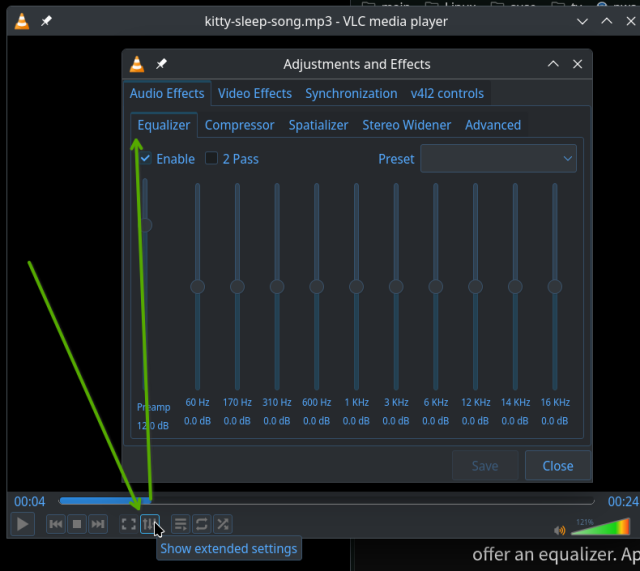
I thought an equalizer if offered by the multimedia player (vs a ‘driver’). Check my screenshot of VLC, which I use for playing music files and video files.
So I fire up VLC, then select the Show Extended Settings button, then that pop-up window is displayed. Then I click on the Equalizer tab, then click the Enable check-box.
Now I can adjust the various sliders. Also, there is a Preset dropdown (right side) where you can select the music type (Flat, Classical, Dance, etc)
Nice, but this may be only applicable to VLC playing files. I use youtube music most of the time playing music from firefox. Firefox being the primary program delivering sound does not have an equalizer. There is no embedded sound enhancer in firefox.
Easyeffects works with all desktop audio, so also for Firefox
Had trouble installing EasyEffects. No success with that.
Install and use the flatpak
Not familiar with Flatpak. EasyEffects is a zip file I’m having trouble with. Need more time to learn.