Recently, I installed Leap 16 on a Microsoft 10 Dell system. The installation of Leap 16 was uneventful and successful. Everything works good. However, the sound quality is degraded, sound not as good as it was under MS 10. On a separate Dell system I am running Leap 15.6 with good sound quality. I’m happy with Leap 16, but need to improve the quality of the sound. The audio sounds like it is coming from a handheld AM/FM pocket radio. Any thoughts on this?
This is the Applications category. You might have better luck posting in Multimedia with a more descriptive subject title.
1 Like
OPI has been installed.
Suggesting to double-post is obviously not recommended.
Admins can change the Category.
==> You didn’t mention the DE you’re using??
.
Check my screenshot (using KDE Plasma) … have you visited System Settings, then Audio … and double-check the Profile setting?
(the screenshot is on my 15.6 KDE Plasma system … I’ll boot 16.1 system and check there, since it’s a newer DE)
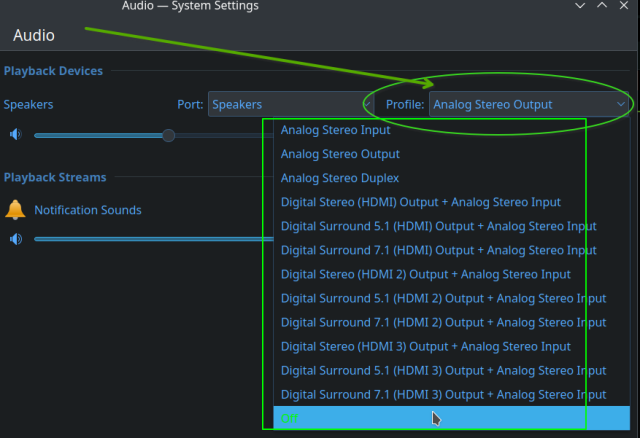
Using KDE 6.4.2
See screenshot for 16.1 Leap … in System Settings … pretty much the same (but Sound vs Audio).
The quality of the audio output depends a lot on which Profile is currently set. As you can see, there are quite a few choices available … so double-check there.
(BTW, I am running on a Dell Latitude laptop.)
.
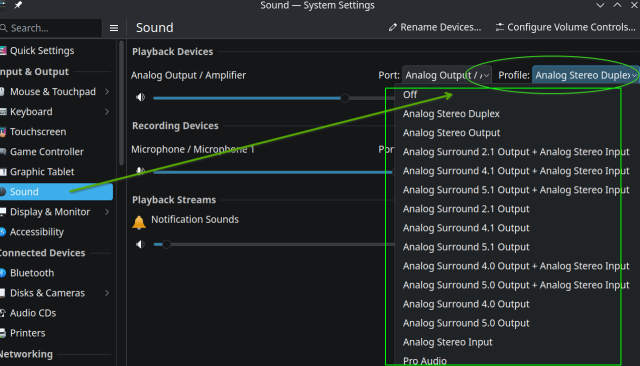
Thanks, using Analog Stereo Output in settings. Switched between profiles and found no difference.
Thinking about buying a Creative Labs X5 amplifier with equalizer. Just thinking.
Audio still very flat …
I wish you good luck with this.
I had a similar problem, but could not get any help.
My workaround was to always boot Windows first, and from there to reboot into Linux.
My current desktop computer, also a Dell, does not have this problem.
So, jump to a command-line window (Konsole), and execute this command:
inxi -A
And copy-paste the complete output using the Preformatted Text tool, as I show here:
myswtest@dell:~> inxi -A
Audio:
  Device-1: Intel Cannon Point-LP High Definition Audio driver: snd_hda_intel
  API: ALSA v: k6.4.0-150600.23.103-default status: kernel-api
  Server-1: PulseAudio v: 17.0 status: active
myswtest@dell:~>
homas@localhost:~> inxi -A
Audio:
Device-1: Intel 6 Series/C200 Series Family High Definition Audio
driver: snd_hda_intel
API: ALSA v: k6.12.0-160000.38-default status: kernel-api
Server-1: PipeWire v: 1.4.6 status: active
thomas@localhost:~>
Maybe I should be using Pulse Audio rather than Pipewire…
Comparing sound quality between Win* and Linux can be tricky.
First of all, recent Win* systems use some form of psycho-acoustics so that your brain is fooled into “feeling” sounds that are not there physically and some vendors include proprietary apps that deeply use those effects. You will get nothing like that on a stock Linux system.
Then some laptops, inherently “squeaky” due to physical limits, include some form of audio filtering e.g. to enhance bass or otherwise shaping the frequency response. You may get something similar on Linux with easyeffects (and a lot of patience configuring it).
In some corner cases the codec configuration is odd and vendors tweak their Win* drivers to fit those quirks but there might be no ready-made equivalent on Linux; that likely happened to @nrickert .
If you disclose the exact Dell model involved and possibly the output of dmesg |grep codec somebody here (or better in the Multimedia section) might be able to help.
And, BTW, look for differences in the 15.6 system that sounds good to you.
Re. Pulseaudio, let it alone; pipewire can be better and more customizable, even if it might need a bit of effort to achieve non trivial filters.
I’m running a Dell 3010 with Leap 16.0. It sounded good with MS10, but now the usual audio frequencies are flat. Strange…
Sorry … the ‘inxi’ output I provided was not for comparison, but to show how the output would look when executing
‘inxi -A’ and pasting to Preformatted Text (that was my 15.6 install).
.
For my Leap 16.1 , it’s using Pipewire
Server-1: PipeWire v: 1.6.8 status: active
No stay with using PipeWire, and consider using easyeffects as OrsoBruno already suggested. It may help you achieve the sound you’re after.
Another vote for Easy Effects, but be careful if you go looking for info, the only official page for Easy Effects is their GitHub:
There is a fake website at https://easyeffects.org that pretends to be the official website. Not sure what their end goal is, but do not trust anything posted there.
Thanks for the warning. I’ll stay away.