I have been noticing “stuff” happening or not happening in my Leap 16 install, that seem ephemeral, but keeping repeating, enough that I wrote it down in my “log” . . . .
1.) Several repeats on the typing or non-typing, clicking in a message box, the cursor loads, start typing, but nothing shows up. Or, trying to edit within the words just typed . . . effort declined, will not move cursor to make the edit.
2.) After today’s zypper up . . . mouse action became “glitchy” . . . the movement of the cursor became erratic, not following the movement of the physical mouse, but aiming off in other directions???
Fair question . . . can’t exactly say. This is a “new” machine from May/June of '25. There have been “historically” problems with the various display managers, requiring changes to another one. But, I believe this install of Leap 16 is “box stock” as it came out of the installer?
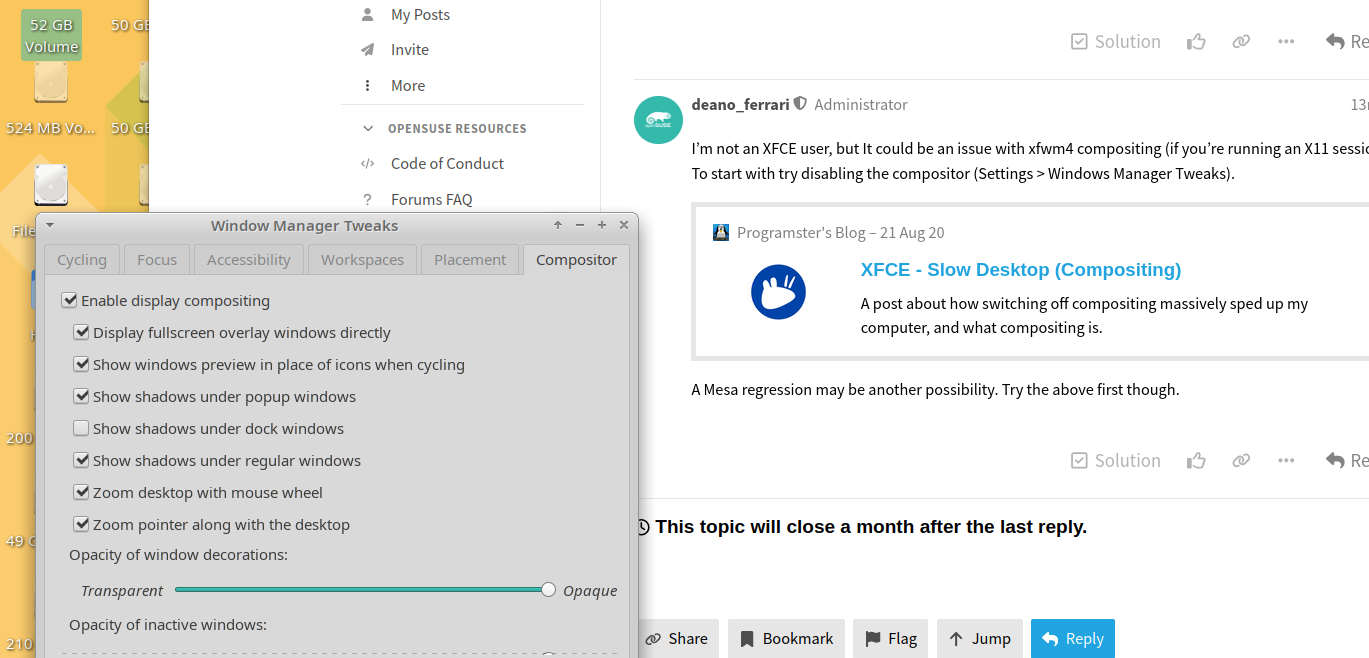
I’m not an XFCE user, but It could be an issue with xfwm4 compositing (if you’re running an X11 session). To start with try disabling the compositor (Settings > Windows Manager Tweaks).
A Mesa regression may be another possibility. Try the above first though.
OK. I believe at that time the Agama installer was not able to select a disk for installation, so I had a 15.6 installer with the older installer on it, installed 15.6 and then edited repos to “16” . . . so I haven’t selected X or Wayland, but generally am still using X wherever possible.
So, are you referring to the unchecking of “enable display compositing”?? As per screenshot that will be included? Just checking before I mess with it. But, as I have in this machine alone 8 distros of various ilk, I have not “gotten under the hood” or messed with the system in the last month or so, which would then manifest with these weird problems, like even in trying to grab the screenshot the mouse behavior was “not stable” . . . . I just run zypper up and let the system take care of itself . . . which has seemingly manifested in these odd behaviors in Leap.
OK, thanks for the clarification on it. I just checked your linked data for XFCE, and that is dated from '20 . . . which I think was relevant around then, but IMHO not recently. Like there was the time when we could pick “compton” but that hasn’t been around for awhile . . . .
It’s not the dragging of windows, which was an historical problem possibly with XFCE or Xubuntu . . . this is “the mouse” and stuff with “the cursor” . . . that seems to show up intermittently, particularly in Google Vooice messaging box, but, not on this or other forums . . . here I am able to type easily.
And the mouse glitch was enhanced when trying to drag the selection in screenshot app . . . . This is recent behavior . . . not going back to 6 months ago.
edit: Another “oddity” the “enable display compositing” box unchecked itself?? So, we can now “monitor” the behavior w/o it?"
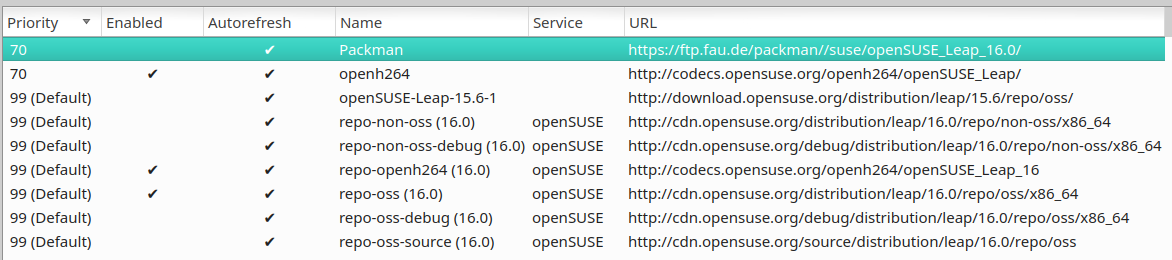
OK . . . “unsupported behavior” that manifests 7 months later?? I think I have three repos enabled . . . does that look problematic or likely to cause problems that come and go?
Missed this. If already disabled, we can move on. A pragmatic approach is to try comparing other desktop behavior - ideally desktops supporting Wayland. If mesa is the underlying issue, it will show up regardless of desktop in use.
OK . . . when it was disabled it added some large black border around the active window and actually did slightly add in the jerky window when dragging it.
I enabled it again and the black border went away . . . I would prefer to not have that black edging . . . . I re-enabled the compositor. Easy enough to turn it on and off.
But, you are suggesting that another DE be brought in for testing purposes, and selecting Wayland?? Might do that, but problem in SUSE is once a DE is added it can’t be removed?? I like an efficient system . . . so far in my testing on other machines Wayland has been not ready for prime time . . .
Had the thought that what might be interesting for testing purposes would be to run a fresh install of Leap 16 using the latest Agama installer, on another drive in the machine . . . let it select Wayland or whatever it would want . . . and then compare the behaviors between the two Leap 16 installs . . . ???
Whichever one “prevails” could then remain as the choice in Leap 16 . . . only difference would be that the present install is I believe running on an nvme drive and the other would be running on a SATA SSD . . . .
What would be the suggested DE to run on it??
It’s not going to happen right away, but rather than tearing apart or adding weight to the Leap 16 install I have now, which is more or less “OK” other than this mouse/curosr anomaly . . . to start another one and see if it is “Leap 16” or if it is “unsupported behavior” at work??
Any answer given will be subjective, but for my money KDE Plasma (run as a Wayland session). You could also try evaluating XFCE Wayland session as Gertjan already hinted at.
Indeed, on the subjective experience. I understand that Plasma seems to be the choice of DE for the majority of linux users . . . I never gravitated toward it, for the general “busyness” of the GUI. I think I have one distro out of a number that is TW running Plasma . . . just to check it out.
But, one thing I haven’t done is to check to see if my present Leap install offers different sessions on log in, like on my Sys76 laptop, GNOME offers a choice of X or Wayland, & COSMIC offers only Wayland. I did see a recent post on Fosstodon that did say, “XFCE will offer Wayland,” and I did post a reply on that thread. Possibly “in the interest of science,” whatever new install of Leap that I do, perhaps the XFCE/Wayland iteration would be the one to choose . . . if it is offered now in the current Leap installer???
If you have XFCE installed, then you should have the option to start it as a Wayland compositor (the same as those running Plasma can). You generally choose the desired session via the login (display) manager. I’m not sure about LightDM, as I generally use SDDM.
It was mentioned here…and mentioned earlier in this thread (post #6)…
Alrighty, thanks for the follow up and the link, which I briefly scanned through.
I did check to see if there is a Wayland session available in my existing 16 install, and no there isn’t . . . just XFCE and “ice” something, the bare bones DE that gets installed with XFCE??
So far in several attempts to test out Wayland function, “stuff” happens, or doesn’t happen so I return to X.
I do have SDDM as the choice in my TW install and possibly others . . . I run the stock system until something “breaks” and then make a switch . . . LightDM is fine for the most part, I don’t have any “faves” these days . . . .
 Did you try disabling it yet? Any different?