@hcvv OP indicated the device went read-only, to check the device, create a new one to verify that is not read only and not just something up with the image. If can’t create or the created partition is read only, then time to get a new device.
But he never showed that. And I do not believe that when he doesn’t show. Preferably showing that the dd command ends in something like an error it can not write.
1 Like
But on my stick now I can not write anything. When I open “Image studio” and try to make image from iso file, message is “Wrong format”. Then, I want to format my stick (erase everything is on it, and try to install image filre from iso, using Imae studio).
I do not so familiar with console, so maybe I wrote something wrong during console installation mentioned earlier in this topic.
So that is why I mention new usb stick - because I can not format and erasing contents from this one.
If somebody could help, I would be so thankful. Maybe I sound now like my pupils, but - veveryone of us are pupils somewhere, sometimes… Like me here, for example. Please, bi teacher, I would be good student.
Who advised you should do anything like that? How difficult is it to just do that dd command and post that with all it’s output here.
Hi @vajcek if you are having trouble with the command line try to install gparted and use it to reformat your usb stick.
If you’re not familiar with it read some instruction online or there is a help option in gparted and it can guide you what to do.
Again! There is no need to partition and/or format the device.
What is on the device is of no importance. He wants to make it a bootable installation of openSUSE medium. The only thing to be done is dd the ISO file to the device. Every action to put something on it first is loss of time end effort. All and everything will be overwritten by the dd of the ISO file.
Does then nobody understand what a byte by byte copy of a file to a mass-storage device means? 
1 Like
@hcvv your missing the point, please stop! The user is not sure if the device is good or not as it’s read only, the user needs to verify if the device is good or faulty. The easiest way is to add a partition and see if they can work with that or throw the device away. It’s at this point nothing to do with the image, dd or anything else. They have already indicated that they will get a new device if needed.
1 Like
As I explained earlier, there is no indication that the device is “read-only” except that the OP says so in post #27 without any proof.
And the best way to see if the device is read-only (soem switch on it?) is doing the dd. It will either come to a fruitful conclusion or it will error with a message that hints to read-only. What is easier? Just doing the dd or teaching him how to partition and create file systems and …?
But I will stop posting here.
2 Likes
@hcvv Thank you 
I am sorry you mad, especially because I think it is because of me. I really can not write anything on that.
@vajcek no need to be concerned, take your time, folks are happy to help you, the whole point of this Forum
1 Like
But, may I say I can not do this?! Everything goes right until I have to do dd command. I simply don’t know how to write path. I follow your steps you gave in post up
Something I do wrongly - it is for sure, but what? 
I said: waiting for weekend to do it
@vajcek so can you show where the iso image is in your system. Open a terminal, use the cd command to change to it eg cd /home/your_username_here/Downloads
@ malcolmlewis Hello, now iso file is on /home/zlatic/Downloads
@vajcek ok, so if you make sure the USB device your going to use is plugged in and then open a terminal and then switch to root user and run the commands;
su -

cd  /home/zlatic/Downloads

ls Leap*

lsblk
Post back the output from those two command, then can continue.
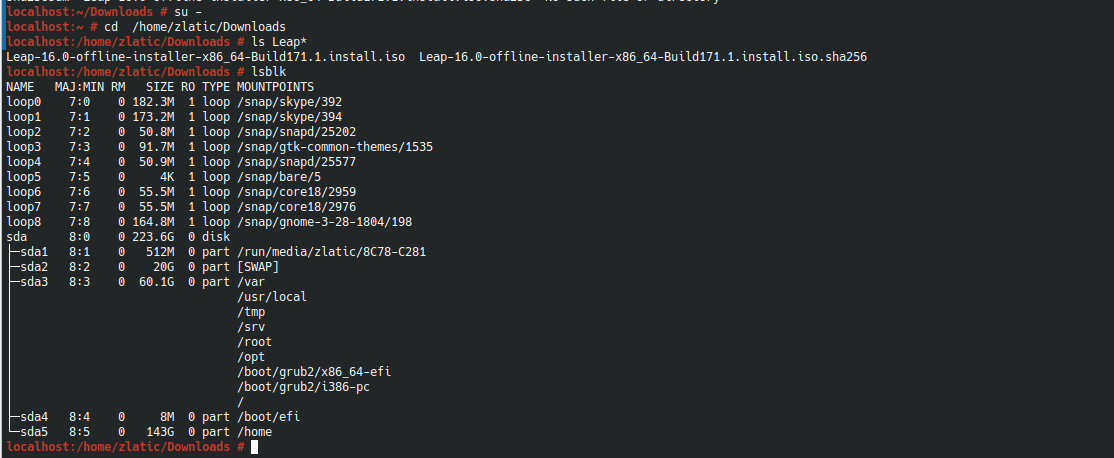
@vajcek so no USB device visible, just the running system (and snapd?)
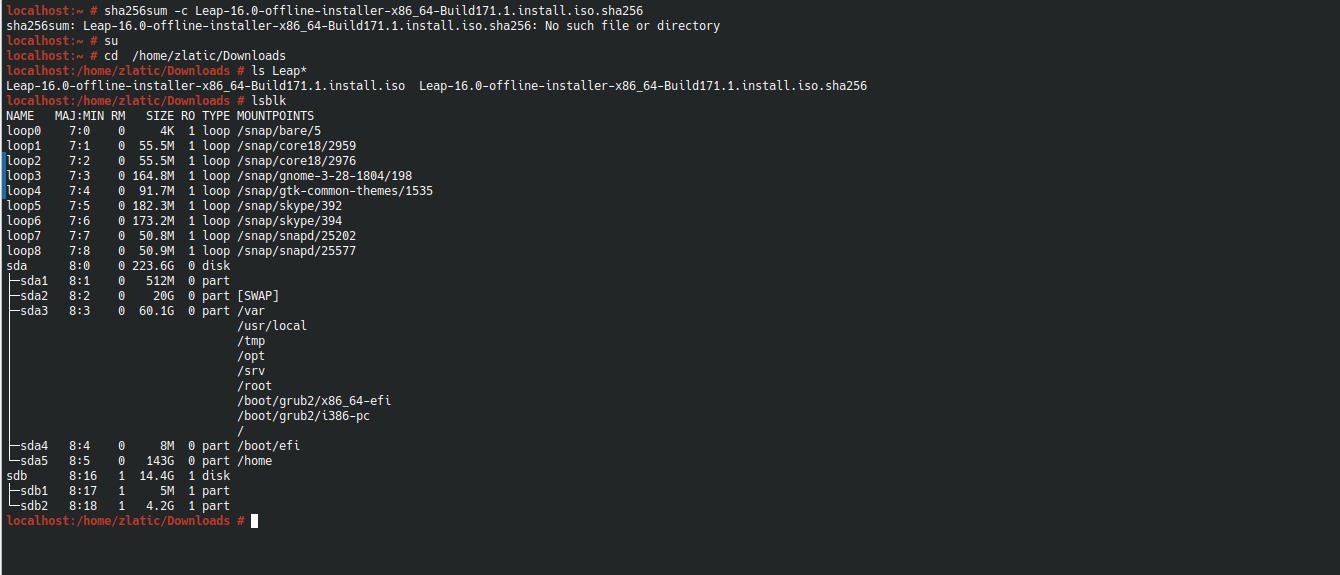
I changed usb-port, and this is screenshot (I did not know it matters)
Also, I dont know anything about this snapd…
@vajcek ok looking good, perhaps that was the problem all along a faulty USB port?
Anyway more commands to follow;
wipefs -a /dev/sdb2
wipefs -a /dev/sdb1
wipefs -a /dev/sdb

sha256sum -c Leap-16.0-offline-installer-x86_64-Build171.1.install.iso.sha256
So you should get a result after a little time from the sha256sum command of “OK”? If so proceed;
dd if=Leap-16.0-offline-installer-x86_64-Build171.1.install.iso of=/dev/sdb bs=4M iflag=fullblock oflag=direct status=progress; sync
After that is finished, you should be good to go.
My friends, thank you for your effort. I don’t know your timezone, but here in Serbia it is about quarter to midnight. I will apply steps you wrote tomorrow. Many thanx for all of you. @malcolmlewis - I have not big enough words to say thank you for your help. I hope this could be successfully. But, let’s wait until tomorrow