Hello, I have a KVM machine, both the host and guest are Tumbleweed and KDE. For about a week my clipboard is only willing to copy into the VM, not out from it.
Chatgpt found that the problem is Wayland, because when I switch the session to X11 it works correctly. Work seems to be underway to fix this, but I do not know the timescale, so I use X11 for now. I have autologin for this VM and it comes up with Wayland every time so I need to log out and select X11. But I only think about this when it is too late and I need to copy something and it does not work.
How can I set the session type to X11 permanently? Chatgpt and guides told me to go into the system settings app, but the page where this could be set no longer exists.
a. Run System Settings
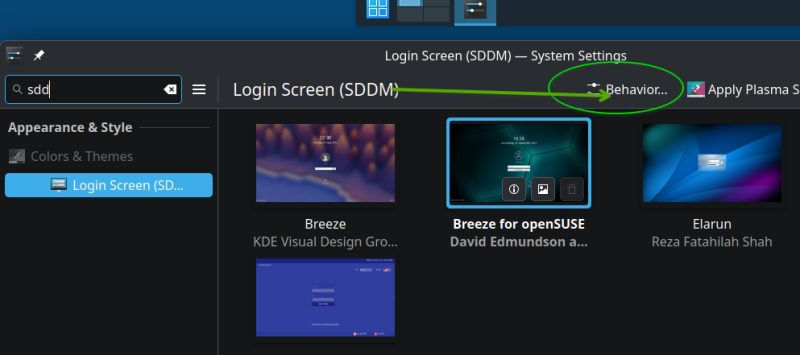
b. Navigate to Login Screen (SDDM)
c. Up at the top, click Behavior (screenshot 1)
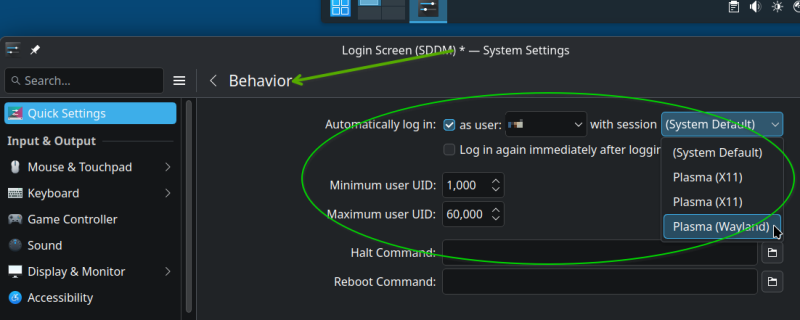
e. For the “with session” drop-down, select what you want (X11?) (screenshot 2)
.
Additionally … at the “Automatically log in” option, you could "un-check the “as user”, so it won’t automatically log in. Then, at the Login screen , you will have the option to choose “Plasma X11” or “Plasma Wayland” drop-down (usually at lower-left)
I told Chatgpt that I used Tumbleweed and KDE. It came up with the X11/Wayland check (obviously from earlier experience online) and indeed switching to X11 fixed my problem. What do you mean by “you used an X11 interface”? Things like a clipboard does have its place in a modern desktop and if it only works in X11 then it has its place as well. Anyway, this (and Konsole not remembering the tabs) worked in Wayland for a while and then regressed since about a month. If these things are fixed, I switch back to Wayland.
What software is being copied into? I’m not following at all… People would usually mention whats displayed in the window title - is this virtualbox,virt manager,gnome boxes,vmware ?!
Indeed I left out that I use Spice, starting from virt-manager. This seems to be the default. Here is a bit from what Chatgpt told me:
This is a known limitation of the traditional spice-vdagent on Wayland. The upstream spice-vdagent documentation still describes the per-session agent as an X-session component and its clipboard implementation uses the X clipboard.
There is, however, some good news: KWin 6.4+ implements the newer ext-data-control Wayland protocol, and work is underway in SPICE to make the agent Wayland-native. A Fedora virtualization bug specifically notes that Plasma 6.4 added this protocol and that spice-vdagent needs to implement the client side.
Right, so because that software is out of date shouldn’t make the entire system out of date - without a doubt that will cause more issues in the long run. Maybe there’s an alternative or maybe the SPICE protocol just has few clients and maintainers.
What Chatgpt told me is not bs (unless you can back it up). If I switch to X, it works.
It does not matter to me which project is at fault, likely none of them. I oversimplified it (“the problem is Wayland” while it is likely spice-vdagent) because my plan A was to just use what works and not to debug a complex system or work around a not yet implemented feature.
It does not matter to me which project is at fault
which is why I use X11 exclusively
What Chatgpt told me is not bs (unless you can back it up)
I just did? What more do you want? Don’t put a mislead LLM you don’t understand against me, then you lose my interest fast and you come off as clueless.
It does not matter to me which project is at fault
Is this an argument for what? Why should it matter to me?
which is why I use X11 exclusively
Until the particular problem is fixed, as I have no choice. You keep ignoring that part, as if I wanted to stay with X indefinitely. (This quote above was not from me.)
What Chatgpt told me is not bs (unless you can back it up)
Where did you back it up? Which part from the Chatgpt quote did you address?

 )
)