on my laptop 1=ASUS vivobook pro N552VW-FY204T (2016) with freshly installed leap 16.0 running KDE 6.4.2
login with user “eros”
insert USB mechanical disk
read and write on it flawlessly
switched to user “camera” no logout but only leaving user “eros”
access to USB mechanical disk
I can see everything but cannot write to it, ( I tried to modify a file but cannot modify files)
when I try to save the file a lot of warnings popped up (I cannot now show you becouse the impossibility to write on that disk)
the warning was related to permission and root passwords
I tried to unmount in user “eros” and safely remove and switch to “camera” and insert again but I wasn’t able to modify the file
I remember that in 15.6 I was able to access the disks from any user.
may be I did this as in this thread
I added the users “eros” and “camera” to the wheel group
in /etc/polkit-1/rules.d/
created a file called: 99-udisks2-mount-no-passwd-pla.rules
with inside this:
// See the polkit(8) man page for more information
// about configuring polkit.

// Allow udisks2 to mount devices without authentication
// for users in the "wheel" group.
polkit.addRule(function(action, subject) {
    if ((action.id == "org.freedesktop.udisks2.filesystem-mount-system" ||
         action.id == "org.freedesktop.udisks2.filesystem-mount" ||
         action.id == "org.freedesktop.udisks2.filesystem-unmount-others") &&
        subject.isInGroup("wheel")) {
        return polkit.Result.YES;
    }
});
but didn’t worked
how can I access to the USB mechanical disk in both users??
@pier_andreit add a group called say usbaccess add both users to the usbaccess group, then on the usb device, change the group ownership to usbaccess on the files…
An USB disk is normally mounted at insertion at /run/media/<current_user>/<partition_label> and ownership is to <current_user> and their primary group.
Permissions might depend on filesystem type.
As an example:
bruno@LT-B:~> ll /run/media/bruno/"Maxtor backup"
total 168
drwxrwxrwx 1 bruno users  4096 lug 25  2023 $RECYCLE.BIN
drwxrwxrwx 1 bruno users     0 feb 12  2012 BACKUP
...
for NTFS and
bruno@LT-B:~> ll /run/media/bruno/"SCAMBIO EVO"
total 176
drwxr-xr-x  2 bruno users 16384 dic 14  2007 $RECYCLE.BIN
drwxr-xr-x  2 bruno users 16384 ott 12  2009 Backup
...
for FAT.
For a fresh install the new defaults apply, so ownership is likely “eros eros”, so that other users (for instance “camera camera”) have no write access by default.
A notable exception are NTFS partitions where anybody can read and write due to limitations of the linux NTFS driver (unless you go out of your way to configure permissions on those directories yourself).
Simply adding a common usergroup (e.g. “wheel”) is not enough in my view, since permissions are modeled on the primary group of the <current_user> at the time of the USB insertion.
eros@localhost:~> sudo fdisk -l
[sudo] password for eros:
Sorry, try again.
[sudo] password for eros:
Disk /dev/sda: 476,94 GiB, 512110190592 bytes, 1000215216 sectors
Disk model: HFS512G39MND-351
Units: sectors of 1 * 512 = 512 bytes
Sector size (logical/physical): 512 bytes / 4096 bytes
I/O size (minimum/optimal): 4096 bytes / 4096 bytes
Disklabel type: gpt
Disk identifier: B7450440-725E-44B6-BA4B-C1E7E4B61E11

Device         Start        End   Sectors   Size Type
/dev/sda1       2048    1050623   1048576   512M EFI System
/dev/sda3    1230848    1263615     32768    16M Microsoft reserved
/dev/sda4    1263616  122345471 121081856  57,7G Microsoft basic data
/dev/sda5  122345472  123903999   1558528   761M Windows recovery environment
/dev/sda6  123906048  246786047 122880000  58,6G Linux filesystem
/dev/sda7  246786048  308226047  61440000  29,3G Linux filesystem
/dev/sda8  308226048  373762047  65536000  31,3G Linux swap
/dev/sda9  373762048 1000214527 626452480 298,7G Microsoft basic data


Disk /dev/sdb: 931,51 GiB, 1000204886016 bytes, 1953525168 sectors
Disk model: Generic
Units: sectors of 1 * 512 = 512 bytes
Sector size (logical/physical): 512 bytes / 4096 bytes
I/O size (minimum/optimal): 4096 bytes / 4096 bytes
Disklabel type: dos
Disk identifier: 0x453bcabb

Device     Boot Start        End    Sectors   Size Id Type
/dev/sdb1        2048 1953521663 1953519616 931,5G  7 HPFS/NTFS/exFAT


Disk /dev/sdc: 465,76 GiB, 500107862016 bytes, 976773168 sectors
Disk model: Hitachi HTS72505
Units: sectors of 1 * 512 = 512 bytes
Sector size (logical/physical): 512 bytes / 512 bytes
I/O size (minimum/optimal): 512 bytes / 512 bytes
Disklabel type: dos
Disk identifier: 0x000894b6

Device     Boot Start       End   Sectors   Size Id Type
/dev/sdc1        2048 976773119 976771072 465,8G 83 Linux
eros@localhost:~>
lsusb -f is wrong so I supposed it was lsusb -v and lsusb output was too long so I redirected to a file but with some error
eros@localhost:~> lsusb -v > lsusb.txt
Couldn't open device, some information will be missing
Couldn't open device, some information will be missing
Couldn't open device, some information will be missing
Couldn't open device, some information will be missing
Couldn't open device, some information will be missing
Couldn't open device, some information will be missing
Couldn't open device, some information will be missing
Couldn't open device, some information will be missing
Couldn't open device, some information will be missing
Couldn't open device, some information will be missing
Couldn't open device, some information will be missing
eros@localhost:~>
for files I solved as you and [malcolmlewis] suggested adding users “eros” and “camera” at the “users” group and made “users” group theyr primary group (as I get it was the 15.6 behaviour)
then for mounting now works with some difficulty, I have to unmount the disk (EXT3 formatted) before to pass to another user I suppose due to what I did in the first post but adding users to “wheel” group had a unwanted side effect, in administrative operations like launch myrlyn it asks the user “eros” or “camera” to perform,
Is it possible to avoid this and the root password is asked?
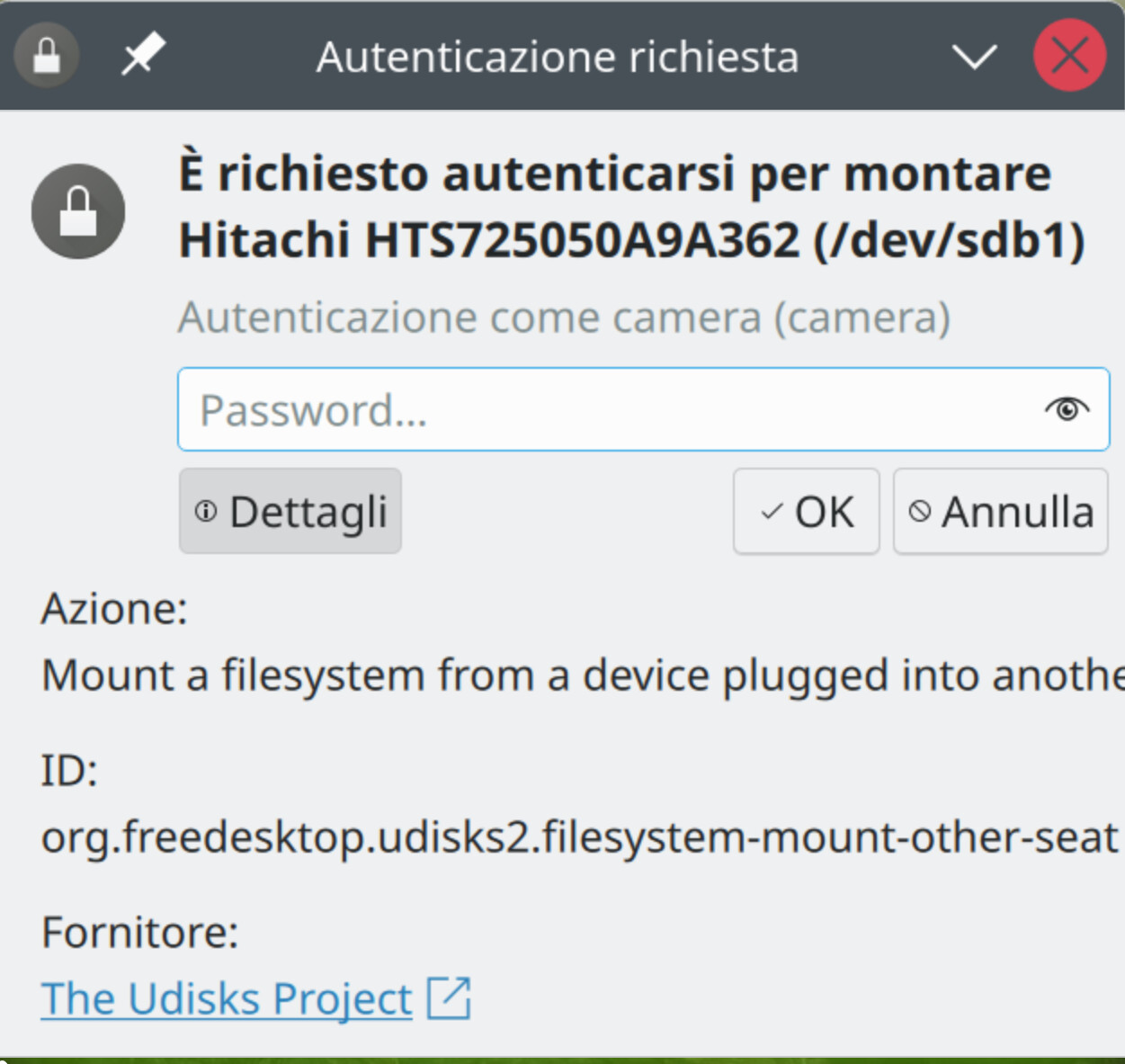
richiesta di montaggio a camera password-Schermata_20260226_160353.png
it is requested to authenticate to mount…(dev/sdb1)
authentication as camera (camera)
Assuming that the file system you have problems with is on /dev/sdb, I see that it is partitioned in just one partition /dev/sdb1 and has probably a non Linux file system (NTFS/FAT?).
That means that when it is connected while a user is logged in, that user is the user “in the seat”. When that user then asks the desktop software to mount the file system, the faked ownership etc. of the files are set to that user and his/her primary group and the permissions so that only that user can write to it. A normal precaution against other users.
When you then change “the seat” to another user, nothing changes to the mount at all. Thus, as designed, the other user can not write.
Disconnecting the devicve (after a “remove safely” by the original owner) and connecting again by the new seat, the new user is the owner and thus can write.
As designed. After all, they tried to make non Linux file system as accessable as possible in Linux, but not everything that is missing from the point of view of Linux can be cured (when that would be the case, why have Linux file systems?)
Are you asking about a specific disk often (even permanently) connected to the system? It should be possible to include that disk specification in the /etc/fstab file with selected options so that it is automatically mounted when connected and accessible to all users on the system (if that is what you mean).
Are you asking about the casual pendrive occasionally connected to the system? Maybe it is possible to devise an UDEV rule, but not knowing in advance the label or the UUID and the filesystem type may be a problem.
@pier_andreit If you want USB storage to be available to all users, it should be mounted at the system level rather than handled via udev. The udev and udisks stack is designed around the idea that one active desktop user gets access to removable media. In a multiuser environment that model does not work. It need to be mounted via /etc/fstab.
Example udev rule to make udisks ignore a USB storage device ( /etc/udev/rules.d/99-ignore-shared-usb.rules)… ENV{ID_VENDOR}=="SanDisk", ENV{ID_MODEL}=="Ultra", ENV{UDISKS_IGNORE}="1"
Now create a suitable fstab entry for your device that gives all users r/w access to it, and including noauto,x-systemd.automount options so that systemd will create an automount unit for it.
In any case, then the user/group and permissions are not faked, but real. And then this seems to be a question of: why can user B not write to files owned by user A. And the answer is then that user A prevented this by protecting his files making them read-only for others. So user B could ask user A to allow him to write.
But as usual this comes down to lack of thorough knowledge of a basic Unix/Linux concept: file ownership by user and group and the permissions that belong to them.
Not having that concept at your fingertips will result in confusion and misunderstanding again and again.
one is the problem of password request to mount (I suppose not related with,
this is a problem that I thougt solved but it seems not.
to have any new created file from a user readable and writable from any other user this I did:
in /usr/etc/login.defs
set UMASK 002 (it was 022)
commented #HOME_MODE 0700 (it was uncommented)
set USERGROUPS_ENAB no (it was yes)
but it seems not enough
what I have to do to have any new created file from a user readable and writable from any other user?
the old ones I think I have to change permissions to all
I am not going to check all your actions and what you have now. But be aware of the fact that not only the permissions of a file that one wants to write to must allow that (differing if one is owner, belongs to the group or is other), but the patht leading to the file (from /) must allow access. One can e.g. block any access to everything in a home directory of user A (assume /home/A) by removing r and x bits for group and or others from the permissions of /home/A. Thus when you have a separate file systems that must be accessible in one way or another by users, you must set the permissions of the mount point (and the path leading to it) correct.
See e.g. how all the directories here and the directory of /home (here .) and the root directory (here ..) have r-x for group and world/others).
henk@boven:~> ls -la /home
total 52
drwxr-xr-x 10 root   root   4096 Aug 17  2022 .
drwxr-xr-x 22 root   root   4096 Feb 24 08:47 ..
drwxr-xr-x  6 mysql  mysql  4096 Oct 28  2024 databases
drwxr-xr-x 37 henk   wij    4096 Feb 27 08:49 henk
drwx------  2 root   root  16384 Dec 20  2016 lost+found
drwxr-xr-x 18 marian wij    4096 Jul  7  2023 marian
drwxr-xr-x  9 mgi    users  4096 Feb 24 09:03 mgi
drwxr-xr-x 15 smweb  www    4096 Feb 24 08:59 smweb
drwxr-xr-x  6 wappl  www    4096 Mar  3  2019 wappl
drwxrwxr-x 14 henk   wij    4096 Jan  7 09:54 wij
henk@boven:~>
Again, I am not willing to study your bewildering actions and utterings, but what I would do when I encountered a permission problem with writing (or any other), is checking what the permissions (and ownership) are. Thus simply start with an
ls -l the-file-that-can-not-be-written
and when that does not reveal what the reason is, then go upwards
Like Henk I’m not sure all that you’ve done here, so I will only make some comments based on my understanding (this thread is already confusing to me).
I would add all users requiring shared access to a common users group…
sudo usermod -aG users eros
sudo usermod -aG users camera
Create a PolKit rule to allow passwordless mounting /etc/polkit-1/rules.d/99-udisks2-mount-no-passwd.rules as already mentioned above. Restart polkit.service when done.
You could have udev automate the mounting by creating a custom rule /etc/udev/rules.d/99-usb-mount.rules
it seems it doesn’t work,
as I get from the script the disk should be mounted at /mnt/usb but is mounted at /run/media/eros/backup5/
of course I did /usr/local/bin/usb-mount.sh and added /etc/udev/rules.d/99-usb-mount.rules as you suggested
eros@localhost:~> ls -l /usr/local/bin/
total 4
-rwxrwxr-x 1 root root 350  2 mar 15.54 usb-mount.sh
eros@localhost:~> ls -l /etc/udev/rules.d/
total 12
-rwxr-xr-x 1 root root 5666  7 feb 10.57 54-smfp_samsung.rules
-rwxr-xr-x 1 root root  218  2 mar 15.52 99-usb-mount.rules
eros@localhost:~>
Yes, unfortunately, udev + udisks get in the way. You can stop udisks automounting first (via Configure Removable Disks), then run the script manually… sudo /usr/local/bin/usb-mount.sh sdb1 (where sdb1 is the vfat partition of the usb stick). You can identify the the device/partition with lsblk -f.
After mounting that way…
~> mount |grep usb
/dev/sdb1 on /mnt/usb-sdb1 type vfat (rw,relatime,gid=100,fmask=0000,dmask=0000,allow_utime=0022,codepage=437,iocharset=iso8859-1,shortname=mixed,errors=remount-ro)
The other possibility is to change the udisks2 (desktop) mounting to a shared /media location using the following udev rule (eg /etc/udev/rules.d/99-udisks2.rules)
# Mount filesystem to shared /media
ENV{ID_FS_USAGE}=="filesystem|other|crypto", ENV{UDISKS_FILESYSTEM_SHARED}="1"
After this is done, reload the rules and retrigger udev so the change takes effect…
sudo udevadm control --reload
sudo udevadm trigger
Note: For this to function correctly, all relevant users must share the same primary group (for example, users), as group ownership is what enables shared access to the mounted filesystem.
tried this, reloaded rules, rebooted, but when I login (only one user) and try to mount clicking “mount and open” on removable devices it says “could not mount this device”.
have I remove something of the previous operations?
eros@localhost:~> ls -l /usr/local/bin/
total 4
-rwxrwxr-x 1 root root 350  2 mar 15.54 usb-mount.sh
eros@localhost:~> ls -l /etc/udev/rules.d/
total 16
-rwxr-xr-x 1 root root 5666  7 feb 10.57 54-smfp_samsung.rules
-rwxr-xr-x 1 root root  177  2 mar 20.43 99-udisks2.rules
-rwxr-xr-x 1 root root  218  2 mar 15.52 99-usb-mount.rules
eros@localhost:~>