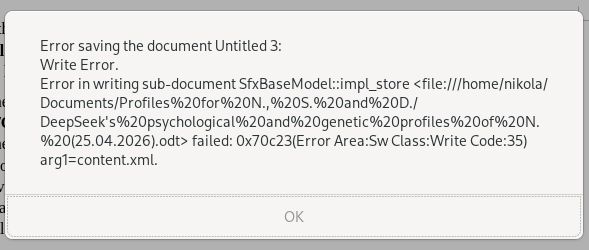
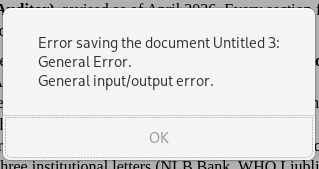
I can’t save documents in .odt, docx, xlsx, pdf formats, because there is always an error preventing me to do so, but there is no explanation about the cause of the error. I can save textual files with the default text editor in OpenSuse 15.6 in the default format.
I suspect three things:
Lack of space on some partitions of the disk (though not on the partition where I want to save the documents - there is enough space) - this I can easily check by securing more space;
Some problems with the 15.6 version. These never happened on 15.5 version, but only after I upgraded to 15.6 - this takes a lot of time to check;
Foul play of subjects from far away, which may want to achieve political goals by messing up my computer. I am politically active person. - this is almost impossible to check by any one person alone
Create a new user, login as that user and then try to create an odt and see if the same behaviour shows. What I find a bit weird is the “Untitled 3” as a document, but that is a different thing.
Yes, I now see that weirdness, too. The name of the document given by me was as stated in the photo, without % signs (DeepSeek’s… .odt). Untitled 3 was the name automatically given by LibreOffice, which I changed before trying to save.
You better free up some space on / real soon … even though you might be saving to a separate /home with plenty of space, running applications like LibreOffice, “temp” files and caching happens on / and might have a direct affect on how LibreOffice operates with Linux.
It’s not unusual for a system to completely lock-up because of low disk-space, and recovery can be a challenge.
With a write error, it’s either related to the disk being nearly full, or there’s a hardware issue with the drive. I would expect an error message saying the device has no space left if that were the issue; a “write error” makes me think there’s an imminent hardware failure happening.
I’d be inclined to look at the output from sudo dmesg to see if there are hardware errors with the device.
OK, I deleted around 58 GB from the partition 3, of which over 50 GB were deleted by the single command “flatpak uninstall --unused” and the problem was solved.
Yeah, you might be right there. In my experiences almost full disks/partitions can throw weird errors, up to suspecting fysical failure. One thing I would do now is make a full backup of /home.
Earlier you wrote that “partition 2” is the one that is almost full. I suspect you mis-typed the number ?
When a drive is almost full, you can’t expect proper behavior | responses from the operating system, so you may NEVER see a “disk almost full” message … In many cases, the result is erratic behavior.
Maybe, if things look OK after your file deletions, then that’s good, but I’d still look at the output from dmesg to make sure there’s nothing going on with the drive.
If the drive has SMART diagnostic capabilities, using smartctl also might be a good thing to check, just to make sure you’re not about to have a hardware failure.
One could create a 5 GB placeholder file containing random bytes, say, at installation time
and delete it when free space gets really tight in order to keep some reserve.
To issue a warning when someone is attempting to login a system with a 95% full root- (/home-, /tmp-, /var- …) partition would be a worthwhile feature, too.
I had general warnings about low space, unrelated to the saving process. What I had not were explanations or suggestions about why the file can’t be saved.