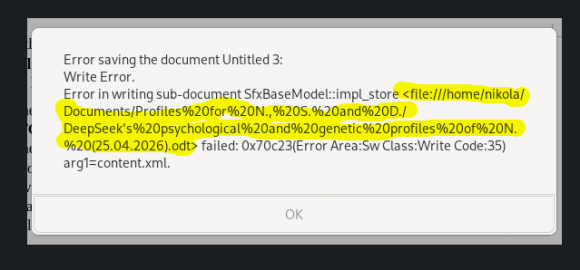
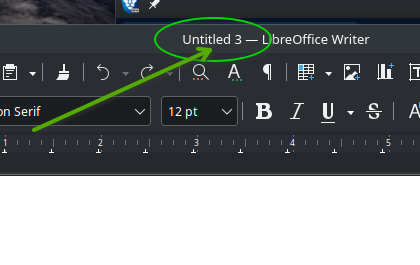
Okay, I will attempt to explain, in brief detail. If you look at the first screenshot … what I marked in Yellow marker, is the filename you specified:
Those “%20” character sequence … that sequence, believe it or not, represents a SPACE character (" ").
.
Personal optinion here … I NEVER use a space character in a filename (I use a dash “-”) - a space(s) could cause issues.
.
There are other odd character sequences used in that filename, such as “(25.04.2026)”. And others, that I’ll not show … but some odd characters used in a filename (my opinion, of course), could present a problem with apps.
The “Untitled 3” for the filename as seen in the LibreOffice Writer screenshot is NOT unusual (I know, you didn’t mention it).
Anyone can easily reproduce that … fire up LibreOffice Writer with a blank file, now select “File, New” from the menu TWO more times … you will now see “Untitled 3” for the new, blank, un-named file
( again, %20 is the URL-encoded (ASCII) representation of a space character).
.
Very well, but I never have issues with names. OpenSUSE handles it nicely in normal state. The problem now was most probably due to low space on partition 2.
Today, after around 2 weeks, the same things happened. The root was almost full again.
During investigation it was found that a software called Foliate (supposedly an e-book reader) downloaded on my disk around 30 G of data in the last two weeks.
I don’t know why would an e-book reader download and keep on the disk 30 G of data in two weeks.
Without further informations it is hard to tell. Check the settings of foliate. Check if you have a big amount of ebooks.
foliate from the official repos or as flatpak?
You have installed it as flatpak but aren’t using it…ok. Question: why not uninstall it then?
Flatpak applications can use a lot more space than the native installations. Make sure to perform some basic flatpak maintenace after uninstalling the app. Like flatpak uninstall --unused.
See extensive flatpak documentation.
It was found that another 30 G were placed in the temp folder of flatpak, supposedly failed download attempts of runtimes by GNOME Software during the past 2 weeks. The attempts to find out which installed applications requested the runtimes were unsuccessful.
Anyway, there is obviously a problem with OpenSUSE 15.6, because such problems were not happening in OpenSUSE 15.5, which I was using for more than two years. They started just after I upgraded to 15.6.
It puts 30 G of an e-book reader for unknown reason and another 30 G in the temp folder. It would have put even more if I wasn’t alarmed by the system that the partition had very little free space. This wasn’t happening in 15.5, but only in 15.6. Something changed after installing 15.6 and I didn’t make the change.
Not just cleaning up by flatpak uninstall --unused… but also here /home/<user>/.var/app/ for applications in use formerly. There are often some remains that can sum up.