usr_40476@2xeon:/home> df -h
Filesystem      Size  Used Avail Use% Mounted on
/dev/sde2       119G   67G   49G  59% /
devtmpfs         32G     0   32G   0% /dev
tmpfs            32G  181M   32G   1% /dev/shm
efivarfs        256K  236K   16K  94% /sys/firmware/efi/efivars
tmpfs            13G  3.3M   13G   1% /run
tmpfs            32G   13M   32G   1% /tmp
tmpfs           1.0M     0  1.0M   0% /run/credentials/systemd-journald.service
/dev/sde2       119G   67G   49G  59% /.snapshots
/dev/sde2       119G   67G   49G  59% /boot/grub2/i386-pc
/dev/sde2       119G   67G   49G  59% /boot/grub2/x86_64-efi
/dev/sde2       119G   67G   49G  59% /opt
/dev/sde2       119G   67G   49G  59% /root
/dev/sde2       119G   67G   49G  59% /srv
/dev/sde2       119G   67G   49G  59% /usr/local
/dev/sde2       119G   67G   49G  59% /var
/dev/sdd1       239G   64G  171G  27% /home
/dev/sde1       511M  6.0M  506M   2% /boot/efi
tmpfs           6.3G  376K  6.3G   1% /run/user/1000
tmpfs           1.0M     0  1.0M   0% /run/credentials/getty@tty1.service
usr_40476@2xeon:/home>
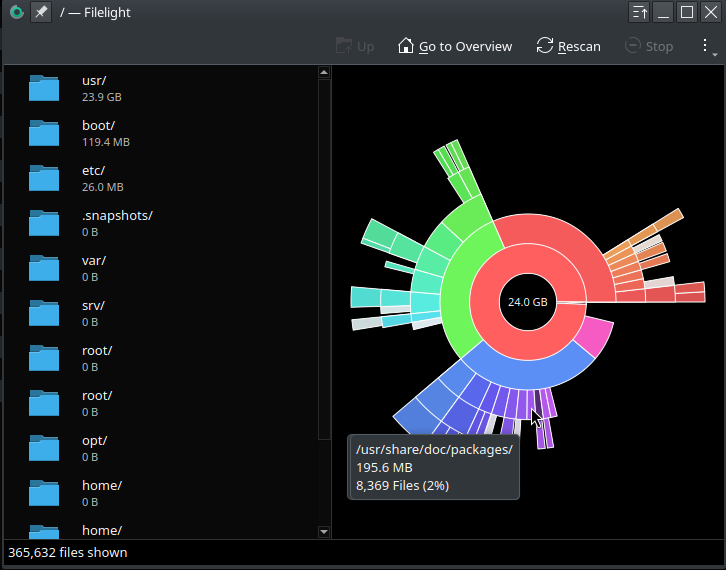
Personally, FileLight for me is unreliable | inaccurate.
Also, I assume you’re using BTRFS (I see .snapshots) ?
If yes, the default “df” is also not accurate with BTRFS.
Might read thru this:
sudo btrfs fi show gave me a concering output
usr_40476@2xeon:~> sudo btrfs fi show
[sudo] password for root:
Label: none  uuid: be27126f-5652-4dce-973b-fb301d94229a
        Total devices 1 FS bytes used 72.73GiB
        devid    1 size 118.74GiB used 91.07GiB path /dev/sde2

Label: none  uuid: a30a184c-ffd9-4aa8-8685-8edb9d8066df
        Total devices 1 FS bytes used 62.44GiB
        devid    1 size 238.47GiB used 123.02GiB path /dev/sdd1
usr_40476@2xeon:~>
So if all that space is being used, what is the right way to measure it? and pin down folders using space?
@40476 let the snapshot and btrfs maintenance timers do their job or run them early? Bit like “Hey” my system has 32GB of RAM and it’s using 24GB what should I do…
How about output showing this (?) :
# btrfs filesystem usage -T /
usr_40476@2xeon:~> sudo btrfs filesystem usage -T  /
[sudo] password for root:
Overall:
    Device size:                 118.74GiB
    Device allocated:             91.07GiB
    Device unallocated:           27.67GiB
    Device missing:                  0.00B
    Device slack:                  3.50KiB
    Used:                         73.41GiB
    Free (estimated):             42.15GiB      (min: 28.31GiB)
    Free (statfs, df):            42.15GiB
    Data ratio:                       1.00
    Metadata ratio:                   2.00
    Global reserve:              110.50MiB      (used: 0.00B)
    Multiple profiles:                  no

             Data     Metadata System
Id Path      single   DUP      DUP      Unallocated Total     Slack
-- --------- -------- -------- -------- ----------- --------- -------
 1 /dev/sde2 85.01GiB  6.00GiB 64.00MiB    27.67GiB 118.74GiB 3.50KiB
-- --------- -------- -------- -------- ----------- --------- -------
   Total     85.01GiB  3.00GiB 32.00MiB    27.67GiB 118.74GiB 3.50KiB
   Used      70.53GiB  1.44GiB 16.00KiB
usr_40476@2xeon:~>
Yea, as mentioned, FileLight here is borked - I never use it.
machine:~ # btrfs filesystem usage -T /
Overall:
    Device size:                 234.47GiB
    Device allocated:            127.07GiB
    Device unallocated:          107.40GiB
    Device missing:                  0.00B
    Device slack:                    0.00B
    Used:                        117.11GiB
    Free (estimated):            115.44GiB      (min: 61.74GiB)
    Free (statfs, df):           115.44GiB
    Data ratio:                       1.00
    Metadata ratio:                   2.00
    Global reserve:              199.91MiB      (used: 0.00B)
    Multiple profiles:                  no

                  Data      Metadata System
Id Path           single    DUP      DUP      Unallocated Total     Slack
-- -------------- --------- -------- -------- ----------- --------- -----
 1 /dev/nvme0n1p4 123.01GiB  4.00GiB 64.00MiB   107.40GiB 234.47GiB     -
-- -------------- --------- -------- -------- ----------- --------- -----
   Total          123.01GiB  2.00GiB 32.00MiB   107.40GiB 234.47GiB 0.00B
   Used           114.97GiB  1.07GiB 16.00KiB
machine:~ #
.
.
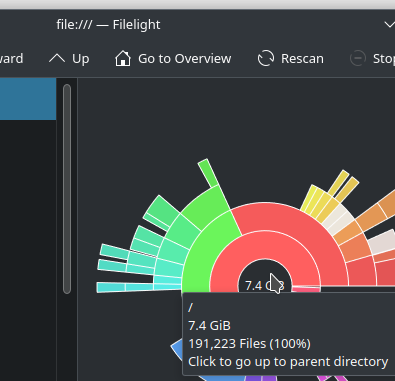
So, 7.4gb? Yea, okay.
It also suggests to “click to go to parent dir”

interesting…
Yep …
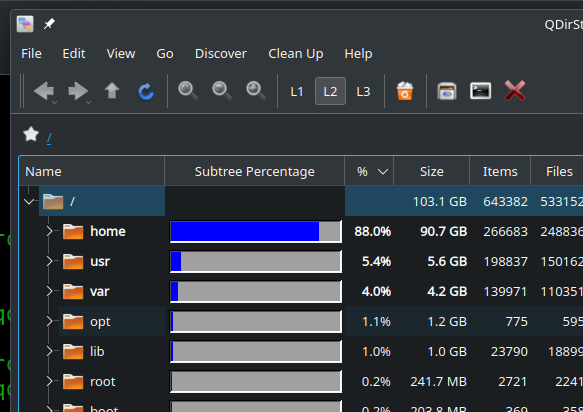
Even good old-fashioned QDirStat is reasonably accurate (and for me, easier on the eyes - not “busy” looking) :
@40476 … sorry, edited this post to investigate a bit more the config changes I make in Filelight
So, I basically “removed” my last Reply, because I thought I found the issue with Filelight … but rwong.
I will show that I found a setting I wasn’t aware of. Setting it to ON shows slightly more improved disk statistics, but it’s still waaaay off.
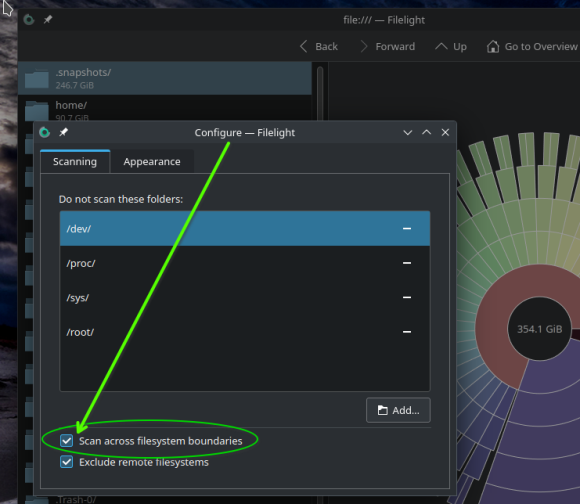
The “Scan across filesystem boundaries” setting was OFF since day one … so I set it to ON.
Now, it shows content size for sub-dirs … if scanning from / (root), but the statistics are still very incorrect. This shows the setting
.
.
And now, when we look at the “wheel” graph, and browse the statistics, I can see the values are too high. I’m hovering the mouse on /home, which is close in size.
But look at the drive size in the center black. 369gb drive? Sorry, that’s 100gb larger.
And notice .snapshots? It thinks 261gb … it’s actually slightly less than 11gb.
So even that setting I found results in incorrect values.
.
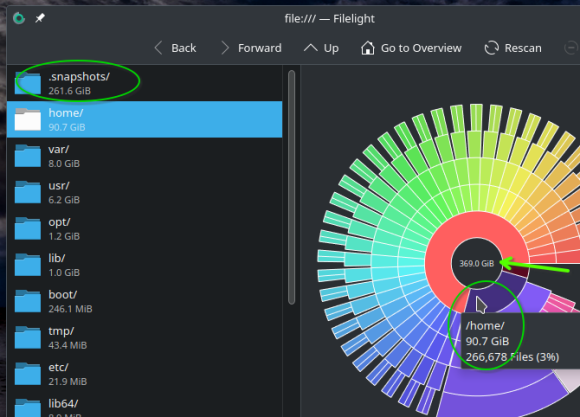
Could it not be reading symlinks correctly? Seems plausible to me…
I am pretty sure that this is the old problem that Btrfs is simply lying with its free disk space output; it gives you a bogus result in the statfs() call which is what all Linux tools use: df, QDirStat, Filelight, Baobab, you name it.
I wrote this up years ago here. Basically, Btrfs sends the wrong data to statfs(), disregarding snapshots and copy-on-write.
df looks fine, but when you use the special Btrfs tools such as btrfs fi usage or btrfs fi df, btrfs fi show, you will see the true status.
This is not the fault of df or the graphical tools; it’s Btrfs reporting bogus numbers.
And of course if the tool you used does not remain on the starting filesystem (like shown above), the numbers deviate even further from the truth.
No, it does not. The most likely answer to the original question - graphical tool stays inside the mountpoint (/). But “btrfs file system” is not equal to the “mountpoint inside the btrfs”.
statfs() return information about the file system and this information is correct. But it obviously need not be equal to sum of file sizes below any given directory. Do you expect statfs() inside chroot to return the size of the directory into which you chrooted?
None of these tools will show 24GB from the original question. The only tool that may do it is btrfs qgroup show.
None of those disk usage programs is following symlinks: That would lead to multiple accounting of that file or subtree. A symlink itself is only a few bytes: if it’s really short, it doesn’t even consume a disk block, if it’s longer, it’s one cluster (typically 4k).
statfs() always refers to the whole filesystem, not to any subtree, and chroot is completely independent of that. Also consider that statfs() also has to account for filesystem meta data (i-node tables etc.) and for files that are already unlinked like temporary files or log files that are open by a process, yet no longer present in any directory.
Btrfs is a special case, and it’s its CoW and snapshots that make it special. While some may think that it looks cleaner to see only the files and directories that are active in the filesystem and not all the old versions of those files as well, the concept falls apart whenever free space on the filesystem runs out despite the sum of the active files accounting for only 50% or 70% its total capacity.
And that happens a lot. This is the typical problem that most Btrfs users encounter sooner or later, and of course they are unaware because all common tools tell them that there is still a lot of free disk space.
Since statfs() also takes typical filesystem metadata like i-node tables, superblock duplicates and whatnot into account, I would really expect the snapshots to appear here as well.
Just for giggles:
This topic was automatically closed 30 days after the last reply. New replies are no longer allowed.