I am posting this under Applications, but it may not be an application issue.
opensuse Tumbleweed 20260318
KDE Plasma 6.62
Kernal 6.19.8-1-default (64-bit)
Graphics platform X11
Brave browser 1.88.134-1
Asus Z390-A m/board [new], CPU Intel i7-9700K, 32 gb Ram, integrated graphics, PSU 650 W [new].
NOTE: I am running Brave on openSuse on another computer and am not having any freezes on that one.
Twice now my computer has “frozen”, where my mouse will not respond. I have checked the mouse on other machines and it is OK [working].
I use Brave as a browser. The circumstances under which it froze are thus:
IN Brave:
1] opened a new tab
2] clicked on a browser shortcut [youtube]
3] clicked on a video in youtube
4] mouse became inoperative on any window that was open at the time
5] I could not even shutdown properly [i.e.] - click on Geco and click on Restart, I had to power down without exiting properly.
6] When I started up again everything was working normally. All my windows that I had open, reopened including Brave browser.
7] I was able to resume using Brave without anything freezing. The lapse between freezes was about 2 weeks and Brave acted normally throughout this time until the 2nd freeze.
Is there a log file that might tell me what may have caused this?
Or test program that would indicate a software or hardware problem, that I could run in the background?
I did google “Brave freezes” and one idea was that extensions should be disabled. I have no extensions in Brave. It also suggested disabling GPU, but as I am using “onboard” GPU I don’t think that is possible. Also suggested, was to “clear cache” which I had done between 1st and 2nd freezes.
I appreciate any help and suggestions. Thank you.
This is a longshot suggestion.
When we used TW, we occasionally had issues with our Chrome-based browsers, Brave being one of them.
There is a sub-directory named “GPUCache” that can be easily removed , which always fixed the oddity issues. It is simply a “cache” sub-dir, so doesn’t matter if cleared out.
(I have numerous bookmarks to those old posts for reference).
Anyway, simply run this command to find them - run it when logged in as your regular user account from its home sub-directory .
username@machine :~> find ~/ -type d -name GPUCache
That will list all applications that are using a GPUCache sub-dir. Then move to that sub-dir of the app in question and delete its content.
.
One post as a reference:
Thank you for your help.
I did the command [although I needed to be root], followed the path it gave to the location of GPUCache for Brave Browser
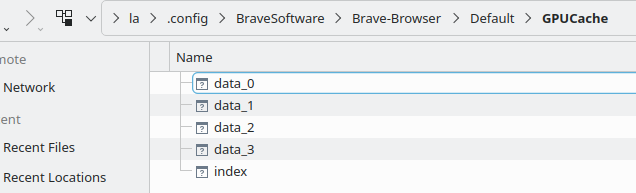
The above picture shows what is in that file. Just to be clear: I am supposed to delete these files? Including the “index” ?
Something is rwong. You do NOT need to be the root user … everything in your /home/* is owned by your user account. (unless something is mis-configured).
Here I am logged in with my user account, and have run the command;
myuser@machine :~> find ~/ -type d -name GPUCache

myuser@machine/.config/BraveSoftware/Brave-Browser/Default/GPUCache
myuser@machine/.config/BraveSoftware/Brave-Browser-Beta/Default/GPUCache
myuser@machine/.config/google-chrome/Default/GPUCache
myuser@machine/.config/google-chrome-beta/Default/GPUCache
myuser@machine/.config/google-chrome-beta/Default/Storage/ext/nmmhkkegccagdldgiimedpiccmgmieda/def/GPUCache
myuser@machine/.config/google-chrome-unstable/Default/GPUCache
myuser@machine/.config/google-chrome-unstable/Default/Storage/ext/nmmhkkegccagdldgiimedpiccmgmieda/def/GPUCache
myuser@machine/.config/chromium/Default/GPUCache
myuser@machine/.local/share/openSUSE/org.opensuse.opensuse_welcome/QtWebEngine/Default/GPUCache
myuser@machine/.local/share/ark/QtWebEngine/Default/GPUCache
myuser@machine/.local/share/konqueror/QtWebEngine/Default/GPUCache
myuser@machine/.local/share/digikam/QtWebEngine/Default/GPUCache
myuser@machine/.local/share/kontact/QtWebEngine/Default/GPUCache
myuser@machine/.local/share/kioslave5/QtWebEngine/Default/GPUCache

myuser@machine :~>
And now to change to that sub-dir (as my user , NOT root) and clear its content:
myuser@machine :~> cd .config/BraveSoftware/Brave-Browser/Default/GPUCache
myuser@machine :~/.config/BraveSoftware/Brave-Browser/Default/GPUCache> ll
total 5392
-rw------- 1   118784 Mar 22 09:57 data_0
-rw------- 1  3153920 Mar 22 09:58 data_1
-rw------- 1  2105344 Mar 22 09:57 data_2
-rw------- 1  4202496 Mar  4 17:17 data_3
-rw------- 1   262512 Mar 22 09:58 index
myuser@machine :~/.config/BraveSoftware/Brave-Browser/Default/GPUCache> rm ./*

myuser@machine :~/.config/BraveSoftware/Brave-Browser/Default/GPUCache> ll
total 0
myuser@machine :~/.config/BraveSoftware/Brave-Browser/Default/GPUCache>
For some reason I could not run that original command unless I was root, but I have found GPUCache for Brave in
/.config/BraveSoftware/Brave-Browser/Default/GPUCache
in myuser [la] file. I will continue on with your example.
I do not think I will need root but will report back, either way.
Thank you for staying with it.
This topic was automatically closed 30 days after the last reply. New replies are no longer allowed.