This is a minor annoyance but I would like to fix it. I have updated my system many times since this started. Chrome browser will not load. Trying to launch it gets no action. Awhile back, I installed Chrome Beta, hoping that would give me a working browser. It launches every time and works perfectly. I made no changes to accommodate the Beta version. It just works. I really don’t NEED the basic version, but I think it should work.
Not a lot of detail to go on. Try launching Chrome from a terminal so we can see if it reports an error.
I have a feeling that the issue is related to this thread where the TO did not follow up.
1 Like
I am going to take a wild guess. For me, when I used to run TW, it was very common for the “GPUCache” sub-dir tree for “chrome-based” browsers to become corrupted.
Just do a search out here for “chrome GPUCache” and you’ll see quite a few posts.
Anyway, you have to delete the GPUCache content and it will be recreated when Chrome is restarted. It will not hurt to delete it. (it’s simply a cache system).
For each affected app, we delete the associated GPUCache content. There are even apps not chrome-related that have the GPUCache sub-dir … you can find them with - do the search in your base HOME sub-dir (no need to be root) as your user:
:> find ~/ -type d -name GPUCache
I would delete them all with:
:> find ~/ -type d -name GPUCache -exec rm -rf {} +
But if you’re more comfortable doing it manually, simply navigate to the sub-dir (s) found from the first command shown, then manually delete them. Be sure the browser is not running.
Since switching to Leap, I’ve never had the issue - with TW, it was quite often an issue after a ‘zypper dup’.
You tried flatpack? Chrome launches for me all the time… using TW
hmmm… I think I got the Beta version from flatpak. If the cache removal doesn’t work, I’ll look there. Myrlyn doesn’t update flatpak, does it? Have to go to Discover?
No.
Yes.
I have a problem on slowroll, but not tumbleweed that is still not resolved:
https://bugzilla.opensuse.org/show_bug.cgi?id=1258078
Dear mattm3a, writing here as I did not find another way to contact you: have the same laptop T14 gen5 amd and the same problem with the same battery as you describe in your second battery post (Lenovo laptop battery does not work after slowroll update). What did the factory servicing do? Did they replace it, or is there a way to reactivate it? Thank you
I don’t know what I’m doing wrong. I cannot get into a Chrome GPUcache. I try as my user and as root. I should correct that statement. I somehow stumbled into the cache but could not delete the files. Dolphin never even finished loading them. I think there were over 1,600 files there. The “find” command tells me the cache is in BrowserMetrics.
Now, I use dolphin to go to home/.config/google-chrome and see a folder BrowserMetrics that is locked. Next I open a root dolphin to get past the lock and I do not see google-chrome in the /.config folder. This is frustrating.
I never mentioned anything named “browser metrics” .
Here’s a real-world example below. That’s the output of “find” command I mentioned to run. See my output … it’s not just Chrome app that has GPUCache, but other Chrome-based browsers.
And ACTUALLY, there are other apps that adopt that same feature (of GPUCache). Look at the output … every entry shows a “GPUCache” sub-dir at the trailing end of each line.
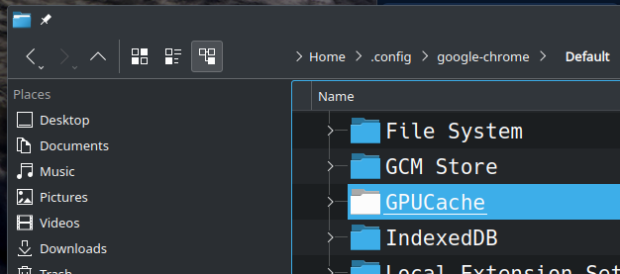
I also show a screenshot of me highlighting the GPUCache sub-dir of Chrome in Dolphin. And you can see the path in the upper right of Dolphin window.
You simply navigate into the GPUCache sub-dir and delete all its content.
... the find command executed:

/user@machine:~> find ~/ -type d -name GPUCache
/user@machine/.config/BraveSoftware/Brave-Browser/Default/GPUCache
/user@machine/.config/BraveSoftware/Brave-Browser-Beta/Default/GPUCache
/user@machine/.config/google-chrome/Default/GPUCache
/user@machine/.config/google-chrome-beta/Default/GPUCache
/user@machine/.config/google-chrome-unstable/Default/GPUCache
/user@machine/.config/chromium/Default/GPUCache

... other apps ...
/user@machine/.local/share/openSUSE/org.opensuse.opensuse_welcome/QtWebEngine/Default/GPUCache
/user@machine/.local/share/ark/QtWebEngine/Default/GPUCache
/user@machine/.local/share/konqueror/QtWebEngine/Default/GPUCache
/user@machine/.local/share/digikam/QtWebEngine/Default/GPUCache
/user@machine/.local/share/kontact/QtWebEngine/Default/GPUCache
/user@machine/.local/share/kioslave5/QtWebEngine/Default/GPUCache
/user@machine:~>
.
This topic was automatically closed 30 days after the last reply. New replies are no longer allowed.