Cannot change to my home directory during login

Hi,

if I login to console I end up in /. If I login with sddm I get logged out again immediately. Both logins leave messages about cannot cd because my home directory does not exist.

It is a new install with no important data, So I created a new user with
useradd -m newuser which has the same problem.

After login on console I can cd to the home directory without problem and see all files. File access looks unsuspicious to me:

❯ ls -lag /dev/shm/home/joachim
drwxr-xr-x@    - joachim 100  18 Jan 17:24  .
drwxr-xr-x     - root    root 18 Jan 17:16  ..
drwx------@    - joachim 100  24 Sep  2025  .cache
drwx------@    - joachim 100  24 Sep  2025  .config
drwx------@    - joachim 100  18 Jan 01:31  .local
.rw-------@   58 joachim 100  18 Jan 17:24 󱆃 .bash_history
.rw-r-----@  604 joachim 100  11 Dez  2025 󱆃 .bashrc
.rw-r--r--@ 1,6k joachim 100  11 Nov  2025  .emacs
.rw-r--r--@  599 joachim 100   1 Sep  2022  .i18n
.rw-r--r--@  861 joachim 100  11 Nov  2025 󱁻 .inputrc
.rw-r-----@  856 joachim 100  11 Dez  2025 󱆃 .profile
.rw-r--r--@ 2,0k joachim 100   1 Sep  2022  .xim.template

Only thing out of normal new tumbleweed install was, I had a lot of trouble finding a partition layout that grub was able to boot tumbleweed from and while cleaning up partition mess, I also deleted the home partition. I recreated it and adapted the blockid in /etc/fstab (from a cachyos live iso, if that matters), deleted my user and recreated it as well.
That is when this login trouble started.

So, the question is: why can a xfs home directory created with cachyos not be used on tumbleweed? Is there some security mechanism going on?

The content of the fstab would be interesting.

As you can see, the group is not OK, hence it shows only 100,

caba1:~ # cat /etc/fstab
UUID=bad49b5e-1830-4131-a992-1d2882db954b  /          ext4  defaults         0  1
UUID=4299-20EB                             /boot/efi  vfat  utf8,dmask=0077  0  2
UUID=38599f26-eb48-47b8-9c1a-b2434ef14dc1  swap       swap  defaults         0  0
UUID=4562b270-288b-46f8-a4dc-89c579623dfa  /home      xfs   defaults         0  0

The ls is done on cachyos which does not have a group with id 100. But it has my user with the same uid 1000.
Anyways the group ownership should not influence the ability to cd to it

to take cachyos out of the equation I now have

  • logged in as root on tumbleweed
  • deleted the test user and my user joachim (all users)
  • unmounted /home
  • deleted home partition
  • recreated xfs /home partition and adapted /etc/fstab
  • mounted /home
  • created user joachim again
  • user can still not log in to gui session with sddm
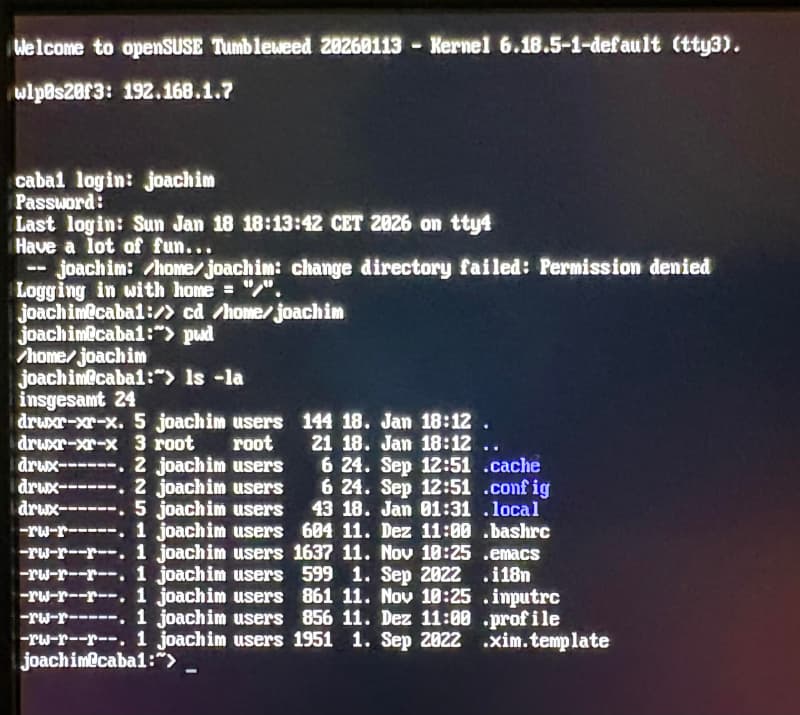
  • user can login on console with this message:

It is pretty confusing that you only tell afterwards that output comes from cachyos or from TW.

sorry, wasn’t my intention. I assumed it is impossible to copy&paste stuff into a browser to post it to the forum without a gui session so I thought this is obvious. It is not. I now realized I still can run a gui session as root.

Sure you can, as long as the paste makes clear where it is coming from.

@joba1 $HOME should be owned by “username:username” not “username:users”, eg “joachim:joachim”

Please show grep joachim /etc/passwd . Also, as your user, show LANG=C id.

That is only for the 1st created user:

knurpht@Lenovo-P16:~/Install/ISO> ls -l /home/
totaal 0
drwx------ 1 beheerder beheerder  354 18 feb  2025 beheerder
drwxr-xr-x 1 knurpht   users     4770 15 jan 02:36 knurpht
knurpht@Lenovo-P16:~/Install/ISO> 

FWIW: User beheerder ( NL for admin ) is always from the initial install. User knurpht is added when system and DE setup are done, and only restore of /home/knurpht remains.

1 Like

joachim:x:1000:100:Joachim:/home/joachim:/bin/bash

uid=1000(joachim) gid=100(users) groups=100(users),494(wheel) context=unconfined_u:unconfined_r:unconfined_t:s0

there is no group joachim in /etc/group

Compare executed as User on Tumbleweed and Cachyos:
id

Please use Code-Tags:
Code-Tags

1 Like

tumbleweed

joachim@caba1:~> LANG=C id
uid=1000(joachim) gid=100(users) groups=100(users),494(wheel) context=unconfined_u:unconfined_r:unconfined_t:s0

cachyos

❯ LANG=C id
uid=1000(joachim) gid=1000(joachim) groups=1000(joachim),3(sys),90(network),956(docker),957(nopasswdlogin),979(rfkill),982(users),983(video),985(storage),989(lp),995(audio),998(wheel)

@knurpht not here…

Tumbleweed;

useradd -m testuser
su - testuser
LANG=C id
uid=1001(testuser) gid=1001(testuser) groups=1001(testuser) context=unconfined_u:unconfined_r:unconfined_t:s0

Leap 16.0;

useradd -m testuser
su - testuser
LANG=C id
uid=1001(testuser) gid=1001(testuser) groups=1001(testuser) context=unconfined_u:unconfined_r:unconfined_t:s0

Hm, yast creates users with group “users” and useradd with group=username. Strange

…but unfortunately the group id has nothing to do with my login problem.
No difference if I create the user with yast (main group users) or useradd (main group joachim): gui login is not possible and console login refuses to cd to /home/joachim.
Otoh, su - joachim has no problem at all. WTF!
@joba1 YaST is deprecated, use commandline or Cockpit → Accounts.

oh, my - weaning off yast . A problem for another day :smiley:

and searching for cockpit in the start menu finds nothing :frowning:

@joba1 you can install the browser based interface and package plugins via Myrlyn patterns or zypper.

Read here first: https://en.opensuse.org/Main:Cockpit