Hi , installed Cockpit including Cockpit Client.
Can not login with userid and password ? … or as root with root-password
what needs to be done ?
thanks
Hi , installed Cockpit including Cockpit Client.
Can not login with userid and password ? … or as root with root-password
what needs to be done ?
thanks
How did you install cockpit, and how are you attempting to access it?
What specific errors do you see?
@hendersj
Installed via Merlyn
Error msg via cockpit client
Authentication failed: internal-error: Error in service module
What’s the output of:
sudo systemctl status cockpit
studio-t@Production:~> sudo systemctl status cockpit
[sudo] password for studio-t:
○ cockpit.service - Cockpit Web Service
     Loaded: loaded (/usr/lib/systemd/system/cockpit.service; static)
     Active: inactive (dead) since Sun 2026-04-12 07:00:14 AEST; 13min ago
   Duration: 1min 30.272s
 Invocation: 7a2925d2c7f84bd09eec47722efc7f24
TriggeredBy: ● cockpit.socket
       Docs: man:cockpit-ws(8)
    Process: 23046 ExecStartPre=/usr/libexec/cockpit-certificate-ensure --for-cockpit-tls (code=exited, statu>
    Process: 23049 ExecStart=/usr/libexec/cockpit-tls (code=exited, status=0/SUCCESS)
   Main PID: 23049 (code=exited, status=0/SUCCESS)
        CPU: 122ms

Apr 12 06:58:44 Production systemd[1]: Starting Cockpit Web Service...
Apr 12 06:58:44 Production systemd[1]: Started Cockpit Web Service.
Apr 12 07:00:14 Production systemd[1]: cockpit.service: Deactivated successfully.
Can you connect directly to it using a web browser using https://localhost:9090 ?
===> the cockpit Client screen comes up and asking for username and password
no login possible
Authentication failed: internal-error: Error in service module
What output do you get with:
sudo journalctl -u cockpit
type or paste code here~
~
~
lines 1-26/26 (END)...skipping...
Apr 08 12:53:18 Production systemd[1]: Starting Cockpit Web Service...
Apr 08 12:53:18 Production cockpit-certificate-ensure[11608]: /usr/libexec/cockpit-certificate-helper: line 3>
Apr 08 12:53:18 Production cockpit-certificate-ensure[11609]: .........+........+..........+...+..+.......+..>
Apr 08 12:53:18 Production cockpit-certificate-ensure[11609]: ..+...+.............+........++++++++++++++++++>
Apr 08 12:53:18 Production cockpit-certificate-ensure[11609]: -----
Apr 08 12:53:18 Production systemd[1]: Started Cockpit Web Service.
Apr 08 13:00:00 Production cockpit-tls[11640]: cockpit-tls: gnutls_handshake failed: A TLS fatal alert has be>
Apr 08 13:00:00 Production cockpit-tls[11640]: cockpit-tls: gnutls_handshake failed: A TLS fatal alert has be>
Apr 08 13:00:00 Production cockpit-tls[11640]: cockpit-tls: gnutls_handshake failed: A TLS fatal alert has be>
Apr 08 13:03:08 Production systemd[1]: cockpit.service: Deactivated successfully.
Apr 08 15:04:42 Production systemd[1]: Starting Cockpit Web Service...
Apr 08 15:04:42 Production systemd[1]: Started Cockpit Web Service.
Apr 08 15:06:12 Production systemd[1]: cockpit.service: Deactivated successfully.
-- Boot 246c96deef4d4c05921737f391c90551 --
Apr 12 06:45:45 Production systemd[1]: Starting Cockpit Web Service...
Apr 12 06:45:45 Production systemd[1]: Started Cockpit Web Service.
Apr 12 06:48:23 Production systemd[1]: cockpit.service: Deactivated successfully.
Apr 12 06:58:44 Production systemd[1]: Starting Cockpit Web Service...
Apr 12 06:58:44 Production systemd[1]: Started Cockpit Web Service.
Apr 12 07:00:14 Production systemd[1]: cockpit.service: Deactivated successfully.
Apr 12 07:18:48 Production systemd[1]: Starting Cockpit Web Service...
Apr 12 07:18:48 Production systemd[1]: Started Cockpit Web Service.
Apr 12 07:20:19 Production systemd[1]: cockpit.service: Deactivated successfully.
Apr 12 07:21:15 Production systemd[1]: Starting Cockpit Web Service...
Apr 12 07:21:15 Production systemd[1]: Started Cockpit Web Service.
Apr 12 07:24:16 Production systemd[1]: cockpit.service: Deactivated successfully.
~
~
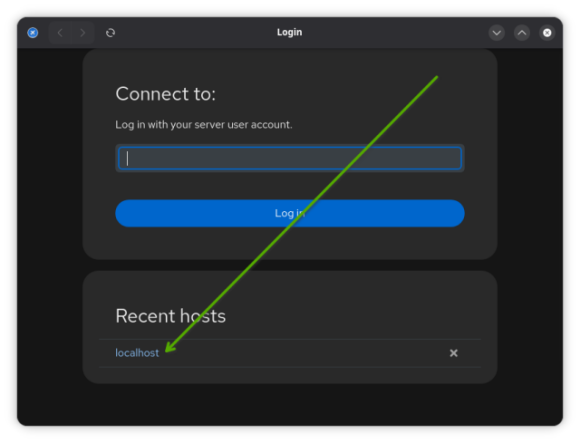
Is this what you see when you start up Cockpit?
(as shown in first screenshot)
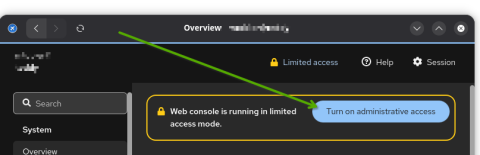
If yes, click where I show the arrow (on “localhost”, the link). Then, on the 2nd screenshot, click on the arrow and log in.
.
I use cockpit a lot to administrate my VMs and I’ve noticed, sometimes it acts strange when I’m trying to login. It just refresh the login page like nothing happened instead of loggin in. I did not have time to trace the root of the problem (I’ve done some changes to Firefox settings suggested by Google, but it did not solve the problem). As a work around adding /system at the end of URL always works for me. Sometimes just adding or removing / at the end of URL works as well.
<your_host>:9090/system
Login from cockpit working on another host works without problems what confused me even more.
BTW. This exact problem appears only on openSUSE. My Cockpits on Debian and Fedora VMs are not affected so I’ve stopped messing with Firefox settings.
By default login as root is not allowed. To change it you can edit /etc/cockpit/disallowed-users but I would say it’s not wise thing to do. 
it appears that the " localhost ’ is not recognized/can’t be found ?
“localhost” is not in the field. when entering it is not recognized
Use the new package cockpit-client-launcher, use your username and password and be done with it. Here is what I have installed on TW, versions may be different on Leap but the package names should be the same:
knurpht@Lenovo-P16:~> rpm -qa | grep cockpit
cockpit-bridge-360-1.1.noarch
cockpit-bootloader-0.4-1.5.noarch
cockpit-podman-120-2.1.noarch
cockpit-subscriptions-16-1.1.noarch
cockpit-ws-selinux-360-1.1.x86_64
cockpit-360-1.1.x86_64
cockpit-snapshots-3.1-2.1.noarch
cockpit-doc-360-1.1.noarch
cockpit-networkmanager-360-1.1.noarch
cockpit-selinux-360-1.1.noarch
cockpit-devel-360-1.1.x86_64
cockpit-repos-4.7-4.1.noarch
cockpit-kdump-360-1.1.noarch
cockpit-client-launcher-356-1.1.noarch
cockpit-firewalld-360-1.1.noarch
cockpit-ws-360-1.1.x86_64
cockpit-system-360-1.1.noarch
cockpit-machines-348-2.1.noarch
cockpit-packages-4.1-4.1.noarch
cockpit-packagekit-360-1.1.noarch
cockpit-storaged-360-1.1.noarch
knurpht@Lenovo-P16:~>
For all the above I used cockpit-client -launcher
As to to the packages, I am missing
cockpit-bootloader
-360
-snapshot
-devel
-repros
when I enter “username” and “localhost:9090”
=> msg “host is unkown”
entering http://localhost:9090 => msg "not found
entering “username” and a False password =>msg “Wrong user name or password”
…so something is working !!!
entering “username” and correct “password” =>
msg “Authentication failed: internal-error: Error in service module”
Hi All
That has not been resolved !
thanks
Hmmmm. Did you mistype? (I’m slightly confused).
At first, I thought it was worded as:
“That has been resolved!
thanks”
Because folks write “thanks” when something is fixed.
And if it’s not working for you, I’m confused because I have Cockpit running on three different installations of openSUSE (Leap 15.6, 16.0, 16.1) and all work without any issues.
Which is very confusing because the one is a username and the other is an URL. So better explain exactly every time where you enter what.
You need to install the missing packages, Otto. I.e. the ones that are on my list, that you don’t have.
That said, there currently is a bug on TW, not sure whether that also hits Leap. Will check later.
… missing , as in missing in Merlyn. I would have installed them ,if … 
I installed all available repositories ? Those packages not to be found ???
The interesting error msg from Cockpit client is:
…so … Error in service module… ?
Something however is working
So I am confused as everyone else
Next step : getting the missing packages
Cheers and happy ANZAC Day