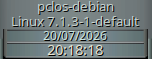
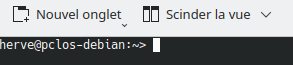
I’ve noticed something rather odd in Gkrell and Konsole: ‘Pclosdebian’ is displayed instead of ‘OpenSUSE Tumbleweed’ in Gkrell, and in the Konsole prompt instead of ‘Zlinux’.
I haven’t installed this distribution on my PC because… the installer won’t recognise my hardware (which is why I installed OpenSUSE Tumbleweed).
I’d only downloaded it and put it on a USB stick.
Any ideas on how to switch back to OpenSUSE in Gkrell and Zlinux in the prompt?
You only have a transient hostname. Transient hostnames can change randomly dependend on the amount of other network participants in the local network.
herve@pclos-debian:~> sudo hostname set-hostname Zlinux
Usage: hostname [-b] {hostname|-F file}         set host name (from file)
       hostname [-a|-A|-d|-f|-i|-I|-s|-y]       display formatted name
       hostname                                 display host name

       {yp,nis,}domainname {nisdomain|-F file}  set NIS domain name (from file)
       {yp,nis,}domainname                      display NIS domain name

       dnsdomainname                            display dns domain name

       hostname -V|--version|-h|--help          print info and exit

Program name:
       {yp,nis,}domainname=hostname -y
       dnsdomainname=hostname -d

Program options:
    -a, --alias            alias names
    -A, --all-fqdns        all long host names (FQDNs)
    -b, --boot             set default hostname if none available
    -d, --domain           DNS domain name
    -f, --fqdn, --long     long host name (FQDN)
    -F, --file             read host name or NIS domain name from given file
    -i, --ip-address       addresses for the host name
    -I, --all-ip-addresses all addresses for the host
    -s, --short            short host name
    -y, --yp, --nis        NIS/YP domain name

Description:
   This command can get or set the host name or the NIS domain name. You can
   also get the DNS domain or the FQDN (fully qualified domain name).
   Unless you are using bind or NIS for host lookups you can change the
   FQDN (Fully Qualified Domain Name) and the DNS domain name (which is
   part of the FQDN) in the /etc/hosts file.
herve@pclos-debian:~>
It CAN mean that the hostname is provided by DHCP. But DHCP is used to provide the IP adresses in the local network. The output you requested is kind of meaningless in this case. I have static hostnames for all my machines in my local network. They get their fixed IPs from the router via DHCP. And the output you requested looks exactly the same and also shows dynamic (i only have different IPs than the OP) even all machines have static hostnames.
@Zlinux1 when a box has no static hostname, the kernel gives the box a transient hostname to identify the box in a network. The transient hostname is volatile and can change with every boot. To prevent this a static hostname is required.
With the provided command you gave the box a static hostname now. Now the static and transient hostname is the same.
This topic is about transient hostnames. As the discussion had drifted into a discussion about the openSUSE name, I’ve split those posts into a separate Open Chat topic to keep this thread focused on the original technical subject. Please stay on topic here, although it appears to have been resolved.