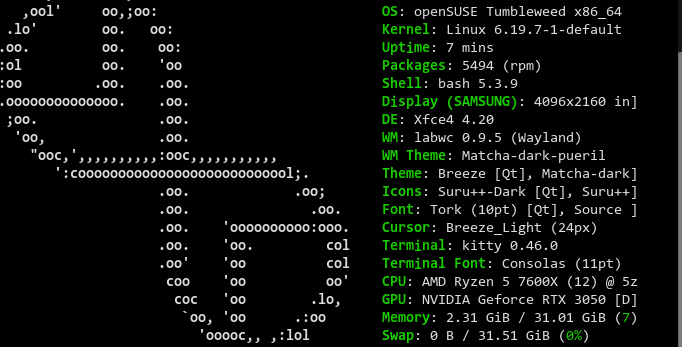
Hi,
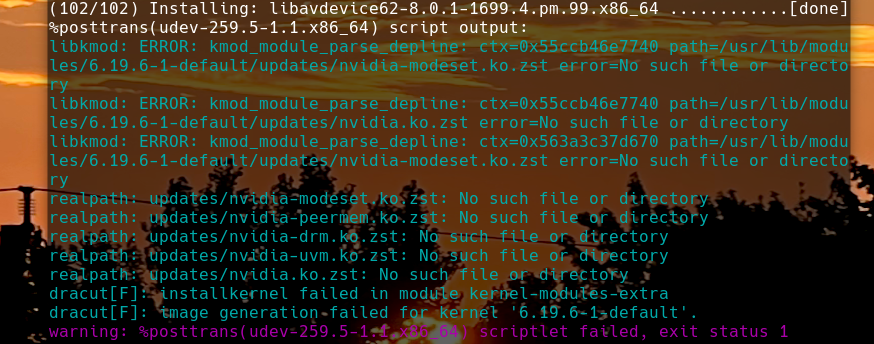
When I did the zypper dup today I saw this problem;
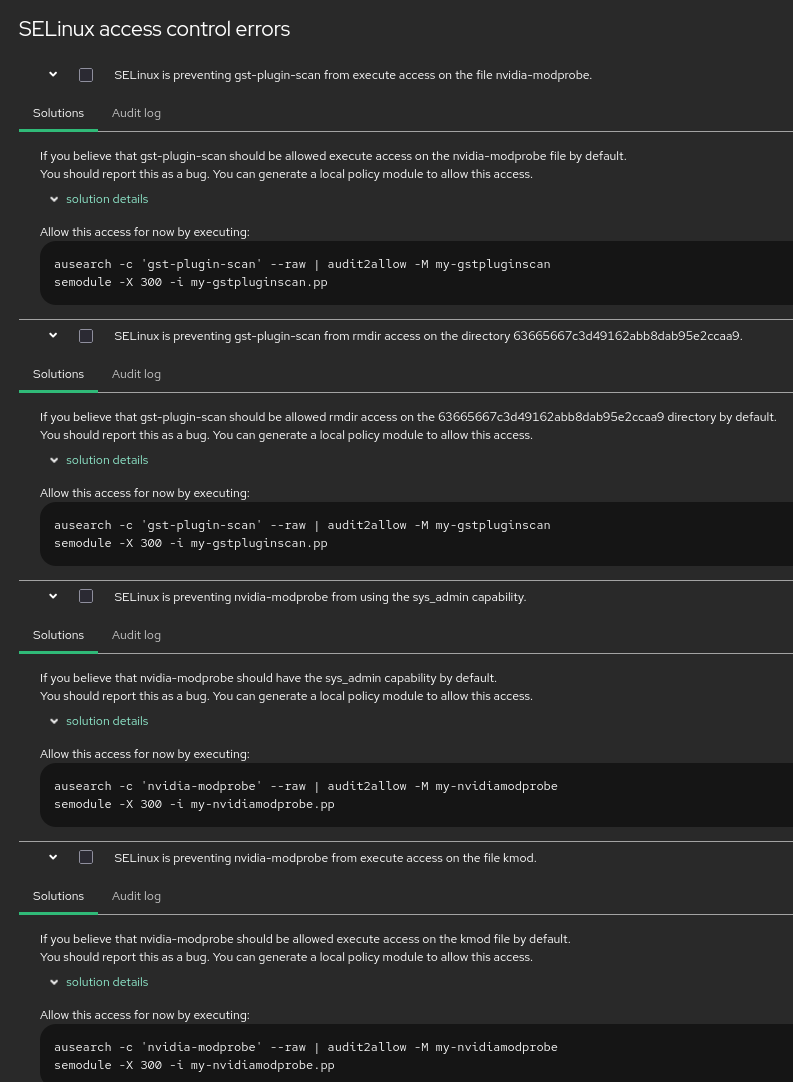
When I open cockpit after rebooting from zypper dup due to new kernel I found this;
Please advice and thank you in advance.
Hi,
When I did the zypper dup today I saw this problem;
When I open cockpit after rebooting from zypper dup due to new kernel I found this;
I would like to add this also if this is relevant to my problem
~> sudo find /usr -name nvidia.ko
/usr/lib/modules/6.19.6-2-default/updates/nvidia.ko
I am on kernel 6.7-1 now.
Correction
I am using kernel:6.19.7-1
@conram Did your system boot to the new kernel “6.19.7” run uname -a.
I see;
find /usr -name nvidia.ko
/usr/lib/modules/6.19.7-1-default/kernel/drivers/video/nvidia.ko
Yes @malcolmlewis I have seen this stuck for a couple of weeks now at kernel:6.19.6-2.
Is that a problem with selinux preventing nvidia as seen on my cockpit errors in my first post.
I am using the nvidia .run proprietary driver.
Yes I rebooted the machine and DKMS rebuilt the nvidia driver when I rebooted.
Here is my initramfs:
~> sudo dracut -f regenerate-all --verbose
dracut[I]: Executing: /usr/bin/dracut -f regenerate-all --verbose
dracut[I]: 11systemd-pcrphase: Could not find any command of '/usr/lib/systemd/systemd-pcrextend /usr/lib/systemd/systemd-pcrphase'!
dracut[I]: 35network-legacy: Could not find any command of 'dhclient wicked'!
dracut[I]: 11systemd-pcrphase: Could not find any command of '/usr/lib/systemd/systemd-pcrextend /usr/lib/systemd/systemd-pcrphase'!
dracut[I]: 35network-legacy: Could not find any command of 'dhclient wicked'!
dracut[I]: *** Including module: bash ***
dracut[I]: *** Including module: systemd ***
dracut[I]: *** Including module: systemd-ask-password ***
dracut[I]: *** Including module: systemd-battery-check ***
dracut[I]: *** Including module: systemd-initrd ***
dracut[I]: *** Including module: systemd-journald ***
dracut[I]: *** Including module: systemd-modules-load ***
dracut[I]: *** Including module: systemd-sysctl ***
dracut[I]: *** Including module: systemd-tmpfiles ***
dracut[I]: *** Including module: systemd-udevd ***
dracut[I]: *** Including module: i18n ***
dracut[I]: *** Including module: drm ***
dracut[I]: *** Including module: plymouth ***
dracut[I]: *** Including module: fs-lib ***
dracut[I]: *** Including module: kernel-modules ***
dracut[I]: *** Including module: kernel-modules-extra ***
dracut[I]: *** Including module: resume ***
dracut[I]: *** Including module: rootfs-block ***
dracut[I]: *** Including module: terminfo ***
dracut[I]: *** Including module: udev-rules ***
dracut[I]: *** Including module: dracut-systemd ***
dracut[I]: *** Including module: initqueue ***
dracut[I]: *** Including module: usrmount ***
dracut[I]: *** Including module: systemd-sysusers ***
dracut[I]: *** Including module: base ***
dracut[I]: *** Including module: shell-interpreter ***
dracut[I]: *** Including module: shutdown ***
dracut[I]: *** Including module: suse-btrfs ***
dracut[I]: *** Including module: suse-xfs ***
dracut[I]: *** Including module: selinux-microos ***
dracut[I]: *** Including module: suse ***
dracut[I]: *** Including module: suse-initrd ***
dracut[I]: *** Including modules done ***
dracut[I]: *** Installing kernel module dependencies ***
dracut[I]: *** Installing kernel module dependencies done ***
dracut[I]: *** Resolving executable dependencies ***
dracut[I]: *** Resolving executable dependencies done ***
dracut[I]: *** Generating early-microcode cpio image ***
dracut[I]: *** Constructing AuthenticAMD.bin ***
dracut[I]: *** Store current command line parameters ***
dracut[I]: Stored kernel commandline:
dracut[I]:  resume=UUID=abb27281-1640-467e-a6af-4cd10dc334a3
dracut[I]:  root=UUID=0ec26bb4-a3ac-47b3-b86f-ec763ca5ef02 rootfstype=ext4 rootflags=rw,relatime,seclabel
dracut[I]: *** Stripping files ***
dracut[I]: *** Stripping files done ***
dracut[I]: *** Creating image file '/home/conram/regenerate-all.tmp' ***
dracut[I]: *** Hardlinking files ***
dracut[I]: *** Hardlinking files done ***
dracut[I]: *** Creating initramfs image file '/home/conram/regenerate-all.tmp' done ***
dracut[I]: *** Moving image file '/home/conram/regenerate-all.tmp' to '/home/tanto/regenerate-all' ***
dracut[I]: *** Moving image file '/home/conram/regenerate-all.tmp' to '/home/tanto/regenerate-all' done ***
Why is it creating file in my home directory 
find /usr -name nvidia.ko
/usr/lib/modules/6.19.6-2-default/updates/nvidia.ko
It’s really stuck in the old kernel.
@conram At boot can you select the newer kernel?
I booted to advance tumbleweed option and selected the newest kernel and still stuck.
I rebuild the boot loader and rebooted same result.
Thanks.
Is it a bug in the selinux permission?
I would systemctl set-default multi-user.target reboot and select the new kernel, force the install of the kernel zypper in -f kernel-default, reboot, select the new kernel, fire up yast bootloader, tab over and make sure the new kernel version is selected. Reboot and should be the newest kernel, then once booted, install the nvidia driver again, systemctl set-default graphical.target, reboot.
Now login as root user for the above, don’t use sudo…
I’m using the “cuda_13.2.0_595.45.04_linux.run” here for the initial install, then “NVIDIA-Linux-x86_64-595.45.04.run” for subsequent kernel updates.
I will try it.
The NVIDIA-Linux-x86_64-595.45.04.run, I tried it yesterday and it doesn’t build here so I went back to 590.48.01.run.
Thanks
@conram it should be working fine, I’m using the open driver;
nvidia-smi
Mon Mar 16 16:22:46 2026
+-----------------------------------------------------------------------------------------+
| NVIDIA-SMI 595.45.04              Driver Version: 595.45.04      CUDA Version: 13.2     |

6.19.7-1-default
Hi.
Still no go
@conram just with SELinux, or booting to the new kernel, or the driver install?
@malcolmlewis It boots to the newest kernel:6.19.7-1
However the nvidia.ko module is still at 6.19.6-2 it didn’t upgrade to the newest kernel as stated on my earlier post. The SElinux error stays like in my first post. I haven’t try the solution that is prompted in cockpit.
+-----------------------------------------------------------------------------------------+ | NVIDIA-SMI 590.48.01 Driver Version: 590.48.01 CUDA Version: 13.1 | +-----------------------------------------+------------------------+----------------------+ | GPU Name Persistence-M | Bus-Id Disp.A | Volatile Uncorr. ECC |
@conram Seems strange that it’s staying in updates and not being rebuilt?
I would not run anything regarding SELinux… If you can get to the current driver you have installed to the kernel version may help?