YaST software manager updates package that Myrlyn will not

Myrlyn will not update package broadcom-wl-kmp-default - Wireless driver for Broadcom 43xx series of chips to version
6.30.223.271_k6.12.0_160000.7-160000.27.pm.18 from version
6.30.223.271_k6.12.0_160000.7-160000.27.pm.17.

YaST software manager gives the options:

#### YaST2 conflicts list - generated 2025-12-12 15:22:49 ####

the to be installed broadcom-wl-kmp-default-6.30.223.271_k6.12.0_160000.7-160000.27.pm.18.x86_64 conflicts with 'broadcom-wl-kmp-default-k6.12.0_160000.7' provided by the installed broadcom-wl-kmp-default-6.30.223.271_k6.12.0_160000.7-160000.27.pm.17.x86_64

    [ ] Following actions will be done:
replacement of broadcom-wl-kmp-default-6.30.223.271_k6.12.0_160000.7-160000.27.pm.17.x86_64 with broadcom-wl-kmp-default-6.30.223.271_k6.12.0_160000.7-160000.27.pm.18.x86_64
deinstallation of broadcom-wl-kmp-default-6.30.223.271_k6.12.0_160000.7-160000.27.pm.17.x86_64
    [ ] do not install broadcom-wl-kmp-default-6.30.223.271_k6.12.0_160000.7-160000.27.pm.18.x86_64

#### YaST2 conflicts list END ###

Selecting the first option does the update:

Installation Successfully Finished
Packages
Updated Packages: 1
broadcom-wl-kmp-default
Removed Packages: 1
broadcom-wl-kmp-default
Statistics
Elapsed Time: 00:38
Total Installed Size: 1.40 MiB
Total Downloaded Size: 1.42 MiB

How can I adjust Myrlyn to do the update?
Thanks,
Howard
How exactly do you perform updates with YaST and Myrlyn? There are multiple ways in both cases.

YaST sw_single doesn’t have the zypper up and zypper dup equivalent; you can only update single packages (with an immediate complaint about a dependency problem if there is one), or “All in this list” → “Update if newer version is available” which does exactly the same, but for several packages at the same time. Typically, that will result in a lot of dependency problems, all in one looong list in the dependency problems window.

Myrlyn on the other hand does offer the zypper up and zypper dup equivalents on the “Updates” page, and there it will do the exact same thing as zypper does with those commands: It tries the update for every package that has a newer version, i.e. that could theoretically be updated. If that works without a problem, it does it; if not, it doesn’t (and there is that “sad face” emoji in that line in the packages list).

This also puts the dependency resolver into a special “up” / “dup” mode; it won’t try operations that result in a dependency problem. That lasts until the transaction is performed, i.e. until you click on the “Accept” button. When you come back to the Myrlyn main page, the solver is reset to standard.

Now, if you tried a “dup” or an “up” from the “Updates” page, and nothing happened there because in your case there is only that one package with a newer version, and that update doesn’t apply cleanly without dependency problems, you can click on that packages’s status icon all you want; it won’t update, because the solver checks the dependencies, finds that there are problems, and simply resets the package status to the old value, i.e. “keep installed”. That is because it’s now in “up” or “dup” state which will avoid dependency problems at all cost.

If you simply leave Myrlyn and restart it and NOT click on “up” or “dup” on the “Updates” page, but simply on the status icon of that package, it will try to change the status, fail with the dependeny problem, and open the dependency problems window for you to sort out manually.

HTH

…looks like it’s about time to start a Wiki with all those questions and answers…

1 Like

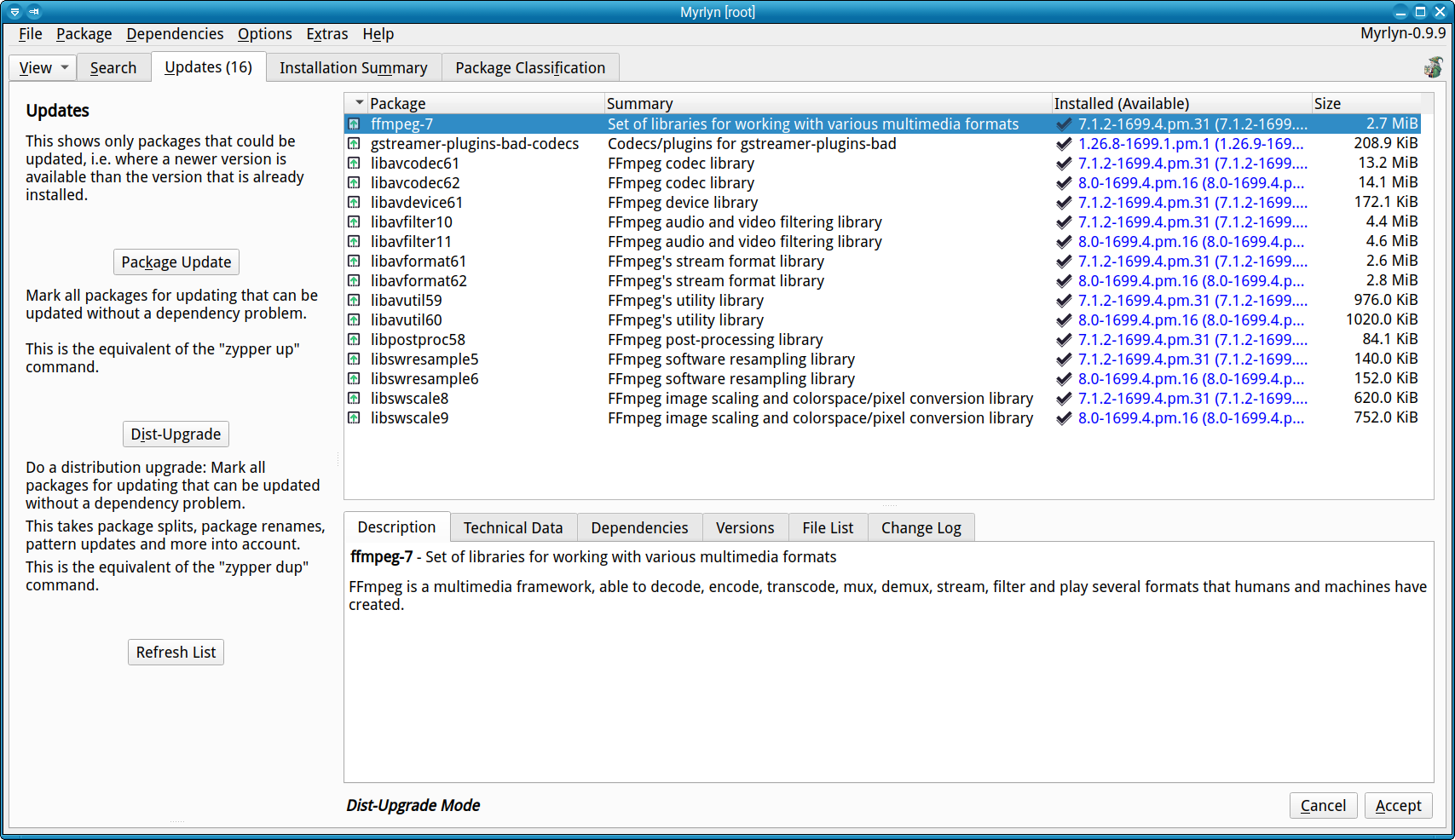
Now showing that resolver mode if it’s “up” or “dup”, not the standard mode:

Notice the status at the bottom of the window.

See also the corresponding entry in the development status issue.

In Myrlyn, in the Updates tab, I click the Package Update button. I see from shundhammer’s post that this invokes the zypper up equivalent, so it doesn’t deal with conflicts.
In YaST Software Management, I search for the package Myrlyn would not update with the above approach. In YaST, I click on the check at the far left and get the options in my original post. I select option 1 and the package updates.
shundhammer describes how to make the update work in Myrlyn. I’ll do that next time the situation arises.

Big ah-ha. I had not recognized that approach in Myrlyn. I’ll do it next time there’s a conflict.
Thanks,
Howard

This topic was automatically closed 7 days after the last reply. New replies are no longer allowed.