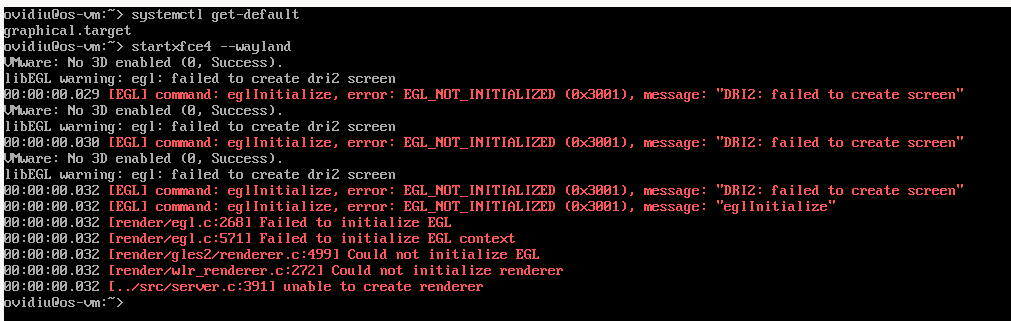
I have done a fresh install into VirtualBox , this time selecting from the installer XFCE as DE. After the installation finished it dropped into the terminal and I have tried to start XFCE4 manually and I have the errors from the picture:
They are the defaults selection from the installer. I just used what the installer offered me. I’ll give it a try in qemu. I think I saw this error before but only in VirtualBox and it’s Wayland related.
You should definitely read the first post. Myrlyn is not involved at all. It is a fresh installation which fails to start the graphical environment after the first reboot. The Leap 16 beta installer only provides the XFCE Experimental Wayland pattern.
Few days ago I played with Cinnamon (I am using only XFCE and Cinnamon) and it worked well (with an exception of one bug) in X11 and Wayland. But I had to install from cli as it wasn’t in the installer options. .
Yep. For us, XFCE with wayland does not work, but X11 does
After installing the Pattern, choices available at login (screenshot #1)
(green arrows = original install, others after adding Pattern)
Then, I show a successful XFCE with X11 (choosing wayland just hung for 5+ minutes). Screenshot #2 - obviously works with X11
That’s why we never use wayland (with KDE) … never works.
Thank you :).
I checked in QEMU. It drops me also in the terminal after installation but it XFCE starts after I start manually. The usability is awful.
I don’t know about KDE. I was on Gnome on Leap 15.6 for one, or 2 days I think. On Wayland is really good. I don’t like Gnome, is heavy, I have to install extensions to use it as a standard desktop. Indeed, Gnome with Wayland is a perfect match.