File was by created by: Right Click on KDE background > Create New > Link To Application…:
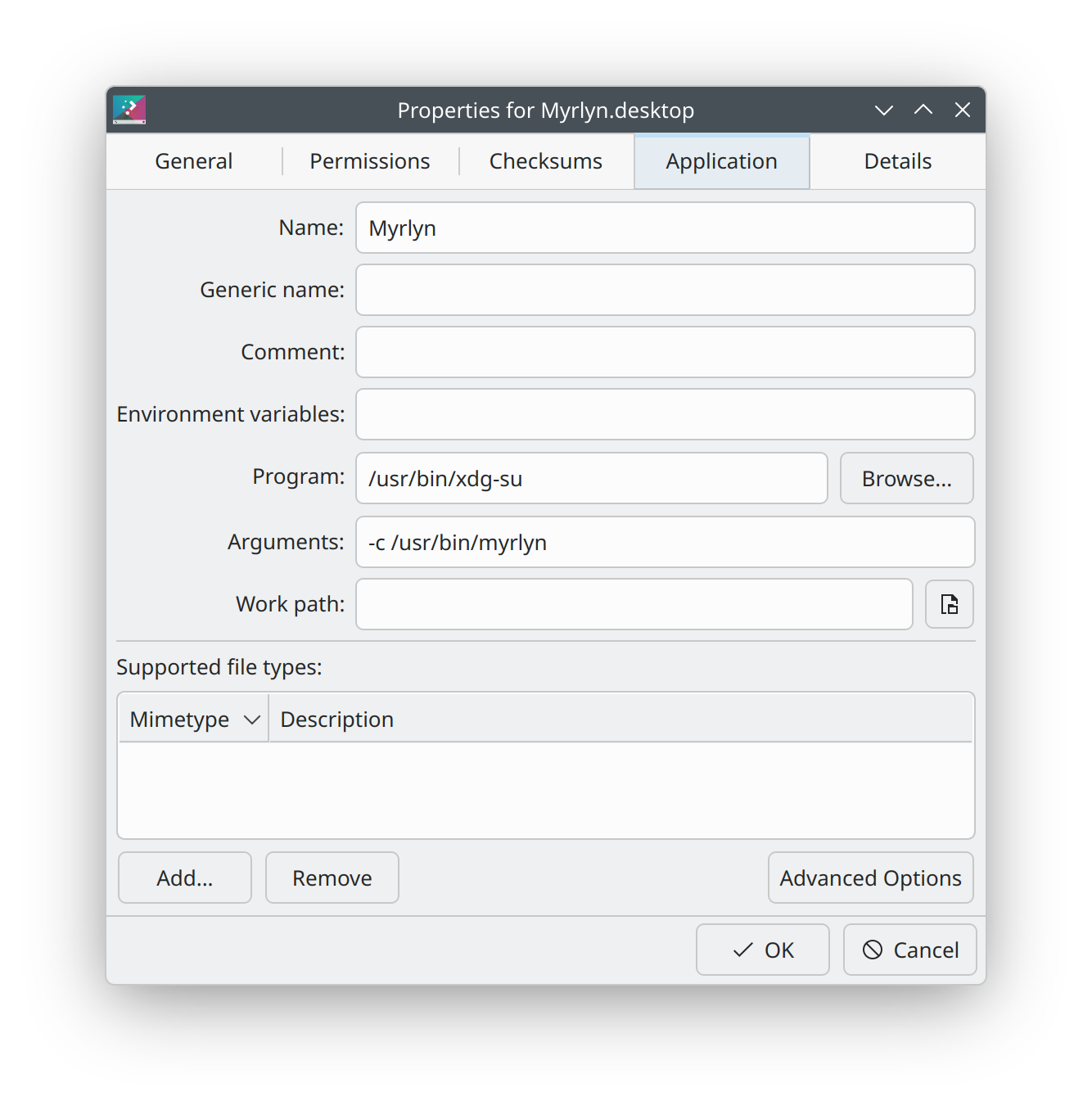
Does that command work from the command line?
false is the default. true will run the Exec line via kdesu.
Yep. Executing /usr/bin/xdg-su -c /usr/bin/myrlyn starts the following:
erlangen:~ # ps aux|grep myrlyn
karl      123607  0.0  0.0   7548  5732 pts/0    S+   18:02   0:00 /bin/sh /usr/bin/xdg-su -c /usr/bin/myrlyn
karl      123609  0.0  0.5 640172 162860 pts/0   Sl+  18:02   0:00 /usr/bin/kdesu -c /usr/bin/myrlyn
root      123634  2.1  1.2 1660292 360844 ?      Ssl  18:02   0:02 /usr/bin/myrlyn
root      123848  0.0  0.0   6692  4184 pts/2    S+   18:04   0:00 grep --color=auto myrlyn
erlangen:~ #
Was it a default installation or an upgrade?
openSUSE Leap 16.0 was officially released on Wednesday, October 1, 2025. I did a pre-release install at Sunday, July 6, 2025 and performed the following upgrades:
i4130:~ # journalctl --quiet --directory /mnt/@/var/log/journal -g dist-upgrade
Sep 03 18:40:25 Leap16 systemd[1]: Started [systemd-run] /usr/bin/zypper --non-interactive dist-upgrade --allow-arch-change --allow-downgrade --allow-name-change --allow-vendor-change --no-recommends.
Sep 30 07:14:58 Leap16 systemd[1]: Started [systemd-run] /usr/bin/zypper --non-interactive dist-upgrade --allow-arch-change --allow-downgrade --allow-name-change --allow-vendor-change --no-recommends.
Oct 26 05:54:00 Leap16 systemd[1]: Started [systemd-run] /usr/bin/zypper --non-interactive dist-upgrade --allow-arch-change --allow-downgrade --allow-name-change --allow-vendor-change --no-recommends.
Nov 23 12:06:57 Leap16 systemd[1]: Started [systemd-run] /usr/bin/zypper --non-interactive dist-upgrade --allow-arch-change --allow-downgrade --allow-name-change --allow-vendor-change --no-recommends.
Dec 13 11:05:53 Leap16 systemd[1]: Started [systemd-run] /usr/bin/zypper --non-interactive dist-upgrade --allow-arch-change --allow-downgrade --allow-name-change --allow-vendor-change --no-recommends.
i4130:~ #
You seem to be the only person able to do so.
@shundhammer what do you think?
There was a very long beta phase, so yes, that’s absolutely possible.
Leap is up to date and uses:
Leap16:~ # repos
#  | Alias             | Name            | Enabled | GPG Check | Refresh | Priority | URI
---+-------------------+-----------------+---------+-----------+---------+----------+---------------------------------------------------------------
 1 | Packman           | Packman         | Yes     | (r ) Yes  | Yes     |   80     | https://ftp.fau.de/packman/suse/openSUSE_Leap_16.0/
 2 | brave-browser     | Brave Browser   | Yes     | (r ) Yes  | Yes     |   99     | https://brave-browser-rpm-release.s3.brave.com/x86_64
 7 | openSUSE:repo-oss | repo-oss (16.0) | Yes     | (r ) Yes  | Yes     |   99     | http://cdn.opensuse.org/distribution/leap/16.0/repo/oss/x86_64
Leap16:~ #
Leap16:~ # zypper if xdg-utils
Refreshing service 'openSUSE'.
Loading repository data...
Reading installed packages...


Information for package xdg-utils:
----------------------------------
Repository     : repo-oss (16.0)
Name           : xdg-utils
Version        : 1.2.1-160000.2.2
Arch           : noarch
Vendor         : SUSE LLC <https://www.suse.com/>
Installed Size : 345.1 KiB
Installed      : Yes (automatically)
Status         : up-to-date
Source package : xdg-utils-1.2.1-160000.2.2.src
Upstream URL   : https://www.freedesktop.org/wiki/Software/xdg-utils/
Summary        : Utilities to uniformly interface desktop environments
Description    :
    The xdg-utils package is a set of simple scripts that provide basic
    desktop integration functions for any Free Desktop, such as Linux.

    They are intended to provide a set of de-facto standards.
    This means that:
     * Third party software developers can rely on these xdg-utils for
       all of their simple integration needs.

    *  Developers of desktop environments can make sure that their
       environments are well supported.

       If a desktop developer wants to be certain that their
       environment functions with all third party software, then can
       simply make sure that these utilities work properly in their
       environment.

Leap16:~ #
Leap16:~ # zypper if kde-cli-tools6
Refreshing service 'openSUSE'.
Loading repository data...
Reading installed packages...


Information for package kde-cli-tools6:
---------------------------------------
Repository     : repo-oss (16.0)
Name           : kde-cli-tools6
Version        : 6.4.2-bp160.1.2
Arch           : x86_64
Vendor         : openSUSE
Installed Size : 997.1 KiB
Installed      : Yes (automatically)
Status         : up-to-date
Source package : kde-cli-tools6-6.4.2-bp160.1.2.src
Upstream URL   : https://www.kde.org
Summary        : Additional CLI tools for KDE applications
Description    :
    Additional CLI tools for KDE applications and workspaces.

Leap16:~ #
Leap16:~ # kinfo
Operating System: openSUSE Leap 16.0
KDE Plasma Version: 6.4.2
KDE Frameworks Version: 6.16.0
Qt Version: 6.9.1
Kernel Version: 6.12.0-160000.18-rt (64-bit)
Graphics Platform: offscreen
Processors: 4 × Intel® Core™ i3-4130 CPU @ 3.40GHz
Memory: 8 GiB of RAM (7.7 GiB usable)
Leap16:~ #
I don’t doubt it’s up to date, but like @shundhammer hinted, there might be remnants from the beta.
Leap16:~ # zypper se -is --type pattern
Loading repository data...
Reading installed packages...

S  | Name          | Type    | Version             | Arch   | Repository
---+---------------+---------+---------------------+--------+----------------
i  | base          | pattern | 20241218-160000.2.2 | x86_64 | repo-oss (16.0)
i+ | enhanced_base | pattern | 20241218-160000.2.2 | x86_64 | repo-oss (16.0)
i  | fonts         | pattern | 20170319-bp160.1.1  | x86_64 | repo-oss (16.0)
i  | games         | pattern | 20220126-bp160.1.1  | x86_64 | repo-oss (16.0)
i+ | kde           | pattern | 20250902-lp160.2.1  | noarch | repo-oss (16.0)
i  | kde_pim       | pattern | 20250902-lp160.2.1  | noarch | repo-oss (16.0)
i  | kde_plasma    | pattern | 20250902-lp160.2.1  | noarch | repo-oss (16.0)
i  | minimal_base  | pattern | 20241218-160000.2.2 | x86_64 | repo-oss (16.0)
i  | multimedia    | pattern | 20201106-bp160.1.1  | x86_64 | repo-oss (16.0)
i  | office        | pattern | 20170506-bp160.1.1  | x86_64 | repo-oss (16.0)
i+ | selinux       | pattern | 20241218-160000.2.2 | x86_64 | repo-oss (16.0)
i  | x11           | pattern | 20241218-lp160.5.1  | x86_64 | repo-oss (16.0)
i  | x86_64_v3     | pattern | 20230201-bp160.1.8  | x86_64 | repo-oss (16.0)

    Note: For an extended search including not yet activated remote resources please use 'zypper
    search-packages'.
Leap16:~ #
I removed any unneeded and orphaned packages:
Leap16:~ # zypper packages --orphaned --unneeded
Refreshing service 'openSUSE'.
Loading repository data...
Reading installed packages...
No packages found.
Leap16:~ #
I was thinking about default configuration files that have changed since then.
It’s not easy to tell.
In 16.0, the system default /etc/sudoers moved to /usr/etc/sudoers. You can write your own rules to a file in /etc/sudoers.d/ to keep your settings separate from the system-wide configuration.
In addition to that, there is now package sudo-policy-wheel-auth-selfwith the new rule to let the members of the wheel user group enter their own password for sudo, and also a PolicyKit rule for the wheel group:
morgul:~ # cat /usr/etc/sudoers.d/50-wheel-auth-self
Defaults:%wheel !targetpw
%wheel ALL = (root) ALL

morgul:~ # rpm -qf /usr/etc/sudoers.d/50-wheel-auth-self
sudo-policy-wheel-auth-self-1.9.17p2-1.1.noarch

morgul:~ # rpm -ql sudo-policy-wheel-auth-self
/usr/etc/sudoers.d/50-wheel-auth-self
/usr/share/polkit-1
/usr/share/polkit-1/rules.d
/usr/share/polkit-1/rules.d/51-wheel.rules

morgul:~ # cat /usr/share/polkit-1/rules.d/51-wheel.rules
polkit._suse_admin_groups.push("wheel");
I don’t remember if I had to install that package manually, or if it was installed by default.
It is mandatory when using Agama:
This topic was automatically closed 30 days after the last reply. New replies are no longer allowed.