Xdg-su not working

I have a Leap 16 install that I’ve been running since Beta (now SR).

An hour ago, I did a second fresh install of Leap 16 (SR), just for testing purposes (in VBox).

  • Orig 16 - I set a root password during install
  • New 16 - I did NOT set a root password, based on the first paragraph of Post 3 (second Reply).

Conclusion so far: the recommendation | claim to NOT set a root password [during install], results in a non-working system, related to root-type work.

I cannot execute commands like

  • xdg-su -c and kdesu … < [ graphical ] app > (keeps asking for root pswd)
  • sudo -E < [ graphical ] app > (keeps asking for root pswd)
  • su -l (results in “su: Authentication failure”)

So, now I can’t execute things like “zypper -v up” as I always do with my Leap 15.6 and (orig)Leap 16 systems (and previous TW systems). I’ll continue my long-standing tradition to set a root user password during install :+1:

2 Likes

For me, I enter the password at the initial password pop-up dialog, then about 2-3 seconds pass, and a second [error] pop-up is displayed “Incorrect password … please enter the root password”, allowing a second attempt.

It was the same for me, before creating a password for root.

I know, I filed that bug report.

Good that you know. But if you file a bug or make crossposts, it is always advised to share the link, so that informations don’t get lost.

That is why i posted the link to your bugreport. And in your bugreport you can see how Stefan posted the link to this thread.

Works here. Does it work using kdesu?

kdesu /usr/bin/systemsettings

Does it work using su directly?

su - -c /usr/bin/systemsettings

No, it doesn’t.

It does launch systemsettings in small fonts, but under the font settings I can see the larger ones I set for the regular user.

I also found these differences between a standard 16.0 install and the 16.0 VM on which xdg-su works:

--- /etc/pam.d/common-session	2025-12-06 13:14:26.026073364 +0100
+++ common-session	2025-09-10 13:10:45.275307247 +0200
@@ -32,11 +32,9 @@
 # at the start and end of sessions of *any* kind (both interactive and
 # non-interactive
 #
-session	required	pam_selinux.so	close 
 session	required	pam_limits.so	
 session	optional	pam_systemd.so
 session	required	pam_unix.so	try_first_pass 
 session	optional	pam_umask.so	
-session	required	pam_selinux.so	open 
 session	optional	pam_kwallet5.so	
 session	optional	pam_env.so	
--- /etc/pam.d/common-session-nonlogin	2025-12-06 13:14:26.029073594 +0100
+++ common-session-nonlogin	2025-09-10 13:10:45.275307247 +0200
@@ -32,10 +32,8 @@
 # at the start and end of sessions of *any* kind (both interactive and
 # non-interactive
 #
-
 session	required	pam_limits.so	
 session	required	pam_unix.so	try_first_pass 
 session	optional	pam_umask.so	
-
 session	optional	pam_kwallet5.so	
 session	optional	pam_env.so	
--- /etc/pam.d/postlogin-session	2025-12-06 13:14:26.035074055 +0100
+++ postlogin-session	2025-09-10 13:10:45.276307252 +0200
@@ -33,3 +33,4 @@
 # non-interactive
 #
 session	optional	pam_wtmpdb.so	skip_if=sshd 
+session	optional	pam_lastlog2.so	silent_if=gdm,gdm-password,lxdm,lightdm,mdm,sddm 

But I don’t quite understand the implications.

Regards

@shundhammer I read your suggestion on github about logging in as root to configure thing and that’s what I did. Unfortunately myrlyn still won’t use larger fonts. Even in a plasma root session.

Is this a topic for this thread or should I move to the relevant github issue?

Never log into a GUI as root you can inadvertently do serious damage!!!
Become root using su, sudo etc as needed.

After 25+ years of linux, I hope I can depended upon not to be rash in such situations.

This is the suggestion, in case anyone was curious.

Perhaps reading the thread or even its title wouldn’t go amiss…

Going through qt6ct did not work for me as well, what did work is this, doesn’t look pretty but much better than before.

I saw that, but I’d like to understand why the font size is seemingly ignored.

You don’t know the context. This is about setting the desktop theme for root to get fonts that are actually readable. This is realistically only doable when logging in as root.

This thread has been quite bouncy. One problem is the “no need to provide a password for the root user at login during the install process”. A previous post of mine proved it does influence “after installation, usability failures for the root user”.

Okay, here’s a quick example about the font | rendering thing. I’m using my regular Leap 16 install (since Beta), where as a matter of habit, I provided a root login during installation. (I’ve deleted the test Leap 16 I installed without defining root config, to test for this thread).

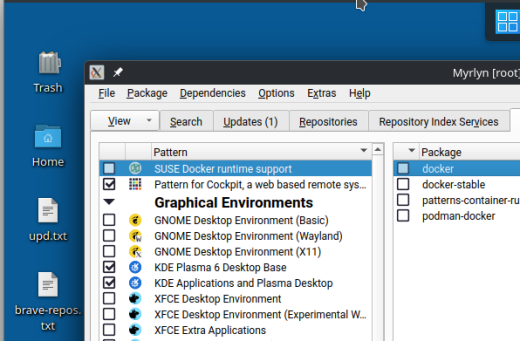
The first screenshot … I launched Myrlyn (root choice) from the KDE Plasma menu (yes, you have to enter the root password). Yuck (to me). No dark mode, etc.

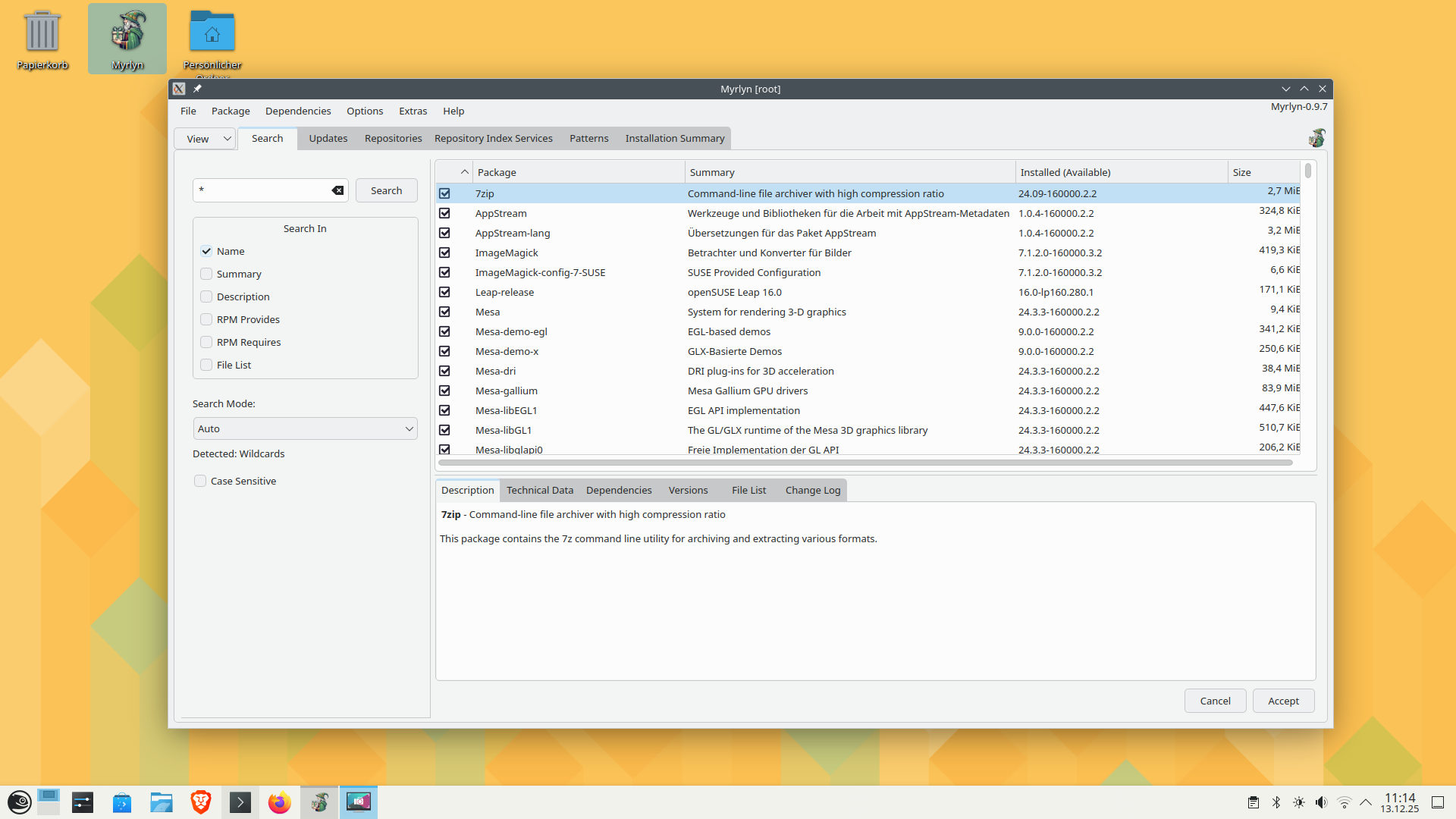
Okay, the second screenshot … I launched from a konsole, as my user, using “sudo -E myrlyn” (then the root password). Notice that it matches my Dark Mode, and the fonts (larger) match my user settings (why I used “-E”, so it inherits my profile settings).

So, for me personally, it’s a pain to have to “configure the root user account to match what you prefer”, because I’ve already done that for my user, and I can pass that on to root activities.

Default from KDE menu


.
Using “sudo -E myrlyn”:

Using kdesu myrlyn here works.
I don’t know if some modification I made had an influence also because I modified
the theme in systemsettings and qt6ct as su.

Not on Leap 16 I guess.

I experimented a lot this evening, and I came up with something new that you could try immediately:

  • Get the latest myrlyn-sudo script from the Git repo.
  • Add the variables that you need/want to a new config file ~/.config/openSUSE/myrlyn-sudo.conf (your home directory, not root’s) like this:
    QT_QPA_PLATFORMTHEME=qt6ct
    QT_ENABLE_HIGHDPI_SCALING=0
    QT_SCALE_FACTOR=1
    
    A look into the myrlyn-sudo script will tell you that it sources this file if it exists, so those variables are added to the environment for the sudo call if they are in the ENV_KEEP list.

This is used for myrlyn-sudo. For a non-root myrlyn call, add the variables to your ~/.bashrc or equivalent as usual.

The latest Myrlyn binary also logs the environment variables starting with QT. Build from source or use myrlyn-git linked from the home page.

HTH

1 Like

Yes, that’s much easier, of course, but sudo -E depends on your sudo configuration allowing to keep the entire shell environment.

On my long journey to make Myrlyn work with root privileges for the average user who doesn’t know much about the sudo configuration I tried that as well, and it didn’t take long for users to populate the issue tracker with exactly that problem.

By all means, use sudo -E if it works for you, but be aware that this may not be the norm.

1 Like

It appears to be working, provided one installs qt6ct first and configures it accordingly.
sudo -E also works and I’m not sure it’s less practical.

Strange, it worked out of the box for me. Do people mess with /etc/sudoers that often?

Anyway, I think I’m set, more or less. I only wish this issue had had more publicity.

Whenever I run an application as root I use e.g:

karl@Leap16:~/Schreibtisch> cat Myrlyn.desktop 
[Desktop Entry]
Comment[en_GB]=
Comment=
Exec=/usr/bin/xdg-su -c /usr/bin/myrlyn
GenericName[en_GB]=
GenericName=
Icon=Myrlyn
MimeType=
Name[en_GB]=Myrlyn
Name=Myrlyn
Path=
StartupNotify=true
Terminal=false
TerminalOptions=
Type=Application
X-KDE-SubstituteUID=false
X-KDE-Username=
karl@Leap16:~/Schreibtisch> 

Is this the right combo then?