Hi !
After a fresh Tumbleweed install, all is fine except the login keyboard which is qwerty. All other keyboards (in KDE and in consoles) are in french azerty as I installed.
I have just looked at such subjects on the forum but I find only old threads.
Can you tell me where to look to find the right config file ? Is it xdm ?
Thanks in advance
How does your /etc/vconsole.conf look? Do you have a keyboard configuration file in /etc/X11/xorg.conf.d/?
What works for me:
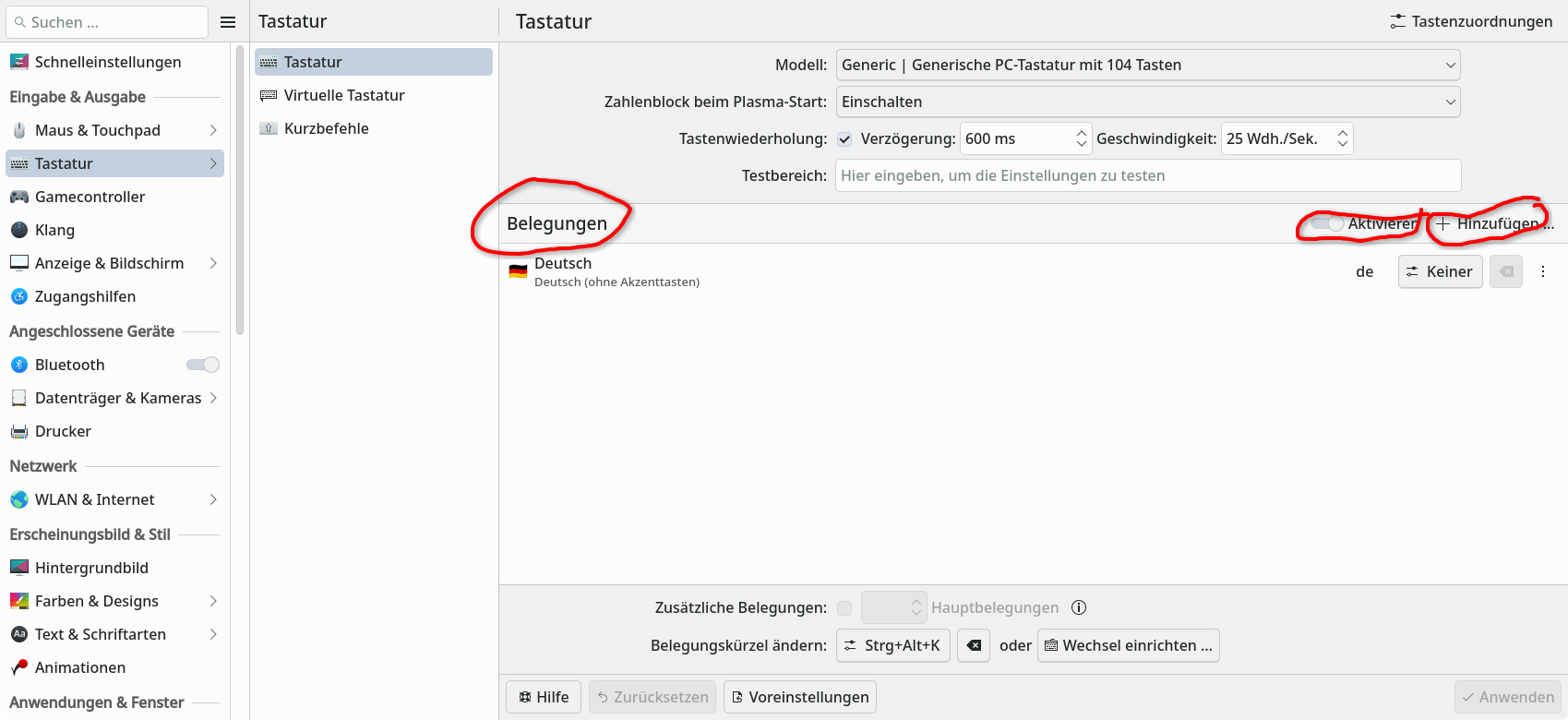
Look in system settings - keyboard, then add the needed keyboard layout as shown in the picture.
I also run the sddm as a wayland service (not sure if this is necessary):
sudo systemctl enable --now --force sddm.service
Thanks.
etc/vconsole.conf :
Written by systemd-localed(8) or systemd-firstboot(1), read by systemd-localed
and systemd-vconsole-setup(8). Use localectl(1) to update this file.
KEYMAP=fr
XKBLAYOUT=fr
XKBMODEL=pc105
XKBOPTIONS=terminate:ctrl_alt_bksp
FONT=eurlatgr.psfu
FONT_MAP=
FONT_UNIMAP=
Please, to make the pieces of computer code in your posts better consumable by technical oriented people:
And post as complete as possible. That is starting with the line with the prompt and the command, then all output, and ending with the new prompt line.
/etc/X11/xorg.conf.d/
is an empty directory 
Thank you, but I have already done that, it is ok for KDE
But my problem is when login into kde
Is there a difference in the output of localectl statusdepending whether you run it as user or superuser?
1 Like
With Leap 16.0 I had the same keyboard problem (which didn’t occur with 15.6) : all DE’s config were in my language, unlocking a graphical session was done with local keyboard but opening the graphical session remained in qwerty.
localectl status (and root’s one) said x11 was unset (others were good).
I set it with localectl set-11-keymap xx with xx is the short code I want (en for english, fr for french, …), also for root, and it solved the problem.
Theses actions also add a keyboard config file in /etc/x11/xorg.conf.d
2 Likes
OK thanks a lot 
Except the command was
localectl set-x11-keymap xx
1 Like
No difference.
See further : problem solved
Thank you everybody ;-))
Yes ! GG ! I made a typo. 
1 Like
This topic was automatically closed 7 days after the last reply. New replies are no longer allowed.