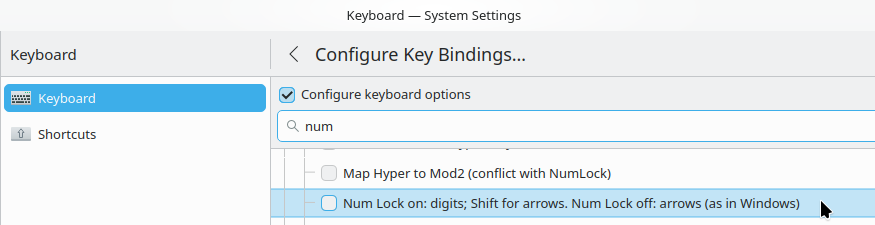
The shift and numlock keys both function on their own, so I presume there’s no hardware issue. The expected behavior is that when I have numlock on but want to hit the home key I can hit shift+7 to go home, or if the numlock key is off then shift+7 types 7 instead of going home. Instead, I always get a number if numlock is on and the arrows if numlock is off, regardless of whether I’m pressing shift.
It would seem that the key binding available in system settings “Num Lock on: digits; Shift for arrows. Num Lock off: arrows (as in Windows)” will get me what I want, or close enough to suffice. Even after a reboot, however, this does not change any behavior. Weirdly, the option right below it, “Numeric keypad always enters digits (as in macOS)” works perfectly.
I’m on a Lenovo ThinkPad P15 Gen 2i, if that makes a difference here. I’m also realizing that some of the other rebinds fail, but only some. Ctrl position at bottom left, for instance, doesn’t override my Fn key with Ctrl, and “Swap Ctrl and Caps Lock” only turns the caps lock into ctrl, not the other way around. Not sure if this is relevant. Has anyone experienced this before?
So this seems to be no the default at least in KDE, but you can change it.
My current keyboard does not have a Num Lock or a num key cluster, when I still had a full keyboard I did remap the Num Lock key to be the Compose Key.
I tried it out and I have the same experience as OP. I tried using either Shift keys but it still typed the number rather than doing the action. I tried toggling other settings as well, such as “Default numeric keypad keys”, and specifying a “Layout of numeric keypad” but none of them allowed the shift+num to function.
An incidental thing I noticed is that when a change is made in any of the key bindings sections, a “Reset” button shows for that section. For any other section, the reset button will untick the options and go back to default; this does NOT happen for the Compatibility options section.
If Shift and the “NumLock” modifier are both set, the default KEYPAD type yields level one.
If either Shift or the “NumLock” modifier alone are set, it yields level two.
If neither Shift nor the “NumLock” modifier are set, it yields level one.
However, this is a 20-year old document, and we did receive bug reports that requested to change the default behavior.
So I kindly invite you to join the discussion. Alternatively, I will try to follow the discussion here, but do note that I found it purely by chance and I am not much active here.
I think I understand what you’re saying. I’m glad you happened across this, since while I had posted about this on the KDE forum, I didn’t know this other conversation existed.
I suppose my two cents are that I don’t really care what the default behavior is as long as the customization options work. For whatever it’s worth, my assumption was that shift should invert whatever behavior the number pad is “locked” onto, but that’s only because I’m mapping the caps lock behavior onto numlock, no other reason.
But my issue has always been that the configuration option exists but isn’t working, not that the default isn’t what I’d like it to be.
I created that file, and the behavior has changed, but not entirely for the better. Previously, Numlock locked the numbers no matter what. Now shift+number = shift+arrow.
So numlock-on gives “1” = 1, “Shift+1” = Shift+End, when if I’m reading the file correctly, it should be “Shift+1” = End.