Both my machines just updated, and I immediately noticed that shutting down now takes about 30 seconds, while it was practically instantaneous before. Two different PCs, both AMD CPUs.
Is this to be considered normal behavior from now on, or do I have to modify something? What changed?
1 Like
I have noticed no difference. Starts and shuts down as it always has.
Logout/shutdown timeout has been set to 30sec for a long time. You can change this by modifying /usr/share/plasma/shells/org.kde.plasma.desktop/contents/logout/Logout.qml
But with every update of plasma this will be reset to 30sec. You can also copy the entire shells folder to ~/.local/share/plasma/ and do the changes there, they won’t be changed by the next plasma update.
1 Like
But if timeout kicks in there is some process that doesn’t shut down properly and it might be better to find out why?
I never had this happen in years of using TW, and I never had to change anything before.
I agree… great nick BTW 
I doubt he complains about the timeout you may see when doing a shutdown from the desktop.
He does not even explain if he uses a desktop.
IMHO he complains about the time a complete shutdown takes. From the moment it really begins stopping processes (thus after an eventual timeout)) until the light in the power button turns off.
Just in case OP is talking about the 30 second confirmation timer…
You can disable it in System Settings > Session > Desktop Session by unchecking Ask for confirmation:  On shutdown, restart, and logout.
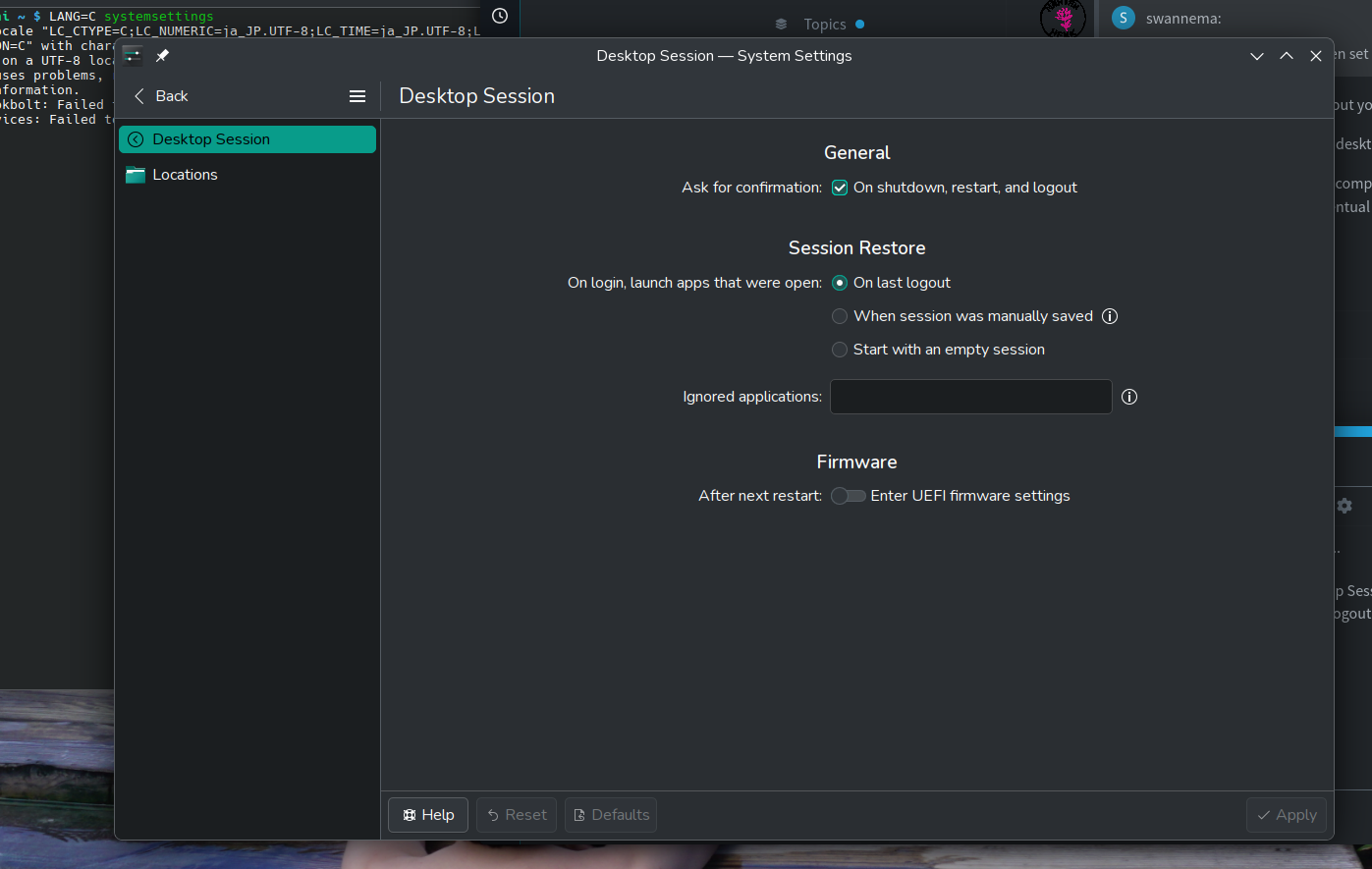
If this isn’t what OP is talking about, hopefully they’ll enlighten us on with at least a kinfo.
@LaloKP, have you checked journalctl?
If it makes any difference, they’re a notebook and a desktop. Yes, I was talking about the time it now takes for both my machines to turn off.
If there is something going on, journalctl -b -1 -r after a reboot should show it.
Please be aware that the output is in reverse order (first line is the last event in time) and you may need sudo to run the command.
Thanks, I’ll try that later today
Could this be the culprit? That’s the only suspicious thing that I could see
localhost.localdomain auditctl[3054]: backlog_wait_time 60000
That’s normal.
You should see very shortly after that message something like:
auditd.service: Deactivated successfully.
and shortly before it
auditd: The audit daemon is exiting.
That entire block is just telling you that auditd is shutting down.
I would look for a gap of 20-30 seconds in the time column if there is really something waiting to shutdown and eventually timing out.
Specifically, look for everything happening after you see:
systemd[####]: Started dbus-:1.2-org.kde.LogoutPrompt@1.service.
systemd[####]: Started dbus-:1.2-org.kde.Shutdown@1.service.
I had a look at the whole thing and I can’t find any line that looks suspicious.
Meanwhile, I discovered that the “delay” is also happening when I log out to change user, I get a black screen with the mouse pointer in the middle, but it will take 30-35 seconds before it shows the user switch screen. Now I have confirmation that something is wrong, because the whole thing was instantaneous before.
Go the a TTY/console, login as your user and do:
sudo systemctl disable display-manager-legacy.service
sudo systemctl enable --force sddm,service
sudo reboot
And see if that fixes things
Aaargh, that should have been:
sudo systemctl disable display-manager-legacy.service
sudo systemctl enable --force sddm.service
sudo reboot
I’m also seeing delayed shutdowns and logouts after the recent Plasma update. In my case, journalctl shows a ~30 second gap followed by a plasmashell timeout:
$ sudo journalctl -r

[...]
Oct 20 12:56:27 RKV systemd[4134]: plasma-plasmashell.service: Consumed 19.106s CPU time over 34min 7.127s wall clock time.
Oct 20 12:56:27 RKV systemd[4134]: Stopped KDE Plasma Workspace.
Oct 20 12:56:27 RKV systemd[4134]: plasma-plasmashell.service: Failed with result 'timeout'.
Oct 20 12:56:27 RKV systemd[4134]: plasma-plasmashell.service: Main process exited, code=killed, status=9/KILL
Oct 20 12:56:27 RKV systemd[4134]: plasma-plasmashell.service: Killing process 8864 (plasmashell) with signal SIGKILL.
Oct 20 12:56:27 RKV systemd[4134]: plasma-plasmashell.service: State 'stop-sigterm' timed out. Killing.
Oct 20 12:55:59 RKV systemd[1]: packagekit.service: Consumed 1.181s CPU time over 20.043s wall clock time.
Oct 20 12:55:59 RKV systemd[1]: packagekit.service: Deactivated successfully.
Oct 20 12:55:59 RKV PackageKit[12161]: daemon quit
Oct 20 12:55:49 RKV systemd[1]: NetworkManager-dispatcher.service: Deactivated successfully.
Oct 20 12:55:48 RKV plasmashell[8864]: QObject::disconnect: Unexpected nullptr parameter
Oct 20 12:55:47 RKV systemd[4134]: app-org.kde.kate@80f926cda2574db9ad804df284d761c5.service: Consumed 33.199s CPU time over 33min 24.137s wall clock time.
Oct 20 12:55:47 RKV systemd[4134]: plasma-kded6.service: Consumed 1.068s CPU time over 33min 26.979s wall clock time.
Oct 20 12:55:47 RKV systemd[4134]: Stopped KDE Daemon 6.
Oct 20 12:55:47 RKV systemd[4134]: app-org.kde.konsole-11309.scope: Consumed 19.256s CPU time over 9min 37.855s wall clock time.
[...]
This is right after logging out and in again (no reboot in between).
A web search for the plasmashell timeout line led me to a few similar reports, including recent KDE bug tracker issues:
1 Like
Glad to see I’m not senile and it’s not only on my side