sudo tail -100 /var/log/cups/error_log
D [29/Jul/2026:05:33:36 +1000] cupsdSetBusyState: newbusy="Not busy", busy="Active clients"
D [29/Jul/2026:05:33:36 +1000] cupsdAddCert: Adding certificate for PID 0
D [29/Jul/2026:05:33:36 +1000] Discarding unused server-started event...
D [29/Jul/2026:05:33:36 +1000] cupsdSetBusyState: newbusy="Not busy", busy="Not busy"
D [29/Jul/2026:05:33:37 +1000] Report: clients=0
D [29/Jul/2026:05:33:37 +1000] Report: jobs=4
D [29/Jul/2026:05:33:37 +1000] Report: jobs-active=0
D [29/Jul/2026:05:33:37 +1000] Report: printers=0
D [29/Jul/2026:05:33:37 +1000] Report: stringpool-string-count=336
D [29/Jul/2026:05:33:37 +1000] Report: stringpool-alloc-bytes=5264
D [29/Jul/2026:05:33:37 +1000] Report: stringpool-total-bytes=5664
D [29/Jul/2026:05:33:53 +1000] cupsdSetBusyState: newbusy="Active clients", busy="Not busy"
D [29/Jul/2026:05:33:53 +1000] [Client 1] Server address is "/run/cups/cups.sock".
D [29/Jul/2026:05:33:53 +1000] [Client 1] Accepted from localhost (Domain)
D [29/Jul/2026:05:33:53 +1000] [Client 1] Waiting for request.
D [29/Jul/2026:05:33:53 +1000] [Client 1] PUT /admin/conf/cupsd.conf HTTP/1.1
D [29/Jul/2026:05:33:53 +1000] cupsdSetBusyState: newbusy="Active clients", busy="Active clients"
D [29/Jul/2026:05:33:53 +1000] [Client 1] Read: status=200, state=9
D [29/Jul/2026:05:33:53 +1000] [Client 1] No authentication data provided.
D [29/Jul/2026:05:33:53 +1000] cupsdIsAuthorized: username=""
D [29/Jul/2026:05:33:53 +1000] [Client 1] cupsdSendHeader: code=401, type="text/html", auth_type=0
D [29/Jul/2026:05:33:53 +1000] [Client 1] WWW-Authenticate: Basic realm=\"CUPS\", PeerCred, Local trc=\"y\"
D [29/Jul/2026:05:33:53 +1000] [Client 1] Closing connection.
D [29/Jul/2026:05:33:53 +1000] cupsdSetBusyState: newbusy="Not busy", busy="Active clients"
D [29/Jul/2026:05:33:53 +1000] cupsdSetBusyState: newbusy="Active clients", busy="Not busy"
D [29/Jul/2026:05:33:53 +1000] [Client 2] Server address is "/run/cups/cups.sock".
D [29/Jul/2026:05:33:53 +1000] [Client 2] Accepted from localhost (Domain)
D [29/Jul/2026:05:33:53 +1000] [Client 2] Waiting for request.
D [29/Jul/2026:05:33:53 +1000] cupsdSetBusyState: newbusy="Active clients", busy="Active clients"
D [29/Jul/2026:05:33:53 +1000] [Client 3] Server address is "/run/cups/cups.sock".
D [29/Jul/2026:05:33:53 +1000] [Client 3] Accepted from localhost (Domain)
D [29/Jul/2026:05:33:53 +1000] [Client 3] Waiting for request.
D [29/Jul/2026:05:33:53 +1000] [Client 2] HTTP_STATE_WAITING Closing for error 32 (Broken pipe)
D [29/Jul/2026:05:33:53 +1000] [Client 2] Closing connection.
D [29/Jul/2026:05:33:53 +1000] cupsdSetBusyState: newbusy="Not busy", busy="Active clients"
D [29/Jul/2026:05:33:53 +1000] cupsdSetBusyState: newbusy="Active clients", busy="Not busy"
D [29/Jul/2026:05:33:53 +1000] [Client 4] Server address is "/run/cups/cups.sock".
D [29/Jul/2026:05:33:53 +1000] [Client 4] Accepted from localhost (Domain)
D [29/Jul/2026:05:33:53 +1000] [Client 4] Waiting for request.
D [29/Jul/2026:05:33:53 +1000] [Client 3] HTTP_STATE_WAITING Closing for error 32 (Broken pipe)
D [29/Jul/2026:05:33:53 +1000] [Client 3] Closing connection.
D [29/Jul/2026:05:33:53 +1000] cupsdSetBusyState: newbusy="Not busy", busy="Active clients"
D [29/Jul/2026:05:33:53 +1000] [Client 4] PUT /admin/conf/cupsd.conf HTTP/1.1
D [29/Jul/2026:05:33:53 +1000] cupsdSetBusyState: newbusy="Active clients", busy="Not busy"
D [29/Jul/2026:05:33:53 +1000] [Client 4] Read: status=200, state=9
D [29/Jul/2026:05:33:53 +1000] [Client 4] Authorized as root using PeerCred.
D [29/Jul/2026:05:33:53 +1000] cupsdIsAuthorized: username="root"
I [29/Jul/2026:05:33:53 +1000] [Client 4] Installing config file "/etc/cups/cupsd.conf"...
D [29/Jul/2026:05:33:53 +1000] [Client 4] cupsdSendHeader: code=201, type="(null)", auth_type=0
D [29/Jul/2026:05:33:53 +1000] cupsdSetBusyState: newbusy="Not busy", busy="Active clients"
D [29/Jul/2026:05:33:53 +1000] [Client 4] Closing connection.
D [29/Jul/2026:05:33:53 +1000] cupsdSetBusyState: newbusy="Not busy", busy="Not busy"
E [29/Jul/2026:05:33:53 +1000] Scheduler shutting down due to program error.
D [29/Jul/2026:05:33:53 +1000] Discarding unused server-stopped event...
D [29/Jul/2026:05:33:53 +1000] Creating KeepAlive/PID file "/var/cache/cups/org.cups.cupsd".
I [29/Jul/2026:05:33:53 +1000] Saving job.cache...
D [29/Jul/2026:05:33:53 +1000] cupsdStopSelect()
I [29/Jul/2026:05:33:53 +1000] Listening to 0.0.0.0:631 (IPv4)
I [29/Jul/2026:05:33:53 +1000] Listening to [v1.::]:631 (IPv6)
I [29/Jul/2026:05:33:53 +1000] Remote access is enabled.
D [29/Jul/2026:05:33:53 +1000] Added auto ServerAlias localhost.localdomain
D [29/Jul/2026:05:33:53 +1000] Added auto ServerAlias localhost
I [29/Jul/2026:05:33:53 +1000] Loaded configuration file "/etc/cups/cupsd.conf"
D [29/Jul/2026:05:33:53 +1000] Using keychain "/etc/cups/ssl" for server name "localhost.localdomain".
I [29/Jul/2026:05:33:53 +1000] Using default TempDir of /var/spool/cups/tmp...
I [29/Jul/2026:05:33:53 +1000] Configured for up to 100 clients.
I [29/Jul/2026:05:33:53 +1000] Allowing up to 100 client connections per host.
I [29/Jul/2026:05:33:53 +1000] Full reload is required.
I [29/Jul/2026:05:33:53 +1000] Loaded MIME database from "/usr/share/cups/mime" and "/etc/cups": 78 types, 114 filters...
I [29/Jul/2026:05:33:53 +1000] Generating printcap /etc/printcap...
I [29/Jul/2026:05:33:53 +1000] Loading job cache file "/var/cache/cups/job.cache"...
E [29/Jul/2026:05:33:53 +1000] [Job 3] Files have gone away.
D [29/Jul/2026:05:33:53 +1000] Scanning /var/spool/cups for jobs...
I [29/Jul/2026:05:33:53 +1000] Full reload complete.
D [29/Jul/2026:05:33:53 +1000] cupsdCleanFiles(path="/var/spool/cups/tmp", pattern="(null)")
I [29/Jul/2026:05:33:53 +1000] Cleaning out old files in "/var/spool/cups/tmp".
D [29/Jul/2026:05:33:53 +1000] cupsdCleanFiles(path="/var/cache/cups", pattern="*.ipp")
I [29/Jul/2026:05:33:53 +1000] Cleaning out old files in "/var/cache/cups".
D [29/Jul/2026:05:33:53 +1000] service_checkin: pid=9754
D [29/Jul/2026:05:33:53 +1000] service_checkin: 1 listeners.
D [29/Jul/2026:05:33:53 +1000] service_add_listener: Listener #1 at fd 3, "/run/cups/cups.sock".
D [29/Jul/2026:05:33:53 +1000] service_add_listener: Adding new listener #1 for /run/cups/cups.sock.
D [29/Jul/2026:05:33:53 +1000] Creating KeepAlive/PID file "/var/cache/cups/org.cups.cupsd".
I [29/Jul/2026:05:33:53 +1000] Listening to 0.0.0.0:631 on fd 7...
I [29/Jul/2026:05:33:53 +1000] Listening to [v1.::]:631 on fd 8...
I [29/Jul/2026:05:33:53 +1000] Listening to /run/cups/cups.sock on fd 3...
I [29/Jul/2026:05:33:53 +1000] Resuming new connection processing...
D [29/Jul/2026:05:33:53 +1000] Avahi server connection now available, registering printers for Bonjour broadcasting.
I [29/Jul/2026:05:33:53 +1000] Defaulting to "DNSSDHostName linux.local".
D [29/Jul/2026:05:33:53 +1000] cupsdSetBusyState: newbusy="Not busy", busy="Active clients"
D [29/Jul/2026:05:33:53 +1000] cupsdAddCert: Adding certificate for PID 0
D [29/Jul/2026:05:33:53 +1000] Discarding unused server-started event...
D [29/Jul/2026:05:33:53 +1000] cupsdSetBusyState: newbusy="Not busy", busy="Not busy"
D [29/Jul/2026:05:33:54 +1000] Report: clients=0
D [29/Jul/2026:05:33:54 +1000] Report: jobs=0
D [29/Jul/2026:05:33:54 +1000] Report: jobs-active=0
D [29/Jul/2026:05:33:54 +1000] Report: printers=0
D [29/Jul/2026:05:33:54 +1000] Report: stringpool-string-count=336
D [29/Jul/2026:05:33:54 +1000] Report: stringpool-alloc-bytes=5264
D [29/Jul/2026:05:33:54 +1000] Report: stringpool-total-bytes=5664
alfred@localhost:~> zypper se -si nss-mdns
Loading repository data...
Reading installed packages...

S  | Name           | Type    | Version    | Arch   | Repository
---+----------------+---------+------------+--------+-----------
i  | nss-mdns       | package | 0.15.1-2.4 | x86_64 | repo-oss
i  | nss-mdns-32bit | package | 0.15.1-2.4 | x86_64 | repo-oss
alfred@localhost:~> sudo tail -100 /var/log/cups/error_log
[sudo] password for root:
D [29/Jul/2026:05:42:22 +1000] cupsdIsAuthorized: username="root"
D [29/Jul/2026:05:42:22 +1000] [Client 3] 2.0 CUPS-Add-Modify-Printer 18
D [29/Jul/2026:05:42:22 +1000] CUPS-Add-Modify-Printer ipp://alfred@localhost:631/printers/MFC-L8690CDW_series
D [29/Jul/2026:05:42:22 +1000] cupsdIsAuthorized: username="root"
D [29/Jul/2026:05:42:22 +1000] MFC-L8690CDW_series device-uri: Unknown scheme in URI
I [29/Jul/2026:05:42:22 +1000] Setting MFC-L8690CDW_series device-uri to "dnssd://Brother%20MFC-L8690CDW%20series._ipp._tcp.local/?uuid=e3248000-80ce-11db-8000-3c2af4507d30" (was "file:///dev/null".)
I [29/Jul/2026:05:42:22 +1000] Setting MFC-L8690CDW_series printer-is-accepting-jobs to 1 (was 0.)
D [29/Jul/2026:05:42:22 +1000] Discarding unused printer-state-changed event...
D [29/Jul/2026:05:42:22 +1000] cupsdDeregisterPrinter(p=0x55ff65946a00(MFC-L8690CDW_series), removeit=1)
I [29/Jul/2026:05:42:22 +1000] Setting MFC-L8690CDW_series printer-is-shared to 0 (was 1.)
I [29/Jul/2026:05:42:22 +1000] Setting MFC-L8690CDW_series printer-state to 3 (was 5.)
D [29/Jul/2026:05:42:22 +1000] Discarding unused printer-state-changed event...
D [29/Jul/2026:05:42:22 +1000] cupsdMarkDirty(P----)
D [29/Jul/2026:05:42:22 +1000] cupsdSetBusyState: newbusy="Active clients and dirty files", busy="Active clients"
D [29/Jul/2026:05:42:22 +1000] cupsdMarkDirty(P----)
D [29/Jul/2026:05:42:22 +1000] cupsdSetBusyState: newbusy="Active clients and dirty files", busy="Active clients and dirty files"
D [29/Jul/2026:05:42:22 +1000] load_ppd: Loading /etc/cups/ppd/MFC-L8690CDW_series.ppd...
D [29/Jul/2026:05:42:22 +1000] cupsdRegisterPrinter(p=0x55ff65946a00(MFC-L8690CDW_series))
D [29/Jul/2026:05:42:22 +1000] [Client 3] Creating PPD in background thread.
D [29/Jul/2026:05:42:22 +1000] Report: clients=1
D [29/Jul/2026:05:42:22 +1000] Report: jobs=0
D [29/Jul/2026:05:42:22 +1000] Report: jobs-active=0
D [29/Jul/2026:05:42:22 +1000] Report: printers=1
D [29/Jul/2026:05:42:22 +1000] Report: stringpool-string-count=426
D [29/Jul/2026:05:42:22 +1000] Report: stringpool-alloc-bytes=7120
D [29/Jul/2026:05:42:22 +1000] Report: stringpool-total-bytes=7832
D [29/Jul/2026:05:42:22 +1000] MFC-L8690CDW_series: Generating PPD file from "dnssd://Brother%20MFC-L8690CDW%20series._ipp._tcp.local/?uuid=e3248000-80ce-11db-8000-3c2af4507d30"...
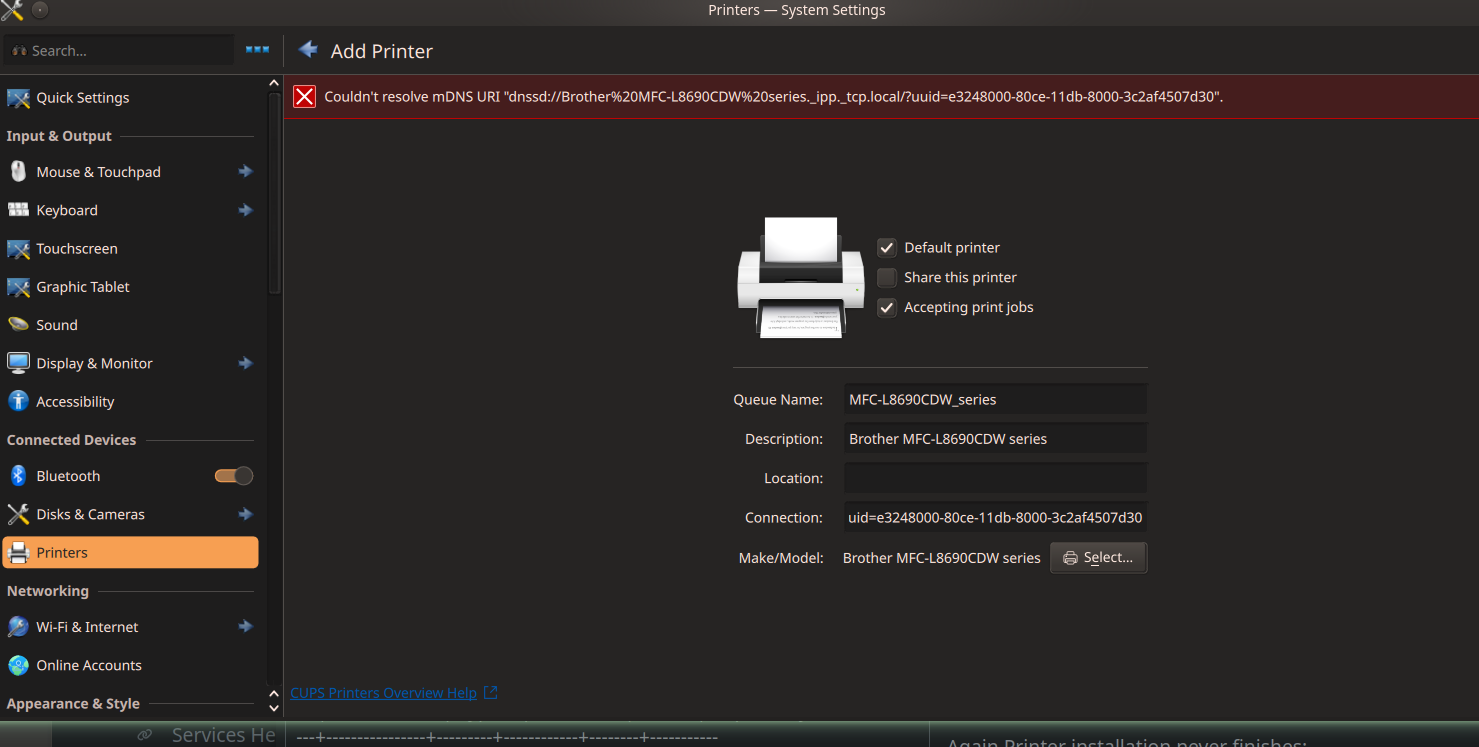
E [29/Jul/2026:05:42:29 +1000] MFC-L8690CDW_series: Couldn't resolve mDNS URI "dnssd://Brother%20MFC-L8690CDW%20series._ipp._tcp.local/?uuid=e3248000-80ce-11db-8000-3c2af4507d30".
D [29/Jul/2026:05:42:29 +1000] CUPS-Add-Modify-Printer server-error-device-error: Couldn\'t resolve mDNS URI \"dnssd://Brother%20MFC-L8690CDW%20series._ipp._tcp.local/?uuid=e3248000-80ce-11db-8000-3c2af4507d30\".
E [29/Jul/2026:05:42:29 +1000] [Client 3] Returning IPP server-error-device-error for CUPS-Add-Modify-Printer (ipp://alfred@localhost:631/printers/MFC-L8690CDW_series) from localhost.
D [29/Jul/2026:05:42:29 +1000] [Client 3] Content-Length: 221
D [29/Jul/2026:05:42:29 +1000] [Client 3] cupsdSendHeader: code=200, type="application/ipp", auth_type=0
D [29/Jul/2026:05:42:29 +1000] [Client 3] con->http=0x55ff658f3eb0
D [29/Jul/2026:05:42:29 +1000] [Client 3] cupsdWriteClient error=0, used=0, state=HTTP_STATE_POST_SEND, data_encoding=HTTP_ENCODING_LENGTH, data_remaining=221, response=0x55ff659073d0(IPP_STATE_DATA), pipe_pid=0, file=-1
D [29/Jul/2026:05:42:29 +1000] [Client 3] Writing IPP response, ipp_state=IPP_STATE_DATA, old wused=0, new wused=0
D [29/Jul/2026:05:42:29 +1000] [Client 3] bytes=0, http_state=0, data_remaining=221
D [29/Jul/2026:05:42:29 +1000] [Client 3] Flushing write buffer.
D [29/Jul/2026:05:42:29 +1000] [Client 3] New state is HTTP_STATE_WAITING
D [29/Jul/2026:05:42:29 +1000] [Client 3] Waiting for request.
D [29/Jul/2026:05:42:29 +1000] cupsdSetBusyState: newbusy="Dirty files", busy="Active clients and dirty files"
D [29/Jul/2026:05:42:29 +1000] cupsdMarkDirty(P----)
D [29/Jul/2026:05:42:29 +1000] cupsdSetBusyState: newbusy="Dirty files", busy="Dirty files"
D [29/Jul/2026:05:42:29 +1000] Discarding unused printer-stopped event...
D [29/Jul/2026:05:42:29 +1000] cupsdDeregisterPrinter(p=0x55ff65946a00(MFC-L8690CDW_series), removeit=1)
D [29/Jul/2026:05:42:29 +1000] Calling FindDeviceById(cups-MFC-L8690CDW_series)
D [29/Jul/2026:05:42:29 +1000] FindDeviceById failed: org.freedesktop.DBus.Error.ServiceUnknown:The name is not activatable
I [29/Jul/2026:05:42:53 +1000] Saving printers.conf...
D [29/Jul/2026:05:42:53 +1000] cupsdSetBusyState: newbusy="Not busy", busy="Dirty files"
D [29/Jul/2026:05:43:39 +1000] [Client 3] POST /admin/ HTTP/1.1
D [29/Jul/2026:05:43:39 +1000] cupsdSetBusyState: newbusy="Active clients", busy="Not busy"
D [29/Jul/2026:05:43:39 +1000] [Client 3] Read: status=200, state=6
D [29/Jul/2026:05:43:39 +1000] [Client 3] Authorized as "root" using Basic.
D [29/Jul/2026:05:43:39 +1000] cupsdIsAuthorized: username="root"
D [29/Jul/2026:05:43:39 +1000] [Client 3] 2.0 CUPS-Add-Modify-Printer 19
D [29/Jul/2026:05:43:39 +1000] CUPS-Add-Modify-Printer ipp://alfred@localhost:631/printers/MFC-L8690CDW_series
D [29/Jul/2026:05:43:39 +1000] cupsdIsAuthorized: username="root"
D [29/Jul/2026:05:43:39 +1000] MFC-L8690CDW_series device-uri: Unknown scheme in URI
I [29/Jul/2026:05:43:39 +1000] Setting MFC-L8690CDW_series device-uri to "dnssd://Brother%20MFC-L8690CDW%20series._ipp._tcp.local/?uuid=e3248000-80ce-11db-8000-3c2af4507d30" (was "file:///dev/null".)
I [29/Jul/2026:05:43:39 +1000] Setting MFC-L8690CDW_series printer-is-accepting-jobs to 1 (was 0.)
D [29/Jul/2026:05:43:39 +1000] Discarding unused printer-state-changed event...
D [29/Jul/2026:05:43:39 +1000] cupsdDeregisterPrinter(p=0x55ff65867700(MFC-L8690CDW_series), removeit=1)
I [29/Jul/2026:05:43:39 +1000] Setting MFC-L8690CDW_series printer-is-shared to 0 (was 1.)
I [29/Jul/2026:05:43:39 +1000] Setting MFC-L8690CDW_series printer-state to 3 (was 5.)
D [29/Jul/2026:05:43:39 +1000] Discarding unused printer-state-changed event...
D [29/Jul/2026:05:43:39 +1000] cupsdMarkDirty(P----)
D [29/Jul/2026:05:43:39 +1000] cupsdSetBusyState: newbusy="Active clients and dirty files", busy="Active clients"
D [29/Jul/2026:05:43:39 +1000] cupsdMarkDirty(P----)
D [29/Jul/2026:05:43:39 +1000] cupsdSetBusyState: newbusy="Active clients and dirty files", busy="Active clients and dirty files"
D [29/Jul/2026:05:43:39 +1000] load_ppd: Loading /etc/cups/ppd/MFC-L8690CDW_series.ppd...
D [29/Jul/2026:05:43:39 +1000] cupsdRegisterPrinter(p=0x55ff65867700(MFC-L8690CDW_series))
D [29/Jul/2026:05:43:39 +1000] [Client 3] Creating PPD in background thread.
D [29/Jul/2026:05:43:39 +1000] Report: clients=1
D [29/Jul/2026:05:43:39 +1000] Report: jobs=0
D [29/Jul/2026:05:43:39 +1000] Report: jobs-active=0
D [29/Jul/2026:05:43:39 +1000] Report: printers=1
D [29/Jul/2026:05:43:39 +1000] Report: stringpool-string-count=427
D [29/Jul/2026:05:43:39 +1000] Report: stringpool-alloc-bytes=7120
D [29/Jul/2026:05:43:39 +1000] Report: stringpool-total-bytes=7840
D [29/Jul/2026:05:43:39 +1000] MFC-L8690CDW_series: Generating PPD file from "dnssd://Brother%20MFC-L8690CDW%20series._ipp._tcp.local/?uuid=e3248000-80ce-11db-8000-3c2af4507d30"...
E [29/Jul/2026:05:43:46 +1000] MFC-L8690CDW_series: Couldn't resolve mDNS URI "dnssd://Brother%20MFC-L8690CDW%20series._ipp._tcp.local/?uuid=e3248000-80ce-11db-8000-3c2af4507d30".
D [29/Jul/2026:05:43:46 +1000] CUPS-Add-Modify-Printer server-error-device-error: Couldn\'t resolve mDNS URI \"dnssd://Brother%20MFC-L8690CDW%20series._ipp._tcp.local/?uuid=e3248000-80ce-11db-8000-3c2af4507d30\".
E [29/Jul/2026:05:43:46 +1000] [Client 3] Returning IPP server-error-device-error for CUPS-Add-Modify-Printer (ipp://alfred@localhost:631/printers/MFC-L8690CDW_series) from localhost.
D [29/Jul/2026:05:43:46 +1000] [Client 3] Content-Length: 221
D [29/Jul/2026:05:43:46 +1000] [Client 3] cupsdSendHeader: code=200, type="application/ipp", auth_type=0
D [29/Jul/2026:05:43:46 +1000] [Client 3] con->http=0x55ff658f3eb0
D [29/Jul/2026:05:43:46 +1000] [Client 3] cupsdWriteClient error=0, used=0, state=HTTP_STATE_POST_SEND, data_encoding=HTTP_ENCODING_LENGTH, data_remaining=221, response=0x55ff65935210(IPP_STATE_DATA), pipe_pid=0, file=-1
D [29/Jul/2026:05:43:46 +1000] [Client 3] Writing IPP response, ipp_state=IPP_STATE_DATA, old wused=0, new wused=0
D [29/Jul/2026:05:43:46 +1000] [Client 3] bytes=0, http_state=0, data_remaining=221
D [29/Jul/2026:05:43:46 +1000] [Client 3] Flushing write buffer.
D [29/Jul/2026:05:43:46 +1000] [Client 3] New state is HTTP_STATE_WAITING
D [29/Jul/2026:05:43:46 +1000] [Client 3] Waiting for request.
D [29/Jul/2026:05:43:46 +1000] cupsdSetBusyState: newbusy="Dirty files", busy="Active clients and dirty files"
D [29/Jul/2026:05:43:46 +1000] cupsdMarkDirty(P----)
D [29/Jul/2026:05:43:46 +1000] cupsdSetBusyState: newbusy="Dirty files", busy="Dirty files"
D [29/Jul/2026:05:43:46 +1000] Discarding unused printer-stopped event...
D [29/Jul/2026:05:43:46 +1000] cupsdDeregisterPrinter(p=0x55ff65867700(MFC-L8690CDW_series), removeit=1)
D [29/Jul/2026:05:43:46 +1000] Calling FindDeviceById(cups-MFC-L8690CDW_series)
D [29/Jul/2026:05:43:46 +1000] FindDeviceById failed: org.freedesktop.DBus.Error.ServiceUnknown:The name is not activatable
I [29/Jul/2026:05:44:10 +1000] Saving printers.conf...
D [29/Jul/2026:05:44:10 +1000] cupsdSetBusyState: newbusy="Not busy", busy="Dirty files"