afalb
December 19, 2025, 12:49pm
1
Hi,
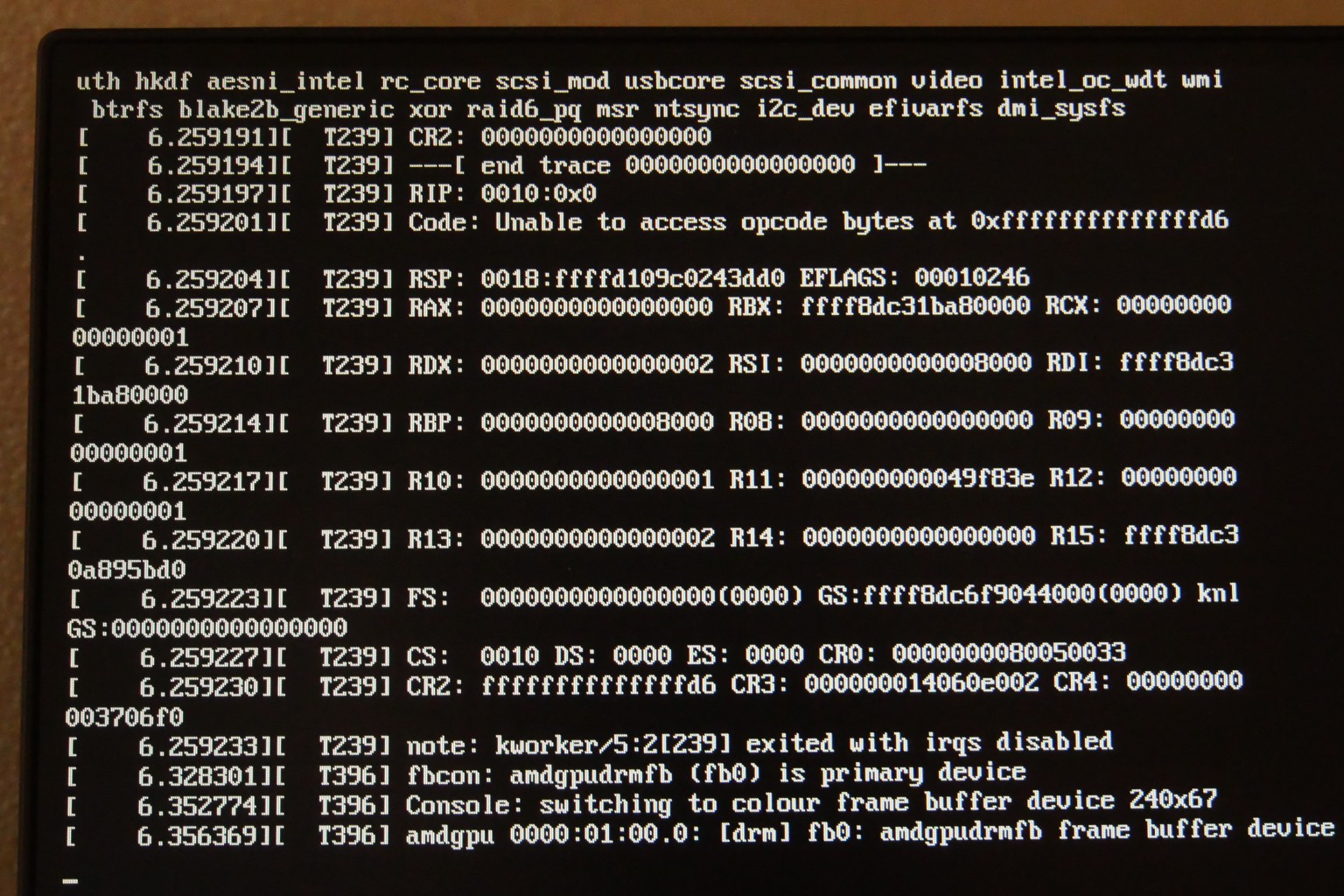
This problem looks a bit similar to what was posted in Kernel 6.18 Won't Let Me Boot , but I don’t have a chance to get into the system. So I have to boot an older kernel 6.17 to access my PC.
Almost 2 years ago, I had a problem with logging in to the PC. This was discussed in After TW update, I can't enter anything at login screen and resulted in adding the following kernel parameters to the boot loader:
amdgpu.cik_support=1 amdgpu.si_support=0
Removing them from the boot loader avoids the crash, but the system boots with a reduced screen resolution, which is not exactly what I want.
Here some information about the graphics system when booted from a 6.17 kernel:
inxi -GSaz
System:
  Kernel: 6.17.9-1-default arch: x86_64 bits: 64 compiler: gcc v: 15.2.1
    clocksource: tsc avail: hpet,acpi_pm
    parameters: BOOT_IMAGE=/boot/vmlinuz-6.17.9-1-default
    root=UUID=923a6911-03da-4598-b9c3-4f09aec7b10a splash=silent quiet
    modprobe.blacklist=radeon amdgpu.cik_support=0 amdgpu.si_support=1
    mitigations=auto
  Desktop: KDE Plasma v: 6.5.4 tk: Qt v: N/A info: frameworks v: 6.21.0
    wm: kwin_x11 tools: avail: xscreensaver vt: 2 dm: 1: GDM v: 49.2 2: SDDM
    note: stopped Distro: openSUSE Tumbleweed 20251216
Graphics:
  Device-1: Advanced Micro Devices [AMD/ATI] Mars LE [Radeon HD 8530M / R5
    M240] vendor: Sapphire driver: amdgpu v: kernel alternate: radeon
    arch: GCN-1 code: Southern Islands process: TSMC 28nm built: 2011-20 pcie:
    gen: 2 speed: 5 GT/s lanes: 8 ports: active: HDMI-A-1 empty: DVI-D-1,VGA-1
    bus-ID: 01:00.0 chip-ID: 1002:6607 class-ID: 0300 temp: 32.0 C
  Device-2: Sunplus Innovation hama C-600 Pro Webcam
    driver: snd-usb-audio,uvcvideo type: USB rev: 2.0 speed: 480 Mb/s lanes: 1
    mode: 2.0 bus-ID: 1-8.3:4 chip-ID: 1bcf:28c4 class-ID: 0102
    serial: <filter>
  Display: x11 server: X.Org v: 21.1.21 with: Xwayland v: 24.1.8
    compositor: kwin_x11 driver: X: loaded: amdgpu unloaded: modesetting,vesa
    alternate: fbdev dri: radeonsi gpu: amdgpu display-ID: :0 screens: 1
  Screen-1: 0 s-res: 1920x1080 s-dpi: 96 s-size: 508x285mm (20.00x11.22")
    s-diag: 582mm (22.93")
  Monitor-1: HDMI-A-1 mapped: HDMI-A-0 model: BenQ GW2780 serial: <filter>
    built: 2017 res: mode: 1920x1080 hz: 60 scale: 100% (1) dpi: 82 gamma: 1.2
    size: 598x336mm (23.54x13.23") diag: 686mm (27") ratio: 16:9 modes:
    max: 1920x1080 min: 720x400
  API: EGL v: 1.5 hw: drv: amd radeonsi platforms: device: 0 drv: radeonsi
    device: 1 drv: swrast gbm: drv: kms_swrast surfaceless: drv: radeonsi x11:
    drv: radeonsi inactive: wayland
  API: OpenGL v: 4.6 compat-v: 4.5 vendor: amd mesa v: 25.3.1 glx-v: 1.4
    direct-render: yes renderer: AMD Radeon R5 M240 (radeonsi oland ACO DRM
    3.64 6.17.9-1-default) device-ID: 1002:6607 memory: 1.95 GiB unified: no
  API: Vulkan v: 1.4.335 layers: 2 device: 0 type: discrete-gpu name: AMD
    Radeon R5 M240 (RADV OLAND) driver: mesa radv v: 25.3.1
    device-ID: 1002:6607 surfaces: N/A device: 1 type: cpu name: llvmpipe
    (LLVM 21.1.6 256 bits) driver: mesa llvmpipe v: 25.3.1 (LLVM 21.1.6)
    device-ID: 10005:0000 surfaces: N/A
  Info: Tools: api: clinfo, eglinfo, glxinfo, vulkaninfo
    de: kscreen-console,kscreen-doctor wl: wayland-info
    x11: xdpyinfo, xprop, xrandr
Any help with this would be highly appreciated.
First, are you updating properly with zypper dup?
I checked my wife’s machine. She has a Radeon RX580 running Wayland and it’s using the amdgpu driver on a fully updated Tumbleweed. Have you tried Wayland?
Here’s the info in case it helps.
> inxi -GSaz
System:
 Kernel: 6.18.1-1-default arch: x86_64 bits: 64 compiler: gcc v: 15.2.1
   clocksource: tsc avail: hpet,acpi_pm
   parameters: BOOT_IMAGE=/boot/vmlinuz-6.18.1-1-default
   root=UUID=xxxxxxxx-xxxx-xxxx-xxxx-xxxxxxxx splash=silent quiet
   mitigations=auto
 Desktop: KDE Plasma v: 6.5.4 tk: Qt v: N/A info: frameworks v: 6.21.0
   wm: kwin_wayland tools: avail: xscreensaver vt: 3 dm: SDDM Distro: openSUSE
   Tumbleweed 20251217
Graphics:
 Device-1: Advanced Micro Devices [AMD/ATI] Ellesmere [Radeon RX
   470/480/570/570X/580/580X/590] vendor: Sapphire Nitro+ driver: amdgpu
   v: kernel arch: GCN-4 code: Arctic Islands process: GF 14nm built: 2016-20
   pcie: gen: 3 speed: 8 GT/s lanes: 16 ports: active: DP-1 empty: DP-2,
   DVI-D-1, HDMI-A-1, HDMI-A-2 bus-ID: 08:00.0 chip-ID: 1002:67df
   class-ID: 0300 temp: 24.0 C
 Display: wayland server: X.org v: 1.21.1.21 with: Xwayland v: 24.1.8
   compositor: kwin_wayland driver: X: loaded: modesetting unloaded: vesa
   alternate: fbdev dri: radeonsi gpu: amdgpu display-ID: 0
 Monitor-1: DP-1 model: Dell G2723HN serial: <filter> built: 2023 res:
   mode: 1920x1080 hz: 120 scale: 100% (1) dpi: 82 gamma: 1.2
   size: 597x336mm (23.5x13.23") diag: 685mm (27") ratio: 16:9 modes:
   max: 1920x1080 min: 720x400
 API: EGL v: 1.5 hw: drv: amd radeonsi platforms: device: 0 drv: radeonsi
   device: 1 drv: swrast gbm: drv: kms_swrast surfaceless: drv: radeonsi
   wayland: drv: radeonsi x11: drv: radeonsi
 API: OpenGL v: 4.6 compat-v: 4.5 vendor: amd mesa v: 25.3.1 glx-v: 1.4
   direct-render: yes renderer: AMD Radeon RX 580 Series (radeonsi polaris10
   ACO DRM 3.64 6.18.1-1-default) device-ID: 1002:67df memory: 7.81 GiB
   unified: no display-ID: :1.0
 API: Vulkan v: 1.4.335 layers: 2 device: 0 type: discrete-gpu name: AMD
   Radeon RX 580 Series (RADV POLARIS10) driver: mesa radv v: 25.3.1
   device-ID: 1002:67df surfaces: N/A device: 1 type: cpu name: llvmpipe
   (LLVM 21.1.6 256 bits) driver: mesa llvmpipe v: 25.3.1 (LLVM 21.1.6)
   device-ID: 10005:0000 surfaces: N/A
 Info: Tools: api: clinfo, eglinfo, glxinfo, vulkaninfo
   de: kscreen-console,kscreen-doctor wl: wayland-info
   x11: xdpyinfo, xprop, xrandr
mrmazda
December 19, 2025, 3:54pm
3
First note that .cik kernel cmdline parameters are specific to GCN-2 GPUs, so your current use of amdgpu.cik_support=0 with your GCN-1 GPU is, or at least should be, inert.
I have a sibling Southern Islands GCN-1 GPU that reproduces your negative 6.18 experience when using boot parameters radeon.si_support=0 amdgpu.si_support=1, but not when excluding them, while both displays run at expected resolutions:
# inxi -GSaz --za --hostname
System:
  Host: fi965 Kernel: 6.18.1-1-default arch: x86_64 bits: 64 compiler: gcc
    v: 15.2.1 clocksource: tsc avail: hpet,acpi_pm
    parameters: root=LABEL=<filter> ipv6.disable=1 net.ifnames=0 noresume
    consoleblank=0
  Desktop: KDE v: 3.5.10 tk: Qt v: 3.3.8c wm: kwin with: kicker vt: 7 dm:
    1: KDM note: stopped 2: XDM Distro: openSUSE Tumbleweed 20251217
Graphics:
  Device-1: Advanced Micro Devices [AMD/ATI] Oland [Radeon HD 8570 / R5 430
    OEM R7 240/340 Radeon 520 OEM] vendor: Dell driver: radeon v: kernel
    alternate: amdgpu arch: GCN-1 code: Southern Islands process: TSMC 28nm
    built: 2011-20 pcie: gen: 1 speed: 2.5 GT/s lanes: 8 link-max: gen: 3
    speed: 8 GT/s ports: active: DP-1,DVI-I-1 empty: none bus-ID: 01:00.0
    chip-ID: 1002:6611 class-ID: 0300 temp: 51.0 C
  Display: x11 server: X.Org v: 21.1.21 compositor: kwin driver: X:
    loaded: modesetting dri: radeonsi gpu: radeon display-ID: :0 screens: 1
  Screen-1: 0 s-res: 4240x1440 s-dpi: 120 s-size: 897x304mm (35.31x11.97")
    s-diag: 947mm (37.29")
  Monitor-1: DP-1 pos: primary,left model: Acer K272HUL serial: <filter>
    built: 2018 res: mode: 2560x1440 hz: 60 scale: 100% (1) dpi: 109 gamma: 1.2
    size: 598x336mm (23.54x13.23") diag: 686mm (27") ratio: 16:9 modes:
    max: 2560x1440 min: 720x400
  Monitor-2: DVI-I-1 pos: right model: Dell P2213 serial: <filter>
    built: 2013 res: mode: 1680x1050 hz: 60 scale: 100% (1) dpi: 90 gamma: 1.2
    size: 473x296mm (18.62x11.65") diag: 558mm (22") ratio: 16:10 modes:
    max: 1680x1050 min: 720x400
...
It works fine with 6.17.9 and LTS 6.12.* kernels too. That said, only yesterday I got this little used PC current with both TW, Slowroll and Mageia 10pre. Last thing before bedtime was Mageia, which locks up booting its 6.18.0 kernel, so, along with Fedora, is on my agenda to investigate today.
The 6.19 kernel will support GCN-1+ and use the amdgpu kernel module by default, so any boot options won’t be needed then.
afalb
December 19, 2025, 9:10pm
5
@jsmith64 :
sudo zypper dup
X11 and Wayland behave exactly the same.
@mrmazda :
@malcolmlewis : So there is hope at the horizon with kernel 6.19.
@afalb It would seem so, so maybe some transition issues with the relevant code move from radeon to amdgpu.
mrmazda
December 19, 2025, 9:57pm
7
Without using radeon.si_support=0 amdgpu.si_support=1 on my GCN-1, Fedora Rawhide’s 6.18.0 kernel on F43 is fine, but reproduces comment #1 using them. Lockup timing with F42 is a little different, but the ill effect is the same with its 6.17.12. Mageia’s 6.18.0 also avoids lockup by omitting those parameters, but the net effect seems to match yours - KMS doesn’t engage, so native screen resolutions are unavailable, only fallback modes.
@afalb , you (should) have (as below) another option besides sticking with 6.17.9 until this gets sorted out upstream and flows down to us: TW offers the 6.12 LTS kernel series along with mainline default. 6.12.62 appeared at the same time as 6.18.1. You could install and run it as long as it takes for 6.18 to get fixed or 6.19 to arrive (fixed?):
sudo al kernel-default
sudo zypper in kernel-longterm
The first locks kernel-default(s) so that it/they will neither be upgraded nor removed until the lock is removed. The second will install 6.12.62 LTS kernel, after which each time a newer LTS is available it will be included with zypper dup in same manner as kernel-default normally does.
# inxi -GSaz --za --hostname
System:
  Host: fi965 Kernel: 6.12.62-1-longterm arch: x86_64 bits: 64 compiler: gcc
    v: 15.2.1 clocksource: tsc avail: hpet,acpi_pm
    parameters: root=LABEL=<filter> ipv6.disable=1 net.ifnames=0
    radeon.si_support=0 amdgpu.si_support=1 noresume
  Desktop: KDE v: 3.5.10 tk: Qt v: 3.3.8c wm: kwin with: kicker vt: 7 dm:
    1: KDM note: stopped 2: XDM Distro: openSUSE Tumbleweed 20251217
Graphics:
  Device-1: Advanced Micro Devices [AMD/ATI] Oland [Radeon HD 8570 / R5 430
    OEM R7 240/340 Radeon 520 OEM] vendor: Dell driver: amdgpu v: kernel
    alternate: radeon arch: GCN-1 code: Southern Islands process: TSMC 28nm
    built: 2011-20 pcie: gen: 1 speed: 2.5 GT/s lanes: 8 link-max: gen: 3
    speed: 8 GT/s ports: active: DP-1,DVI-I-1 empty: none bus-ID: 01:00.0
    chip-ID: 1002:6611 class-ID: 0300 temp: 53.0 C
  Display: x11 server: X.Org v: 21.1.21 compositor: kwin driver: X:
    loaded: modesetting dri: radeonsi gpu: amdgpu display-ID: :0 screens: 1
  Screen-1: 0 s-res: 4240x1440 s-dpi: 120 s-size: 897x304mm (35.31x11.97")
    s-diag: 947mm (37.29")
  Monitor-1: DP-1 pos: primary,left model: Acer K272HUL serial: <filter>
    built: 2018 res: mode: 2560x1440 hz: 60 scale: 100% (1) dpi: 109 gamma: 1.2
    size: 598x336mm (23.54x13.23") diag: 686mm (27") ratio: 16:9 modes:
    max: 2560x1440 min: 720x400
  Monitor-2: DVI-I-1 pos: right model: Dell P2213 serial: <filter>
    built: 2013 res: mode: 1680x1050 hz: 60 scale: 100% (1) dpi: 90 gamma: 1.2
    size: 473x296mm (18.62x11.65") diag: 558mm (22") ratio: 16:10 modes:
    max: 1680x1050 min: 720x400
...
LTS kernel still knows how to use .si and .cik parameters.
I’m puzzled that with our three APUs so closely matched why you get stuck in fallback resolution when the blacklist, .cik and .si parameters are omitted. Do you have what I have for installed firmware?:
# rpm -qa | grep -E 'radeon|amdgpu' | sort
kernel-firmware-amdgpu-20251203-1.1.noarch
kernel-firmware-radeon-20250627-1.1.noarch
libdrm_amdgpu1-2.4.130-1.1.x86_64
libdrm_radeon1-2.4.130-1.1.x86_64
libvulkan_radeon-25.3.1-1.2.x86_64
xf86-video-amdgpu-25.0.0-1.1.x86_64
#
Do you have anything in /etc/X11/xorg.con* that would override automagic driver selection? What about in /etc/modprobe.d/?
afalb
December 20, 2025, 5:28pm
8
@mrmazda , this is what I get for the installed firmware:
amdgpu-versionlist-20.20-1089971.noarch
kernel-firmware-amdgpu-20251203-1.1.noarch
kernel-firmware-radeon-20250627-1.1.noarch
libdrm_amdgpu1-2.4.130-1.1.x86_64
libdrm_amdgpu1-32bit-2.4.130-1.1.x86_64
libdrm_radeon1-2.4.130-1.1.x86_64
libdrm_radeon1-32bit-2.4.130-1.1.x86_64
libvulkan_radeon-25.3.1-1.2.x86_64
libvulkan_radeon-32bit-25.3.1-1.2.x86_64
xf86-video-amdgpu-25.0.0-1.1.x86_64
Looks very much the same as your list, but with the additional 32-bit packets. I removed the 32-bit packets. Didn’t change anything.
But your hint to have a look at the configuration files was a good one:
blacklist radeon
Deleting that file plus removing the amdgpu-related kernel boot parameters fixed the issue.
Thanks a lot to all of you for your patient support.
2 Likes
I’ve also run into this problem with my Tahiti card. But the latest kernel update (6.18.5-1-default) fixed the issue for me. My southern island card is running happily again using the amdgpu driver.
system
February 17, 2026, 1:16pm
10
This topic was automatically closed 30 days after the last reply. New replies are no longer allowed.