Hey folks! Have been running Tumbleweed for a couple of months, and I’m quite happy with it.
I installed it with secureboot enabled, and have been running quite nice. I have noticed that, after upgrading some nvidia drivers a couple of times, I’m no longer getting MOK during boot to prompt me to add the signing keys.
I have tried checking if secure boot is enabled by running mokutil --sb-state, but I’m getting this output:
❯ mokutil --sb-state
This system doesn't support Secure Boot
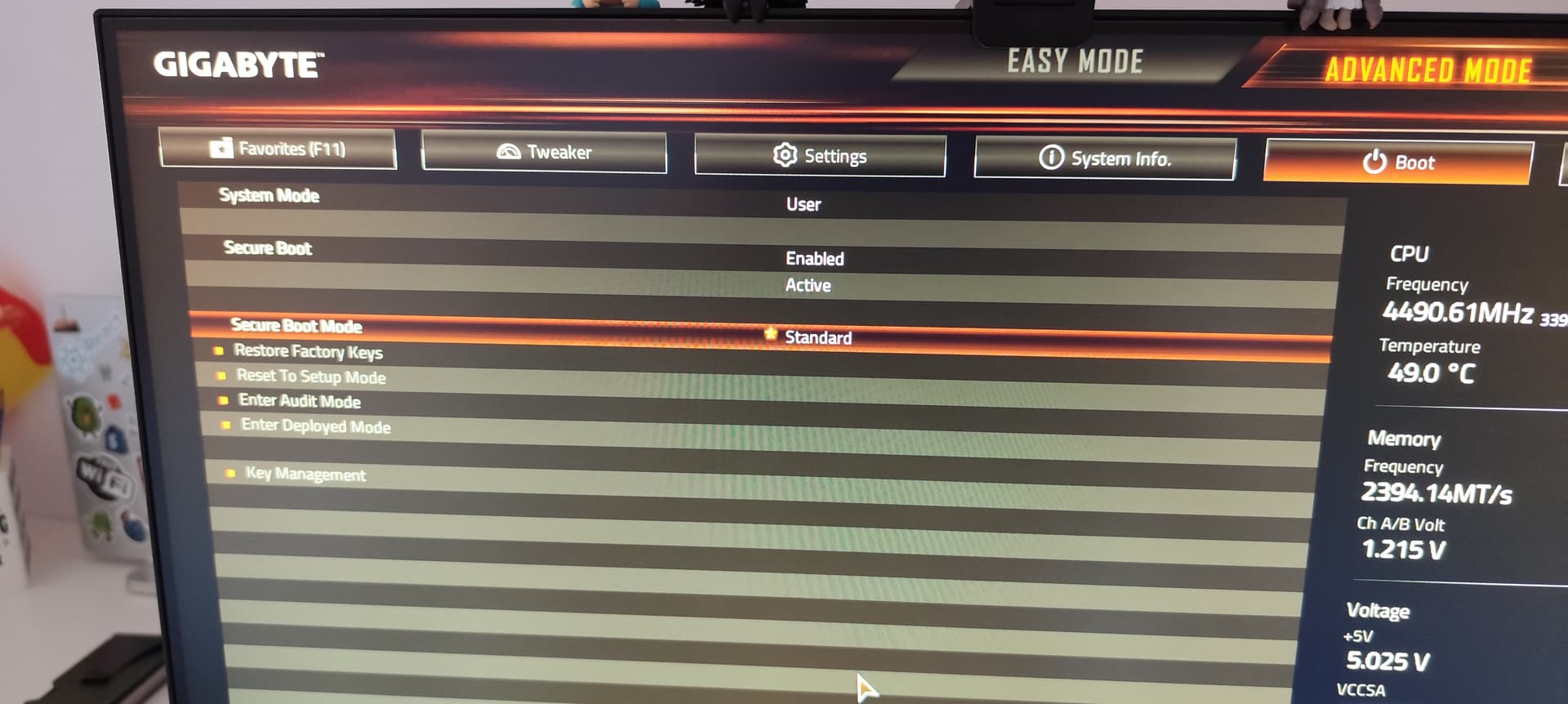
Which is weird, because I don’t recall disabling it. I checked the BIOS setting, and secure boot is enabled.
dmesg also hints that secure boot is disabled during boot sequence:
❯ sudo dmesg | grep secure
[    0.000000] [      T0] secureboot: Secure boot disabled
[    0.015388] [      T0] secureboot: Secure boot disabled
I recall a couple of weeks ago having to troubleshoot some NVIDIA drivers that were not properly signed, so I had to disable and re-enable secure boot to get the desktop to boot (maybe this is what currently causing this issue, who knows).
Here are the outputs of efibootmgr, in case it might be useful for debugging this:
❯ sudo efibootmgr -v
Timeout: 1 seconds
BootOrder: 0002,0000
Boot0000* Windows Boot Manager  HD(1,GPT,96c51cc3-625d-41b4-8b87-744102e29655,0x800,0x32000)/File(\EFI\MICROSOFT\BOOT\BOOTMGFW.EFI)57494e444f5753000100000088000000780000004200430044004f0042004a004500430054003d007b00390064006500610038003600320063002d0035006300640064002d0034006500370030002d0061006300630031002d006600330032006200330034003400640034003700390035007d0000002e000100000010000000040000007fff0400
      dp: 04 01 2a 00 01 00 00 00 00 08 00 00 00 00 00 00 00 20 03 00 00 00 00 00 c3 1c c5 96 5d 62 b4 41 8b 87 74 41 02 e2 96 55 02 02 / 04 04 46 00 5c 00 45 00 46 00 49 00 5c 00 4d 00 49 00 43 00 52 00 4f 00 53 00 4f 00 46 00 54 00 5c 00 42 00 4f 00 4f 00 54 00 5c 00 42 00 4f 00 4f 00 54 00 4d 00 47 00 46 00 57 00 2e 00 45 00 46 00 49 00 00 00 / 7f ff 04 00
    data: 57 49 4e 44 4f 57 53 00 01 00 00 00 88 00 00 00 78 00 00 00 42 00 43 00 44 00 4f 00 42 00 4a 00 45 00 43 00 54 00 3d 00 7b 00 39 00 64 00 65 00 61 00 38 00 36 00 32 00 63 00 2d 00 35 00 63 00 64 00 64 00 2d 00 34 00 65 00 37 00 30 00 2d 00 61 00 63 00 63 00 31 00 2d 00 66 00 33 00 32 00 62 00 33 00 34 00 34 00 64 00 34 00 37 00 39 00 35 00 7d 00 00 00 2e 00 01 00 00 00 10 00 00 00 04 00 00 00 7f ff 04 00
Boot0002* openSUSE Boot Manager (grub2-bls)     HD(2,GPT,2e74af33-a2a5-40eb-ae63-bfc37e54aadb,0x200800,0x200000)/File(\EFI\opensuse\shim.efi)
      dp: 04 01 2a 00 02 00 00 00 00 08 20 00 00 00 00 00 00 00 20 00 00 00 00 00 33 af 74 2e a5 a2 eb 40 ae 63 bf c3 7e 54 aa db 02 02 / 04 04 32 00 5c 00 45 00 46 00 49 00 5c 00 6f 00 70 00 65 00 6e 00 73 00 75 00 73 00 65 00 5c 00 73 00 68 00 69 00 6d 00 2e 00 65 00 66 00 69 00 00 00 / 7f ff 04 00
I tried running mokutil --enable-validation, but it still says that secure boot is not supported.
❯ sudo mokutil --enable-validation
This system doesn't support Secure Boot
Any help is appreciated for enabling back secure boot (and I might also need some help signing some kernel modules that might be currently unsigned). Thanks!

 I can update it after solving the secure boot issue tho

