Hi there,
I’m trying to override a global Desktop Entry in KDE, but my user-level changes in ~/.local/share/applications/ aren’t reflected in the KDE application launcher menu.
I made the same change on another system where it works flawlessly, so I’m a bit puzzled why it doesn’t on this machine.
Would appreciate any hints on why the user copy isn’t taking precedence and how to make KDE honor the overridden Exec line.
What I did
I ran:
desktop-file-install --dir="$HOME/.local/share/applications" \
  --set-key=Exec \
  --set-value="/opt/google/chrome/google-chrome --disable-features=GlobalShortcutsPortal %U" \
  /usr/share/applications/google-chrome.desktop
The expected diff is:
❯ diff /usr/share/applications/google-chrome.desktop ~/.local/share/applications/google-chrome.desktop
108c108
< Exec=/usr/bin/google-chrome-stable %U
---
> Exec=/opt/google/chrome/google-chrome --disable-features=GlobalShortcutsPortal %U
115a116
> X-Desktop-File-Install-Version=0.28
However, the change is not picked up in the KDE Application Launcher:
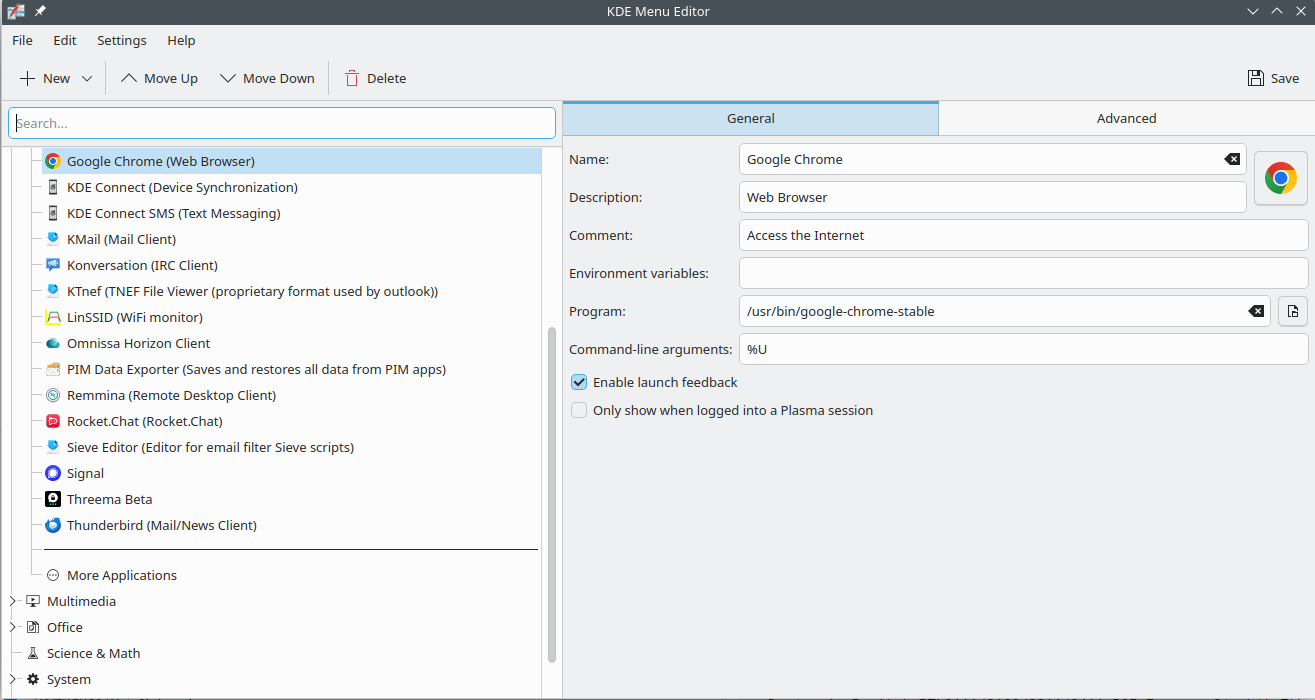
What I’ve tried (unsuccessful)
- Deleting
~/.cache/ksycoca5*and runningkbuildsycoca5 --noincremental - Doing the same with
kbuildsycoca6 - Running
update-desktop-database ~/.local/share/applications
These attempts were based on the related threads below.
Debugging
When I rename the desktop entry to $HOME/.local/share/applications/google-chrome-test.desktop the kde menu is updating ,so it might have something todo with desktop file precedence?
Interestingly, if I rename the desktop entry to ~/.local/share/applications/google-chrome-test.desktop, the KDE menu updates correctly but obviously shows a duplicated entry.
This suggests the issue might be related to desktop file precedence?
Environment
XDG_DATA_DIRS=/home/matthias/.local/share/flatpak/exports/share:/var/lib/flatpak/exports/share:/usr/local/share:/usr/share
System:
  Host: riser Kernel: 6.17.0-1-default arch: x86_64 bits: 64
  Desktop: KDE Plasma v: 6.4.5 Distro: openSUSE Tumbleweed 20251002
Machine:
  Type: Laptop System: LENOVO product: 21K5000GGE v: ThinkPad P14s Gen 4
    serial: <superuser required>
  Mobo: LENOVO model: 21K5000GGE v: SDK0T76530 WIN
    serial: <superuser required> UEFI: LENOVO v: R2FET61W (1.41 )
    date: 11/15/2024
Battery:
  ID-1: BAT0 charge: 53.5 Wh (97.9%) condition: 54.6/52.5 Wh (104%)
CPU:
  Info: 8-core AMD Ryzen 7 PRO 7840U w/ Radeon 780M Graphics [MT MCP]
    speed (MHz): avg: 2326 min/max: 419/5135
Graphics:
  Device-1: Advanced Micro Devices [AMD/ATI] Phoenix1 driver: amdgpu v: kernel
  Device-2: Bison Integrated Camera driver: uvcvideo type: USB
  Display: wayland server: X.org v: 1.21.1.15 with: Xwayland v: 24.1.8
    compositor: kwin_wayland driver: X: loaded: amdgpu
    unloaded: modesetting,vesa dri: radeonsi gpu: amdgpu
    resolution: 1920x1200~60Hz
  API: OpenGL v: 4.6 compat-v: 4.5 vendor: amd mesa v: 25.2.4 renderer: AMD
    Radeon 780M (radeonsi phoenix LLVM 21.1.2 DRM 3.64 6.17.0-1-default)
  Info: Tools: api: eglinfo, glxinfo, vulkaninfo
    de: kscreen-console,kscreen-doctor gpu: amdgpu_top wl: wayland-info
    x11: xdpyinfo, xprop, xrandr
Network:
  Device-1: Realtek RTL8111/8168/8211/8411 PCI Express Gigabit Ethernet
    driver: r8169
  Device-2: Qualcomm QCNFA765 Wireless Network Adapter driver: ath11k_pci
Drives:
  Local Storage: total: 953.87 GiB used: 304.7 GiB (31.9%)
Info:
  Memory: total: 32 GiB note: est. available: 29.02 GiB used: 5.75 GiB (19.8%)
  Processes: 485 Uptime: 0h 5m Shell: Zsh inxi: 3.3.39
