If I log out, the password no longer works and I have to request a new password (token) by email - why? I set a new password and change it to KeePassXC as well. So far all is OK.
After this, a template will appear (update the profile, if I remember correctly), where you should come up with something, but when nothing other than the password has been changed, just save. But it won’t work.
In the end, it happens that I end up on an Ipsilon page and I’m completely lost. Somehow though, I finally managed to log in when I closed Firefox and started over.
I guess my activity can be seen in the Forum logs?
13.10.2023 at 11:00 - 11:40 (EEST - 24-hour clock)
First: this is not the category Forums Feedback, thus your chances that someone administering the forums sees this are considerable less then when you would have put it there. Also take into account that Soapbox will be avoided by many here, special those that are more interested in serious helping in technical problems then in, well … Soapbox stories.
Then: I am not using KeePassXC (but KDE Kwallet) and do not have your problems. One thing is for sure, if you remove all openSUSE related cookies. you are logged out. Same should be done (and as far as I am aware, is done) at logout. As I let FF do this when it stops, I never run into any login problems.
As it seems that more people try to handle this as a technical help request, I have moved this to Forums Feedback.
I doubt it is problem in the forum’s login server. The server only gets what is filled in in the fields, it does not now how the fields are filled in on the client system, typing, some password manager, or whatever.
The only page where keepassxc doesn’t work properly is the opensuse Forum login page.
And yes, I deleted all the accumulated data from Firefox, because I thought there was a good reason for that.
Maybe that’s why things went wrong.
However, it happened that even though I entered my username correctly and copied the new password (ie it should be correct), the password was still not accepted. So this was a manual operation without keepassxc.
There must be some confusion here?
Yes. And this wasn’t the first time this happened and that’s why I wrote about it.
There you can find additional information/log:
13.10.2023 at 11:00 - 11:40 (EEST - 24-hour clock)
I must apologize. This is not true. I use the Firefox password manager for this.
And that brings me to another wild thought. I know nothing about KeePassXC and thus also how it is integrated into Firefox. But are you sure it isn’t Firefox that is filling in (old) credentials?
It seems to me that Firefox that is filling in (old) Credentials and Chromiun also?
But neither browser is intended to store passwords.
I’ve logged out and back in several times this evening, and no problems.
Next, I’ll clear the data saved by Firefox and see how it goes.
You could at least look in FF settings > Privacy and Security > Sign-on and Passwords (or similar names, this is translated from Dutch). if there are entries there.
I tried to turn on the fault situation, but everything worked as it should. Of course, I had to log in to several different pages again, as well as the opensuse forum page, but everything worked fine.
Maybe I’m getting too old…
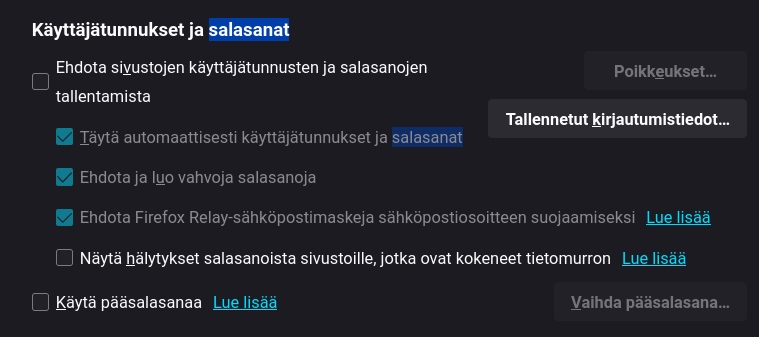
There’s also a picture of how I have my username and password settings in Firefox (and Chormius). I’m sorry that it’s in Finnish, but I think the essential thing is how I’ve put the ticks in the settings.
As I am using this FF feature, I have things of course different. Some remarks.
The first checkbox (you have it off) is something like “Asking before storing of names/passwords”. I have it on and it asks when i enter a site for the first time. I wonder, when you have it off, does it store without asking? or does it not store at all? I do not know.
Then, have you looked in the list (that is what I asked in the first place): Tallennetut kirjautumistledot…??? That is where an eventual (right or wrong) entry is to be seen.
The first field means to suggest saving site usernames and passwords . When it is not selected, the username and password are not saved. This is how I understand the Finnish text.
The saved login information does not contain any data, and that’s how I want it to be, because I want all the information about usernames and passwords to be saved to the keepassxc database.