Supergfxctl Hybrid mode not working (ASUS Gaming Laptops)

First, I want to thank deano_ferrari months back for pointing out a detail I and other missed that allowed the supergfxctl plasmoid to finally work for me in the first place. (I don’t really know hot @'ing someone works, and if its as annoying as @'ing someone on discord).

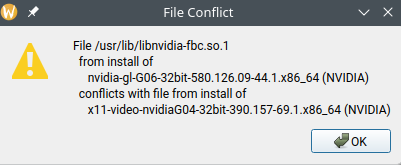
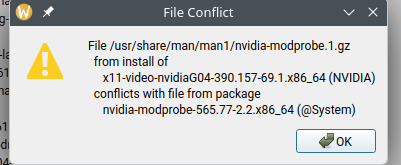
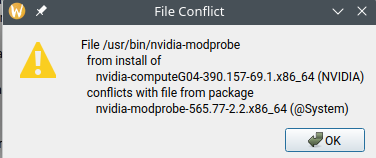
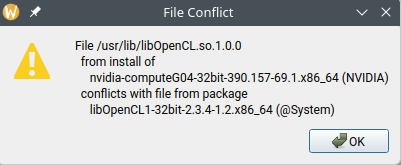
This has worked for many months, though recently is has partially broken, and likely my fault. During one of the updates these past two weeks, an Nvidia update was getting file conflict errors trying to install G04 for some reason, replacing my G06 drivers (below is the errors I got in Myrlyn):

Generally forgetting about the types of Nvidia drivers out there, and getting annoyed at the rest of the non-Nvidia updates failing due to this, I just used the terminal to update and select deinstallation/replace options whenever the file conflicts came up. Actually my computer froze up near the end of the update process, and I hard shut down after seeing nothing will get my computer functioning again that session. My system worked just as normal in spite of this, though supergfxctl seemed to break, specifically with Hybrid mode no longer functioning as intended.


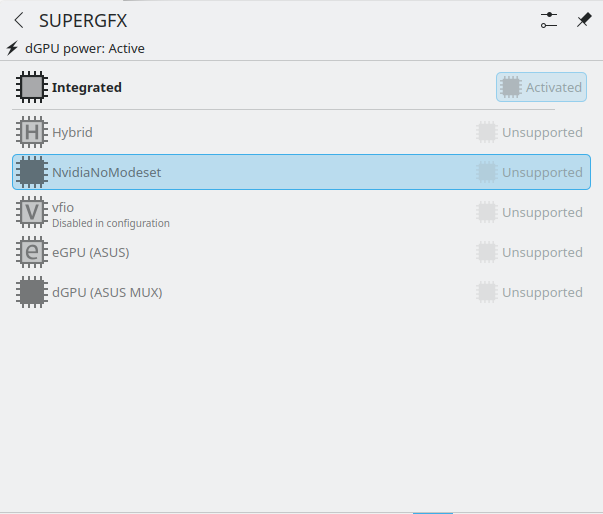
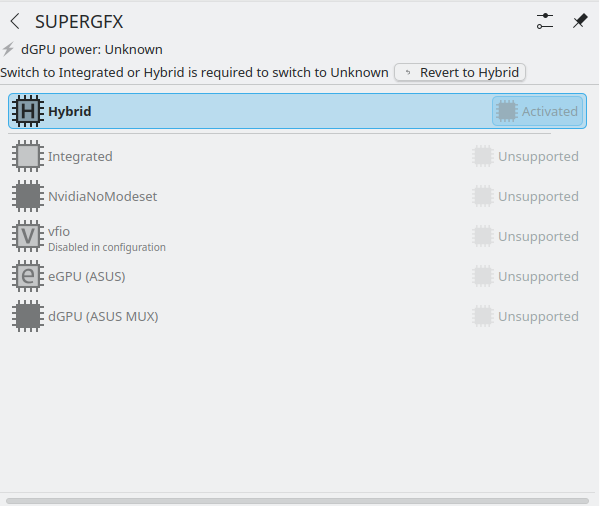
Ignore the other options below Integrated and Hybrid, they’re unsupported.

When switching to Hybrid mode, the dGPU (Nvidia) just stays on all the time without ever turning off/winding down. Some of the options for switching between Integrated or Hybrid are either grayed out or visually do not make sense as shown from the above screenshots (Like the plasmoid saying I am on Integrated while I switched to Hybrid and the dGPU is still active).

For now my laptop has not seen any problems these past few days, but it would be nice to figure out what is happening and how it can be resolved.

Can you start by showing the results of zypper se -i nvidia?

As a slightly unrelated note, this has happened to me before this glitch occurred. When I put my laptop to sleep while its on Integrated mode, turning it back on makes the dGPU always active despite the mode I am in.

Here is what the output looks like:

zypper se -i nvidia
Loading repository data...
Reading installed packages...

S  | Name                           | Summary                                                               | Type
---+--------------------------------+-----------------------------------------------------------------------+--------
i  | kernel-firmware-nvidia         | Kernel firmware files for Nvidia Tegra and graphics drivers           | package
i  | libnvidia-egl-gbm1             | The GBM EGL external platform library                                 | package
i  | libnvidia-egl-gbm1-32bit       | The GBM EGL external platform library                                 | package
i  | libnvidia-egl-wayland1         | The EGLStream-based Wayland external platform                         | package
i  | libnvidia-egl-wayland1-32bit   | The EGLStream-based Wayland external platform                         | package
i  | libnvidia-egl-x111             | NVIDIA XLib and XCB EGL Platform Library                              | package
i  | libnvidia-egl-x111-32bit       | NVIDIA XLib and XCB EGL Platform Library                              | package
i  | libnvidia-gpucomp              | NVIDIA library for shader compilation (nvgpucomp)                     | package
i  | libnvidia-gpucomp-32bit        | NVIDIA library for shader compilation (nvgpucomp)                     | package
i  | nvidia-common-G06              | Common files for the NVIDIA driver packages                           | package
i  | nvidia-compute-G06             | NVIDIA driver for computing with GPGPU                                | package
i  | nvidia-compute-G06-32bit       | 32bit NVIDIA driver for computing with GPGPU                          | package
i  | nvidia-compute-utils-G06       | NVIDIA driver tools for computing with GPGPU                          | package
i+ | nvidia-driver-G06-kmp-default  | NVIDIA graphics driver kernel module for GeForce 700 series and newer | package
i  | nvidia-gl-G06                  | NVIDIA OpenGL libraries for OpenGL acceleration                       | package
i  | nvidia-gl-G06-32bit            | 32bit NVIDIA OpenGL libraries for OpenGL acceleration                 | package
i  | nvidia-libXNVCtrl              | Library providing the NV-CONTROL API                                  | package
i+ | nvidia-modprobe                | NVIDIA kernel module loader                                           | package
i  | nvidia-persistenced            | A daemon to maintain persistent software state in the NVIDIA driver   | package
i  | nvidia-userspace-meta-G06      | Meta package to autoselect NVIDIA userspace packages                  | package
i+ | nvidia-video-G06               | NVIDIA graphics driver for GeForce 700 series and newer               | package
i  | nvidia-video-G06-32bit         | 32bit NVIDIA graphics driver for GeForce 700 series and newer         | package
i+ | openSUSE-repos-Slowroll-NVIDIA | openSUSE NVIDIA repository definitions                                | package

I forgot to mention this, but I did go back from the G04 drivers installed in that messy update back to the G06 drivers I had before this mess. Or at least, tried to reinstall all the G06 drivers I had previously. Once again, my laptop seems fine with the change, with only supergfxctl glitching out from it.

That package list looks ok. Perhaps that left residual inconsistencies, particularly in things supergfxctl relies on.

Can you change the GPU mode ok? For example…

supergfxctl mode integrated
supergfxctl mode hybrid

What do these now report?

supergfxctl status
nvidia-smi

Another thought: You could see if ~/.config/supergfxctl exists, and perhaps remove any stale config there…
rm -rf ~/.config/supergfxctl
Remove the system-wide state…
sudo rm -rf /var/lib/supergfxctl
then restart the user service…
systemctl --user restart supergfxctl
Any different?

I don’t have NVIDIA hardware, and not sure how this would come about, but just to be sure try rebuilding the RPM database with
sudo rpm --rebuilddb
then

sudo zypper ref
sudo zypper clean --all
sudo zypper dup

Hopefully others have further ideas about this.

This doesn’t show package versions. But matching package versions are the most important thing for Nvidia drivers.
Better show
zypper se -si nvidia

1 Like

Ok a lot of suggestions, so I’ll start with the one’s that affect my system the least then go from there:

Here is the output for that command:

zypper se -si nvidia
Loading repository data...
Reading installed packages...

S  | Name                           | Type    | Version                   | Arch   | Repository
---+--------------------------------+---------+---------------------------+--------+----------------
i  | kernel-firmware-nvidia         | package | 20251018-1.1              | noarch | repo-oss
i  | libnvidia-egl-gbm1             | package | 1.1.2.1-1.1               | x86_64 | repo-oss
i  | libnvidia-egl-gbm1-32bit       | package | 1.1.2.1-1.1               | x86_64 | repo-oss
i  | libnvidia-egl-wayland1         | package | 1.1.21-1.1                | x86_64 | update-slowroll
i  | libnvidia-egl-wayland1         | package | 1.1.21-1.1                | x86_64 | repo-oss
i  | libnvidia-egl-wayland1-32bit   | package | 1.1.21-1.1                | x86_64 | update-slowroll
i  | libnvidia-egl-wayland1-32bit   | package | 1.1.21-1.1                | x86_64 | repo-oss
i  | libnvidia-egl-x111             | package | 1.0.5-1.1                 | x86_64 | repo-oss
i  | libnvidia-egl-x111-32bit       | package | 1.0.5-1.1                 | x86_64 | repo-oss
i  | libnvidia-gpucomp              | package | 580.126.09-44.1           | x86_64 | repo-non-free
i  | libnvidia-gpucomp-32bit        | package | 580.126.09-44.1           | x86_64 | repo-non-free
i  | nvidia-common-G06              | package | 580.126.09-44.1           | x86_64 | repo-non-free
i  | nvidia-compute-G06             | package | 580.126.09-44.1           | x86_64 | repo-non-free
i  | nvidia-compute-G06-32bit       | package | 580.126.09-44.1           | x86_64 | repo-non-free
i  | nvidia-compute-utils-G06       | package | 580.126.09-44.1           | x86_64 | repo-non-free
i+ | nvidia-driver-G06-kmp-default  | package | 580.126.09_k6.18.4_1-44.2 | x86_64 | repo-non-free
i  | nvidia-gl-G06                  | package | 580.126.09-44.1           | x86_64 | repo-non-free
i  | nvidia-gl-G06-32bit            | package | 580.126.09-44.1           | x86_64 | repo-non-free
i  | nvidia-libXNVCtrl              | package | 580.119.02-1.1            | x86_64 | repo-oss
i+ | nvidia-modprobe                | package | 580.126.09-22.1           | x86_64 | repo-non-free
i  | nvidia-persistenced            | package | 580.126.09-2.1            | x86_64 | repo-non-free
i  | nvidia-userspace-meta-G06      | package | 580.126.09-31.1           | x86_64 | repo-non-free
i+ | nvidia-video-G06               | package | 580.126.09-44.1           | x86_64 | repo-non-free
i  | nvidia-video-G06-32bit         | package | 580.126.09-44.1           | x86_64 | repo-non-free
i+ | openSUSE-repos-Slowroll-NVIDIA | package | 20250728.9adc675-1.1      | x86_64 | repo-oss

Changing the GPU mode, whether I use the plasmoid or the terminal, does not seem to do any further changes outside of what I outlined in the original post. On integrated, I got the following outputs for supergfxctl status & nvidia-smi:

supergfxctl -S
off
nvidia-smi
NVIDIA-SMI has failed because it couldn't communicate with the NVIDIA driver. Make sure that the latest NVIDIA driver is installed and running.

Btw, for anyone not too knowledgeable on supergfxctl commands, here are all of them from the supergfxctl manual on the ASUS Linux site:

supergfxctl --help
Optional arguments:
  -h, --help         print help message
  -m, --mode         Set graphics mode
  -v, --version      Get supergfxd version
  -g, --get          Get the current mode
  -s, --supported    Get the supported modes
  -V, --vendor       Get the dGPU vendor name
  -S, --status       Get the current power status
  -p, --pend-action  Get the pending user action if any
  -P, --pend-mode    Get the pending mode change if any

When changing to hybrid…

supergfxctl --mode Hybrid
Graphics mode changed to Hybrid. Required user action is: Logout required to complete mode change

After logging out… (side note: sometimes when doing this, it kicks me to the session/desktop environment launcher/changer, so I have to re-login. This is another one of those bugs that have existed before this issue, but are too annoying nor important enough I think to get a separate post? But idk where else to talk about them.)

supergfxctl -S
active
nvidia-smi
NVIDIA-SMI has failed because it couldn't communicate with the NVIDIA driver. Make sure that the latest NVIDIA driver is installed and running.

None of the folders proposed here exist on my system.


Here is the output for all those commands:

sudo rpm --rebuilddb
[sudo] password for root: 
sudo zypper ref
Repository 'update-slowroll' is up to date.                                                                                          
Repository 'repo-non-free' is up to date.                                                                                            
Repository 'asusctl (openSUSE_Tumbleweed)' is up to date.                                                                            
Repository 'repo-non-oss' is up to date.                                                                                             
Repository 'repo-openh264' is up to date.                                                                                            
Repository 'repo-oss' is up to date.                                                                                                 
Repository 'Security tools (openSUSE_Tumbleweed)' is up to date.                                                                     
Repository 'snappy' is up to date.                                                                                                   
All repositories have been refreshed.
sudo zypper clean --all
All repositories have been cleaned up.
sudo zypper dup
Refreshing service 'NVIDIA'.
Refreshing service 'openSUSE'.
Retrieving repository 'repo-non-free' metadata ................................................................................[done]
Building repository 'repo-non-free' cache .....................................................................................[done]
Looking for gpg keys in repository asusctl (openSUSE_Tumbleweed).
  gpgkey=https://download.opensuse.org/repositories/home:/RN:/asusctl/openSUSE_Tumbleweed/repodata/repomd.xml.key
Building repository 'asusctl (openSUSE_Tumbleweed)' cache .....................................................................[done]
Looking for gpg keys in repository repo-non-oss.
  gpgkey=http://download.opensuse.org/slowroll/repo/non-oss/repodata/repomd.xml.key
Retrieving repository 'repo-non-oss' metadata .................................................................................[done]
Building repository 'repo-non-oss' cache ......................................................................................[done]
Retrieving repository 'repo-openh264' metadata ................................................................................[done]
Building repository 'repo-openh264' cache .....................................................................................[done]
Looking for gpg keys in repository repo-oss.
  gpgkey=http://download.opensuse.org/slowroll/repo/oss/repodata/repomd.xml.key
Retrieving repository 'repo-oss' metadata .....................................................................................[done]
Building repository 'repo-oss' cache ..........................................................................................[done]
Looking for gpg keys in repository update-slowroll.
  gpgkey=http://download.opensuse.org/update/slowroll/repo/oss/repodata/repomd.xml.key
Retrieving repository 'update-slowroll' metadata ..............................................................................[done]
Building repository 'update-slowroll' cache ...................................................................................[done]
Looking for gpg keys in repository Security tools (openSUSE_Tumbleweed).
  gpgkey=https://download.opensuse.org/repositories/security/openSUSE_Tumbleweed/repodata/repomd.xml.key
Building repository 'Security tools (openSUSE_Tumbleweed)' cache ..............................................................[done]
Looking for gpg keys in repository snappy.
  gpgkey=https://download.opensuse.org/repositories/system:/snappy/openSUSE_Tumbleweed/repodata/repomd.xml.key
Retrieving repository 'snappy' metadata .......................................................................................[done]
Building repository 'snappy' cache ............................................................................................[done]
Loading repository data...
Reading installed packages...
Warning: You are about to do a distribution upgrade with all enabled repositories. Make sure these repositories are compatible before you continue. See 'man zypper' for more information about this command.
Computing distribution upgrade...
Nothing to do.

Could you please run inxi -SGaz and share the output?

Also…

lsmod | grep nvidia
sudo dmesg | grep -i nvidia

Here are the outputs:

System:
  Kernel: 6.18.6-1.0.4.sr20260101-default arch: x86_64 bits: 64 compiler: gcc
    v: 15.2.1 clocksource: tsc avail: hpet,acpi_pm
    parameters: BOOT_IMAGE=/boot/vmlinuz-6.18.6-1.0.4.sr20260101-default
    root=UUID=6aabb84a-c961-4dd6-9e5f-7c3ea3a8581a splash=silent
    mitigations=auto quiet security=apparmor ia32_emulation=1
    rd.driver.blacklist=nouveau
  Desktop: KDE Plasma v: 6.5.4 tk: Qt v: N/A info: frameworks v: 6.21.0
    wm: kwin_wayland tools: avail: xscreensaver vt: 7 dm: 1: LightDM v: 1.32.0
    note: stopped 2: SDDM note: stopped Distro: openSUSE Tumbleweed-Slowroll
    20260101
Graphics:
  Device-1: Advanced Micro Devices [AMD/ATI] Cezanne [Radeon Vega Series /
    Radeon Mobile Series] vendor: ASUSTeK driver: amdgpu v: kernel arch: GCN-5
    code: Vega process: GF 14nm built: 2017-20 pcie: gen: 3 speed: 8 GT/s
    lanes: 16 ports: active: HDMI-A-1 off: eDP-1 empty: none bus-ID: 04:00.0
    chip-ID: 1002:1638 class-ID: 0300 temp: 56.0 C
  Display: wayland server: X.org v: 1.21.1.21 with: Xwayland v: 24.1.9
    compositor: kwin_wayland driver: X: loaded: modesetting unloaded: vesa
    alternate: fbdev dri: radeonsi gpu: amdgpu display-ID: 0
  Monitor-1: HDMI-A-1 model: Acer K243Y serial: <filter> built: 2020 res:
    mode: 1920x1080 hz: 75 scale: 100% (1) dpi: 93 gamma: 1.2
    size: 527x296mm (20.75x11.65") diag: 604mm (23.8") ratio: 16:9 modes:
    max: 1920x1080 min: 720x400
  Monitor-2: eDP-1 model: Najing CEC Panda 0x005e built: 2020 res: 1920x1080
    dpi: 158 gamma: 1.2 size: 309x174mm (12.17x6.85") diag: 355mm (14")
    ratio: 16:9 modes: max: 1920x1080 min: 640x480
  API: EGL v: 1.5 hw: drv: amd radeonsi platforms: device: 0 drv: radeonsi
    device: 1 drv: swrast gbm: drv: kms_swrast surfaceless: drv: radeonsi
    wayland: drv: radeonsi x11: drv: radeonsi
  API: OpenGL v: 4.6 compat-v: 4.5 vendor: amd mesa v: 25.3.3 glx-v: 1.4
    direct-render: yes renderer: AMD Radeon Graphics (radeonsi renoir ACO DRM
    3.64 6.18.6-1.0.4.sr20260101-default) device-ID: 1002:1638 memory: 500 MiB
    unified: no display-ID: :0.0
  API: Vulkan v: 1.4.335 layers: 8 device: 0 type: integrated-gpu name: AMD
    Radeon Graphics (RADV RENOIR) driver: mesa radv v: 25.3.3
    device-ID: 1002:1638 surfaces: N/A device: 1 type: cpu name: llvmpipe
    (LLVM 21.1.8 256 bits) driver: mesa llvmpipe v: 25.3.3 (LLVM 21.1.8)
    device-ID: 10005:0000 surfaces: N/A
  Info: Tools: api: clinfo, eglinfo, glxinfo, vulkaninfo
    de: kscreen-console,kscreen-doctor gpu: nvidia-smi wl: wayland-info
    x11: xdpyinfo, xprop, xrandr
lsmod | grep nvidia
sudo dmesg | grep -i nvidia
[sudo] password for root: 
[   23.692451] [    T197] input: HDA NVidia HDMI/DP,pcm=3 as /devices/pci0000:00/0000:00:01.1/0000:01:00.1/sound/card0/input23
[   23.692550] [    T197] input: HDA NVidia HDMI/DP,pcm=7 as /devices/pci0000:00/0000:00:01.1/0000:01:00.1/sound/card0/input24
[   23.692652] [    T197] input: HDA NVidia HDMI/DP,pcm=8 as /devices/pci0000:00/0000:00:01.1/0000:01:00.1/sound/card0/input25
[   23.692787] [    T197] input: HDA NVidia HDMI/DP,pcm=9 as /devices/pci0000:00/0000:00:01.1/0000:01:00.1/sound/card0/input26

Also let me know if anything requires that I be in hybrid mode/have the DGPU active. For the most part I am running these command in Integrated mode unless specified.

It may be a while before my next response, its late at night for me.

Huh? There is no nvidia device present at all! Powered down?

Check the UEFI/BIOS GPU mode settings is the next step.

(Emphasis added)

But integrated mode alone still shouldn’t make the NVIDIA device vanish from enumeration. Or maybe it is implemented differently than I expected?

For what its worth, the gpu does appear on (my broken) hybrid mode

System:
  Kernel: 6.18.6-1.0.4.sr20260101-default arch: x86_64 bits: 64 compiler: gcc
    v: 15.2.1 clocksource: tsc avail: hpet,acpi_pm
    parameters: BOOT_IMAGE=/boot/vmlinuz-6.18.6-1.0.4.sr20260101-default
    root=UUID=6aabb84a-c961-4dd6-9e5f-7c3ea3a8581a splash=silent
    mitigations=auto quiet security=apparmor ia32_emulation=1
    rd.driver.blacklist=nouveau
  Desktop: KDE Plasma v: 6.5.4 tk: Qt v: N/A info: frameworks v: 6.21.0
    wm: kwin_wayland tools: avail: xscreensaver vt: 7 dm: 1: LightDM v: 1.32.0
    note: stopped 2: SDDM note: stopped Distro: openSUSE Tumbleweed-Slowroll
    20260101
Graphics:
  Device-1: NVIDIA GA106M [GeForce RTX 3060 Mobile / Max-Q] vendor: ASUSTeK
    driver: N/A alternate: nouveau non-free: 550-580.xx+ status: current (as of
    2025-11; EOL~2026-12-xx) arch: Ampere code: GAxxx process: TSMC n7 (7nm)
    built: 2020-2023 pcie: gen: 3 speed: 8 GT/s lanes: 8 link-max: gen: 4
    speed: 16 GT/s lanes: 16 bus-ID: 01:00.0 chip-ID: 10de:2520 class-ID: 0300
  Device-2: Advanced Micro Devices [AMD/ATI] Cezanne [Radeon Vega Series /
    Radeon Mobile Series] vendor: ASUSTeK driver: amdgpu v: kernel arch: GCN-5
    code: Vega process: GF 14nm built: 2017-20 pcie: gen: 3 speed: 8 GT/s
    lanes: 16 ports: active: HDMI-A-1 off: eDP-1 empty: none bus-ID: 04:00.0
    chip-ID: 1002:1638 class-ID: 0300 temp: 59.0 C
  Display: wayland server: X.org v: 1.21.1.21 with: Xwayland v: 24.1.9
    compositor: kwin_wayland driver: X: loaded: modesetting unloaded: vesa
    alternate: fbdev dri: radeonsi gpu: amdgpu display-ID: 0
  Monitor-1: HDMI-A-1 model: Acer K243Y serial: <filter> built: 2020 res:
    mode: 1920x1080 hz: 75 scale: 100% (1) dpi: 93 gamma: 1.2
    size: 527x296mm (20.75x11.65") diag: 604mm (23.8") ratio: 16:9 modes:
    max: 1920x1080 min: 720x400
  Monitor-2: eDP-1 model: Najing CEC Panda 0x005e built: 2020 res: 1920x1080
    dpi: 158 gamma: 1.2 size: 309x174mm (12.17x6.85") diag: 355mm (14")
    ratio: 16:9 modes: max: 1920x1080 min: 640x480
  API: EGL v: 1.5 hw: drv: amd radeonsi platforms: device: 0 drv: radeonsi
    device: 1 drv: swrast gbm: drv: kms_swrast surfaceless: drv: radeonsi
    wayland: drv: radeonsi x11: drv: radeonsi
  API: OpenGL v: 4.6 compat-v: 4.5 vendor: amd mesa v: 25.3.3 glx-v: 1.4
    direct-render: yes renderer: AMD Radeon Graphics (radeonsi renoir ACO DRM
    3.64 6.18.6-1.0.4.sr20260101-default) device-ID: 1002:1638 memory: 500 MiB
    unified: no display-ID: :0.0
  API: Vulkan v: 1.4.335 layers: 8 device: 0 type: integrated-gpu name: AMD
    Radeon Graphics (RADV RENOIR) driver: mesa radv v: 25.3.3
    device-ID: 1002:1638 surfaces: N/A device: 1 type: cpu name: llvmpipe
    (LLVM 21.1.8 256 bits) driver: mesa llvmpipe v: 25.3.3 (LLVM 21.1.8)
    device-ID: 10005:0000 surfaces: N/A
  Info: Tools: api: clinfo, eglinfo, glxinfo, vulkaninfo
    de: kscreen-console,kscreen-doctor gpu: nvidia-smi wl: wayland-info
    x11: xdpyinfo, xprop, xrandr

So that output (hybrid mode?) shows the NVIDIA device is present the but NVIDIA module not loaded.

Sorry, here’s the other commands in Hybrid mode

lsmod | grep nvidia
sudo dmesg | grep -i nvidia
[sudo] password for root: 
[   24.728134] [    T173] input: HDA NVidia HDMI/DP,pcm=3 as /devices/pci0000:00/0000:00:01.1/0000:01:00.1/sound/card0/input22
[   24.728249] [    T173] input: HDA NVidia HDMI/DP,pcm=7 as /devices/pci0000:00/0000:00:01.1/0000:01:00.1/sound/card0/input23
[   24.728971] [    T173] input: HDA NVidia HDMI/DP,pcm=8 as /devices/pci0000:00/0000:00:01.1/0000:01:00.1/sound/card0/input24
[   24.729386] [    T173] input: HDA NVidia HDMI/DP,pcm=9 as /devices/pci0000:00/0000:00:01.1/0000:01:00.1/sound/card0/input25
[  766.171510] [  T36009] input: HDA NVidia HDMI/DP,pcm=3 as /devices/pci0000:00/0000:00:01.1/0000:01:00.1/sound/card0/input32
[  766.171621] [  T36009] input: HDA NVidia HDMI/DP,pcm=7 as /devices/pci0000:00/0000:00:01.1/0000:01:00.1/sound/card0/input33
[  766.171701] [  T36009] input: HDA NVidia HDMI/DP,pcm=8 as /devices/pci0000:00/0000:00:01.1/0000:01:00.1/sound/card0/input34
[  766.171779] [  T36009] input: HDA NVidia HDMI/DP,pcm=9 as /devices/pci0000:00/0000:00:01.1/0000:01:00.1/sound/card0/input35

Did you get a chance to check UEFI/BIOS settings yet? Not iGPU-only?

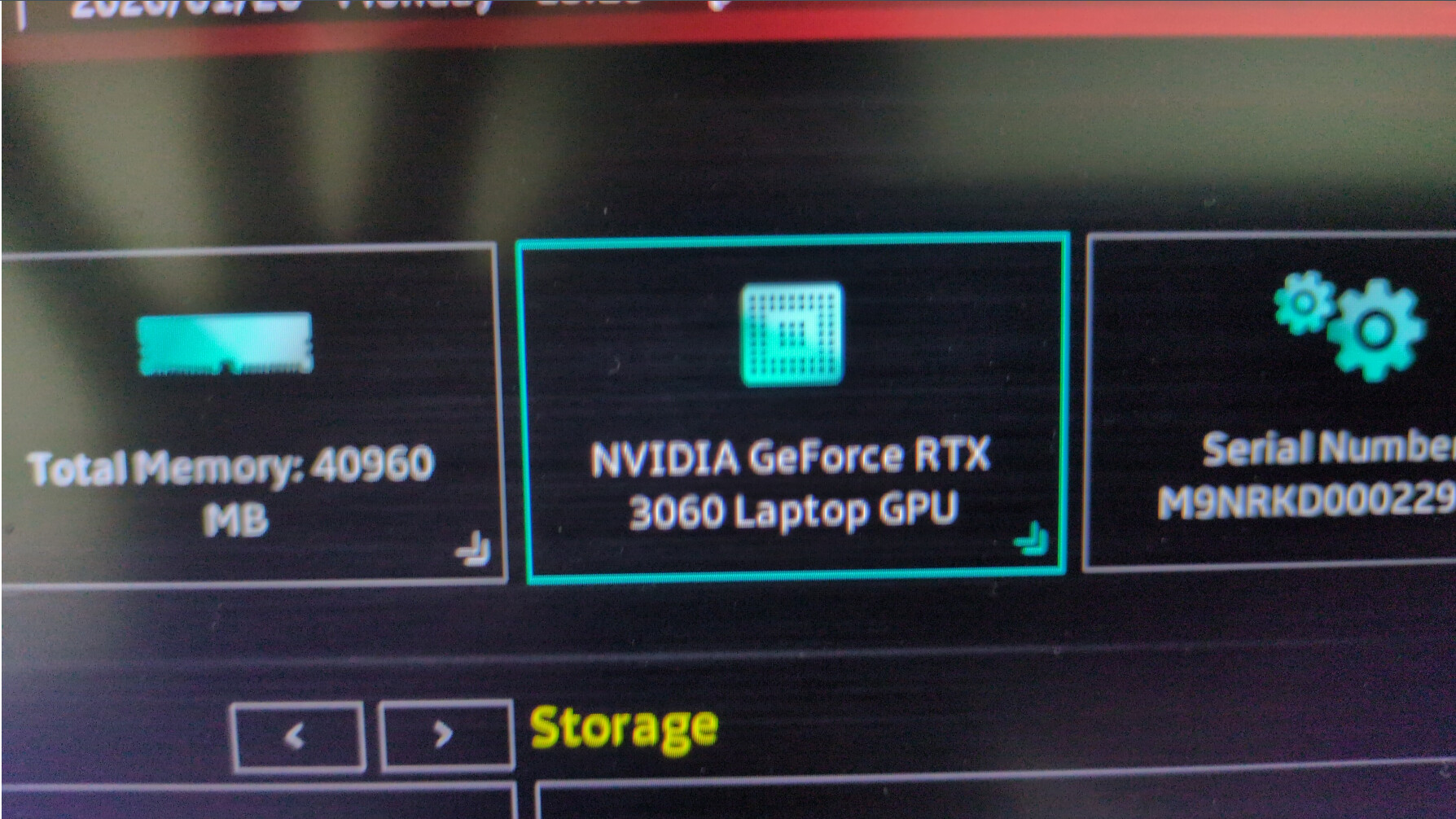
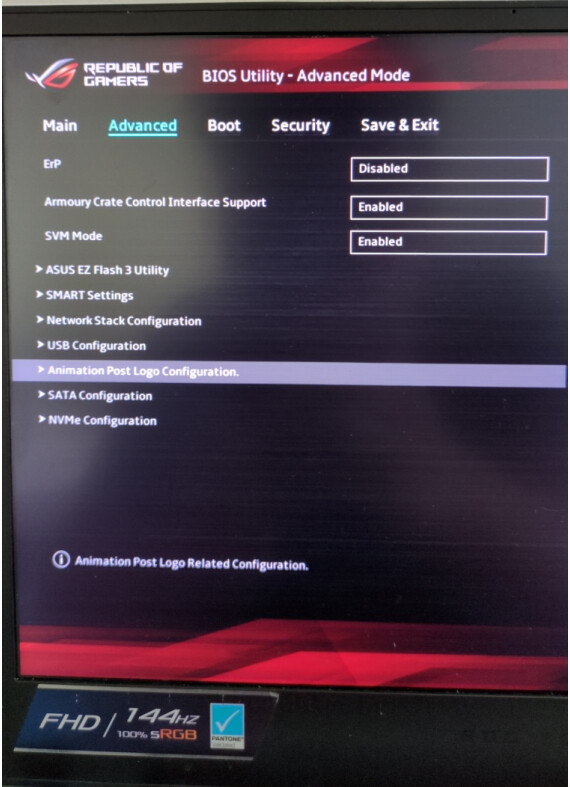
Sorry, what should I be looking at in the BIOS? I did not see any GPU mode settings, or any GPU-related settings at all. I only know that the BIOS recognizes both IGPU and DGPU. I took some pictures of the BIOS that could help show what I am looking at.


I don’t own this hardware so difficult to advise specifically, but the image of the UEFI screen showing the RTX3060 is a good sign - it’s seen by the firmware at least.

From a root terminal do modprobe nvidia, then note any dmesg output generated dmesg | tail -50. Any errors evident?
Also…
mokutil --sb-state