Hi I’m a new OpenSUSE user, thanks for looking at my question.
I ran zypper dup to update my system, which broke my nvidia drivers, so I uninstalled and then reinstalled them. Then I found out my problem, I’m booting into an old kernel version, while my nvidia package is made for a newer kernel. The correct, newer kernel version is installed however:
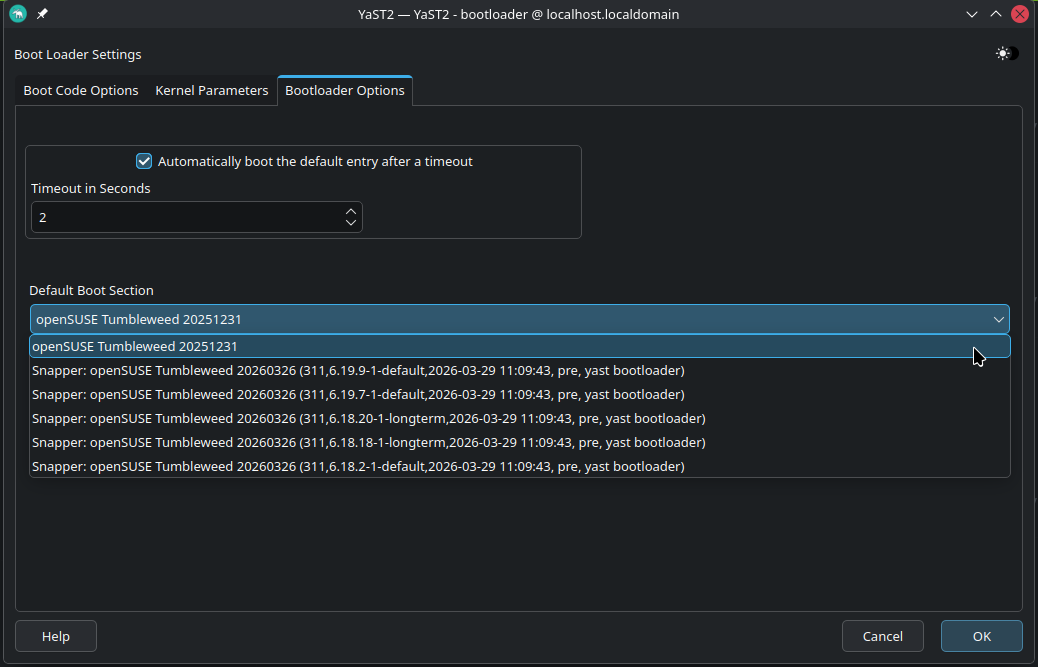
When I start my PC, in the GRUB menu, there is an entry marked 6.19.9-1; when I open that one the system loads and my nvidia drivers work. When I restart however I’m back in my old kernel with broken driver. I have the feeling the GRUB entry is a snapper snapshot of some sort, but I’m not sure how to check that.
An LLM told me to do something with sdbootult (?) but I’m scared to break something.
i am not very experienced but we maybe try to see the snapshot list and see if you’re currently on a rollback or something
could you get the output of sudo snapper list
and while we at it could you give me sudo zypper se -si nvidia
and sudo zypper se -si kernel-longterm
as i remeber 6.18 became longterm now why it’s in your default is it old and didn’t get purged … i am not sure
in my OS slowroll
sudo zypper se -si kernel-longterm
Loading repository data...
Reading installed packages...

S  | Name            | Type    | Version     | Arch   | Repository
---+-----------------+---------+-------------+--------+----------------
i+ | kernel-longterm | package | 6.18.19-1.1 | x86_64 | update-slowroll
I’ve truncated the list a bit, most of the ‘single’ snapshots I’ve created myself. The post/pre were made by previous updates. The last one is a snapshot I tried to make of the nvidia drivers working.
> sudo snapper list
   # │ Type   │ Pre # │ Date                     │ User │ Used Space │ Cleanup │ Description                     │ Userdata
─────┼────────┼───────┼──────────────────────────┼──────┼────────────┼─────────┼─────────────────────────────────┼──────────────
  0  │ single │       │                          │ root │            │         │ current                         │
 63  │ single │       │ Thu Dec 18 11:10:34 2025 │ root │   2.44 GiB │         │ Before nvidia auto uninstall    │
<...>
228  │ single │       │ Sat Jan 24 12:53:18 2026 │ root │  59.40 MiB │         │ 20260124-stable                 │
234* │ single │       │ Sat Jan 24 13:44:09 2026 │ root │ 712.09 MiB │         │ writable copy of #228           │
241  │ single │       │ Sat Jan 24 16:20:38 2026 │ root │ 171.29 MiB │         │ 20260124-sysupd                 │
250  │ single │       │ Sun Feb 15 16:06:01 2026 │ root │ 302.89 MiB │         │ 20260215-stable                 │
255  │ single │       │ Mon Feb 16 15:16:18 2026 │ root │ 944.80 MiB │         │ 20260216-stable                 │
272  │ single │       │ Thu Mar 19 16:01:45 2026 │ root │   2.53 MiB │         │ 20260319-stable                 │
275  │ pre    │       │ Thu Mar 19 16:04:51 2026 │ root │   4.19 MiB │ number  │ zypp(zypper)                    │ important=yes
276  │ post   │   275 │ Thu Mar 19 16:16:36 2026 │ root │  21.75 MiB │ number  │                                 │ important=yes
277  │ pre    │       │ Thu Mar 19 16:28:43 2026 │ root │   1.86 MiB │ number  │ zypp(zypper)                    │ important=yes
278  │ post   │   277 │ Thu Mar 19 16:28:59 2026 │ root │   7.05 MiB │ number  │                                 │ important=yes
279  │ single │       │ Sat Mar 28 16:55:24 2026 │ root │ 384.00 KiB │         │ 20260328-stable                 │
280  │ pre    │       │ Sat Mar 28 16:55:48 2026 │ root │ 384.00 KiB │ number  │ zypp(zypper)                    │ important=yes
281  │ post   │   280 │ Sat Mar 28 17:00:18 2026 │ root │   3.42 MiB │ number  │                                 │ important=yes
282  │ pre    │       │ Sat Mar 28 17:02:21 2026 │ root │   1.33 MiB │ number  │ zypp(zypper)                    │ important=yes
283  │ post   │   282 │ Sat Mar 28 17:02:33 2026 │ root │   1.50 MiB │ number  │                                 │ important=yes
286  │ pre    │       │ Sat Mar 28 17:20:57 2026 │ root │ 512.00 KiB │ number  │ zypp(zypper)                    │ important=yes
287  │ post   │   286 │ Sat Mar 28 17:22:00 2026 │ root │   1.47 GiB │ number  │                                 │ important=yes
298  │ pre    │       │ Sat Mar 28 21:30:25 2026 │ root │ 961.77 MiB │ number  │ zypp(myrlyn)                    │ important=no
299  │ post   │   298 │ Sat Mar 28 21:30:37 2026 │ root │ 176.00 KiB │ number  │                                 │ important=no
300  │ pre    │       │ Sat Mar 28 21:35:46 2026 │ root │ 176.00 KiB │ number  │ zypp(myrlyn)                    │ important=no
301  │ post   │   300 │ Sat Mar 28 21:36:21 2026 │ root │ 448.00 KiB │ number  │                                 │ important=no
302  │ pre    │       │ Sat Mar 28 21:51:02 2026 │ root │ 272.00 KiB │ number  │ zypp(zypper)                    │ important=no
303  │ post   │   302 │ Sat Mar 28 21:51:29 2026 │ root │  16.00 KiB │ number  │                                 │ important=no
304  │ single │       │ Sat Mar 28 22:04:51 2026 │ root │  16.00 KiB │         │ 20260328-stable-nvidiaupdate    │
As I undertstand it the kmp-default version refers to the kernel 6.19.9 it expects:
“start your PC”, whatever that might mean: is your system working as expected?
If so, perform a “zypper dup” (just to be sure everything is indeed up to date).
Check that you are indeed running the current kernel by:
~> uname -r
6.19.9-1-default
If you get the result shown above, update the bootloader by issuing sudo update-bootloader; that should have been done by zypper dupbut possibly something went wrong.
Reboot (I don’t know what you exactly mean by “restart”).
If after reboot uname -r shows something different from 6.19.9-1-default there is something wrong with your bootloader that should be fixed.
after some searching sdbootutil is for grub2-bls
i didn’t use it yet i installed TW from a wile so ago i am on grub-efi it became the default recently
acroding to this annoucment i don’t have any first hand experience with it but sdbootutil reliant on snapper according to to this github page
that’s explain the a lot of snapper config
you maybe try to to rebuild all the boot entries like stated in the article
i am sure there is more elegant solution like editing the grub configuration but due to my lake of knowledge you could boot into 6.19.9-1.1 and remove the 6.18.2-1.1 version using this command sudo zypper rm kernel-default=6.18.2-1.1 that’s should initiate grub recordes update while removing and should fix every thing at least in theory
just please check the output and make sure ther nothing important being removed
after that i would suggest locking the kernel update and nvidia drivers because they can get out sync you can see my recent post about it
you can use myrln to lock the kernel and nvidia drivers
there is script in the post stated above but it didn’t succeed for me for some reason
Please be aware that the only Nvidia driver you have currently installed works only with the 6.19.9 default kernel.
So, unless you have dual graphics on your system, any other kernel installed and any other boot option is not going to work.
thank you for correcting me i made the assumption that sdbootutil is exclusive to grub2-bls after reading the announcement i should have read more
i didn’t verify you’re claim yet however i will take your word for it until i verify
That looks to me like a grub2-bls problem, I did run into something similar, by default it did load the oldest instead of the newest kernel.
A warning here, update-bootloader does only part of what is needed to switch from grub2-bls to grub2-efi, I did try and had a boot menu with only memtest and EFI var manager. I did eventually manage this with the instructions you can find in this topic:
@GWigWam be careful, this thread is getting confused, so let’s resume:
you have a boot option that does work (with kernel-default 6.19.9
you are using grub2-bls
the default option for grub2-bls apparently boots kernel-default 6.18.2, the oldest still installed on your system.
So please post the result of update-bootloader --default-settings just to confirm the info above. (Note: issue su - and the root password to perform system management)
If the info above is correct, the right way to fix your system is:
update-bootloader --default ENTRY
where “ENTRY” should be replaced by whatever is needed to boot 6.19.9-1-default.
Since I’m not currently using grub2-bls I should stop here.
If @malcolmlewis chimes is, follow his advice, he is one of the more experienced members here.
That explains why you see a broken boot…
Unless you need the old 6.18.2 kernel for other purposes, I would simply uninstall it and see if update-bootloader fixes things.
If that is not the case, you have to figure out what “ENTRY” will engage the 6.19.9 kernel (or wait for a member with experience with grub2-bls to chime in).
So just to be sure. I would run: sudo zypper remove kernel-default-6.18.2-1.1 to remove the old kernel. And then simply sudo update-bootloadershould fix things, or do I pass some options?