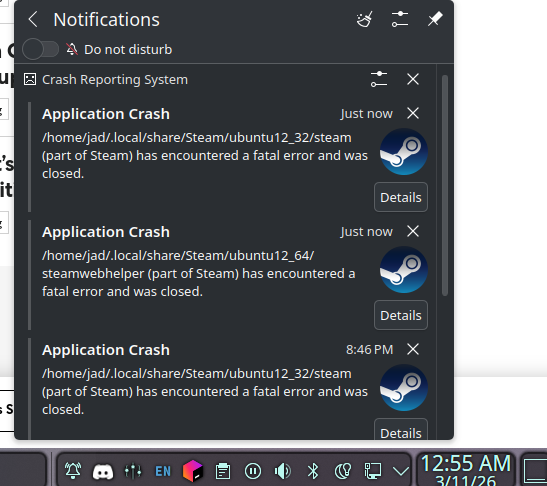
This is kind of driving me nuts because the crashes has been bothering me more often than before.
Basically here’s what happens, my laptop suspends after inactivity, then I start using it and it wakes up, I go on steam then it will crash and re launches then I would use steam normally after this.
Now it does the same thing again, except when it re launches, it crashes steam again, making me have to start steam again manually.
Here’s what I’ve done to try to fix this yet failed:
Clearing steam download cache
opening steam from terminal
re installed steam
purged the entire steam files until there was no steam files visible on dolphin (file manager) then re installed, this worked for a couple of wake from suspends then the issue persists
tried to enable and disable gpu hard acceleration
I even tried launching with STEAM_RUNTIME=O steam in terminal yet the issue still persists
I don’t know what else to try, this is what I see every time it crashes. all this is from the native repo from opensuse TW
Have u tried Steam from Flatpak? Maybe it’s alternative for ur current problem. Since i using steam from flatpak, i’ve no countered or related issue like that
san@NBA:~> flatpak list --user
Name                                  Application ID                                          Version                              Branch
Portal for Teams                      com.github.IsmaelMartinez.teams_for_linux               2.7.9                                stable
OBS Studio                            com.obsproject.Studio                                   32.0.4                               stable
Steam                                 com.valvesoftware.Steam                                 1.0.0.84                             stable
Freedesktop Platform                  org.freedesktop.Platform                                freedesktop-sdk-25.08.8              25.08
i386                                  org.freedesktop.Platform.Compat.i386                                                         25.08
Mesa                                  org.freedesktop.Platform.GL.default                     25.3.3                               24.08
Mesa (Extra)                          org.freedesktop.Platform.GL.default                     25.3.3                               24.08extra
Mesa                                  org.freedesktop.Platform.GL.default                     25.3.5                               25.08
Mesa (Extra)                          org.freedesktop.Platform.GL.default                     25.3.5                               25.08-extra
Mesa                                  org.freedesktop.Platform.GL32.default                   25.3.5                               25.08
Mesa (Extra)                          org.freedesktop.Platform.GL32.default                   25.3.5                               25.08-extra
Codecs Extra Extension                org.freedesktop.Platform.codecs-extra                                                        25.08-extra
i386                                  org.freedesktop.Platform.codecs_extra.i386                                                   25.08-extra
openh264                              org.freedesktop.Platform.openh264                       2.5.1                                2.5.1
KDE Application Platform              org.kde.Platform                                                                             6.8
Zoom                                  us.zoom.Zoom                                            6.7.5.6891                           stable
I agree that checking the Wiki for troubleshooting ideas should be the first port-of-call. I see you tried passing environment variables, so maybe you have gone through the wiki already.
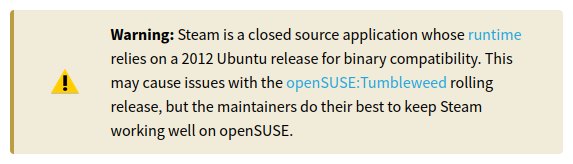
Steam can be finicky on Tumbleweed because it’s built for Ubuntu and expects specific libraries that might be too new on TW, the maintainers do their best to essentially force a square peg into a round hole, but it isn’t easy and sometimes breaks. As 13ihsan92 suggested, the flatpak might fix things for you. It’s an unverified flatpak, but should be trustworthy.
If you do switch to the flatpak, keep in mind that Steam doesn’t play well with SELinux (which is enabled by default in TW). When you install it via zypper, it automatically includes selinux-policy-targeted-gaming as a fix, but if you are using the flatpak then you will need to make sure that package is installed separately.
For what it’s worth, I have steam installed from the official repository and it works mostly flawlessly (slow to start, but after that it works fine and doesn’t crash). But each system is different (notably, my gpu is AMD)
Here are a few things to check:
Is Steam installed from the official repository? What repositories do you have enabled? Check with zypper lr and paste the results here.
Rather than screenshotting the drkonqi notifications, click the “Details” button and copy/paste the actual crash report so we have some idea of what is happening.
Do you have Lutris/Heroic installed? Do they work? They aren’t necessary, but if they work and Steam doesn’t, we know its more likely to be a Steam-specific issue. (In which case, using Lutris might be a workable alternative to the Steam client)
Hi, I’ve seen the replies of both you and 12ihsan92.
I’d like to mention that I prefer sticking to official repo when it comes wanting to use apps, usually I would keep flatpak as a lst resort if I can’t get the nativo repo to work how I want it to be since I’m a little skeptical when it comes to flatpak. so yes steam is from from the official repo.
2:  For part of steam Hint: You are currently not seeing messages from other users and the system.
      Users in the 'systemd-journal' group can see all messages. Pass -q to
      turn off this notice.
           PID: 313224 (steam)
           UID: 1000 (jad)
           GID: 1000 (jad)
        Signal: 11 (SEGV)
     Timestamp: Thu 2026-03-12 12:48:22 +04 (10s ago)
  Command Line: /home/jad/.local/share/Steam/ubuntu12_32/steam -srt-logger-opened
    Executable: /home/jad/.local/share/Steam/ubuntu12_32/steam
 Control Group: /user.slice/user-1000.slice/user@1000.service/app.slice/app-steam@5781d523bc554548b673397b08dadfd5.service
          Unit: user@1000.service
     User Unit: app-steam@5781d523bc554548b673397b08dadfd5.service
         Slice: user-1000.slice
     Owner UID: 1000 (jad)
       Boot ID: 721f3dc3977b4563914a0d8576d46b11
    Machine ID: 97bb9d293c694e2790da5d71a1555950
      Hostname: localhost.localdomain
       Storage: /var/lib/systemd/coredump/core.steam.1000.721f3dc3977b4563914a0d8576d46b11.313224.1773305302000000.zst (present)
  Size on Disk: 49.6M
       Message: Process 313224 (steam) of user 1000 dumped core.

                Stack trace of thread 313224:
                #0  0x0000000000000000 n/a (n/a + 0x0)
                ELF object binary architecture: Intel 80386
For part of Steamwebhelper: I have been trying to get the details and to cause it again but can’t seem to get it, seems like it just crashes without sending this anymore.
Yes, both of them from official repo and yes, both of them work without any issues, I haven’t tried lutris as an alternative to play my steam games so maybe another alternative I could try.
Is there any details you’d like me to provide so this issue can be troubleshooted esily?
Oof. That’s a lot of unformatted output. In future, please put console output and logs into a preformatted text block (use the button that looks like </>) to make it more readable.
You can also do it by using pasting your text between two lines of three accent graves (the ` key) like this:
```
user@host ~ $ ls -l ~
total 20
drwxr-x—. 2 user user 4096 3月 12 13:14 Desktop
drwxr-x—. 9 user user 183 3月 12 22:03 Documents
drwxr-x—. 9 user user 4096 3月 12 22:01 Downloads
drwxr-x—. 4 user user 66 2月 26 20:57 Games
drwxr-x—. 2 user user 6 1月 8 21:14 Music
drwxr-x—. 19 user user 4096 1月 23 11:33 OneDrive
drwxr-x—. 6 user user 103 3月 11 00:23 Pictures
drwxr-x—. 2 user user 6 1月 8 21:14 Public
drwxr-x—. 2 user user 6 1月 8 21:14 Templates
drwxr-x—. 6 user user 4096 3月 11 00:23 Videos
```
This will give you something much prettier like this:
user@host ~ $ ls -l ~
total 20
drwxr-x---.  2 user user 4096  3月 12 13:14  Desktop
drwxr-x---.  9 user user  183  3月 12 22:03  Documents
drwxr-x---.  9 user user 4096  3月 12 22:01  Downloads
drwxr-x---.  4 user user   66  2月 26 20:57  Games
drwxr-x---.  2 user user    6  1月  8 21:14  Music
drwxr-x---. 19 user user 4096  1月 23 11:33  OneDrive
drwxr-x---.  6 user user  103  3月 11 00:23  Pictures
drwxr-x---.  2 user user    6  1月  8 21:14  Public
drwxr-x---.  2 user user    6  1月  8 21:14  Templates
drwxr-x---.  6 user user 4096  3月 11 00:23  Videos
Much easier on the eyes, don’t you think?
Searching for similar issues, it seems like it might be a problem with either the Nvidia drivers or with Steam trying to use the wrong GPU.
I don’t have any experience with Nvidia drivers, but for the sake of gathering more info:
Share the output of journalctl -b | grep -i "steam"
(journalctl -b prints out your system’s logs since last boot and grep -i "steam" trims the output down to only lines that mention “steam”)
Share the output of lspci -k | grep -A3 'VGA'
(lspci -k lists all PCI devices and their kernel drivers grep -A3 'VGA' trims it down to only the line that says ‘VGA’ and the 3 lines after that)
Share the output of zypper se -si nvidia
(zypper se nvidia lists all packages with ‘nvidia’ in the name, -s shows more details like version information, architecture and repository,-i limits the list to installed packages)
That might at least help pinpoint if it’s a driver issue or not. Steam can be very picky about drivers.
Apologies, it’s my first time posting an issue in a forum so I didnt know about this, I will try to put logs and console in a performmated text block next time!
posting lspci -k | grep -A3 'VGA' and reading the output made me get a lil bit confused about my dGPU, how come nouveau, nvidia and nvidia_drm are all being used here? I thought nouveau and proprietary nvidia drivers dont get along and will cause issues (atleast that’s how I’ve experienced it from other distro’s).
Unfortunately for the first command I’m not able to paste the output here since it exceeds the text limit and neither can I upload a .txt file since it is unsupported.
They aren’t ‘in use’ but they are available. Maybe it’s causing a conflict, but the last time I used nvidia in a Linux system was at least 20 years ago, so I’m not sure. Maybe somebody else knows more.
You can use pastebin.com or paste.opensuse.org to share longer output. Both format text nicely. If you use the openSUSE site make sure to change the “Remove after” setting to something more reasonable like a month.
While you’re at it, paste the output from journalctl -b | grep -Ei "nouveau|nvidia" to see what’s being logged about your drivers.
Can you try switching off the auto suspend temporarily, then waiting until CPU load is as close to zero as possible (ideally, 0 0 0 in the output of uptime or “load average” of top, but anything < 3 3 3 may be sufficient), then suspending the system manually.
Does it crash after wake-up/thaw just as before?
What if you wait until CPU load has gone close to zero after wake-up before starting CPU-intensive programs?
(For minimizing CPU load in order to test the suspend/wake-up at minimum CPU load, you could close all application programs, run top and watch the 3 “load average” numbers in the top right corner. It may take a while (in my system 10 minutes, 30 minutes or even longer sometimes) until load is zero and stays there. If CPU-intensive background services are running, then it could be even impossible, I guess.)
I was able to get the first one near 0 but the last 2 were taking forever to reach 0 but was < 2
I closed all application except terminal and yet, the crash still happened, tho I was finally able to get the steamwebhelper crash details which I couldn’t before.
Hint: You are currently not seeing messages from other users and the system.
      Users in the 'systemd-journal' group can see all messages. Pass -q to
      turn off this notice.
           PID: 31634 (steamwebhelper)
           UID: 1000 (jad)
           GID: 1000 (jad)
        Signal: 11 (SEGV)
     Timestamp: Sat 2026-03-14 13:51:28 +04 (2min 16s ago)
  Command Line: ./steamwebhelper -nocrashdialog -lang=en_US -cachedir=/home/jad/.local/share/Steam/config/htmlcache -steampid=31454 -buildid=1773426488 -steamid=0 -logdir=/home/jad/.local/share/Steam/logs -uimode=7 -startcount=0 -steamuniverse=Public -realm=Global -clientui=/home/jad/.local/share/Steam/clientui -steampath=/home/jad/.local/share/Steam/ubuntu12_32/steam -launcher=0 -use_xcomposite_workaround --valve-initial-threadpool-size=8 --valve-enable-site-isolation --enable-smooth-scrolling --password-store=basic --log-file=/home/jad/.local/share/Steam/logs/cef_log.txt --disable-quick-menu --disable-component-update --gaia-url=http://disabled.invalid --enable-features=PlatformHEVCDecoderSupport --disable-features=WinRetrieveSuggestionsOnlyOnDemand,SpareRendererForSitePerProcess,DcheckIsFatal,BlockPromptsIfIgnoredOften,ValveFFmpegAllowLowDelayHEVC
    Executable: /home/jad/.local/share/Steam/ubuntu12_64/steamwebhelper
 Control Group: /user.slice/user-1000.slice/user@1000.service/app.slice/app-steam@6933df496e8348de93640b41e39332a2.service
          Unit: user@1000.service
     User Unit: app-steam@6933df496e8348de93640b41e39332a2.service
         Slice: user-1000.slice
     Owner UID: 1000 (jad)
       Boot ID: 216a5b68702e40fd8f9ce3c6ff459a6f
    Machine ID: 97bb9d293c694e2790da5d71a1555950
      Hostname: localhost.localdomain
       Storage: /var/lib/systemd/coredump/core.steamwebhelper.1000.216a5b68702e40fd8f9ce3c6ff459a6f.31634.1773481888000000.zst (present)
  Size on Disk: 12M
       Message: Process 31634 (steamwebhelper) of user 1000 dumped core.

                Stack trace of thread 31634:
                #0  0x0000000000007621 n/a (n/a + 0x0)
                ELF object binary architecture: AMD x86-64
I’d also like to mention I downgraded my nvidia drivers from G07 to G06 so in case no one gets confused looking at the console output and seeing different nvidia versions and yes, even when downgrading the issue still happens
I’m a bit stumped at this point because I’m not experienced with Nvidia drivers, but I’ll try to help as much as I can.
Just a thought, but have you tried disabling your iGPU (the Iris Xe Graphics) in BIOS to see if it’s causing problems? I’ve read that Steam can sometimes try to use the wrong gpu. (It doesn’t seem to be the case here, but it’s worth a shot)
I tried switcheroo control and tested to launch steam for each device, both on iGPU and dGPU alone and same issue. Would I need to disable atleast one gpu to test what you said or was the switcheroo control equivalent to doing that?
What DE are you using? KDE? Maybe try switch from wayland to x11 or vice versa. I will add that on my Mint HTPC (x11, rdna1) steam has been acting up lately. Basically no window appears in x11 unless it’s launched from the terminal. Not sure if it’s possible to test a different wayland compositor under KDE, but you could also install something like Niri and see if it’s a compositor problem.
Switcheroo should be enough, as far as I understand it , but disabling it in BIOS would be even more certain.
I would try disabling the iGPU first. I’ve never used a hybrid GPU system in Linux so I don’t know much about how they are handled, but it can’t hurt to try to see if something is getting confused about the GPU. If the problem persists with the iGPU disabled, try disabling the dGPU instead and see if improves. It’s in no way a fix, but if it works with only the iGPU available, it suggests an Nvidia driver problem.
A DuckDuckGo search brought up launching Steam with SDL_VIDEO_ALLOW_SCREENSAVER=1 as a workaround for the system crashing after sleep with Steam, but that’s not the same problem you’re having so I don’t think it’s a solution. I also don’t know if they were using X11 or Wayland.
Hey, I did try this for BIOS but it was the same issue unfortunately. However I can’t speak for the last paragraph because I unfortunately moved on to cachyos since this is the only distro that can come as close as opensuse with rolling release and automatic snapshots enabled but with better support for nvidia drivers. Opensuse on nvidia esp with hybrid gpu can be a bit finicky and sometimes frustrating when wanting to downgrade, update or upgrade nvidia drivers and having issues here and there. it’s been a good near month using this distro and this is act my fav ngl, I’m defo putting this distro when I get a non-nvidia pc or laptop .
I apologise if this is not the outcome you expected and appreciate your best for trying to help me (same goes for others).
Maybe just maybe, we lived in a world where nvidia wasn’t terrible when it comes to linux
It’s a shame you didn’t have any luck getting Steam working. Because you had the same result even when disabling dGPU I don’t think it was a driver issue, but I can’t imagine what could have been causing the trouble.
It’s a shame to see you go (for now, at least), but CachyOS is a popular distribution for users interested in gaming performance, especially on Nvidia, so good choice!
Hey, hope you’re doing good and already miss opensuse but recently I saw this news about steam testing their 64-bit client and potentially release it when it’s ready, do you think when they release their 64-bit app would fix the crash I was encountering from 32-bit libraries on opensuse TW?
Another question I couldn’t help notice but I am on opensuse discord and noticed the packman repo’s (which are the licensed codecs) sometimes fail to fully update the distro using dup. Do these issues get fixed by the packman repo or do the user have to manually fix and figure out what’s wrong? Is it possible to temporarily lock the repo and upgrade the distro and wait for it to get fixed or does it have to be manually disabled until it is fixed?
Apologies if there are many questions asked here but I’d appreciate any answers for them.
just wait a day with the updates, mostly the “nothing provides” error disappear with the other repos updates.
also currently nvidia and kde is borked, gnome and XFCE work. so sometime logging into a different desktop helps and then some days later the fixes are applied and you can get back.
Maybe! I have no idea, but it might be worth a try, at least. I’m certainly looking forward to it.
Packman repositories are notorious for breaking updates. There’s really nothing for Packman to ‘fix’. The break happens because they release updated versions of important libraries like mesa, libav or ffmpeg before they’ve been okayed for the Official Repository, so things get out-of-sync.
Basically Packman is trying to force new libraries but the rest of the system is still expecting the old ones, which confuses zypper.
The solutions are all pretty easy:
Permanent Fix: Don’t use Packman Repos (VideoLan repos are safer if you just need H.265/HEIF/AAC codec support)
Temporary Fix (Obnoxious): Choose “keep obsolete <package name>” for each package problem listed.
Temporary Fix (Easy): Just wait it out until the repos get back in sync. You don’t need to zypper dup just because there’s an update available.
I recommend Solutions 1 or 3, personally.
No worries! Normally forum etiquette is to start a new topic if you have an unrelated question, but there are enough topics open about this issue already…
In future if you do open a new-but-related topic, you can get a user’s attention with @ symbol and their username like @ikanotheokara