Spectacle: not authorized

trying to create a screenshot via spectacle reults in the following error:

Beim Erstellen eines Bildschirmfotos ist ein Fehler aufgetreten.
Anforderung für KWin-Bildschirmfoto fehlgeschlagen:
The process is not authorized to take a screenshot
Möglicherweise relevante Informationen:
- Method: CaptureScreen
- Method specific arguments: "eDP-1"
  • can that be resolved?
  • how can I bind a different screenshot application to the “Print” key on the keyboard?
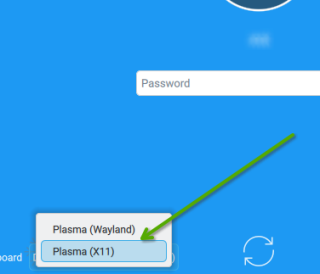
Do you get that while creating the screenschot or when you want to save it as a file?

And it is always better to introduce your environment to your potential helpers explaining a few things, like what DE and maybe more.

BTW, I can use Spectacle using the PrintScrn key on KDE Plasma without problems.

I get that message when executing spectacle in the terminal or when pressing the PrintScrn on the keyboard.

It’s KDE Plasma. It worked fine on OS 15.6.
flameshot is working.

So you upgraded from 15.6 to 16 and using Plasma KDE.

Are you logging in with the “KDE / Wayland” option?
If “yes” , a quick test … logout, then choose “KDE / X11” (click “Desktop” button), then login.

After login, test Spectacle screenshotting. Does it now work without error(s)??
.

it was a fresh install, not an update.

I don’t know yet, whether its wayland or X11. It’s the default - I have to check.

Do you have by any chance following file in your home directory?

~/.local/share/applications/org.kde.spectacle.desktop

You can check via

ls -l ~/.local/share/applications

that was it.
removing that file solved it.