Hi,
After updating TW (not the last one but a couple of months ago), SMB4k stopped working with the following error
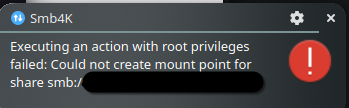
I tried everything I was able to find without success.
Hi,
After updating TW (not the last one but a couple of months ago), SMB4k stopped working with the following error
I tried everything I was able to find without success.
Are you using SELinux (enforcing) or AppArmor?
I’m not using SELinux, at least when I tried “setenforce 0” ( following this https://en.opensuse.org/Portal:SELinux/Troubleshooting ) it doesn’t even look like packages are installed.
I’m using AppArmor, I tried disabling It but the issue persists. At least I haven’t tried rebooting after disabling it, should I ?
The easy way to know is running both
getenforce
aa-enabled
What mount location were you trying to use in SMB4K?
Was it a directory under your user’s runtime folder (e.g., /run/user/$UID/smb4k) or a system-wide path like /mnt?
yes apparmor is enabled but not SELinux.
The directory was under my user’s runtiem folder e.g. /home/vixxo/smb4k and was working perfectly fne until the update
Any errors returned after attempting the mount via SMB4K?
sudo journalctl -xe | egrep -i "polkit|smb4k"
I assume manual mounting of the share works fine?
sudo mount -t cifs //server/share /home/vixxo/smb4k -o username=<user>,uid=$(id -u),gid=$(id -g),file_mode=0664,dir_mode=0775
~> sudo journalctl -xe | egrep -i “polkit|smb4k”
[sudo] password for root:
Feb 22 11:02:12 localhost.localdomain polkit-kde-authentication-agent-1[2235]: Failed to register with host portal QDBusError(“org.freedesktop.portal.Error.Failed”, “Could not register app ID: Unable to open /proc/2235/root”)
Feb 22 11:02:12 localhost.localdomain polkit-kde-authentication-agent-1[2235]: Failed to register with host portal QDBusError(“org.freedesktop.portal.Error.Failed”, “Could not register app ID: Unable to open /proc/2235/root”)
Feb 22 11:08:57 ip5w.lan systemd[1903]: Started Smb4K - Advanced Network Browser for SAMBA.
Feb 22 11:14:21 ip5w.lan smb4k[6459]: Action “org.kde.smb4k.mounthelper.mount” has no parentWindow, assuming QWidgetWindow(0x55a8de3ddfa0, name=“Smb4KMountDialogClassWindow”)
Feb 22 11:14:21 ip5w.lan systemd[1]: Created slice Slice /system/dbus-:1.2-org.kde.smb4k.mounthelper.
░░ Subject: A start job for unit system-dbus\x2d:1.2\x2dorg.kde.smb4k.mounthelper.slice has finished successfully
░░ A start job for unit system-dbus\x2d:1.2\x2dorg.kde.smb4k.mounthelper.slice has finished successfully.
Feb 22 11:14:21 ip5w.lan systemd[1]: Started dbus-:1.2-org.kde.smb4k.mounthelper@0.service.
░░ Subject: A start job for unit dbus-:1.2-org.kde.smb4k.mounthelper@0.service has finished successfully
░░ A start job for unit dbus-:1.2-org.kde.smb4k.mounthelper@0.service has finished successfully.
Feb 22 11:14:21 ip5w.lan smb4k[6459]: Warning from helper: KLocalizedString: Domain is not set for this string, translation will not work. Please see https://api.kde.org/frameworks/ki18n/html/prg_guide.html msgid: “Could not create mount point for share %1.” msgid_plural: “” msgctxt: “”
Feb 22 11:14:21 ip5w.lan smb4k[6459]: Neither size nor group specified!
Feb 22 11:14:32 ip5w.lan systemd[1]: dbus-:1.2-org.kde.smb4k.mounthelper@0.service: Deactivated successfully.
░░ The unit dbus-:1.2-org.kde.smb4k.mounthelper@0.service has successfully entered the ‘dead’ state.
While mounting manually I probably have the same error:
mount error(13): Permission denied
Refer to the mount.cifs(8) manual page (e.g. man mount.cifs) and kernel log messages (dmesg)
Are you using a Flatpak version of SMB4K, or a native package installed on the host? Looks like a sandboxing issue.
The mount error(13) is what mount.cifs returns when authentication fails or permissions are insufficient. It would be useful to see the exact command you typed and the options you used, eg uid, gid, vers, etc, because these affect whether the mount succeeds.
It’s not flatpak but from the opensuse repo.
This is what I typed
sudo mount -t cifs //xxx.xxx.xx.xx/nasfolder /home/user/smb4k -o username=user,uid=$(id -u),gid=$(id -g),file_mode=0664,dir_mode=0775,vers=3.0,subdir=subnasfolder
I replaced folders and usernames but the command was exactly this one
Mod edit: Command as preformmated text
Ok, and you got the same mount error? Something else? Not a SMB4-specific issue then.
Yes, that is the error I got with this exact command, nothing else.
The topic title is misleading. The above reads like a server-side permissions issue, or protocol/security mismatch perhaps.
Attempt a manual mount again…
sudo mount -t cifs //xxx.xxx.xx.xx/nasfolder /home/user/smb4k -o username=user,uid=$(id -u),gid=$(id -g),vers=3.0
(Change to suit the server and share you are trying to mount)
Then examine the CIFS messages from sudo dmesg | tail -n 20 eg STATUS_ACCESS_DENIED or STATUS_LOGON_FAILURE.
The server type matters a lot here. Are you mounting from a NAS, a Windows server, or a Linux Samba host? Also, do you know the Samba version running on the server?
NAS (Synology) , SMB version 4.15.13, but all worked fine until the smb4k update.
Ok, but you found that manual mounting also fails?
sudo mount -t cifs //xxx.xxx.xx.xx/nasfolder /home/user/smb4k \
  -o username=user,uid=$(id -u),gid=$(id -g),file_mode=0664,dir_mode=0775,vers=3.0,sec=ntlmssp
Please report back with the exact command you type and output returned as preformatted text.
Also sudo dmesg | tail -n 30 output at this time.
Manual mounting with the command I pasted above give the following error:
[56813.383072] [  T23205] CIFS: Attempting to mount //xxx.xxx.xx.xx/nasfolder
[56813.655052] [  T23205] CIFS: Status code returned 0xc000006d STATUS_LOGON_FAILURE
[56813.655072] [  T23205] CIFS: VFS: \\xxx.xxx.xx.xx failed to create a new SMB session with RawNTLMSSP: -13
[56813.655110] [  T23205] CIFS: VFS: cifs_mount failed w/return code = -13
That is an authentication failure. During the mount were you prompted for a SMB password?
Password for user@//server/share:
How about if you specify it explicitly like this?
sudo mount -t cifs //xxx.xxx.xx.xx/nasfolder /home/user/smb4k -o username=user,password=secret,vers=3.0
If this also fails, then it is a credentials issue that needs to be sorted on the NAS.
Same issue editing the command too for password. Credentials are correct and NAS authetication works fore, I can even authenticate using Dolphin to browser the folder with those crendial. SMb4k stopped working after an update.
Ok, but not a SMB4K issue. As you can see manual mounting fails as well. Dolphin uses userspace smbclient libraries to authenticate and access shares, while mount.cifs uses the kernel CIFS driver. The NAS may be rejecting the kernel authentication attempt due to differences in NTLMv2/RawNTLMSSP handling, even though the same username and password works in userspace.
Maybe we can learn what authentication method is being attempted (NTLMv2/RawNTLMSSP) when using smbclient…
smbclient //xxx.xxx.xx.xx/nasfolder -U user -m SMB3 -d 3
lp_load_ex: refreshing parameters
Initialising global parameters
rlimit_max: increasing rlimit_max (1024) to minimum Windows limit (16384)
Processing section "[global]"
added interface wlp0s20f3 ip=xxx.xxx.xx.xx bcast= netmask=ffff:ffff:ffff:ffff::
added interface wlp0s20f3 ip=xxx.xxx.xx.xx bcast= netmask=ffff:ffff:ffff:ffff::
added interface ipv6leakintrf0 ip=xxx.xxx.xx.xx bcast= netmask=ffff:ffff:ffff:ffff::
added interface wlp0s20f3 ip=xxx.xxx.xx.xx bcast=xxx.xxx.xx.xx netmask=255.255.255.0
Client started (version 4.23.5-git.463.513487e87f1SUSE-oS16.9-x86_64).
Connecting to xxx.xxx.xx.xx at port 445
Connecting to xxx.xxx.xx.xx at port 139
GENSEC backend 'gssapi_spnego' registered
GENSEC backend 'gssapi_krb5' registered
GENSEC backend 'gssapi_krb5_sasl' registered
GENSEC backend 'spnego' registered
GENSEC backend 'schannel' registered
GENSEC backend 'ncalrpc_as_system' registered
GENSEC backend 'sasl-EXTERNAL' registered
GENSEC backend 'ntlmssp' registered
GENSEC backend 'ntlmssp_resume_ccache' registered
GENSEC backend 'http_basic' registered
GENSEC backend 'http_ntlm' registered
GENSEC backend 'http_negotiate' registered
GENSEC backend 'krb5' registered
GENSEC backend 'fake_gssapi_krb5' registered
gensec_gse_client_start: Not using kerberos to cifs/xxx.xxx.xx.xx as WORKGROUP\user: NT_STATUS_INVALID_PARAMETER
Got challenge flags:
Got NTLMSSP neg_flags=0x628a8215
Password for [WORKGROUP\user]:
NTLMSSP: Set final flags:
Got NTLMSSP neg_flags=0x62088215
NTLMSSP Sign/Seal - Initialising with flags:
Got NTLMSSP neg_flags=0x62088215
NTLMSSP Sign/Seal - Initialising with flags:
Got NTLMSSP neg_flags=0x62088215
tree connect failed: NT_STATUS_BAD_NETWORK_NAME