Hi all, recently i experiance very strange behaviour with Firefox, when i click the icon it takes some 30-40 seconds for the browser to open, the issue appeared out of nothing, so far the only thing that i have figure out is that when i stop the internet connection (i am using gnome desktop network manager) it starts normally fast which is 1-2 seconds. I have no idea why that happened, probably after some package updates? Using Tumbleweed on AMD cpu and GPU with just normal gnome desktop environment. Thanks for the attention 
Are you using a Flatpak?
1 Like
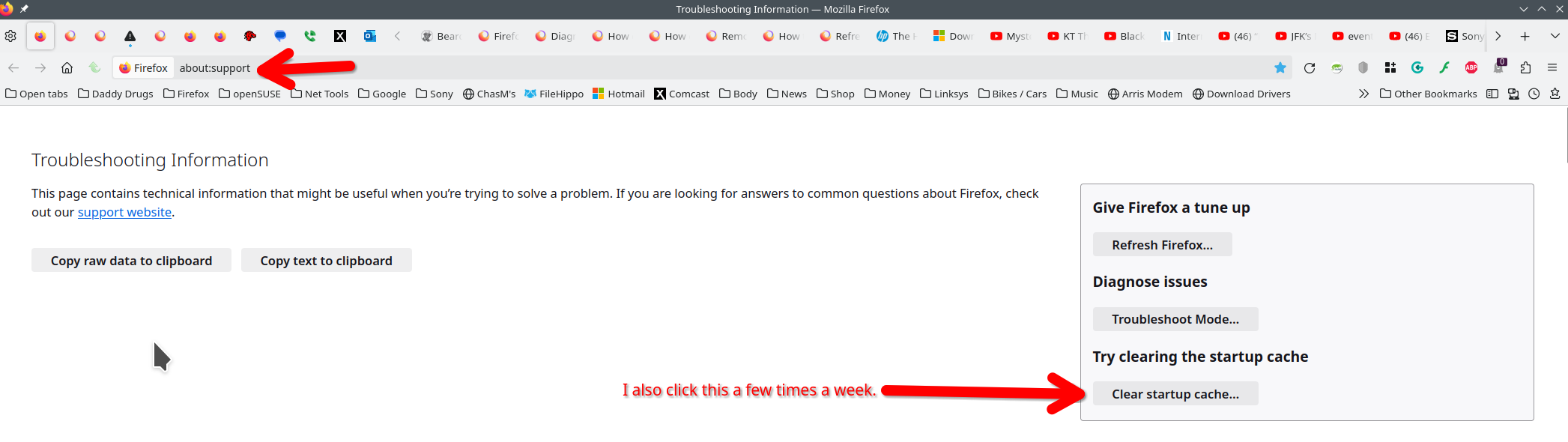
Did you clear the startup cache? see screenshots
Does it happen with Firefox in Troubleshoot Mode? https://support.mozilla.org/en-US/kb/diagnose-firefox-issues-using-troubleshoot-mode#search
Try downloading Firefox from Mozilla. Download, unzip, and run ‘’‘firefox-bin’‘’ from the folder and see if you have the same issue.
no, default package which comes with the distro.
I have tried clearing up startup cache as well troubleshoot mode - same. As i mentioned early it only happens with an active network connection, which leads me to - browser is trying to access something, i have found some hints in the internet that leads to maybe something in the “/etc/hosts” or “/etc/resolv.conf” files, i really have no idead what is going on. To summarize again - the moment that i disable my network connection in the GUI interface - magically the browser starts up lightning fast, and opposite the moment that i connect to wifi or wired connection - it needs more than 30 seconds to start…
If you haven’t already, might try these two easy troubleshooting steps.
a. Open a windowed command line (as with “konsole” if using KDE, etc) while logged in as your regular user account … then execute “firefox” at the command line … any output that suggests an issue?
or try …
b. Create a brand new regular user account … then log out of your default user account … log into the new user account and select the Firefox icon. Does it start up as expected?
1 Like
It happens on all 3 of my PC’s (2 PC’s and one laptop) with Tumbleweed KDE and GNOME
Are you using any browser extension (e.g. an adblocker) that wants to fetch lots of data from the Internet on startup? If you aren’t sure, did you try to temporarily disable all extensions?
Firefox sends home some telemetry on startup if the network is available, if you have a slow firewall or a DNS with high latency or such you may see a noticeable delay.
If that is the case, you may disable everything under
Settings >> Privacy & Security >> Firefox Data Collection and Use
and try again.
Okay it seems that i have this issue sorted out, i have just unplugged the power of my network equipment that is my router (which is mine) and the optical device that has been given by my internet service provider - latter seems like causing the problem since i tried with router reboot before that. Really weird stuff tho and quite annoying. Thanks to all that has replied. 
I think it’s due to firefox not being able to resolve your hostname, your system is probably using a dynamic hostname.
One possible solution:
Set Up a Static Hostname
Set a static hostname:
sudo hostnamectl set-hostname my-pc
After executing the command, check that it was successful by verifying that your new hostname appears in /etc/hostname.
Assign an address to the hostname
Edit the /etc/hosts file:
sudo nano /etc/hosts
Add the following line at the end of the file:
127.0.1.1 my-pc
Now when you launch firefox and it tries to resolve your hostname (my-pc in this example), it’ll resolve it to 127.0.1.1. This should fix the issue.
1 Like
As of now after rebooting of my network providers optical device the issue is resolved, but if it will happen in the future i would try this out as it seems like that is the solution that you mention.
This topic was automatically closed 7 days after the last reply. New replies are no longer allowed.