At some point, I developed a shutdown action that hangs for 1 minute, 30 seconds before systemd kills whatever it’s doing and continues on. The system does eventually shutdown.
I have tried hitting the ESC key during the hang for more details, but nothing show. I have looked through the journalctl with no luck. Does anyone have a suggestion to see just what the issue is?
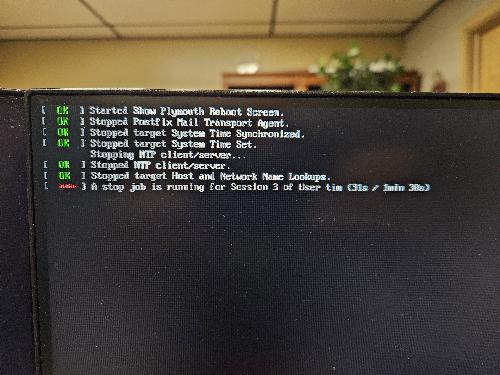
That is the time, which is standard in the config of systemd.
You can change it.
I read about that, but I am more interested in just what is taking so long to respond.
@dekernel2 Next time you start up, just look at the previous journal and check the whole shutdown process in reverse journalctl -b -1 -r, you might pick up on something that was running, perhaps a file left open?
On rare occasions, I’ve experienced this.
- I usually tap CTRL-C one or more times to force more details
- What commands did you execute to peruse the journal file(s) ?
I’ve also checked things the traditional ways, such as
- examining “/var/log/warn” log file (using an editor, then search for ‘shutdown’)
- examining “/var/log/messages” (using editor to search,
or “cat /var/log/messages | grep shutdown” at a prompt
Can you pinpoint when this event began? After a recent update? Or after installing some new software? Added a new Service?
Have you selected a different snapshot or a previous kernel? If yes, is the issue still there?
When I try that command, I get an error indicating no persistent journal was found. This sent me down another rabbit hole that I eventually stopped.
I don’t remember exactly when this started because typically I initiate a shutdown and walk away which is what makes this difficult to track down.
When I look through the logs, the only indicator I see is
workstation kiod5[21485]: The X11 connection broke (error 1). Did the X11 server die?
workstation org.gtk.vfs.Daemon[5053]: A connection to the bus can't be made
workstation kiod5[21485]: QDBusAbstractAdaptor: Cannot relay signal KDEDModule::moduleDeleted(KDEDModule*): Pointers are not supported: KDEDModule*
I THINK I remember picking up an update to X11 in the past two weeks, I am now wondering if that is the trigger for those broken connection errors.
Well, if you suspect a possible X11 issue, you could try this.
Logout of the current session, and wait for the Login screen.
When it shows up, tap CTRL-ALT-F1 (on my Dell laptop, I have to use CTRL-fn-ALT-F1).
At the v-term prompt, login as root account.
Execute “xinit 3”.
That command switches the system to Runlevel 3, which is “multi-user no graphical user interface” (x11).
- Any error messages show up while it’s dropping from Runlevel 5 to Runlevel 3??
After that, you can execute the shutdown command to check for any other issues.
I am guessing this shows the issue. It appears that X is still running after the “xinit 3” command. Any ideas just what the fix is?

I am SOOOO sorry … I have no idea how that “x” creeped into my suggested “init 3” command.
I apologize and am embarrased I didn’t see my misspelling.
The command to execute should be:
“init 3”,
NOT “xinit 3”.
I just tested this on my machine and show similar results, so i went back to re-read my Reply.
Again, it should be “init 3”.
Here’s the obvious output I see when I run my misspelled command (xinit 3):
machine : # xinit 3
XSERUTransSocketUNIXCreateListener: ...SocketCreateListener() failed
XSERUTransMakeAllC0TSServerListeners: server already running
(EE)
Fatal server error:
(EE) Cannot establish any listening sockets - Make sure an X server isn't already running
(EE)
Please consult the The X.Org Foundation support
at http://wiki.x.org for help.
(EE) Please also check the log file at "/var/log/Xorg.0. log" for additional information
(EE)
(EE) Server terminated with error (1). Closing log file.

Authorization required, but no authorization protocol specifiied authorization required, but no authorization protocol specified
xinit: giving up
xinit: unable to connect to X server: Resource temporarily unavailable
xinit: server error
machine : #
Again, should be “init 3”
Yes. I’d almost say “of course”.
With systemd, shouldn’t that rather be systemctl isolate multi-user.target ?
1 Like
Both commands
init 3
and
sysytemctl isolate multi-user.target
produce the same results. For each command, I do not see any errors on the screen, but I get the same hang during the shutdown sequence.
I can mitigate the issue with a custom script for systemd with these entries:
[Manager]
DefaultTimeoutStartSec=60s
DefaultTimeoutStopSec=15s
but I sure would like to find out the issue. I still don’t see anything odd when journalctl which seems odd to me.
- Login in GUI as your user
- Login on console as root
- Run
init 3 - Check what processes belonging to your user are still running.
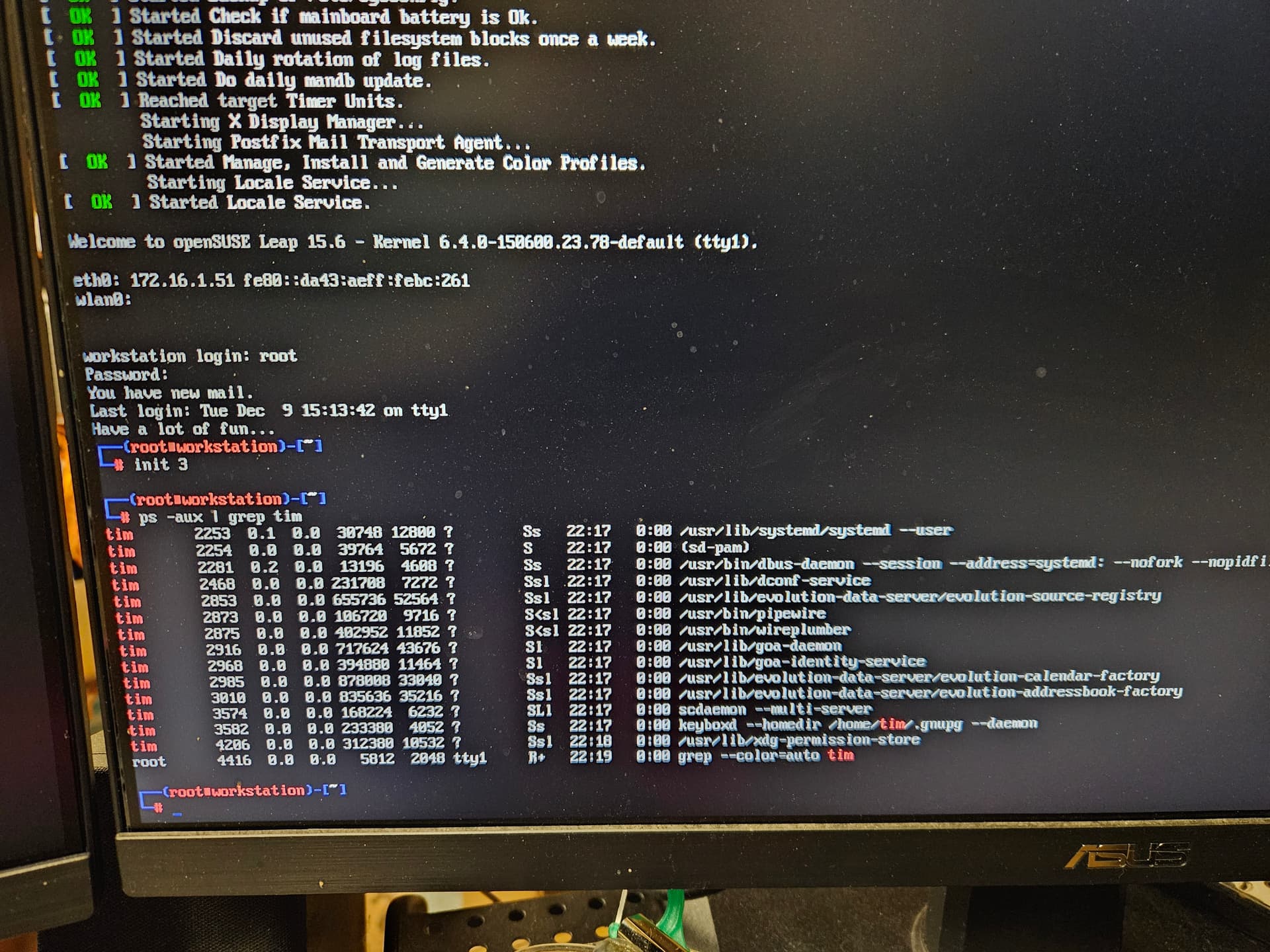
Sp, all those processes were left running and they are probably left running during shutdown which explains the delay.
@dekernel2 are you running XFCE for a DM by chance because I have the same problem when I choose that … KDE-X11 on the other hand login/logout/restart works just fine
Running KDE actually.
This topic was automatically closed 30 days after the last reply. New replies are no longer allowed.