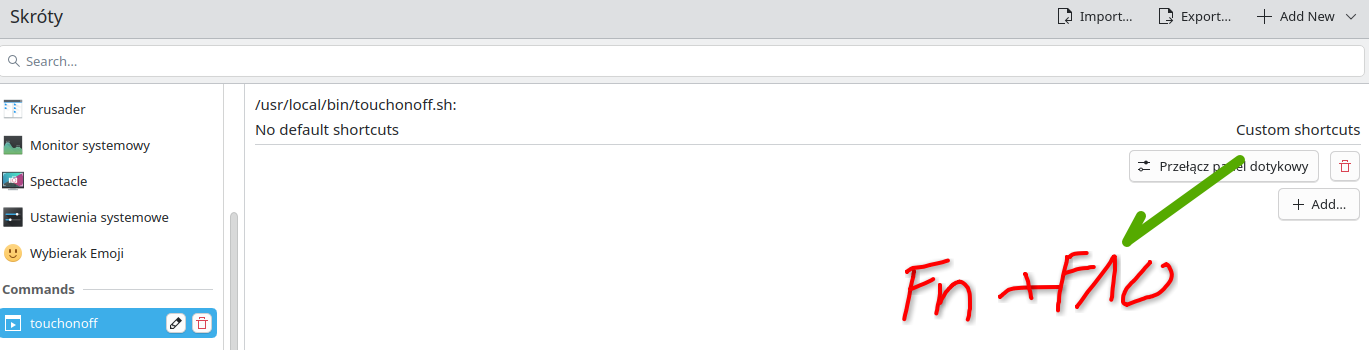
I’m having trouble assigning a keyboard shortcut that involves the FN key.
I wrote a script to toggle the touchpad on and off on my Asus TUF Gaming laptop (for some reason, openSUSE Tumbleweed doesn’t seem to recognize the driver for this touchpad out of the box).
Here is the issue:
- If I bind the script to a shortcut using CTRL (e.g.,
CTRL + F10), it works perfectly.
- However, if I try to bind it to
FN + F10, nothing happens.
It seems like the system isn’t registering the FN key combination properly for this shortcut. Any ideas on how to fix this or how to get Tumbleweed to recognize the FN keypress?
Thanks in advance for the help!
52: PS/2 00.0: 10500 PS/2 Mouse
  [Created at input.249]
  Unique ID: AH6Q.w0FmQocvyY8
  Hardware Class: mouse
  Model: "ELAN1200:00 04F3:30BA Touchpad"
  Vendor: 0x04f3
  Device: 0x30ba "ELAN1200:00 04F3:30BA Touchpad"
  Compatible to: int 0x0210 0x0001
  Device File: /dev/input/mice (/dev/input/mouse1)
  Device Files: /dev/input/mice, /dev/input/mouse1, /dev/input/event4
  Device Number: char 13:63 (char 13:33)
  Driver Info #0:
    Buttons: 1
    Wheels: 0
    XFree86 Protocol: explorerps/2
    GPM Protocol: exps2
  Config Status: cfg=no, avail=yes, need=no, active=unknown
You can’t remap the Fn key and you can’t use it in a shortcut combination. The Fn key is a hardware key that tells the system to send different key codes for some keys. It’s not under the control of the OS.
2 Likes
I can’t agree with that. The shortcut with FN kay was working until the latest update.
@rilicek perhaps codes changed? If you run as root user evtest /dev/input/by-id/usb-*event-kbd do th key codes correspond with what’s in your script?
evtest /dev/input/event4
Input driver version is 1.0.1
Input device ID: bus 0x18 vendor 0x4f3 product 0x30ba version 0x100
Input device name: "ELAN1200:00 04F3:30BA Touchpad"
Supported events:
  Event type 0 (EV_SYN)
  Event type 1 (EV_KEY)
    Event code 272 (BTN_LEFT)
    Event code 325 (BTN_TOOL_FINGER)
    Event code 328 (BTN_TOOL_QUINTTAP)
    Event code 330 (BTN_TOUCH)
    Event code 333 (BTN_TOOL_DOUBLETAP)
    Event code 334 (BTN_TOOL_TRIPLETAP)
    Event code 335 (BTN_TOOL_QUADTAP)
  Event type 3 (EV_ABS)
    Event code 0 (ABS_X)
      Value    699
      Min        0
      Max     3200
      Resolution      31
    Event code 1 (ABS_Y)
      Value   1425
      Min        0
      Max     2198
      Resolution      31
    Event code 47 (ABS_MT_SLOT)
      Value      0
      Min        0
      Max        4
    Event code 53 (ABS_MT_POSITION_X)
      Value      0
      Min        0
      Max     3200
      Resolution      31
    Event code 54 (ABS_MT_POSITION_Y)
      Value      0
      Min        0
      Max     2198
      Resolution      31
    Event code 55 (ABS_MT_TOOL_TYPE)
      Value      0
      Min        0
      Max        2
    Event code 57 (ABS_MT_TRACKING_ID)
      Value      0
      Min        0
      Max    65535
  Event type 4 (EV_MSC)
    Event code 5 (MSC_TIMESTAMP)
Properties:
  Property type 0 (INPUT_PROP_POINTER)
  Property type 2 (INPUT_PROP_BUTTONPAD)
Testing ... (interrupt to exit)
When I press FN+F10, nothing happens.
Those are the events for the touchpad, not keyboard. The keyboard might be somewhere else, for instance here:
LT-B:~ # evtest /dev/input/by-path/platform-i8042-serio-0-event-kbd
Input driver version is 1.0.1
Input device ID: bus 0x11 vendor 0x1 product 0x1 version 0xab83
Input device name: "AT Translated Set 2 keyboard"
For the records here “Fn+F10” issues Event code 113 (KEY_MUTE) and mutes the loudspeakers, while for instance “Fn+F9” issues no event and disables the touchpad.
But all that is HW and vendor dependent AFAIK.
# evtest /dev/input/by-path/platform-i8042-serio-0-event-kbd
Input driver version is 1.0.1
Input device ID: bus 0x11 vendor 0x1 product 0x1 version 0xab83
Input device name: "AT Translated Set 2 keyboard"
FN + F5 to F12 works, with the exception of F10, but no logs are showing up in evtest. The remaining keys and FN+F1-F4 show up in the evtest logs.