I need to run something overnight on my Tumbleweed system and have to reboot before the utilities can run in order to reset an API from another piece of software. I set it up in YaST and it reboots OK, except something called KDEWallet pops up demanding a password before I can go any further. I’ve never even heard of KDEWallet. How can I bypass this so the computer will continue to reboot?
I am not quite understanding what you try to explain. But KWallet (which is the password manager of KDE) will only run after somebody logs in using the KDE desktop and then tries to run something that needs a password (like KMail). So I do not understand why it has anything to do with a simple boot.
Hi, I’ll try again. I want my PC to reboot itself at 2:00 AM every night. To do this I used Zeit to create a chron thing that runs the command /usr/sbin/reboot. When it does that The thing that reboots the computer asks for my password so It can log me in, except I’m asleep at 2:00 AM, so I need a way of logging in without being there to enter my password.
I figured out how to do that, you can see Google’s procedure by Googling “use YaST to create login without password”, but then I hit this KDE Wallet app that asks for my password as well. I don’t know what KDE Wallet is and I have never used it. That’s all I know, and I sorry, but I don’t completely understand your description of it either. I thought the purpose of setting up a passwordless reboot was so I could bypass roadblocks like KDE Wallet. As it is, there seems to be no way to reboot/login without entering a password with KDE Wallet in the way.
As you already disabled a security meassure (password) for login into your machine, you can simply disable additional safety guards like the masterpassword for your password wallet (kwallet)
Simply set an empty password (no keys pressed when setting the password) for your wallet. You can manage that via systemsettings->KDE Wallet and kwalletmanager
Warning for all other readers: disabling password for your machine and kwallet might be really dangerous, as everybody has full access to this machine. Only use this setup in fully isolated environments.
I seems that you do not quite understand that Linux is a multi-user and multi session system. There is a huge difference between system processes and user processes. You do a re-boot and that is completed fine.
After that you have configured a login in KDE for a specific user. And that seems to work also.
Now that user either has KWallet configured to open always, or an application is started at login that asks for a password and thus wants KWallet to open. Applications that come to mind are Network Management (for a WiFi password) or KMail (for a mail provider password).
You probably can configure KWallet to open a wallet without asking for a password (I never tried such a security unfriendly thing). Main KDE Menu > System > KWallet should open a window where you can configure KWallet.
.
PS. and the name of the tool that starts things at a specific time is cron. It is nowadays replaced by a systemd timer, but will still function.
Since when is Google doing openSUSE support? Are you aware that if I ask the same question the AI most likely comes up with a totally different answer?
You’ve never used Google to search for a solution to a computer problem? I wish I was that smart, but I’ve only been using Linux (Tumbleweed specifically) for about 6 months. I never knowingly click buttons that take me to AI answers. Although I’m sure that AI already has a hand in what I’m reading anyway.
I’m not to worried about disabling KDE Wallet. My wife and sons have their own computers, and don’t need anything from mine. I live in remote rural Thailand. Nobody within 50 miles can use this computer, mainly because it boots into English.
You’re right. I don’t understand about multi-user and multi-session. All I can tell you is that I am the only user on this system. Nobody within 50 miles knows about Linux and certainly nobody around here even speaks English. I configured KWallet using a blank password and everything works fine now.
YaST has been removed from the default Leap 16 install (and from SUSE SLE16).
YaST is still available in Tumbleweed for compatibility reasons with old installs but still uses old defaults for users creation that differ from the current system defaults and might cause problems with future system upgrades.
More to the point of your problem, “Password-less login”, while still available in YaST2-Users in the “Expert Options”, no longer works in current Tumbleweed.
So I guess that you are referring to “Auto-login”, still available and working if you are using Gnome and gdm as display manager (and possibly with KDE and sddm, cannot check ATM); with that you still need to enter a password to resume from screen lock, for instance.
So generally speaking still relying on YaST (or Google that might reference outdated information) is not an optimal option unless you know what you are doing.
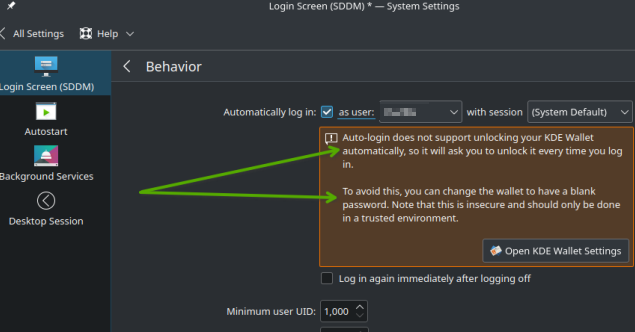
You are correct … KDE Plasma does offer “Auto-login” - my first screenshot shows the option in Leap 15.6 using KDE Plasma5 … but it’s also available in Leap 16.x (I see it in my 16.1 install, using KDE6 Plasma). Notice that I get a pop-up warning about doing “Auto-login” when using KWallet. It explains what to do to get around the issue.
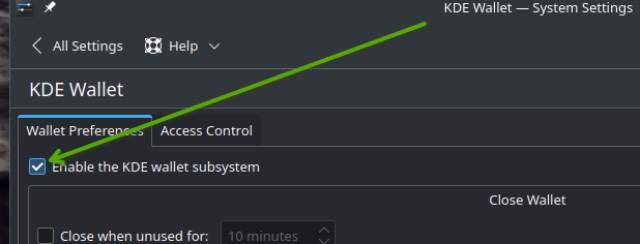
I thought I’d include the second screenshot, which shows the option to "Disable KDE Wallet Subsystem. That’s my 15.6 KDE5 System Settings, but it’s also available on KDE6.