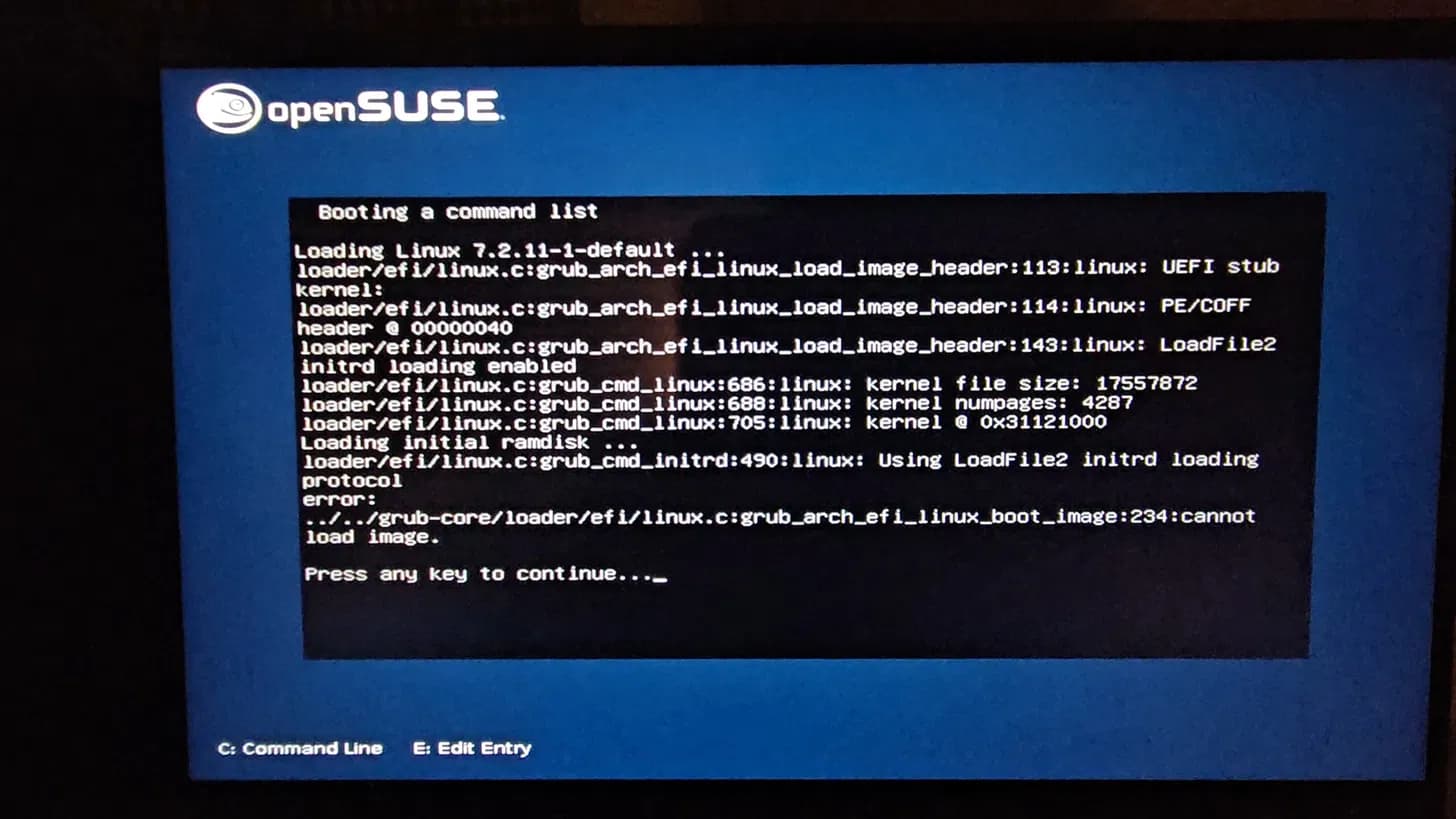
Today I booted my laptop as normal with secure boot enabled. After noticing my nvidia card wasn’t being detected by the dolphin emulator (possibly a separate issue, was working before today), I figured I’d run sudo zypper dup. The reboot failed with this error message
I tried booting into the previous kernel (7.3.0 → 7.2.11) from grub and previous snapshots and got basically the same result (with debug=linux,efi,secureboot)
No even when you have disabled secure boot in UEFI/BIOS mokutil should list the machine owner keys. And on a Tumbleweed machine i would expect that at least the openSuSE key in the output. So it seems to me that the openSuSE key is missing and this is the reason why the kernel could not be loaded with active secure boot.
and it should display the Microsoft keys even if secure boot is off to check this.
I am on Leap so i it is just a guess but i thing the key comes with the kernel in Tumbleweed and is stored in /etc/uefi/certs/. Could you post
@eclipse So your keys have not been updated to 2023 versions…
Check fwupdmgr security and (as root user) fwupdmgr get-upgrades if none show, then you need to visit your hardware manufacturer or use Windows to update…
HP System
mokutil --db --short
69525b095f Hewlett-Packard UEFI Secure Boot DB Key
d9e4bd4748 HP UEFI Secure Boot 2013 DB key
580a6f4cc4 Microsoft Windows Production PCA 2011
46def63b5c Microsoft Corporation UEFI CA 2011
b5eeb4a670 Microsoft UEFI CA 2023
3fb39e2b8b Microsoft Option ROM UEFI CA 2023

Dell System
mokutil --db --short
15254b199b Dell Inc. UEFI DB
46def63b5c Microsoft Corporation UEFI CA 2011
580a6f4cc4 Microsoft Windows Production PCA 2011
b5eeb4a670 Microsoft UEFI CA 2023
3fb39e2b8b Microsoft Option ROM UEFI CA 2023
I was able to update these. I tried rebooting with secure boot on and it didn’t fix the problem.
$ mokutil --db --short
46def63b5c Microsoft Corporation UEFI CA 2011
580a6f4cc4 Microsoft Windows Production PCA 2011
2e0dcdc439 RAZER Certificate
b5eeb4a670 Microsoft UEFI CA 2023
3fb39e2b8b Microsoft Option ROM UEFI CA 2023
In my opinion the problem is still the missing machine owner key from openSuSE . I do not know how Tumbleweed handles this stuff but i would try to import it manual. You could start to import it with
mokutil --import /etc/uefi/certs/F8CEAA94.crt
then reboot and import the key in the machine owner store. Then check if
mokutil -l
shows an openSUSE key and enable secure boot again.
I wanted to check whether importing the key would change anything before touching my MOK list, so I compared it with what my shim already trusts:
/etc/uefi/certs/F8CEAA94.crt is “openSUSE Secure Boot Signkey”, issued by “openSUSE Secure Boot CA”.
I extracted the certificate embedded in shim.efi (objcopy of the .vendor_cert section, then openssl). It is “openSUSE Secure Boot CA”, and its SHA-256 fingerprint is identical to 4659838C-shim-opensuse.crt in /etc/uefi/certs.
sbverify --cert reports “Signature verification OK” for vmlinuz-7.3.0 and grub.efi.
So as far as I can tell shim already trusts the whole chain through its built-in CA, and enrolling the Signkey as a MOK would be a second route to trust that already exists. Also, a stock Tumbleweed live image, with its own shim and signing, fails with the same “cannot load image” error on this laptop, which suggests the cause isn’t in my MOK list.
However, sbverify checks the signature chain and not shim’s revocation or SBAT handling. If I’ve misread something, please let me know. I may still try the import.
You are right the secure boot chain is and was ok. From the screenshot we can see that the error occurs after the kernel has been loaded from grub while try to load the initial ram disk. My statement that the kernel did not load was nonsense (i should not post late at night but i am still not in sync after the time change last weekend).
Shim and grub are still dual signed for the 2011 and 2023 CA so the update of the Microsoft keys did change nothing but you are prepared for new shim versions now.
The openSUSE MOK key is required for loading kernel modules as far as i understand the Tumbleweed scheme. And i must admit that i do not understand how you could load kernel moules on that machine without this key in MOK. And this is still a guess from a Tumbleweed layman i think this is could be related to the kernel lockdown mode that is active with secure boot and that could require the MOK key. I must admit i have no clue how secure boot and kernel lockdown on a live image work but the same error did not suggest that this problem is MOK related. I would just try to import the MOK key. And if it did not work you could delete it with mokutil.
The proprietary driver might interfere with SecureBoot. Posting inxi -Gaz might help.
Also force reinstalling of the Nvidia kmp (and enrolling its signing key if needed) might help with SecureBoot.
Ignore in my posts the manual import. It will not help or even work. After some tests with a new Tumbleweed VM with active secure boot and grub-efi i found these results:
Import of F8CEAA94.crt is rejected with “Already in kernel trusted keykring. Skip F8CEAA94.crt”. So it is already in the kernel keyring. And it is of course the wrong key anyway what is missing in your mokutil -l is the shim key.
I was not able to delete the shim key from the MOK list and the reason seems to me that the key from the shim binary is used implicit. It is in the output of mokutil but has never been imported into the MOK store explicit so the MOK store is empty and the delete or reset fails.
As mentioned above form @OrsoBruno a reinstall of shim might be a good idea.
Yesterday I upgraded from the proprietary G06 to the open G07 driver and my nvidia problem went away. I haven’t enrolled a MOK for it and I’m not sure if I’m supposed to.