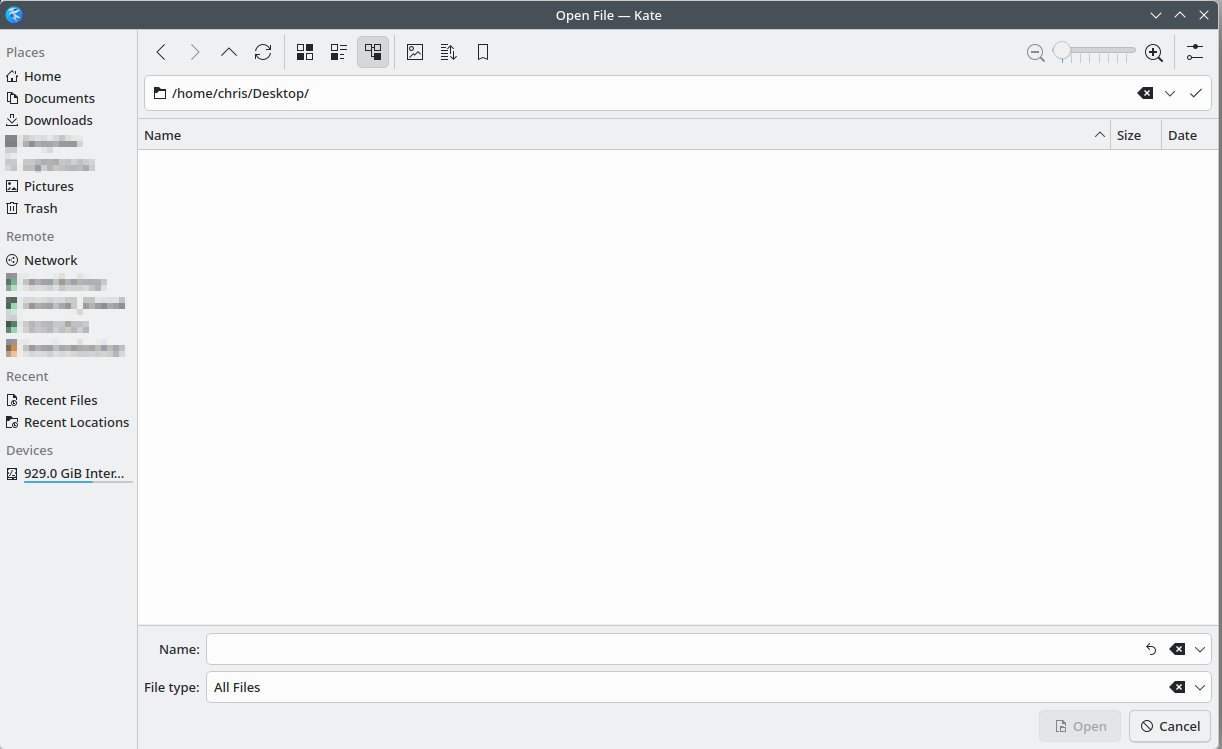
Something I miss from macOS is the ability to search for files inside a file dialog. For example, if I knew the file I wanted to open was named “greatfile.txt” rather than navigating through folders I could just search for file:greatfile.txt and it would show up immediately.
It doesn’t look like the Plasma file dialog supports this. Does anyone have any workarounds for a quicker way to open specific files? Are there any desktops in Linux-land that do support this?
I am not sure if I understand you correct because my Dolphin (I admit: on Leap 15.6), has a Search button and using it opens a text bar at the top. Filling that in and hitting Rtrn gives all the files below my home directory with that name. It also shows a few option button below the text filed.
Here on Gnome (on Gmome-Files aka Nautilus) as soon as you start typing you see files containing the typed string in the current and lower folders, as well as having a search button in the top bar.
Hi @chris88
I am using thunar. In thunar I have to be in the folder where my .txt file resides and typing the name of the file, the file will be highlighted.
This is not Dolphin. This is the “Open File” dialog from Kate. Open File dialogs have in 99% of cases no search functionality. This is not what they are meant to use for.
That is the “Open File” dialog from within another app (Kate in this case) and you are missing no buttons…
The button @hcvv is hinting at is from Dolphin (the file manager proper) and it is a magnifying glass near the upper right corner.
In Gnome even within another app the “Open File” dialog behaves like I described above.
This functionality is also possible with the KDE Open File dialog…simply start typing in the name field and you will get results for the actual directory.
This will just show the files in the current directory. My goal is to avoid the overhead of clicking through directory hierarchies to get to the file I want to open.
If you miss MacOS you might feel at home (well, to an extent…)
I must admit that the behavior I described applies only to the GTK4 integrated apps, older GTK3 apps like Gedit or LibreOffice offer only search in the current folder.
@chris88
It is now clear I didn’t. You say “file dialog” and that is what this is about.
Maybe I didn’t think about it because almost never have the need to search for a file name then. It comes up when downloading or storing a file. And new file, new name, thus no searching for something that should not exist.