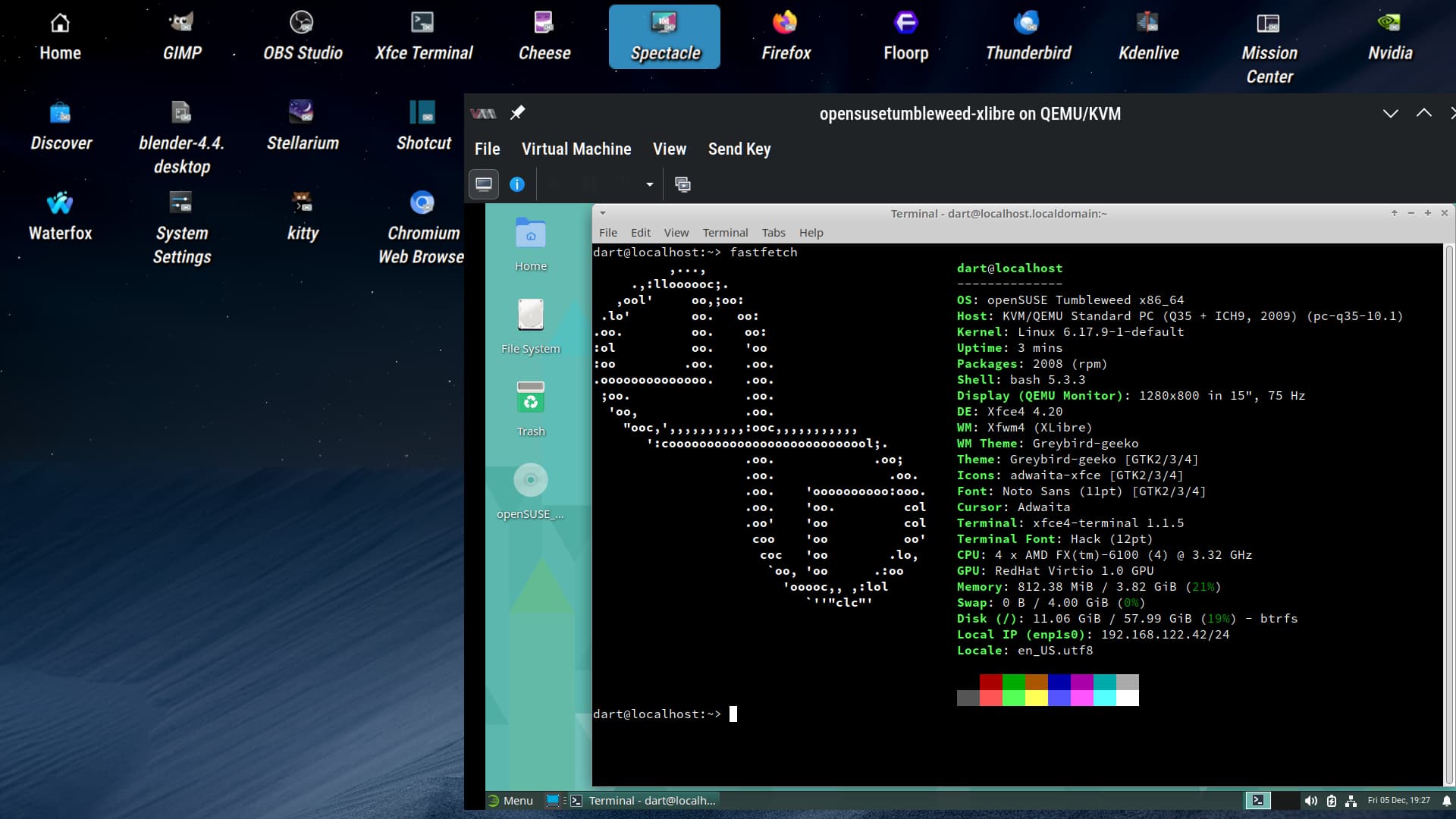
Dear all!
Please, publish
DE … like GNOME, KDE, Xfce and such
DSP … like X11 or Wayland
DM … like GDM, SDDM, LightDM and such
together with your screenshots!
TIA!
Dear all!
Please, publish
DE … like GNOME, KDE, Xfce and such
DSP … like X11 or Wayland
DM … like GDM, SDDM, LightDM and such
together with your screenshots!
TIA!
We already have the monthly Screenshots threads, why have an extra one?
The TO means, that everybody who posts screenshots, should add the above informations to it…
So that everybody knows, on which desktop environment the fancy cat picture was used…
…that is at least my understanding of this post.
I got that, but why not ask people to do so in the other thread. I myself tend to do that, see December 2025 Screenshots
Because my request holds for every single “MM YYY Screenshots” thread — not just "12 2025 Screenshots.
I wouldn’t like to repeat it in every single thread of that subject.
And yes, I find this information substantial. Otherwise, those screenshots are quite useless for personally me. But with, it really get’s interesting. Sometimes a get to view a desktop I would have associated with a different setup (when it’s actually stated). And it’s always nice to know the quotes of X11 vs. Wayland and such.
Why do you expect any visual difference between X11 and wayland?
I do not expect “any visual difference between X11 and wayland”! But I sometimes wonder if it actually works at all or if it works really properly.
Like: GNOME on Wayland… is somehow boring these days. But Xfce on Wayland is kind of new (it’s beta, still) and thus interesting.
And personally I am also interested in DM (light GDM, SDDM, LightDM, there may be more…).
Just watching screenshots with no much difference is boring! … And yes, I personally find that many of those screenshots are more or less the same. I don’t want to stop people publishing — but I ask for some more information to gain more impact on insight.
knurpht@Lenovo-P16:~> fastfetch
          ,...,                                 knurpht@Lenovo-P16
     .,:lloooooc;.                              ------------------
   ,ool'     oo,;oo:                            OS: openSUSE Tumbleweed x86_64
 .lo'        oo.   oo:                          Host: 21K9CTO1WW (ThinkPad P16s Gen 2)
.oo.         oo.    oo:                         Kernel: Linux 6.17.9-1-default
:ol          oo.    'oo                         Uptime: 1 day, 5 hours, 55 mins
:oo         .oo.    .oo.                        Packages: 4899 (rpm), 31 (flatpak)
.oooooooooooooo.    .oo.                        Shell: bash 5.3.3
 ;oo.               .oo.                        Display (LEN41B7): 1920x1200 in 16", 60 Hz [Built-in]
  'oo,              .oo.                        DE: KDE Plasma 6.5.3
    "ooc,',,,,,,,,,,:ooc,,,,,,,,,,,             WM: KWin (Wayland)
       ':cooooooooooooooooooooooooool;.         WM Theme: Breeze
                    .oo.             .oo;       Theme: Breeze (OpenSUSEdarkalternateTitleGreen) [Qt], Breeze-Knurpht [GTK2/3/4]
                    .oo.               .oo.     Icons: breeze-dark [Qt], breeze-dark [GTK2/3/4]
                    .oo.    'oooooooooo:ooo.    Font: Noto Sans (10pt) [Qt], Noto Sans (10pt) [GTK2/3/4]
                    .oo.    'oo.         col    Cursor: breeze (24px)
                    .oo'    'oo          col    Terminal: yakuake 25.8.3
                     coo    'oo          oo'    Terminal Font: Monospace (16pt)
                      coc   'oo        .lo,     CPU: AMD Ryzen 7 PRO 7840U (16) @ 5.13 GHz
                       `oo, 'oo      .:oo       GPU: AMD Radeon 780M Graphics [Integrated]
                         'ooooc,, ,:lol         Memory: 9.76 GiB / 58.55 GiB (17%)
                            `''"clc"'           Swap: Disabled
                                                Disk (/): 644.01 GiB / 951.37 GiB (68%) - btrfs
                                                Local IP (enp1s0f0): 192.168.1.66/24
                                                Battery (5B10W51871): 90% [AC Connected]
                                                Locale: nl_NL.UTF-8
knurpht@Lenovo-P16:~>
Does this provide all the info you’d like to see?
The majority!
I just miss DM (like GDM, SDDM, LightDM). — But this seems to be not supported by neofecth, fastfetch and the likes.
But including a windows with neofetch, fastfetch or such is a pretty good idea. It’s done very simple and easy and provides important info.
Then, it’s even obvious if it is TW, SR, Leap as OS — or even something completely different.
Also, the used resolution is nice to know when watching a specific screenshot.
In this way, it gets of much more impact on insight for me.
@C7NhtpnK With Hyprland I just use seatd and tty1 for login… the rest are all GDM or multi-user.target.
@malcolmlewis Thank you! Interesting…
This is getting OT now. But as you mentioned it: I use Xfce on X11 with LightDM. I am looking forward to Xfce on Wayland. And I would like to replace LightDM even now (X11) because it is not “rootless”. GDM and SDDM are said to work rootless (with more support/better experience said on GDM).
@C7NhtpnK Most of my systems are multi-user no DE, No WM etc and info doesn’t fit on the screen either… 
inxi -c 11 -F --za

System:
  Kernel: 6.12.0-160000.7-default arch: x86_64 bits: 64
  Console: pty pts/0 Distro: openSUSE Leap 16.0
Machine:
  Type: Desktop System: Dell product: Precision 5820 Tower v: N/A serial: <superuser required>
  Mobo: Dell model: 0TVW7J v: A09 serial: <superuser required> UEFI: Dell v: 2.42.0
    date: 03/17/2025
CPU:
  Info: quad core model: Intel Xeon W-2102 bits: 64 type: MCP cache: L2: 4 MiB
  Speed (MHz): avg: 1200 min/max: 1200/2900 cores: 1: 1200 2: 1200 3: 1200 4: 1200
Graphics:
  Device-1: Intel DG2 [Arc A310] driver: i915 v: kernel
  Display: unspecified server: N/A driver: N/A tty: 169x29
  API: OpenGL Message: GL data unavailable in console. Try -G --display
  Info: Tools: api: glxinfo
Audio:
  Device-1: Intel 200 Series PCH HD Audio driver: snd_hda_intel
  Device-2: Intel DG2 Audio driver: snd_hda_intel
  API: ALSA v: k6.12.0-160000.7-default status: kernel-api
Network:
  Device-1: Intel Ethernet I219-LM driver: e1000e
  IF: em1 state: up speed: 1000 Mbps duplex: full mac: <filter>
RAID:
  Hardware-1: Intel SATA Controller [RAID Mode] driver: ahci
  Hardware-2: Intel Volume Management Device NVMe RAID Controller driver: vmd
  Hardware-3: Intel Volume Management Device NVMe RAID Controller driver: vmd
  Hardware-4: Broadcom / LSI MegaRAID Tri-Mode SAS3408 driver: megaraid_sas
  Device-1: md125 type: mdraid level: raid-5 status: active size: 226.55 GiB report: 3/3 UUU
  Components: Online: 0: sdc 1: sdb 2: sda
  Device-2: md126 type: mdraid level: mirror status: active size: 115.24 GiB report: 2/2 UU
  Components: Online: 0: nvme0n1p2 1: nvme1n1p2
  Device-3: md127 type: mdraid level: N/A status: inactive size: N/A report: N/A
  Components: Online: N/A Spare: 0: sdb 1: sda 2: sdc
Drives:
  Local Storage: total: raw: 9.68 TiB usable: 9.09 TiB used: 22.07 GiB (0.2%)
  ID-1: /dev/nvme0n1 vendor: Patriot model: M.2 P300 128GB size: 119.24 GiB
  ID-2: /dev/nvme1n1 vendor: Patriot model: M.2 P300 128GB size: 119.24 GiB
  ID-3: /dev/sda vendor: Silicon Power model: SPCC M.2 SSD size: 119.24 GiB
  ID-4: /dev/sdb vendor: Silicon Power model: SPCC M.2 SSD size: 119.24 GiB
  ID-5: /dev/sdc vendor: Silicon Power model: SPCC M.2 SSD size: 119.24 GiB
  ID-6: /dev/sdd vendor: LSI model: MR9440-8i size: 1.82 TiB
  ID-7: /dev/sde vendor: LSI model: MR9440-8i size: 7.28 TiB
Partition:
  ID-1: / size: 115.24 GiB used: 22.06 GiB (19.1%) fs: btrfs dev: /dev/md126p1
  ID-2: /boot/efi size: 3.99 GiB used: 6 MiB (0.1%) fs: vfat dev: /dev/nvme0n1p1
  ID-3: /home size: 115.24 GiB used: 22.06 GiB (19.1%) fs: btrfs dev: /dev/md126p1
  ID-4: /opt size: 115.24 GiB used: 22.06 GiB (19.1%) fs: btrfs dev: /dev/md126p1
  ID-5: /var size: 115.24 GiB used: 22.06 GiB (19.1%) fs: btrfs dev: /dev/md126p1
Swap:
  ID-1: swap-1 type: zram size: 1.79 GiB used: 0 KiB (0.0%) dev: /dev/zram0
Sensors:
  System Temperatures: cpu: 24.0 C mobo: 14.0 C
  Fan Speeds (rpm): cpu: 2990 fan-2: 748 fan-3: 614 fan-4: 940
Info:
  Memory: total: 8 GiB note: est. available: 7.14 GiB used: 649.8 MiB (8.9%)
  Processes: 188 Uptime: 0h 3m Init: systemd Shell: Bash inxi: 3.3.39
 I just couldn’t resist