Rarely used machine, any next steps after snapper delete?

So, I booted my desktop, which I rarely use … now, mostly to boot up and do updates.

I panicked when I saw / only had about 1-2 GB available! (separate / and /home).

# btrfs filesystem df -H /
Data, single: total=38.62GB, used=37.26GB
System, DUP: total=6.29MB, used=16.38kB
Metadata, DUP: total=2.15GB, used=1.95GB
GlobalReserve, single: total=105.96MB, used=0.00B
#

So, I ran “snapper list” and see entries going back to “Nov 11 2024”

So, I ran a “snapper delete 94-219”.
(Jul 7 2025 … thru Nov 16 2025)

Now I see (about 10 GB free):

# btrfs filesystem df -H /
Data, single: total=38.62GB, used=29.62GB
System, DUP: total=6.29MB, used=16.38kB
Metadata, DUP: total=2.15GB, used=1.10GB
GlobalReserve, single: total=105.96MB, used=0.00B
#

Then I ran a:

# btrfs filesystem sync /

And then another “snapper list” and all seems fine now.

Anything else I should execute before I do a reboot?
(still logged in and have not rebooted yet)
Maybe an update (which it seems is what you were doing, so maybe you already did).

Depends on what your goal is - not really sure what that is.

Thanks for the Reply!

I did a “zypper up” on Jan 8, so two days ago. (prior update was Dec 21, 2025).

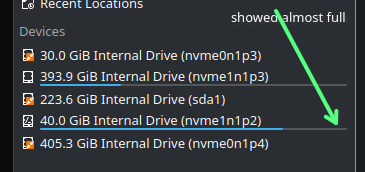
After I did the “zypper up” two days ago, I then opened Dolphin (file manager for KDE) and that’s when I noticed / was almost full (screenshot today, not 2 days ago).

So I shut down the system … then today - I booted again to work to increase the available free space (which shows it has increased, but making sure nothing else to do after “snapper delete”).
.

You deleted the snapshots, so they’re gone. There’s nothing more to do for that.

To avoid that snapper snapshots take too much space (especially when your partition is not that large) you can adjust the config. The configuration files are located in /etc/snapper/configs/

If you are running the default setup it should be just one file: /etc/snapper/configs/root

In this file you can adjust how many snapshots should be left after cleanup and how much space they are allowed to take. If you want you can have a read here: http://snapper.io/manpages/snapper-configs.html

I don’t remember what were the default settings of /etc/snapper/configs/root after install but I always make sure that timeline snapshots are switched off (TIMELINE_CREATE="no"), number cleanup is on (NUMBER_CLEANUP="yes") and that the number of kept snapshots is reasonable (I set it to NUMBER_LIMIT="2-10" and NUMBER_LIMIT_IMPORTANT="4-10"). Of course that is a matter of personal preference, usecase, available storage, etc.

Thanks @hendersj … I didn’t know if I needed to “synchronize” the Snapshot changes with Grub (boot listings) or any other system configuration, before I reboot.

Thanks for all that info. I saved the "root’ config file for the desktop and my laptop, then open them up in Kompare (KDE text-difference app) and yes, I apparently made some odd changes to the desktop’s configuration.

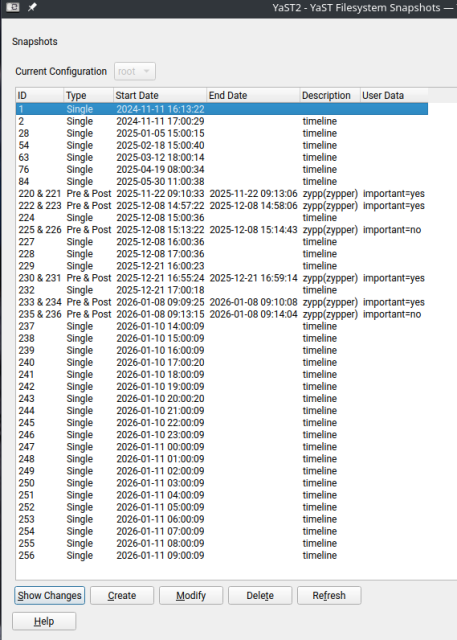
I guess I thought I needed “timeline”, and that is part of the disk consumption. And the Limits settings I changed are pretty obvious (side-effect). See screenshots … the YaST2 Snapper shows that since yesterday (after I did the cleanup), a Snapshot has been created every hour since.

Apparently, I made no changes to the laptop’s configuration, so I’m going to copy it to the desktop’s settings (similar to your suggestions).

Diff showing Desktop vs Laptop


.
YaST2 Snapper showing hourly snapshots created since yesterday, which I will delete next.

1 Like

@DuctTape … quick question.

On my laptop (using default settings), there is this:

# btrfs qgroup for space aware cleanup algorithms
QGROUP="1/0"

and on the desktop it’s empty (not sure if I changed it):

# btrfs qgroup for space aware cleanup algorithms
QGROUP=""

What is that setting on your machine?

Unfortunately I will not have access to my openSUSE system until next weekend, so I don’t know what is the value in my configuration.

Your question made me try to read a bit about quota groups. I won’t claim I understood everything I read but it seems the qgroup parameter in the config-file is necessary if you use quota cleanups, which is IMHO not really necessary if number cleanups are set correctly and timeline snapshots are deactivated.

Information that I found to be important in this regards:

If you want you can set quota support with the command

sudo snapper setup-quota

That should set the qgroup value if I understood correctly. Apparently it’s not supposed to be changed by manipulating the configuration file.

I quote from the link above: “On SUSE Linux Enterprise Server 12 SP5, using Btrfs quota groups can degrade file system performance.”

And also in the Arch-wiki in chapter 5.6.2 here:
https://wiki.archlinux.org/title/Snapper
is described how you find out whether quota support is enabled and how to disable it.

Nope, you didn’t have to do anything for them to show up or to be updated when you did additional zypper up operations. It’s managed automatically.

1 Like

Thanks for all that research you’ve done … and yes, after reading the documentation, you can NOT edit the “config” file.

You need to execute the snapper command to make changes. So , I did this:

machine:~ # snapper set-config TIMELINE_CREATE=no NUMBER_LIMIT="2-10" NUMBER_LIMIT_IMPORTANT="4-10"

Multiple settings can be changed on the single command line.

Then, I executed this:

desktop:/etc/snapper/configs # snapper cleanup all
quota not working (qgroup not set)
desktop:/etc/snapper/configs #

No errors, so all seems fine. So, next I executed these two commands:

desktop:/etc/snapper/configs # snapper list
   # | Type   | Pre # | Date                     | User | Cleanup  | Description  | Userdata     
-----+--------+-------+--------------------------+------+----------+--------------+--------------
  0  | single |       |                          | root |          | current      |              
  1  | single |       | Mon Nov 11 16:13:22 2024 | root |          |              |              
  2  | single |       | Mon Nov 11 17:00:29 2024 | root | timeline | timeline     |              
220  | pre    |       | Sat Nov 22 09:10:33 2025 | root | number   | zypp(zypper) | important=yes
221  | post   |   220 | Sat Nov 22 09:13:06 2025 | root | number   |              | important=yes
222  | pre    |       | Mon Dec  8 14:57:22 2025 | root | number   | zypp(zypper) | important=yes
223  | post   |   222 | Mon Dec  8 14:58:06 2025 | root | number   |              | important=yes
224  | single |       | Mon Dec  8 15:00:36 2025 | root | timeline | timeline     |              
225  | pre    |       | Mon Dec  8 15:13:22 2025 | root | number   | zypp(zypper) | important=no 
226  | post   |   225 | Mon Dec  8 15:14:43 2025 | root | number   |              | important=no 
229  | single |       | Sun Dec 21 16:00:23 2025 | root | timeline | timeline     |              
230  | pre    |       | Sun Dec 21 16:55:24 2025 | root | number   | zypp(zypper) | important=yes
231  | post   |   230 | Sun Dec 21 16:59:14 2025 | root | number   |              | important=yes
233  | pre    |       | Thu Jan  8 09:09:25 2026 | root | number   | zypp(zypper) | important=yes
234  | post   |   233 | Thu Jan  8 09:10:08 2026 | root | number   |              | important=yes
235  | pre    |       | Thu Jan  8 09:13:15 2026 | root | number   | zypp(zypper) | important=no 
236  | post   |   235 | Thu Jan  8 09:14:04 2026 | root | number   |              | important=no 
259  | single |       | Sun Jan 11 12:00:09 2026 | root | timeline | timeline     |              
desktop:/etc/snapper/configs #

desktop:~ # btrfs filesystem df -H /
Data, single: total=38.62GB, used=19.62GB
System, DUP: total=6.29MB, used=16.38kB
Metadata, DUP: total=2.15GB, used=696.32MB
GlobalReserve, single: total=105.96MB, used=0.00B
desktop:~ #

So, the / partition went down to almost 20gb used, so recovered about 16+gb. And yes, I did reboot the system after all that work, and all is working fine !!

So, with those changes, I suspect that / partition consumption will stay at a low value over time. :+1:

1 Like

Thanks for the info.
I remember changing the snapper configuration but I don’t remember anymore if I changed it with snapper commands or just in the config file. I probably used the documentation and hence the commands as you described.